it already support MacOS dude!
However, chromedriver may not be executable since you have not give it an “execute” permission
- go to the root of code
- cd handy\driver
- chmod +x chromedriver_mac
- execute run_me again
it already support MacOS dude!
However, chromedriver may not be executable since you have not give it an “execute” permission
bro can you please explain it. How can I do because I don’t know anything about python.
it does not matter which shell or terminal you using.
just python run_me.py
@dydx has provided the brief instruction at the beginning.
I have set all these things but now don’t know how to get to the source of the code.
here , but you need to ask dydx for the permission.
I have the code but I can’t give you without dydx permission. it is his invention his credit.
need permission to download
I have the code but I can’t give you without @dydx permission. it is his invention his credit.
ok so let me ask him
SCRIPT HAS SOME BUG , PLEASE HAVE SOME PATIENCE, IF IT’S WOKING AGAIN WILL WILL LET YOU KNOW SOON
thank you 

thank you
i appreciate bro
you need python3.8.. update the python, if not it won’t work
bro, how to sign up google rdp? you need a valid cc right?
I think you have to locate the folder first then you can run this script.
waiting for new update
Where should I located?
Which folder?
Sorry to say but I am currently on MacOS. I can’t help about Windows Command but you can google your problem. That’s how I solved my problem. Also the preferred site for your answer is stackoverflow.com , I hope it will help you.
Please create a new thread with updated script. It’s difficult to understand here which script is working
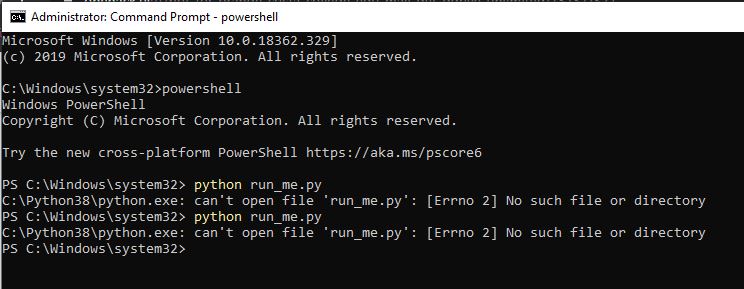
 !
!