# 🔐 DarkInfo Protector v2.4 Beta — Password-Protect Any Windows EXE With AES‑256 Encryption, Offline and Free
**URL:** https://onehack.st/t/darkinfo-protector-v2-4-beta-password-protect-any-windows-exe-with-aes-256-encryption-offline-and-free/323856
**Category:** Tools & Scripts
**Tags:** privacy, windows
**Created:** [July 13, 2026, 2:04pm UTC](https://onehack.st/t/darkinfo-protector-v2-4-beta-password-protect-any-windows-exe-with-aes-256-encryption-offline-and-free/323856 "2026-07-13T14:04:48Z")
**Posts on this page:** 2
**Page:** 1
### Author:  [@aleks\_uskov](https://onehack.st/u/aleks_uskov)
#### Post date: [July 13, 2026, 2:04pm UTC](https://onehack.st/t/darkinfo-protector-v2-4-beta-password-protect-any-windows-exe-with-aes-256-encryption-offline-and-free/323856/1 "2026-07-13T14:04:48Z")
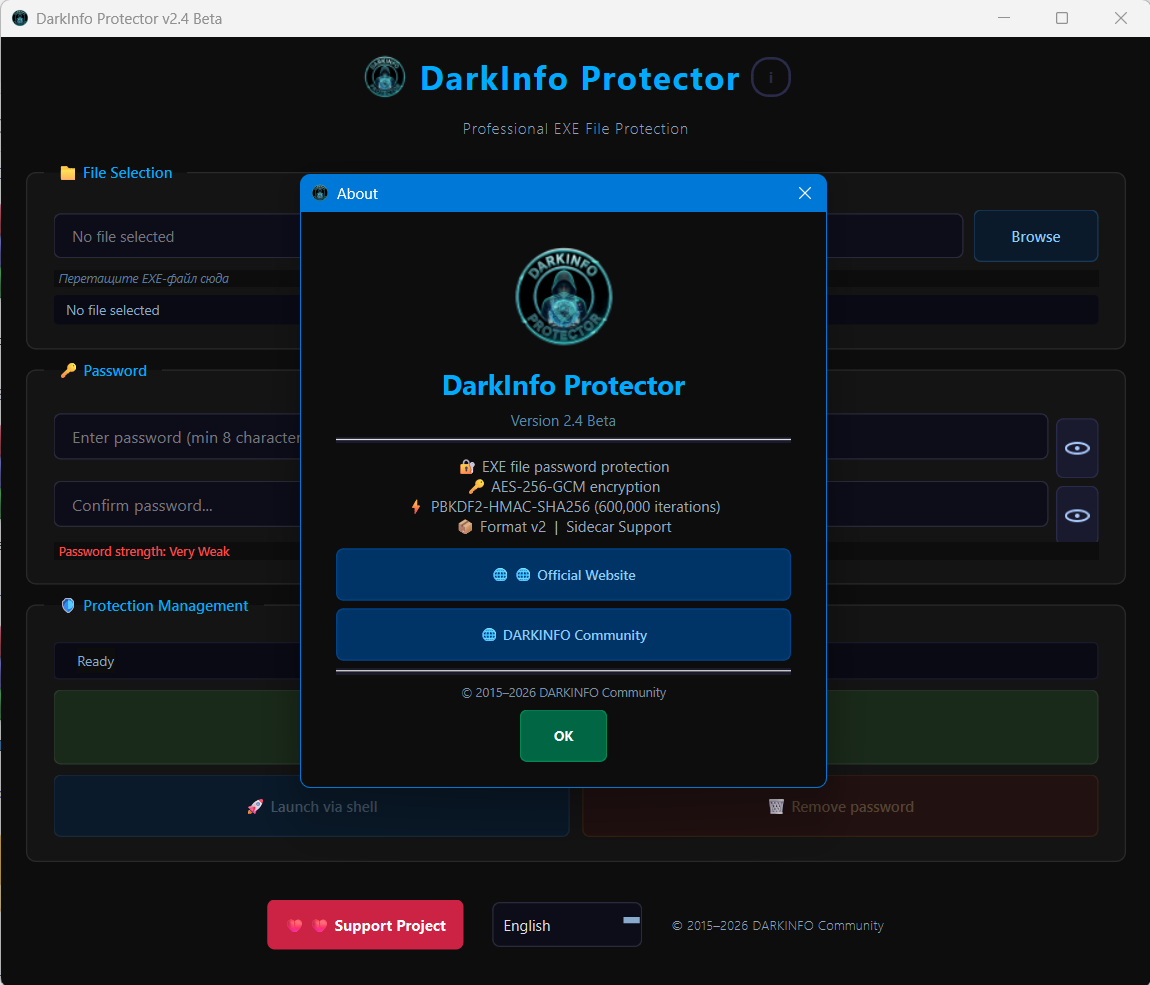
Turn any Windows application into a password-protected executable. No cloud, no activation servers, no subscriptions. Everything happens locally on your own PC.
> **🔐 What Is It?**
>
> DarkInfo Protector allows you to take an existing Windows executable and create a protected copy that cannot be launched without the correct password.
>
> The application encrypts the original program using AES‑256‑GCM and stores the encrypted data separately using a Sidecar architecture. A lightweight runtime launcher (Stub) asks for the password before the protected application can start.
>
> If somebody enters the wrong password:
>
> - The application does not launch.
> - The encrypted data remains inaccessible.
> - No recovery key or hidden backdoor exists.
>
> Everything works entirely offline.
> **🆕 What's New In v2.4 Beta?**
>
> Version 2.4 Beta is the biggest update the project has received so far.
>
> ### Completely Refreshed Stub Interface
>
> The runtime password window has been redesigned and now matches the main application.
>
> New features include:
>
> - Modern DarkInfo Protector design
> - Built-in project branding
> - Improved buttons and controls
> - Better password input experience
> - Password visibility eye button
> - English and Russian localization
> - Automatic language detection
> **Drag & Drop Support**
>
> One of the most requested features.
>
> You can now simply drag an EXE file into the main window.
>
> No need to browse manually.
>
> Just:
>
> 1. Drag the EXE.
> 2. Set a password.
> 3. Create the protected copy.
>
> The program automatically validates the file and updates the interface.
> **Original Icon Preservation**
>
> Protected applications now keep the original icon.
>
> That means your protected copy still looks like the original software instead of showing a generic Windows icon.
>
> This works even after encryption and protection are applied.
> **Better Build System**
>
> The entire build process was redesigned.
>
> Highlights:
>
> - Automatic Stub compilation
> - Automatic resource generation
> - VersionInfo integration
> - Cleaner repository structure
> - Improved reliability
> - Reproducible builds
> **Improved Localization**
>
> DarkInfo Protector now supports:
>
> - English
> - Russian
>
> The application automatically detects the Windows language while still allowing manual language switching.
> **🔒 Security**
>
> DarkInfo Protector currently uses:
>
> - AES‑256‑GCM encryption
> - PBKDF2‑HMAC‑SHA256
> - 600,000 password derivation iterations
> - Sidecar container architecture
>
> No passwords are sent anywhere.
>
> No cloud services are required.
>
> Everything happens locally on your machine.
> **🕵️ Privacy**
>
> DarkInfo Protector does not:
>
> - Upload files
> - Require registration
> - Require activation
> - Collect telemetry
> - Require an Internet connection
>
> The software works fully offline.
> **⚙️ How To Use**
>
> 1. Launch DarkInfo Protector.
> 2. Drag an EXE into the window or select it manually.
> 3. Enter a password.
> 4. Confirm the password.
> 5. Click **Create Protected Copy**.
> 6. Run the protected executable.
>
> A password dialog appears before the application launches.
> **🎯 Practical Uses**
>
> ### Shared Computers
>
> Protect applications from being launched by other users.
>
> ### USB Drives
>
> Keep portable applications protected if the drive is lost or copied.
>
> ### Personal Utilities
>
> Prevent accidental access to sensitive software.
>
> ### Workstations
>
> Restrict access to selected tools without modifying Windows accounts.
>
> ### Portable Software Collections
>
> Protect individual applications while keeping them portable.
> **📊 Current Status**
>
> DarkInfo Protector v2.4 Beta introduces:
>
> - Automatic Stub Build System
> - Drag & Drop Support
> - Improved Stub UI
> - Password Visibility Button
> - RU / EN Localization
> - Automatic Language Detection
> - Original Icon Preservation
> - VersionInfo Integration
> - Repository Cleanup
> - False Positive Reduction
>
> Latest signed build:
>
> **VirusTotal: 1 / 68 detections**
>
> Most major antivirus vendors including Kaspersky, ESET, Bitdefender, Sophos, Malwarebytes, Google, Fortinet and many others report the application as clean.
## 💾 Download
[**GitHub Release**](https://github.com/aleks103al-ship-it/DarkInfo-Protector/releases/tag/v2.4-beta)
[Source Code](https://github.com/aleks103al-ship-it/DarkInfo-Protector)
[Official Website](https://darkinfo-community.blogspot.com/)
[Support Development](https://boosty.to/darkinfo_community/donate)
_DarkInfo Protector remains completely free. No PRO versions. No license activation. No HWID locking. Community-built and continuously improved through testing and feedback._
**Feedback, bug reports and testing results are welcome.** 🛡🚀
---
### Author:  [@aleks\_uskov](https://onehack.st/u/aleks_uskov)
#### Post date: [August 24, 2026, 12:49pm UTC](https://onehack.st/t/darkinfo-protector-v2-4-beta-password-protect-any-windows-exe-with-aes-256-encryption-offline-and-free/323856/2 "2026-08-24T12:49:58Z")
🔄 Project Update
DarkInfo Protector v2.4 Beta is now available.
New features include:
✅ Drag & Drop support
✅ New Stub UI
✅ Password visibility button
✅ Improved localization
✅ Automatic Stub build system
✅ Original icon preservation
✅ Multiple bug fixes and stability improvements
VirusTotal: 1/68
[Download:](https://github.com/aleks103al-ship-it/DarkInfo-Protector/releases/tag/v2.4-beta)