where are you from?
does that matter ?
I didn’t use any vpn for this. And it worked fine.
after creating this, which website or domain we should visit to open it again, i mean can we login in onedrive directly at onedrive.com?
How can i help you?
Thanks  but it’s working now perfectly , it wasn’t allowing me to save anything , but now it’s allowing to save
The same has happened with me too. I am using domain @t.odmail.cn and my onedrive is also not working. I hope it’s a temporary problem
Same here, not working anymore. Lost more than 100GB of data 
503 error means either subscription closed or microsoft terminated contract with that institute
Is there any chance that we can get back our data. The fact that I won’t access the account is not important but the data uploaded is. So is there any way to get back that data ?
These apps are not available
Word Powerpoint Excel Onedrive
Rest all are working fine
did u try to save data and retrieve it??
The data doesn’t load. It says 503 error so saving option cannot be seen
Already said may be violation of contract or institute may terminated the contract with microsoft forget your data let it go if we have luck institute renew it we may get access .
This is still working for me btw ,had to use the third temp mail ,but the acc got setup just like it’s shown what I need your help for @goku_pistol is for the proof ,I can’t see the option to see my storage on the app or the site could you help me ? And thanks for the share 
I Have the same 503 error. Do you have any update if is a problem os the server or onedrive shut down this one? Tks
Most probably got shut off ,with any luck hopefully they’ll renew the access and should work fine in a while ,to be safe don’t upload any vital data
Hello guys, please help, the method is working fine by the way thanks  , I have Microsoft Office 2016 and have also installed Office 35, however when I check the back end of the programs they still are registered under Microsoft Office 2016 (see below screenshot), however I am struggling to have them show Office 365 even after I switch to a different license, anyone know how to enable all the desktop apps from Microsoft Office 2016 to Office 365?
Thanks in advance.
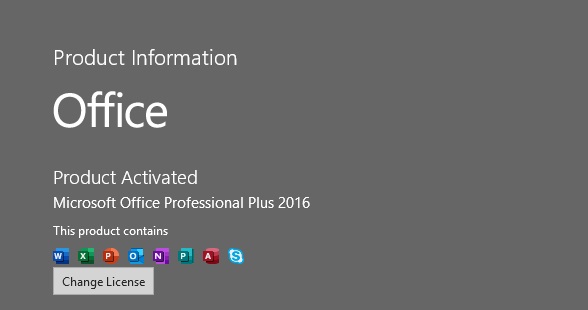
All I had to do was uninstall Microsoft Office 2016 and just install Office 365, and everything works perfectly.
you got Office 365 desktop apps??? Please share word or excel screen shot
 !
!