https://github.com/mohitjoshi155/rco
this can
https://github.com/mohitjoshi155/rco
this can
bro can u explain it little bit, i deployed it but in readme it says paste rclone config in “RCLONE_CONFIG” and further it says Set RCLONE_DESTINATION to a path you want to store your downloaded files, but during deploying there were no “RCLONE_CONFIG” field or Rclone_Destination field. So where to paste these values??
Also what should we give as rclone _destination path?? can u give example path here
everythg is explained in the guide
and wat do u mean
there shd be…send screenshot
and bruh u had succesfully deployed in the past i think i hv also helped u in pm why r u asking again?did u forget or somethg?jus scroll up u can see ur own comments
and u dont understand any of my guides bro even with detailed explanation…u hv left qs on my every guide
Bro..
i have learnt a lot from you, and i successfully done many tasks because of your help, but im sorry if i didnt reply back on some questions i ask but i successfully completed them other than few.
coming back to this topic i have successfully run aria2 but i asked about your latest comment in which you shared a github page (https://github.com/mohitjoshi155/rco) and you said it can seed torrents. So i asked about that.
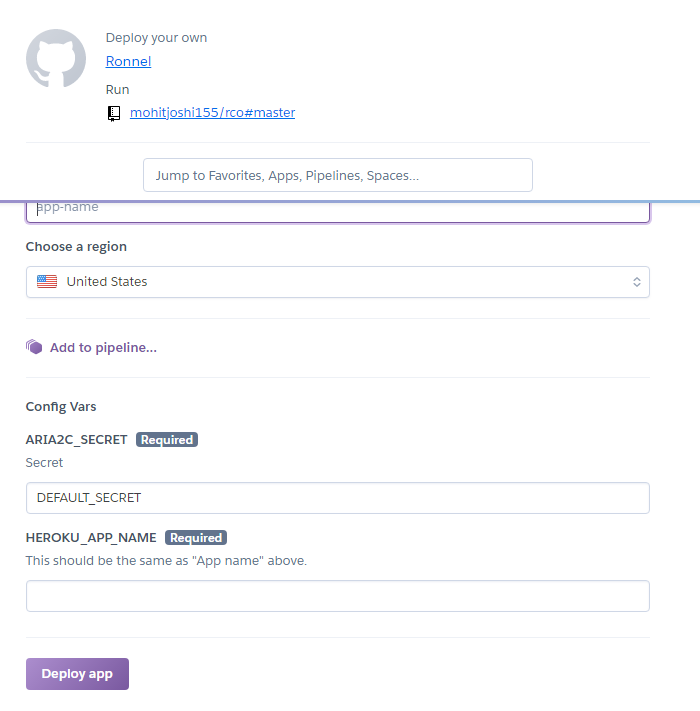
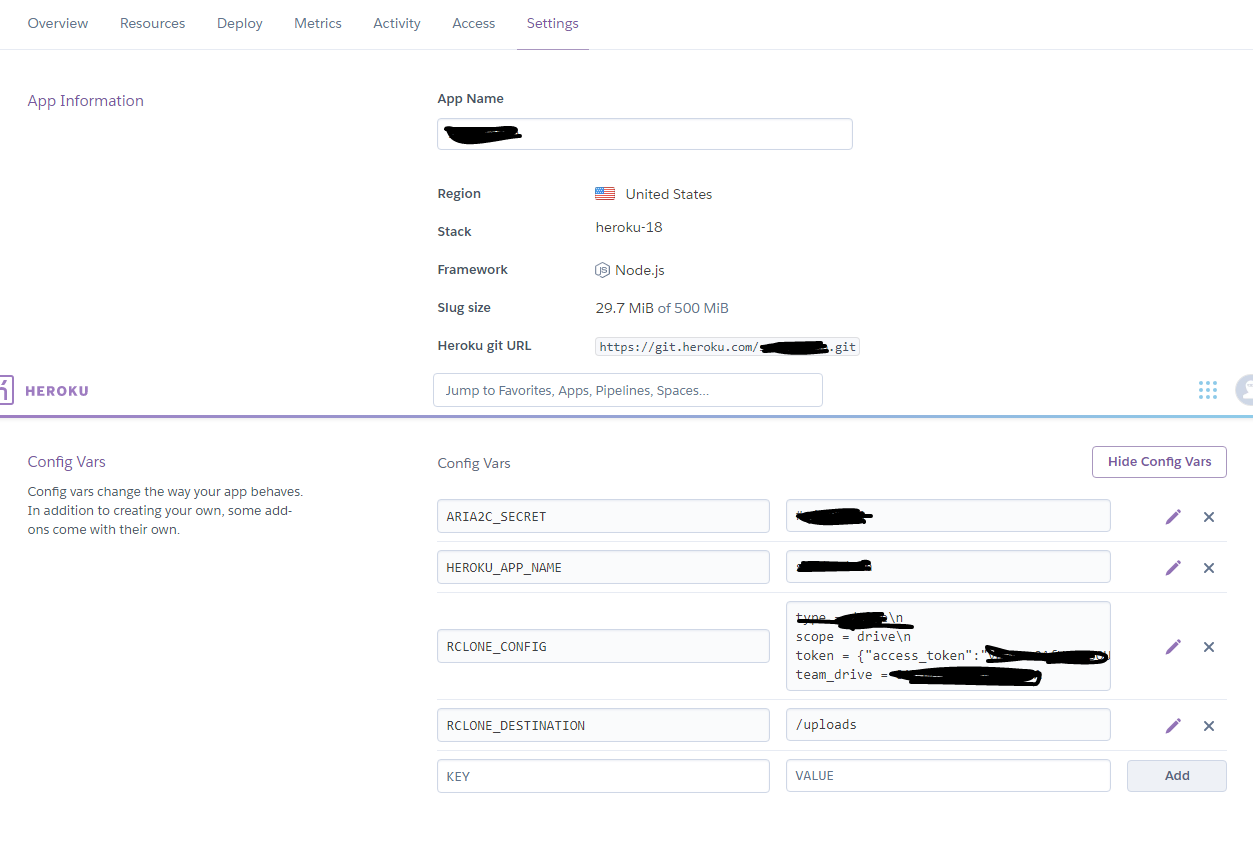
and here is the screenshot, as u can see there is no above mentioned fields in the deploy settings, but what i did is that i went to app settings, revealed varchar and added these fields and values, but it seems its not working yet, i am attaching both screenshots.
oh then say like that na…i thought u were asking abt the maple’s repo
the rco repo is forked frm someone else…and the author deleted it…so it could be that he didnt put the option to input wen u deploy
yes u hv to do that if option is not there or u want to chg the config
yes but downloading doesnt start even though i have saved in varchar as u can see in above screenshot, btw i have given path as /uploads as this is the main folder in my td and everything is inside that folder, so is that correct? or i should change it to /content/drive/Shared Drives/My Drive/uploads
dont put /
Thank you very much !!
if that’s true then it’s amazing…
EDIT:
it doesn’t ask for the Rclone config…so where to put it ? is it even supported ? @FlashyFlash
Thank u so much bro…its really working.
I just downloaded a video, and after completion its still there in downloading list and seeding.
Thats really a good treat.
btw..how long will it keep seeding? and can we keep seeding even after closing browser?
and is there any chance to set ratio?
see my above screenshots, it doesnt ask these values while deploying. So just deploy the app without those valsues, after app is deployed than go to settings and click show varchar and add value there, see screenshot above.
i added the settings myself, as you said, but it doesn’t download in my TeamDrive…
i can see in ariaNG a “My drive” menu on the left, but when i click it, it sends me to https://beta.ronneldrive.workers.dev/ and i don’t know what it is and it is not my TeamDrive.
My drive link is not working at my side too.
have u given destination path??
yes, first i tried : /Torrent
second, i tried : Torrent (without the / at the begining)
none are working, i don’t know where the downloaded file is going…
torrent is root folder in your team drive??
like mine is uploads folder as root folder and everything is inside that folder.
yes it is. my teamdrive is empty so i can’t miss it  if the file is somewhere i must see it…
WTF
just got my Heroku account suspended…i was just trying to make the app working so i didn’t even downloaded a lot, maybe 6 or 7 times the same small 20MB torrent…
@FlashyFlash bro how can we select and unselect files from torrent file to download before start downloading? can we do that?
yes u can…
my next question obviously would be HOW?
can you explain a bit?
Read all the comment.so easy if you read complete post
 !
!