# 📵 No SMS, No Rented Number, No Money — Telegram Still Lets You In
**URL:** https://onehack.st/t/no-sms-no-rented-number-no-money-telegram-still-lets-you-in/324598
**Category:** Tutorials & Methods
**Tags:** phone, tips-tricks, social-media
**Created:** [August 9, 2026, 4:20pm UTC](https://onehack.st/t/no-sms-no-rented-number-no-money-telegram-still-lets-you-in/324598 "2026-08-09T16:20:47Z")
**Posts on this page:** 1
**Page:** 1
### Author:  [@BlueHacker](https://onehack.st/u/BlueHacker)
#### Post date: [August 9, 2026, 4:20pm UTC](https://onehack.st/t/no-sms-no-rented-number-no-money-telegram-still-lets-you-in/324598/1 "2026-08-09T16:20:48Z")
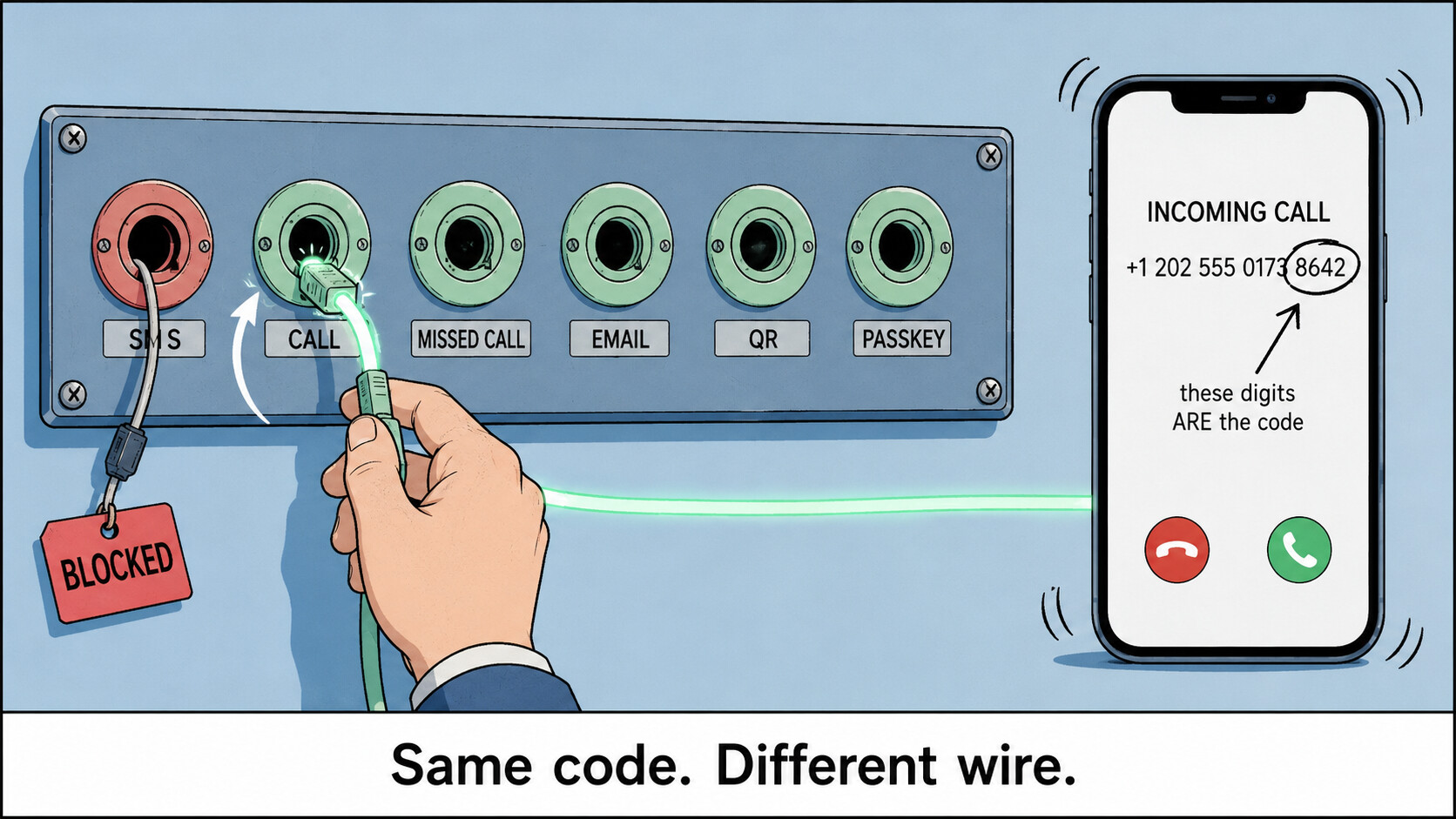
### ☎ INCOMING… ▸ DON’T ANSWER ▸ THE NUMBER CALLING YOU IS THE CODE
That is one of **six** ways Telegram will verify you. SMS is only one of them — and it’s the lane Telegram guards hardest, which is why your code often never got sent at all.
**You weren’t failing the check. You were queueing on the one closed road.**
* * *
### ▶ Do this first — 60 seconds, any phone, any country
```auto
1. Type your number. Then TOUCH NOTHING.
2. Let the "Sending you an SMS in m:ss" countdown run to zero.
3. Tap "Didn't get the code?" at the bottom.
4. READ THE LABEL — it names the lane queued next:
"Get code on this phone" → voice / missed call
"Send the code as an SMS" → SMS retry
"Get a code via Fragment" → Fragment
5. Keep tapping through the cycle. Do NOT restart the app —
restarting drops you back to SMS and burns your timers.
```
That link is not a complaint button. It fires [`auth.reportMissingCode`](https://core.telegram.org/method/auth.reportMissingCode) — it hands Telegram your operator’s network ID so its routing logs your carrier as swallowing codes, and the wording changes to name the next pipe. **Official app only** ; on a modded client the link is inert.
> ⚠ **Why “just tap Call me” never worked for you.** That button doesn’t exist unless Two-Step Verification is already on. Telegram’s own FAQ: dictated call codes are [“only available for accounts that have two-step verification enabled”](https://telegram.org/faq#getting-a-code-via-a-phone-call). Every guide has you pressing a button your account was never shown.
* * *
### ⚡ One question splits the entire answer
| Logged in on **any** device right now? | |
| --- | --- |
| ✅ **Yes** — old phone, tablet, laptop, a forgotten web tab | You can retire SMS **permanently** , today → **🅰** |
| ❌ **No** — locked out cold | Three routes exist, and only three → **🅱** |
> **🅰 Still have a session — kill SMS for good (Passkey · the hidden Login Email row · QR · 2FA · session timers)**
>
> Do these **now** , while you still can. Every one of them is prevention, not rescue.
>
> **🔑 Passkey — face/finger replaces the code, forever**
> `Settings > Privacy and Security > Passkeys > Add Passkey` (iOS: `> Passkey > Create Passkey`). It saves into Google Password Manager / iCloud Keychain / 1Password, so it survives losing the phone. Every future login screen then offers _log in using passkey_ instead of a number. Shipped Dec 2025 — [what it is](https://telegram.org/faq#q-what-is-a-passkey). Official apps only; update first.
>
> **📧 Login Email — the row Telegram hides from you**
> Once set, **all** future login codes go to your inbox instead of your SIM. The catch: the setup row is gated client-side and on most phones simply isn’t drawn. Two ways to make it appear —
> ├─ **The language gate (iOS).** The row renders if you already have one, _or_ your number starts +7, _or_ the app’s language is Russian. So: `Settings > Language > Русский` → back to `Settings > Privacy and Security` → the _Login Email_ row is now there → add + verify → `Settings > Language > English`.
> └─ **The budget flood.** On official mobile: start a login, request the SMS code, enter it, back out, request again, repeat. The server eventually pops its own _set up Login Email_ prompt.
> ⚠ Android’s row only appears when an email is **already** set — it’s a change-email row, not an add one. The server can still refuse outside its rollout regions. You need at least one deliverable code during setup. Keep 2FA on too: anyone knowing your number can start a 7-day email-reset. Lane spec: [core.telegram.org/api/auth](https://core.telegram.org/api/auth)
>
> **🟢 “Sign in with Google”** — on official Android with Play Services, when the server flags it, a _Sign in with Google_ link appears under the code box. One tap makes that address your Login Email. Absent on de-Googled ROMs, Huawei, and any third-party client.
>
> **🔒 Two-Step Verification** — `Settings > Privacy and Security > Two-Step Verification` → password → **set the recovery email**. This is the switch that puts the voice-call lane into your resend chain later. Honest: the recovery email only ever receives a _password_ reset code, never a login code — that’s the single most repeated mix-up on this topic.
>
> **⬛ QR login — a whole device, no code at all**
> Open [web.telegram.org/k](https://web.telegram.org/k/) or [Telegram Desktop](https://desktop.telegram.org/); both show _Log in by QR Code_ before asking for a number. Scan it from `Settings > Devices > Link Desktop Device` — **from inside that menu** , not a camera app. That’s where most people give up. [How it works](https://core.telegram.org/api/qr-login)
>
> **⏳ Stop Telegram reaping your last session** — `Settings > Devices` → set sessions self-destruct to the **longest** option, then `Privacy and Security > Account self-destruct` → longest (default kills the account after 18 idle months). Every route above dies with your last session.
>
> **🌐 [my.telegram.org/auth](https://my.telegram.org/auth)** — an official login surface with SMS removed by design: the page states it sends the code via Telegram, not SMS. Same at [telegram.org/deactivate](https://telegram.org/deactivate), which frees a number from a dead account so it can be re-registered fresh.
>
> **💾 [TgAuth](https://offici5l.github.io/TgAuth/)** ([repo](https://github.com/offici5l/TgAuth)) — mints a portable session key from one successful login; paste it back later and your in-app code appears live on the page. Solves _“I registered on a number I no longer have.”_ ⚠ That key **is** your account — treat it like a root password, and it’s unaudited third-party code. Keeping one official session alive does the same job with none of the risk.
> **🅱 Zero sessions — the voice run, Telegram's 3 unlisted login mailboxes, the support form**
>
> **1 — Make the line able to ring, then take the call lane.**
> Turn on Wi-Fi Calling / VoLTE (`Settings > Network & internet > SIMs > Calls`; iOS `Settings > Cellular > Wi-Fi Calling`) and turn **off** DND and _Silence Unknown Callers_. Then run the 60-second sequence at the top. Two different things can arrive:
> ├─ **Dictated call** — a robot reads 5 digits aloud, twice. Needs 2FA already on.
> └─ **Missed / flash call** — [`sentCodeTypeMissedCall`](https://core.telegram.org/constructor/auth.sentCodeTypeMissedCall): a call rings once and cuts. **Do not answer** — there’s no audio, it’s closed by design. The **last digits of the calling number _are_ the code**. Official [Telegram for Android](https://telegram.org/android) fills them in itself if you allowed the Phone permission — the permission everyone reflexively denies. Otherwise read them off `Phone > Recents`. iOS can’t do this at all.
>
> **2 — The three mailboxes that exist only inside the Android client.** None is on any Telegram web page. Match the mailbox to the **exact** on-screen error:
>
> | Error on screen | Write to | Subject |
> | --- | --- | --- |
> | Code never arrives | `sms@telegram.org` | `+ Android Registration/Login Issue ()` |
> | _Invalid phone number_ | `login@stel.com` | `Invalid phone number: +` |
> | _This phone number is banned_ | `recover@telegram.org` | `Banned phone number: +` |
>
> Body: your number in full international form, device, OS/SDK, app version, locale, then the problem in plain English. ⚠ Never add `#enableSMS` — that’s a developer queue for third-party app authors, not a user login issue.
>
> **3 — [telegram.org/support](https://telegram.org/support)** — the only lane that works with zero sessions and zero codes. Four fields; paste the **exact** error string and name your carrier. Answered by volunteers: no ticket, no SLA, sometimes no reply.
>
> **4 — [@smstelegram](https://x.com/smstelegram)** — Telegram’s FAQ explicitly blesses this account and says to DM it your number. Check the handle character by character; the lookalikes are all theft. Nobody official ever asks for your **code**.
>
> **5 — Already inside but acting restricted?** [@SpamBot](https://t.me/SpamBot) states your limit status and appeals it — but only once you’re logged in.
>
> **Straight answer:** if the number itself is banned, none of this revives it. Only a different number does.
* * *
### 📓 Read your error before trying anything else
Same screen, different walls — and each one leaves a different door open.
| What you get | What it actually means | Door still open |
| --- | --- | --- |
| `PHONE_NUMBER_INVALID` | Not a real assignable mobile number — the classic VoIP range | Get a real mobile-range number; test it first |
| `PHONE_NUMBER_BANNED` | The **number** is burned, often by its previous owner | Only a different number — or `recover@` if it’s inherited |
| `PHONE_NUMBER_FLOOD` | Too many code requests / too many accounts on it | Stop re-requesting. Wait hours. Then switch lane **once** |
| `FLOOD_WAIT_X` | Wait exactly X seconds. Literal | Waiting. A VPN does nothing — this is scoped to the number |
| `PHONE_CODE_EXPIRED` | You were slow | Request a fresh one |
| `SESSION_PASSWORD_NEEDED` | **Not an error — a green light.** The code step passed | Just type your 2FA password |
📦 Official dictionary: [core.telegram.org/api/errors](https://core.telegram.org/api/errors) · machine-readable [errors.json](https://core.telegram.org/api/errors.json) · offline grep: [Telethon errors.csv](https://raw.githubusercontent.com/LonamiWebs/Telethon/v1/telethon_generator/data/errors.csv) · per-method error sets at [tl.telethon.dev](https://tl.telethon.dev/)
> **🧪 Test a number BEFORE you burn it — free VoIP / line-type lookups**
>
> A VoIP-flagged range is the exact class Telegram refuses. Check first, spend second.
> ├─ [IPQualityScore free lookup](https://www.ipqualityscore.com/free-phone-number-lookup) / [HLR variant](https://www.ipqualityscore.com/free-hlr-lookup) — VOIP flag, carrier, live-subscriber, prepaid. Browser, no signup, a few per day.
> ├─ [numverify](https://numverify.com/) — 100 free/month, key-based: `apilayer.net/api/validate?access_key=KEY&number=…` → read `line_type` + `carrier`. Loop it over candidates and build a will-clear list.
> └─ [Abstract line-type checker](https://www.abstractapi.com/tools/line-type-checker) — 190+ countries, tie-breaker.
>
> **If any tool says VoIP, treat the number as dead on arrival.** Accuracy drops outside major markets — a good SIM occasionally reads Unknown.
>
> Honest gap: there is **no** maintained public ledger of “which numbers clear Telegram today.” The channels selling that are selling the burned ranges. A line-type check is the only real-time signal that exists.
> **⚖️ Keep a SIM alive forever without paying — and the 4 countries where it can't work**
>
> Outside North America, incoming is free to you by market rule — the caller’s side pays. That makes a dormant prepaid SIM a permanent zero-cost receiver.
>
> **🌍 Check this first — [receiving-party-pays markets](https://en.wikipedia.org/wiki/Receiving_party_pays): USA · Canada · Hong Kong · Singapore.** There, _your_ balance is charged to receive, so a zero-balance SIM structurally can’t deliver a code, and dormancy is only ~30–60 days. Everywhere else is [calling-party-pays](https://en.wikipedia.org/wiki/Calling_party_pays) with 90–365 day windows. Apply the filter _before_ choosing where to source a number — this alone kills weeks of wasted effort.
>
> **🇮🇳 The self-renewing loop.** India’s [consolidated consumer regulations](https://trai.gov.in/sites/default/files/2025-03/CR_TCPR_28032025.pdf) (Ch. IV, Reg. 11–12) bar disconnection for 90 days of non-usage — and Reg. 12(3) grants a **fresh 90 days** after any qualifying activity. Then the hinge: both [Airtel](https://trai.gov.in/sites/default/files/2024-11/Airtel_12.pdf) and [Vodafone Idea](https://trai.gov.in/sites/default/files/2024-11/Vodafone_9.pdf) told the regulator in writing that an **incoming call counts as usage — an incoming SMS does not.**
>
> > **So the pipe you pick changes the outcome twice.** Waiting for the SMS delivers a code and lets the line die anyway. Taking the **call** delivers the same code _and_ re-arms the 90-day clock. Same login, opposite result.
>
> Also: [TRAI’s prepaid FAQ](https://www.trai.gov.in/faqcategory/prepaid) Q3 — incoming stays available at zero balance during validity. Screenshot it for the store clerk who insists you must recharge.
>
> ├─ **🇵🇭 Philippines** — [Joint Circular 05-12-2017](https://region7.ntc.gov.ph/wp-content/uploads/2024/01/Joint_MC_05-12-2017.pdf) §3: load expires one year from your **latest** top-up, rolling. One small load = a 12-month receiving window.
> ├─ **🇮🇩 Indonesia** — [masa tenggang](https://www.telkomsel.com/jelajah/jelajah-lifestyle/masa-tenggang-telkomsel-penjelasan-dan-cara-mengaktifkannya): 30 days of free _incoming_ after expiry, across all major carriers. A countdown, not a parking spot — then the number is permanently burned.
> ├─ **🇰🇪 Kenya** — Safaricom [Recreate Old SIM](https://www.safaricom.co.ke/personal/value-added-services/other-services/recreate-old-sim), USSD `*100*2#`, pulls a lapsed line back before it’s recycled.
> └─ **🌐 Any country** — [Prepaid SIM wiki](https://prepaid-data-sim-card.fandom.com/wiki/India), swap the country in the URL: carriers, registration rules, credit validity, expiry, in one table.
>
> This keeps a line you already hold. It does not get you one.
> **📦 Free real mobile numbers — what's genuinely free, by country**
>
> Real carrier ranges only. Every free eSIM you’ve seen advertised is **data-only** — no number is issued at all, so there’s nothing for a code to arrive at.
>
> ├─ **[Lyca free eSIM](https://www.lycamobile.nl/en/esim/i-ordered-lyca-mobile-free-esim-without-a-plan-or-topup/)** — order **without** picking a plan; QR by email in minutes, real host-network number (KPN/Vodafone/Bouygues/Telstra depending). NL/DE/FR/BE/AT/DK/PL/PT/IE/AU/TN. ⚠ Only registers while you’re physically in that country. UK forces a plan; DE/FR/ES/IT/AT want ID.
> ├─ **🇮🇳 [Vi free SIM home delivery](https://www.myvi.in/new-connection/vi-free-sim-home-delivery)** — ₹0, agent brings it, eKYC at the door, live in ~30–60 min. Airtel and Jio run the same doorstep flow.
> ├─ **🇿🇦 [HelloMobile](https://hellomobile.co.za/get-your-free-sim/)** — free Cell C-network SIM. Pick **Voice SIM** , not Data SIM — a data SIM has no usable number.
> ├─ **🇦🇷 [Movistar chip prepago](https://www.movistar.com.ar/prepago)** — free courier to your door with gift data. Claro/Personal/Tuenti rotate the same promo.
> └─ **🇦🇪 du tourist SIM** — free at UAE airport immigration on a passport scan. Register Telegram _and_ set a Login Email or Passkey on day one.
>
> **Say it plainly:** every one of these needs national ID and physical presence. There is no globally-reachable source of a free real mobile number — if there were, it would already be burned. This lane is “be in the right country,” not “order online.”
> **🔌 Catch the call on a computer — USSD forwarding, scrcpy, KDE Connect, headless SIP**
>
> Telegram only accepts **mobile** numbers, so no softphone, PBX or VoIP line can ever _be_ your registered number. These catch a call forwarded from a real mobile you already control.
>
> **📞 Standard GSM forwarding — works on virtually every carrier on earth, free, zero-skill.** Dial from the phone holding the SIM, _while you still have it_:
>
> ```auto
> *21*# forward everything
> *61*# forward when unanswered
> *62*# forward when unreachable / off
> *004*# all conditional forwards at once
> *#21# check status ##21# cancel
>
> ```
>
> Some carriers bill the forwarded leg or block international destinations.
>
> ├─ **[scrcpy](https://github.com/Genymobile/scrcpy)** — mirror the phone holding the SIM to your PC over USB or Wi-Fi. Reads the incoming call and caller ID when the screen is smashed. Needs USB debugging already on.
> ├─ **[KDE Connect](https://kdeconnect.kde.org/)** ([Android](https://f-droid.org/packages/org.kde.kdeconnect_tp/)) — enable the Telephony plugin and the incoming caller ID pops up on your desktop. That caller ID _is_ the flash-call code. Same Wi-Fi only.
> └─ **Headless auto-answer** — [baresip](https://github.com/baresip/baresip) with `answermode=auto`, or [pjsua](https://github.com/pjsip/pjproject) `--null-audio --auto-answer=200 --auto-rec`, then read the digits with [whisper.cpp](https://github.com/ggml-org/whisper.cpp) offline. Honestly: the recorded WAV is the prize — just play it.
> **☠️ Proven dead — stop spending time and money on these**
>
> ├─ **Free SMS-receive sites, rent-a-number services, VoIP number apps** — their whole DID pools are blacklisted before a code is ever sent. Hunting a fresh burner in the same pool is the loop you’re stuck in.
> ├─ **TextNow / 2ndLine / Talkatone / Google Voice** — they genuinely ring, but the ranges are pre-blocked for registration, and they’re US/Canada only.
> ├─ **Any SIP, landline or DID number** — Telegram states it supports mobile numbers only. A perfect free SIP number is refused at signup.
> ├─ **Free SIP accounts (Linphone, OnSIP, Zoiper, Callcentric)** — they give you an address, not a number. The phone network has no route to it.
> ├─ **“Free incoming” VoIP DIDs (Zadarma, Sonetel, VoIP.ms, FlyNumber)** — “free” means free to _answer_; the number itself is a monthly fee. Sonetel’s free plan no longer includes a number at all.
> ├─ **Every free travel eSIM (Airalo, Nomad, Holafly, GigSky, Firsty…)** — data-only, no number provisioned. The biggest time sink in this whole topic.
> ├─ **giffgaff** — the #1 English answer, and wrong twice: international shipping is paused, and a number is only issued _after_ a purchase.
> ├─ **US carrier free trials (Mint, US Mobile, Visible, T-Mobile Network Pass)** — the eSIM only camps on US networks; from anywhere else, nothing arrives.
> ├─ **Any foreign SIM used at home** — it only receives while camped in its home country; roaming needs a paid plan.
> ├─ **Android emulators / Waydroid for the flash-call trick** — no modem, no incoming call, no call log. `adb emu gsm call` only injects a number _you_ type, and the number is the code you don’t have.
> ├─ **Answering the flash call** — it’s cut before you can pick up and carries no audio. Racing to answer burns the attempt.
> ├─ **Scripting `auth.resendCode` to demand a call** — you can only request the lane the server already queued. No client parameter says “call me.”
> ├─ **Modded clients (Nekogram, Plus, APKPure builds)** — they _remove_ lanes: reportMissingCode, Google sign-in and passkeys are all official-app-gated.
> ├─ **The 2FA recovery email as an SMS replacement** — it only ever receives a _password_ reset code. Different mechanism from Login Email.
> ├─ **VPN-hopping a FLOOD error** — scoped to the number, not your IP, and it makes the login look like a takeover.
> └─ **Fragment +888 numbers** — a real Telegram-accepted lane, genuinely worldwide, but auctioned in TON from tens of dollars. No free tier.
* * *
_The number was never the check. It was just the address the check got mailed to — and you can change the address._