Let’s make it this way & proper…
What is this DNS server
The main purpose of DNS servers is the transformation of the domain names to the IP address. In simple words, when you type Google.com in the browser, the DNS server looks for what IP addresses assigned to this domain, and the loading of web pages occurs via IP addresses.
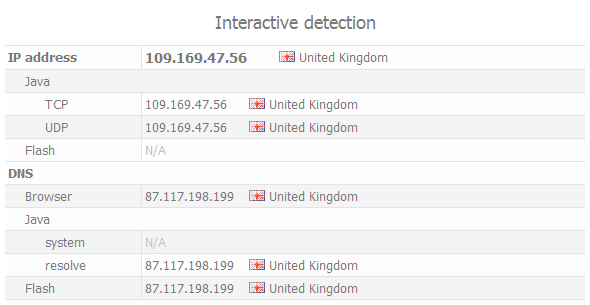
Below you can see an example of DNS server detection on web site Whoer.net.
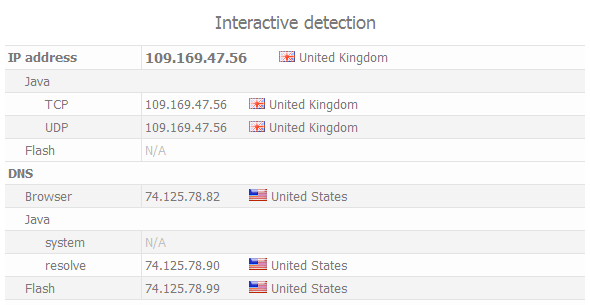
We have connected to VPN and hide own IP (United Kingdom IP) but the DNS server shows our real location (USA).
In this case, the problem is in the principle of the Windows DNS service. When connecting to the VPN, by default, the query is sending to the DNS of the VPN server. Then the Windows DNS service waits 2 seconds and if the answer did not come, it sends a request to the next DNS server in the list of Windows. It could be your real DNS of ISP.
DNS of the VPN server may have no time to respond to the request on time because of the geographical remoteness of the VPN server from you. The DNS server of your ISP is located closer to your computer. Also, this may affect the quality of the signal from your ISP to the VPN server.
Solution: forced using the required DNS server. In this case, we clearly indicate to the operating system that you want to use only the specified DNS server.
How to hide own real DNS in Windows
Make the next actions in any version of Windows:
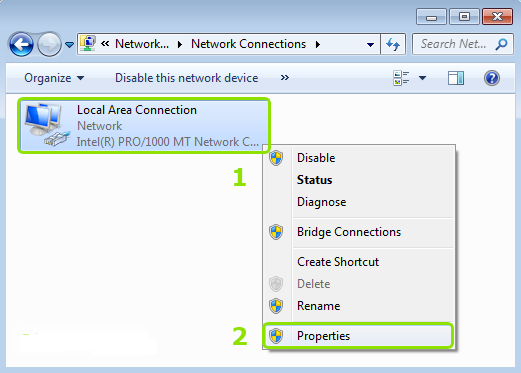
Click the right mouse button on the network connection of Windows and then choose “Properties”.
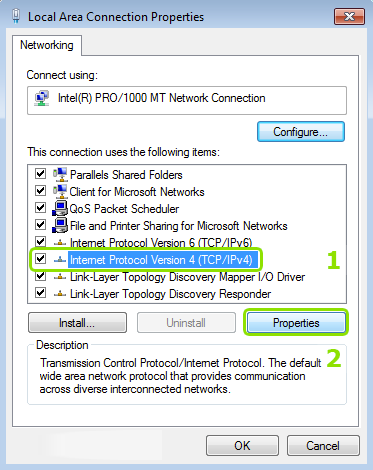
Type public DNS servers of Google or OpenDNS.
Google DNS:
- 8.8.8.8
- 8.8.4.4
OpenDNS:
- 208.67.222.222
- 208.67.220.220
These DNS servers usually defined as the United States. So will be impossible to detect your real DNS.
For full anonymity, we recommend using our DNS servers. In your account on the link “Subscriptions” → tab “DNS” will appear DNS server recommended for using with our VPN servers. For each VPN direction will be indicated own DNS server. And in this case, your DNS server will be always matched to your IP address (by country).
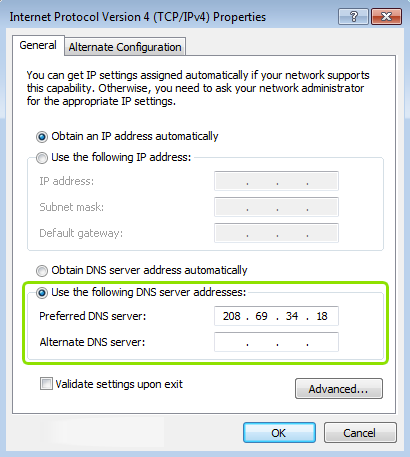
After these actions, your real DNS in Windows will be hidden.
Lastly, if you want to plug and play kinda thing, then simply use this and its hide DNS, VPN client Secure Kit can fix DNS leak automatically. SECURE KIT Windows, Linux, iOS, Android, macOS, browser add-ons.
For better understanding the VPN services, kindly take a look here, it will help you understand such things: Ultimate VPN Guide Gives You Everything You Need To Know About Virtual Private Networks
Good luck! 
@darkhelm I’m sure it has been solved as you’ve willing it should be get done. Cheers
 !
!