# vMix Pro for Church Streaming – Looking for Affordable Options
**URL:** https://onehack.st/t/vmix-pro-for-church-streaming-looking-for-affordable-options/323374
**Category:** Discussion & Solutions
**Tags:** solved
**Created:** [June 25, 2026, 5:21pm UTC](https://onehack.st/t/vmix-pro-for-church-streaming-looking-for-affordable-options/323374 "2026-06-25T17:21:10Z")
**Posts on this page:** 5
**Page:** 1
### Author:  [@odirachukwu\_onyejefu](https://onehack.st/u/odirachukwu_onyejefu)
#### Post date: [June 25, 2026, 5:21pm UTC](https://onehack.st/t/vmix-pro-for-church-streaming-looking-for-affordable-options/323374/1 "2026-06-25T17:21:10Z")
Hello everyone,
I am setting up a live streaming system for my church and have been considering vMix Pro -[https://www.vmix.com/](https://www.vmix.com/) because of its professional features and flexibility.
Unfortunately, the full license is currently outside my budget. Does anyone know of any official discounts, non-profit pricing, free trials, or affordable ways to get started with vMix?
I would also appreciate recommendations for alternative software that can provide similar functionality for live streaming, recording, and multi-camera production, using phone as camera.
Thank you for your help and recommendations.
---
### Author:  [@Emanuel\_Branson](https://onehack.st/u/Emanuel_Branson)
#### Post date: [June 25, 2026, 7:08pm UTC](https://onehack.st/t/vmix-pro-for-church-streaming-looking-for-affordable-options/323374/2 "2026-06-25T19:08:59Z")
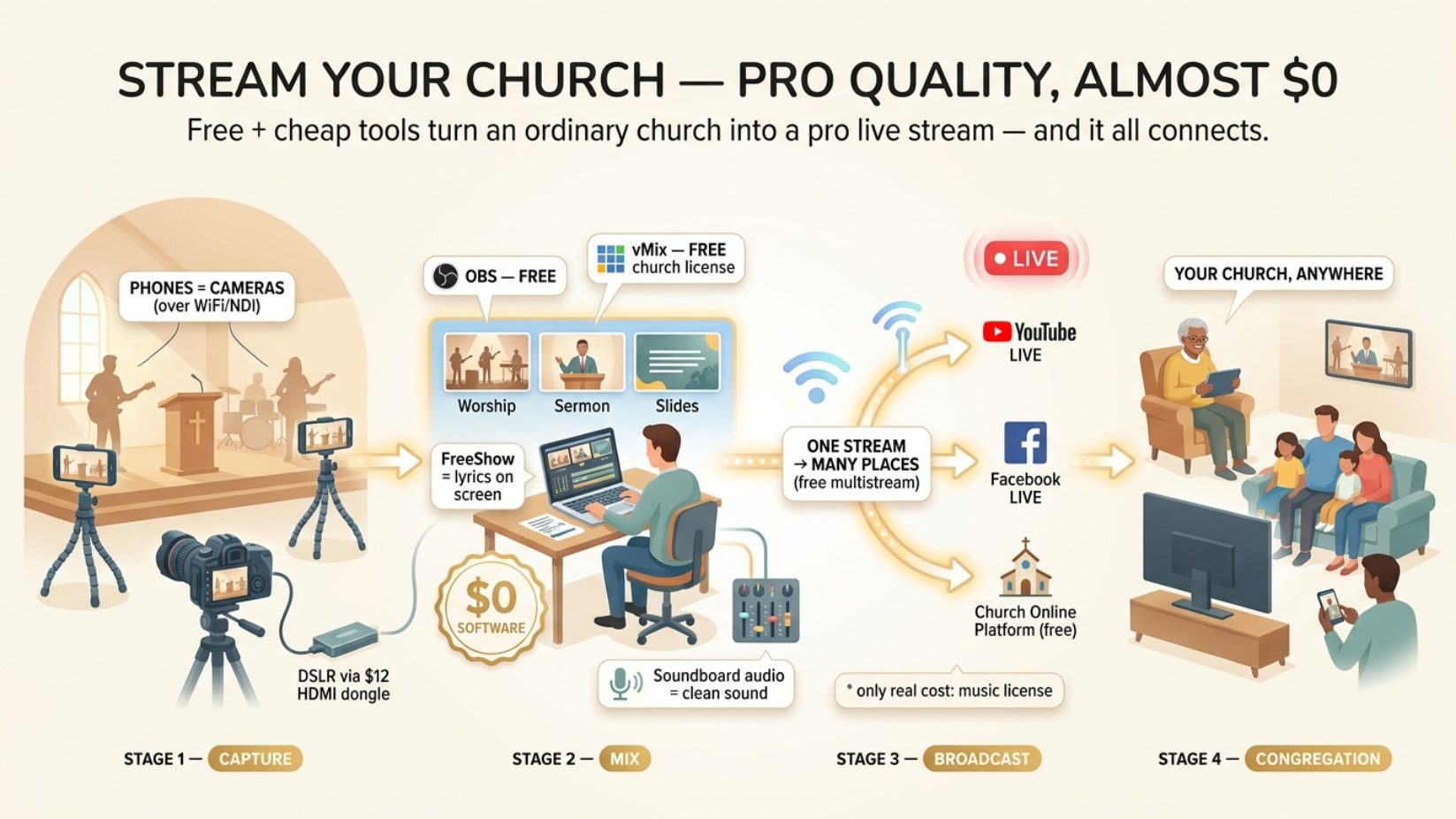
You don’t pay for any of this. vMix hands churches the paid license free, and if it doesn’t land, OBS + a stack of free tools runs a broadcast your congregation will never know was free.
* * *
* * *
Below is the whole kit — lyrics, scripture overlays, multicam off phones, clean audio, multistream, the lot. Skim the headers, open what you need 👇
## 🎁 vMix quietly gives churches the $350 license for free — most never apply
Official program. Apply with a **church website + church email** (not Gmail), get a free **vMix HD** license — no subscription, no expiry.
→ **[https://www.vmix.com/purchase/churches.aspx](https://www.vmix.com/purchase/churches.aspx)**
```auto
NEED: church site + church email (you@yourchurch.org) + 1 line about your ministry
REPLY: ~7 days if approved. No reply = limited batch → retry in 3–6 months (people get in round 2)
```
## 🧪 Run the full Pro free for 60 days while you wait
Every feature unlocked, no watermark. Use it to **train volunteers on the real thing** before the license lands.
→ **[https://trial.vmix.com](https://trial.vmix.com)**
## 💰 Buying instead? One tier covers a normal Sunday
vMix is **one-time** (pay once, keep forever) — not monthly.
| Tier | Price | Covers |
| --- | --- | --- |
| Basic | free | 2 cams, 768p — learn on it |
| **Basic HD** | **$60 once** | **3 cams, 1080p, stream YT+FB at once — the sweet spot** |
| HD | ~$350 once | unlimited cams |
| 4K / Pro | ~$700 / ~$1,200 | multi-campus broadcast tier |
| Max | $50/mo | only if you hate one-time buys |
Skip everything above Basic HD unless you run two campuses.
## 🆓 The free stack that quietly runs thousands of churches
**OBS Studio** — free, open-source, forever. Not a watered-down vMix; the real thing.
→ **[https://obsproject.com](https://obsproject.com)**
```auto
Scene switching (1-click worship→preacher→slides) · logo/scripture overlays
record-to-MP4 while streaming · picture-in-picture · green screen · audio mixer
4K local recording · runs on a 2015 laptop · YT + FB + Twitch built in
```
Want it easier? Same family, gentler face:
| Tool | Link | Why |
| --- | --- | --- |
| 🥈 Streamlabs | [https://streamlabs.com](https://streamlabs.com) | OBS power, drag-and-drop. Overlays, alerts, themes baked in |
| 🥉 StreamYard | [https://streamyard.com](https://streamyard.com) | Browser only, zero install. **Up to 10 remote guests** join by link. Free tier = small watermark |
| 🎖 Restream | [https://restream.io](https://restream.io) | One stream → YouTube + Facebook + church site **at once** |
## 📲 Every phone in the building is already a camera
Phones on cheap tripods at different angles = instant multi-cam into OBS/vMix.
| App | Where | Note |
| --- | --- | --- |
| **NDI Camera** | iOS+Android | Best quality, lowest delay. NDI = video sent over your WiFi/LAN |
| DroidCam | [https://droidcam.app](https://droidcam.app) | WiFi or USB cable, free |
| EpocCam | iOS | Auto-detected, stable on WiFi |
NDI is cleanest on **wired Ethernet** + a 5GHz router, all on one network.
* * *
Now the deep cuts — the stuff nobody hands a small church 👇
## ✝ Free lyrics on screen — the ProPresenter you don’t pay for
Free apps that throw song words + scripture on the stream. The trick is sending a **clean text-only feed** , not filming your projector.
> **📖 The 5 free presenters + the clean-feed trick**
>
> | App | Link | Why it’s worth it |
> | --- | --- | --- |
> | **FreeShow** | [https://freeshow.app](https://freeshow.app) | **Top pick — native NDI output.** Sends lyrics straight to the streaming PC, no cables, no color-key. Modern ProPresenter-style UI, mobile remote |
> | OpenLP | [https://openlp.org](https://openlp.org) | Rock-solid since 2004, Win/Mac/Linux. Dated UI, but free forever. Imports EasyWorship/OpenSong songs |
> | Quelea | [https://quelea.org](https://quelea.org) | Multilingual, has a **stage view** (chords for the band, hidden from the crowd) |
> | VideoPsalm | [https://videopsalm.org](https://videopsalm.org) | Windows-only. Ships **one-click OBS integration** + lower-third mode + 330+ Bible translations |
> | OpenSong | [http://www.opensong.org](http://www.opensong.org) | Simple lyrics/chords/scripture, runs anywhere |
>
> **The clean-feed trick (any app):** set all slide backgrounds to **black** , capture the window in OBS, add a **Color Key filter → Similarity ~1000**. Black vanishes, only the words sit over your camera. Full method: [https://www.worshiptools.com/en-us/docs/10-livestream](https://www.worshiptools.com/en-us/docs/10-livestream)
> **Even cleaner:** if the app does NDI (FreeShow), use that and skip the color-key entirely.
## 📜 Drop Bible verses on the stream without typing live
Free OBS overlays that show scripture as a lower-third while you stay on the camera.
> **🔖 4 free scripture overlays**
>
> | Tool | Link | Note |
> | --- | --- | --- |
> | Bible Plugin for OBS | [https://bibleplugin.firstfruitsstudio.com](https://bibleplugin.firstfruitsstudio.com) | **No-install free version** — paste 2 URLs into OBS, search + display verses live, auto-splits long ones |
> | Free OBS Bible Plugin | [https://obsproject.com/forum/resources/free-obs-bible-plugin.1784/](https://obsproject.com/forum/resources/free-obs-bible-plugin.1784/) | Works **fully offline** , does verses _and_ song lyrics |
> | Church Verse Dock / Cinematic | [https://obsproject.com/forum/resources/church-verse-dock-cinematic-bible-overlay-lower-third-scripture-display.2344/](https://obsproject.com/forum/resources/church-verse-dock-cinematic-bible-overlay-lower-third-scripture-display.2344/) | Lower-third + full-screen “cinematic” typewriter/scroll modes |
> | Bible Dock Plugin | [https://obsproject.com/forum/resources/bible-dock-plugin.2017/](https://obsproject.com/forum/resources/bible-dock-plugin.2017/) | CSV-driven, multi-version, good for chapter readings |
>
> Get plugins only from the official OBS resources page — never random sites.
## 🏠 The free church platform nobody tells you exists
Don’t just dump people on a bare YouTube link. **Church Online Platform** is built by Life.Church (the YouVersion Bible app team) and **100% free since 2011 — no tiers, no limits** , used by 38,000+ churches.
→ **[https://churchonlineplatform.com](https://churchonlineplatform.com)**
You **embed your free YouTube/Facebook feed** into it and get live chat with auto-translation, live prayer requests, “I decided today” moments, and your own branding. Best free upgrade over a plain embed, full stop.
> **💸 Paid church platforms — what's actually free vs not (so you don't overpay)**
>
> All of these are **paid, trial-only** — only reach for one when you need ad-free embedding or rock-solid weak-internet delivery:
>
> | Platform | Link | Real cost |
> | --- | --- | --- |
> | BoxCast | [https://www.boxcast.com](https://www.boxcast.com) | $109–279/mo, annual commit. 14-day free trial |
> | Resi | [https://resi.io](https://resi.io) | Quote-based (~$119–179/mo). Packet-recovery = buffer-free on weak internet |
> | Dacast | [https://www.dacast.com](https://www.dacast.com) | From $39/mo. Works with OBS/vMix (RTMP). 14-day trial |
> | [ChurchStreaming.tv](http://ChurchStreaming.tv) | [https://www.churchstreaming.tv](https://www.churchstreaming.tv) | ~$79–139/mo. 30-day trial |
> | Subsplash | [https://www.subsplash.com](https://www.subsplash.com) | Custom quote; only the _giving_ tool is $0/mo |
>
> **Verdict:** stream free to YouTube/Facebook → embed in Church Online Platform. Pay only when you’ve genuinely outgrown that.
## 🔗 NDI Tools — the free glue that chains it all together
One free download from **[https://ndi.video/tools](https://ndi.video/tools)** turns your normal network into a video pipeline. No capture cards, no long HDMI runs.
> **🧰 What's in the free NDI box + the killer church move**
>
> ```auto
> NDI Scan Converter → put your LYRICS computer's screen on the network as a clean
> source. The streaming PC just pulls it in. No cable. (killer use)
> NDI Virtual Input → make any NDI feed show up as a "webcam" in Zoom/Teams
> NDI Studio Monitor → view any network feed as a confidence monitor / signage
> NDI VLC Plugin → pre-roll videos straight off the network
>
> ```
>
> Run cameras + PC on **wired Ethernet** — NDI hates WiFi for the main feeds. On a LAN you can push huge bitrates with zero lag.
## 📷 Turn a real camera into a webcam — free, plus the $12 trick
A DSLR/mirrorless looks 10× better than a webcam. Two routes, both cheap.
> **🎥 DSLR-as-webcam + cheap capture + clean audio**
>
> **Free manufacturer apps (USB, no capture card):**
>
> - Canon EOS Webcam Utility — [https://www.usa.canon.com/digital-cameras/eos-webcam-utility](https://www.usa.canon.com/digital-cameras/eos-webcam-utility) ⚠ Canon **discontinued the free standalone version on Aug 20, 2025** (last free build v1.3.16; new one is paid). If you’ve still got the free installer, keep it.
> - Sony Imaging Edge Webcam — free, 35+ models
> - Nikon Webcam Utility — free
> - ⚠ **None of these carry audio over USB** — get sound separately (below).
>
> **The more future-proof route — clean HDMI + a ~$10–15 dongle:** generic HDMI-to-USB capture sticks are plug-and-play, show up in OBS as “USB Video,” and give full 1080p from any camera with **clean HDMI output** (google your model + “clean HDMI”). Gotchas: usually 1080p30; won’t grab copy-protected sources; if audio rasps, set the source’s HDMI audio to **PCM**.
>
> **The single biggest quality jump — clean audio from the soundboard:** never use the camera mic. Run a spare output from your mixer into a cheap **USB audio interface** (2-channel Behringer-class) → into OBS as its own audio input. Instantly broadcast-grade sound.
## 🎚 Make the audio sound pro — free plugins + the legal bit nobody mentions
Stream audio fails more than video. All fixable for free.
> **🔊 Free audio chain + the CCLI license reality**
>
> **Free OBS filter chain (in this order on your audio source):**
>
> ```auto
> Noise Gate → ReaFIR (noise removal) → EQ → Compressor → Limiter (last)
>
> ```
>
> **ReaPlugs** (free VST suite) → [https://www.reaper.fm/reaplugs/](https://www.reaper.fm/reaplugs/) — its **ReaFIR in “Subtract” mode** auto-learns your booth’s hum/fan noise and erases it. Church AV folks swear by it for killing HVAC drone.
>
> **The legal part — you cannot stream worship music for free, even with your projection license:** you need a **CCLI Streaming License** → [https://ccli.com/us/en/streaming](https://ccli.com/us/en/streaming) — covers 450,000+ worship songs performed live by _your_ musicians. **From $84/yr** if already CCLI-licensed, **~$108/yr** for an average 100–199-person church. _Streaming Plus_ adds backing tracks/multitracks. It does **not** cover playing others’ recordings or movie clips on the stream. Show your license number on screen. (US terms; check your country. Hymns published before 1931 are public domain as of Jan 2026.)
## 🥷 The free gems pros hoard
> **⚡ Remote guests, auto-start, PTZ control, the plugin pack**
>
> - **VDO.Ninja** → [https://vdo.ninja](https://vdo.ninja) — 100% free, browser-based, no install. Brings a remote guest’s phone/laptop camera into OBS with near-zero lag. Also a free wireless phone-cam-to-OBS tool. Tip: add `&buffer=0` for lowest latency.
> - **vMix Call** — free inside the vMix trial / church license. Remote guests join via a link, **auto mix-minus** kills echo.
> - **PTZOptics control app + OBS plugin** → [https://ptzoptics.com/app-download/](https://ptzoptics.com/app-download/) — free; drive up to 8 PTZ cameras, **auto-recall presets when you switch OBS scenes** = one volunteer “operates” every angle. Cross-brand free option: PTZ Controls → [https://obsproject.com/forum/resources/ptz-controls.1284/](https://obsproject.com/forum/resources/ptz-controls.1284/)
> - **OBS plugins churches love (all free, from [obsproject.com/forum/resources](http://obsproject.com/forum/resources)):**
> - **Advanced Scene Switcher** → auto-_start the Sunday stream_ on a schedule + automate scene changes (needs OBS 31.1.1+)
> - **Move Transition** → smooth animated camera/lower-third moves
> - **Source Record** → record an ISO of the pulpit cam / clean program while you stream, for re-use
> - **Background Removal** → free AI green-screen-free background knockout
>
> - **Performance check:** open View → Stats, watch “time to render frame.” Over ~10 ms = dropped frames coming. Add plugins one at a time.
## 🎬 Free overlays, motion backgrounds & countdown timers
> **🎨 Free worship media + pre-service countdowns**
>
> **Free motion backgrounds / loops:** Life.Church Open Network ([https://open.life.church](https://open.life.church)), Motion Worship ([https://www.motionworship.com/free-download/](https://www.motionworship.com/free-download/)), Igniter Media ([https://www.ignitermedia.com/free-worship-backgrounds](https://www.ignitermedia.com/free-worship-backgrounds)), Church Motion Graphics ([https://www.churchmotiongraphics.com/free-worship-media/](https://www.churchmotiongraphics.com/free-worship-media/)). General stock: Pexels, Pixabay, Mixkit, Coverr.
> **Free countdown timers (the “Starting Soon” screen):** H2R Graphics ([https://h2r.graphics](https://h2r.graphics) — free core, drops into OBS as a browser source), Ashmanix Countdown Timer (OBS resources), or a no-install web one: [https://www.danielchi.live/timer/](https://www.danielchi.live/timer/)
## 📡 Stream to YouTube AND Facebook at once — free
Skip paid Restream tiers: **Aitum Multistream** → [https://aitum.tv](https://aitum.tv) — free OBS plugin, pushes to YouTube + Facebook + more from one OBS, no monthly fee. ⚠ Each extra destination doubles your **upload load** — test it first if your internet is tight.
## 📶 The numbers that stop your stream buffering
> **🚦 Bitrate, upload speed & weak-internet survival**
>
> ```auto
> 720p30 → 2,500–4,000 Kbps (start here if upload is tight)
> 1080p30 → 4,500–9,000 Kbps
> RULE: keep upload headroom ≥ ~1.4× your bitrate, tested at speedtest.net
> (a 6 Mbps stream wants ~8.4 Mbps reliable UPLOAD)
>
> ```
>
> A clean **720p beats a stuttering 1080p** every time. Weak internet kit: wire the PC, drop to 720p/30fps, lower bitrate; if it’s chronically bad, use Resi’s packet recovery or pre-record and upload slightly delayed. Keep a phone hotspot as failover.
## 🛠 The whole $0 setup, copy-paste
```auto
SOFTWARE OBS (free)
LYRICS FreeShow → NDI into OBS (free)
SCRIPTURE Bible Plugin for OBS (free)
CAMERAS phones via NDI Camera app + 1 DSLR via HDMI dongle (~$12)
AUDIO soundboard → cheap USB interface → OBS + ReaFIR (free)
PLATFORM YouTube Live → embedded in Church Online Platform (free)
MULTISTREAM Aitum → also hits Facebook (free)
LICENSE CCLI Streaming (~$84–108/yr) ← the one real cost
ARCHIVE OBS records locally while streaming (free upload copy)
```
## 🎯 Where this actually pays off
- 🛏 The shut-in who hasn’t reached a pew in two years watches live from bed — close-up on the preacher’s face, lyrics on screen
- ✈ Guest preacher stuck three states away joins the stream from a **link** — nobody knows he wasn’t in the room
- 🚗 Easter, building’s packed — overflow crowd in the car park watches the same feed on their phones
- 💻 A dead-slow 2015 laptop runs the full multi-cam broadcast because OBS sips hardware
- 🍽 Record-while-streaming means the sermon’s uploaded and shareable **before everyone’s home for lunch**
## 🗺 Find your row, go straight to it
| You are… | Do this |
| --- | --- |
| Want the “proper” tool, have a church site + email | Apply for the **free vMix church license** → train on the 60-day trial meanwhile |
| Need it running _this_ Sunday, $0 | **OBS** + 2 phones (NDI) + **FreeShow** lyrics + soundboard audio → YouTube |
| Volunteers scared of software | **StreamYard** in a browser, anyone can run it |
| Want YT + Facebook at once | **Aitum Multistream** (free) in front of OBS |
| Internet keeps dropping mid-service | 720p, wired PC, or **Resi** packet recovery |
| Happy to spend a little, want it simple forever | **vMix Basic HD, $60 once** |
**Order of operations:** apply for the license today (10 min), set up OBS tonight, FreeShow for words, pull audio off the soundboard, grab the **CCLI Streaming License** so the music’s legal, run one private YouTube test before Sunday. Either way, the people watching from home get a broadcast worth sharing.
_A church too broke for a camera still has fifty in its pockets, the best software in the room costs nothing, and the only bill left is the one that keeps the music honest._ 🙏
---
### Author:  [@odirachukwu\_onyejefu](https://onehack.st/u/odirachukwu_onyejefu)
#### Post date: [June 26, 2026, 3:47am UTC](https://onehack.st/t/vmix-pro-for-church-streaming-looking-for-affordable-options/323374/3 "2026-06-26T03:47:37Z")
This is a Gold mine. I really appreciate. That’s why I love onehackers. God bless you all
---
### Author:  [@Akhlakuzzaman\_Pranto](https://onehack.st/u/Akhlakuzzaman_Pranto)
#### Post date: [June 30, 2026, 11:41am UTC](https://onehack.st/t/vmix-pro-for-church-streaming-looking-for-affordable-options/323374/4 "2026-06-30T11:41:12Z")
Recently, I have been tested an AI Tools that completely faith-based with lots of features.
---
### Author:  [@Nulled](https://onehack.st/u/Nulled)
#### Post date: [June 30, 2026, 12:49pm UTC](https://onehack.st/t/vmix-pro-for-church-streaming-looking-for-affordable-options/323374/5 "2026-06-30T12:49:16Z")
really huge stuff here. been using vmix almost a decade but never knew of church license. great free propresenter alternatives. you’ve really done good.