 Free Adobe Express Premium (4 Months) + LinkedIn Premium (3 Months) — L’Oréal Brandstorm Method
Free Adobe Express Premium (4 Months) + LinkedIn Premium (3 Months) — L’Oréal Brandstorm Method$130+ in premium tools. One registration. A chain of freebies that keeps going.
L’Oréal runs the world’s biggest innovation competition for people under 30. Every single person who registers gets a free 4-month Adobe Express Premium license. No entry required. No submission. No judging. Just sign up and take the freebie.
But here’s what most people miss — that Adobe license unlocks a second freebie: 3 months of LinkedIn Premium Career. And LinkedIn Premium itself unlocks a third layer: free NordVPN, Audible, and more. One registration starts an entire chain.
🧠 How This Works
L’Oréal Brandstorm is a legit global innovation competition. It’s been running for years. Adobe is their official partner and gives every registered participant a free 4-month Adobe Express Premium license as a “competition tool.”
The trick: You don’t need to compete. You don’t need to be a student. You don’t need to submit anything. The Adobe license is handed out at registration — before the competition even starts. L’Oréal wants high registration numbers to show Adobe the partnership is valuable. You’re helping them hit their KPIs by signing up.
What they check at registration:
- Age (must be 18–30) → self-declared, no ID verification at signup. The official rules say L’Oréal “reserves the right” to verify, but this only happens if you advance to later rounds — which you won’t, because you’re not competing.
- School → not mandatory. Select “No” and move on.
- Location → pick any participating country. The list is on the site.
- Email → needs to be valid (confirmation email). Use Gmail.
What they don’t check:
- Whether you’re actually a student
- Whether you plan to compete
- Whether your name is real
- Whether you ever log in again after redeeming
The Adobe license key is delivered to your email. Once redeemed on Adobe’s side, it’s a real 4-month Premium subscription — same as what paying customers get.
 Official site: brandstorm.loreal.com/en
 Registration is open until August 31, 2026 — no rush, but don’t sit on it.
🔗 The Freebie Chain — One Registration, Three Premium Subscriptions
This is where it gets interesting. One L’Oréal signup triggers a chain:
Link 1 → Adobe Express Premium (4 months free — ~$40 value)
Register on L’Oréal Brandstorm → redeem Adobe license from dashboard
Link 2 → LinkedIn Premium Career (3 months free — ~$90 value)
Your Adobe account now has “member benefits” → one of them is 3 months of LinkedIn Premium Career
Link 3 → LinkedIn Premium Partner Perks (varies)
LinkedIn Premium itself comes with partner benefits including:
| Perk | What You Get |
|---|---|
| NordVPN | 3 months free (no auto-renewal) |
| Audible Plus | 6 months free (US only) |
| BetterHelp | 1 month free therapy (up to 4 sessions) |
| Adobe Express | 3 months free trial (if you need more time later) |
| Microsoft 365 | 3 months free (not available in India) |
 Total chain value: $130+ from one fake signup on a cosmetics competition website.
🚀 Step-by-Step Method
Part 1 — Get Adobe Express Premium:
Step 1 — Go to brandstorm.loreal.com/en
Step 2 — Click Create an Account → use your Gmail
Step 3 — Fill in details. Age: 18–30. School: select No. Location: any participating country.
Step 4 — After registration, find your dashboard
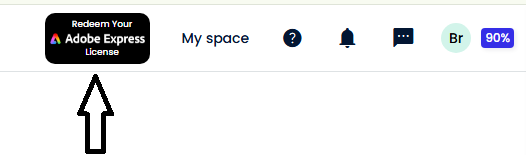
Step 5 — Top right corner → Adobe 4 Months Redeem button
Step 6 — Click it → enter your email → license key arrives in your inbox
Step 7 — Activate on Adobe → done. 4 months Premium.
 Pro tip: The license timer starts when you redeem on Adobe, not when you register on L’Oréal. If you don’t need it right now, register today but wait to redeem.
Part 2 — Get LinkedIn Premium Career:
Step 1 — Go to adobe.com/benefits and log in with your new Adobe account
Step 2 — Scroll down → find LinkedIn Premium Career — 3 months free
Step 3 — Click Redeem → follow the link to LinkedIn → activate
Alternative path: Open new.express.adobe.com → click your profile picture (top right) → click Member Benefits → scroll down → find LinkedIn Premium → redeem
 Known issue: The redeem button sometimes grays out and does nothing. Fix: try a different browser (Chrome, Firefox, Edge) or try on mobile. Multiple users report it works on mobile when desktop fails. If it still doesn’t work, wait 24–48 hours and try again — Adobe has acknowledged this bug.
Requirement: You must be a first-time LinkedIn Premium user. If you’ve had Premium before (even a trial), the offer won’t apply to that LinkedIn account. Use a fresh LinkedIn account if needed.
Part 3 — Claim LinkedIn Partner Perks:
Once LinkedIn Premium is active → go to your LinkedIn Settings → look for Partner Benefits → grab NordVPN, Audible, Microsoft 365, etc.
♻️ Scaling It — Gmail Trick + Multiple Accounts
Gmail ignores dots (.) and plus signs (+) in email addresses. Every variation lands in the same inbox:
| Inbox | |
|---|---|
[email protected] |
Your inbox |
[email protected] |
Same inbox |
[email protected] |
Same inbox |
[email protected] |
Same inbox |
What this means for L’Oréal: You can create multiple Brandstorm accounts using different Gmail variations → each one gives you a separate Adobe redeem code.
What this means for Adobe: Adobe checks for duplicate emails, so each Adobe activation needs a unique email. Use temp mail services (guerrillamail.com, tempmail.com) to create fresh Adobe accounts for each license code.
The official rules actually confirm this works: They say “Participants who have already participated in the previous year should create a new Adobe Express ID using a different email address.” L’Oréal is literally telling you to use a different email.
Practical limit: You can realistically create 5–10 Adobe Express Premium accounts this way. Each one gets 4 months. That’s potentially 40 months of Adobe Express Premium from one afternoon of registrations.
🎁 What Adobe Express Premium Actually Includes
| Feature | What It Means |
|---|---|
| 200M+ Adobe Stock assets | Royalty-free photos, videos, music, design elements — use in any project commercially |
| 30,000+ Adobe Fonts | Premium fonts for logos, presentations, social posts |
| 250 AI credits/month | Adobe Firefly AI — Text to Image, Generative Fill, AI background removal |
| All premium templates | Social media, flyers, presentations, resumes, videos — thousands of them |
| Photoshop Express + Premiere Rush | Full premium mobile photo and video editing apps — included |
| 100GB cloud storage | Sync across all devices |
| Content Scheduler | Schedule and auto-publish to social media |
| One-click Resize | One design → auto-resize for every platform (Instagram, TikTok, YouTube, LinkedIn) |
| Remove Background | One click, works on images and video |
| Brand Kit | Save your logo, colors, fonts → apply to any design instantly |
Normal price: $9.99/month ($119.88/year). You’re getting 4 months free = ~$40 saved.
💡 Use Cases — What Smart People Do With Free Premium Tools
| Use Case | How It Pays Off |
|---|---|
| Fiverr/Upwork gigs | Offer social media design, thumbnails, logo design. Your tool cost = $0. Charge $20-50 per design |
| Social media management | Create content for local businesses. Charge $100-300/month per client. Content Scheduler handles posting |
| YouTube thumbnails | Premium templates + AI background removal = thumbnails in 2 minutes flat |
| Resume + portfolio | Premium templates make you look like you hired a designer. Use for job applications |
| Merch design | T-shirts, stickers, posters using 200M+ stock assets — sell on Redbubble, Etsy, or Printful |
| LinkedIn Premium | 24,000+ Learning courses. InMail to recruiters. See who viewed your profile. Actually land interviews |
| NordVPN (from LinkedIn chain) | 3 months of VPN access — no auto-renewal, genuinely free |
| Course certificates | LinkedIn Learning courses give certificates → add to resume/LinkedIn profile |
 Most people grab the freebie and forget about it. The people who use it to start a Fiverr gig or build a design portfolio are the ones who turn $0 into real money.
⚠️ Things That Can Go Wrong — And How to Fix Them
| Problem | Fix |
|---|---|
| Adobe redeem button doesn’t appear | Make sure you’re on the dashboard, not the competition page. Look top-right corner |
| LinkedIn redeem button grays out | Try a different browser or mobile. Adobe has acknowledged this bug. Wait 24–48 hours if needed |
| “Already have LinkedIn Premium” | Offer only works for first-time Premium users. Use a fresh LinkedIn account |
| Age field — you’re over 30 | Age is self-declared at registration. No ID check. L’Oréal only verifies if you advance to competition rounds |
| Adobe says “code already used” | Each code works once. Use a different email for each Adobe activation |
| License key doesn’t arrive | Check spam folder. If nothing after 30 min, try redeeming again with a different email format |
| You registered last year too | Official rules say use a different Adobe email. Gmail dot/plus trick handles this |
Quick Hits
| Want | Do |
|---|---|
| Adobe Express 4 months |
→ Register at brandstorm.loreal.com → redeem top right |
 LinkedIn Premium 3 months LinkedIn Premium 3 months |
→ adobe.com/benefits → scroll → redeem (or Adobe Express → profile → Member Benefits) |
 NordVPN 3 months NordVPN 3 months |
→ LinkedIn Premium → Partner Benefits → NordVPN |
 Multiple accounts Multiple accounts |
→ Gmail dot/plus trick for L’Oréal + temp mail for Adobe |
| Make money |
→ Fiverr gigs, social media management, merch design |
L’Oréal built a pipeline to find future employees. We built a pipeline to find free subscriptions.


 !
!