Aryan — an offline eBook reader for Windows that keeps your shelves, notes, highlights and reading progress right beside the book itself.
I keep my books across three drives. Every reader I tried wanted me to move them into its own library, re-import everything, and then keep the originals somewhere safe as a second copy.
Aryan reads them where they already sit.
EPUB
PDF
MOBI
AZW3
CBZ
CBR
Multiple drives, and your original files are never touched.
The part that keeps the book alive
A book you finish and forget is a file. A book you remember is a library. These are the parts that turn one into the other:
Feature
What it does for you
Shelves & lists
Group books however your brain actually files things
Notes
Your own words, attached to the page they came from
Highlights & clips
Save the exact lines worth keeping, recover them in seconds
Progress & history
Never lose your place across weeks of reading
Authors, series & tags
Follow an author or a whole series without hunting
Search, filters & cleanup
Find one book among thousands, then clear the duplicates out
Backup, restore & CSV export
Your library leaves with you, in a format you can read
Offline-drive awareness
Spots a drive that dropped out and helps you recover from it
A dictionary that works with no internet
English ⇄ Myanmar and English ⇄ Hindi, entirely offline. Long night, spotty connection, aeroplane — the word is still one tap away.
   📖 page open
        │
        ├── 📝 your note
        ├── ⭐ your highlight
        └── 🌐 Right click any word ──►Define──► English/ Myanmar / Hindi, no signal needed
Built on a short list of promises
source       = open
install      = portable
internet     = not required
account      = none
tracking     = none
subscription = none
Those five lines are the whole design. My other Windows apps follow the same list, and Aryan follows it too.
Aryan is young. It is already the reader and library I wanted for myself, and it keeps getting better.
Your books stay yours — on your drives, in your hands.
[About the App name]
Aryan (आर्यन) is my son’s name; he is one year old. In India and across South Asia it is a common given name, meaning “noble” in Sanskrit and Hindi. The app has nothing to do with the racist misuse of the word in 20th-century Europe, which I reject completely.
I love it! Movement is smooth and UI sleek and easy to browse. I am so fond of the Details page, it’s so smooth too. I noticed that when we read something and try to go back or exit the book, there’s no Back to Homepage option so I had to press the X at the top right. I had over a thousand books/docs to import immediately and it scanned it quickly and smoothly without any lag or weirdness so I really appreciate it and it makes me excited to actually read now instead of browsing for books in Downloads folder and no bulky or heavy and slow app where importing is no fun. Finally, I love the light and dark app themes and sepia etc. in the reading screen and for the overall app theme, I will just go ahead again with suggesting for more theme variants for custom colors in future. Thank you for continuing to share us your beautiful creations and not minding little suggestions like this.
Your feedback genuinely means a lot to me, especially because you’ve been using and giving thoughtful feedback on so many of my apps. You don’t just say “looks good” you actually use them with real collections and notice the little things that I might miss.
And 1,000+ books/documents! That makes me especially happy to hear that the import was still fast and smooth. That’s exactly the kind of experience I wanted Aryan to provide, instead of digging through folders and Downloads, you should be able to open it and just feel like your books are finally in a proper library.
I agree about the reader navigation too. The X works, but I can see why a clear “Back to Library/Home” option feels more natural. I’ll put that on the list.
And yes… I already know what your next request is going to be. More theme colors! I’ll keep that in mind for a future update.
Thank you again, Marie. And seriously, thank you for continuing to test my little creations and being honest about what works and what could be better. That kind of feedback is incredibly valuable to me.
Wow, this looks great. I am a man getting back into reading after years doing all i could to never open a book. Maybe its a age thing… But you live and learn and happily i can report with age comes wisdom, lol
No, seriosly this looks great. I have a 1500+ ebook collection on everything in the world i find interesting, so i will test your program with these.
On a small note..
In regards to money/business this would be a very good tablet app with a few minor tweaks and ebook readers that are decent are not cheap.. Something to think about
Thank you so much! And honestly, that first part made me smile. There’s something quite nice about finding your way back to books after years away from them. And 1,500+ ebooks… I am damn sure that Aryan can help you!
I agree about the tablet idea too. Android probably is a very natural direction for Aryan, especially on a larger tablet.
The only thing that holds me back is that I have a bit of a stubborn rule with my apps: I don’t want to just write the code, see that it runs, and call it done. If I can’t actually use and test something properly, I know it will end up merely usable rather than genuinely polished. And I don’t currently have an Android tablet to do that with.
So it’s definitely something I’d like to explore, but only when I can properly test it. I’m not building Aryan as a business either, I’m mostly making the kind of software I personally wish existed, and then giving it away.
For now, I’d be very interested to hear how Aryan behaves with that 1,500+ book collection. Please share your experience after testing it, and don’t hesitate to let me know the way you want it to improve.
Back to the library from a book. Every reader has a Library button at the left of its toolbar. It closes the book and brings the library back, even when the library was minimized. Ctrl+W does the same.
Colour themes. Settings > Appearance > Colour has eight colours. The one you pick colours buttons, switches and selections, and tints every window: the library, the reader’s toolbar and side pane, and book details, in light and dark. Colour intensity sets how strong the tint is. Your books’ pages are never tinted, and Aryan blue keeps the classic look.
A note when a new version is out. When Aryan starts, it asks GitHub whether a newer version has been released. If one has, a small bubble says so: Download opens the release page, and the cross skips that version. Nothing is downloaded or installed by itself, nothing about you or your books is sent, and with no internet it simply says nothing.
Read aloud. Press Ctrl+Shift+U or the speaker button and Windows’ own voices read the book, nothing sent online. In books the spoken word is marked and the page turns with it; PDFs are read a page at a time. Hindi is read in a Hindi voice. Windows has no Burmese voice, so Burmese books say so. The speed is in Settings.
Open a book in one step. Point at a cover for Read (or Continue). With the keyboard, Enter reads and Alt+Enter shows the details.
Bookmarks.Ctrl+D or the ribbon button marks the page. Bookmarks are listed with your highlights, and F2 / Shift+F2 step through them.
Pages. The PDF reader and comics have a Pages tab with every page as a small picture. A PDF without its own table of contents opens on its pages.
Text and layout for books: font, line spacing, text width and justified text.
Keys for the side pane:Ctrl+Shift+C, P and H open Contents, Pages or Highlights, even with the toolbar hidden, and the pane opens on the tab you used last.
More keys:Ctrl+Right/Left for the next or previous chapter, Ctrl+H to highlight in the last colour, Ctrl+Shift+T for the page colour, Ctrl+L for Pages or Scroll. In the library, Page Up/Down, Home and End, and F1 lists every key there and in each reader.
Faster start. Your books show before Aryan checks the folders for changes.
Fixes
A PDF keeps Fit width after it opens.
The F1 lists scroll when they are taller than the window.
Closing Aryan right after it starts no longer cuts short its check of your folders.
What’s new in v1.5.0: many books at once, and tools for big libraries
Ticking books is quick now, and a library in the thousands can be searched, sorted and marked from the keyboard.
Tick many books, quickly.Ctrl+click ticks a book and Shift+click ticks every book from the last one ticked, or point at a cover and click the tick in its corner. Space, Shift+arrows and Ctrl+A do it from the keyboard.
One menu for all of them. Right-click a ticked book to mark, favorite, list, edit, look up or copy every ticked book at once.
Search by field.author:tolstoy, tag:history, year:1990-2000, rating:4+, format:pdf, is:unread, and a minus to leave books out: -tag:lent. Save as shelf keeps any such search.
Go anywhere with Ctrl+K. Type a few letters to jump to any book, author, series, tag, list, shelf or page.
Rate and mark from the keyboard.1 to 5 give a book stars, F makes it a favorite, R marks it reading and D finished.
Copy to a folder or drive. Put the ticked books on an e-reader or a USB stick; the originals stay where they are.
More ways to sort and see. Sort by progress, size or format, and choose the list’s columns: rating, status, file size, date added and last opened.
What’s new in v1.6.0: words you looked up, every book’s length, and undo
Thank you to everyone who has been pouring in requests. Some of them are in this version, and the rest are coming in the next one.
Words you looked up. Every word you look up with Define is kept on the new Words page, with the sentence you met it in and the book. Export them as cards for Anki or a spreadsheet to learn them.
Every book’s length. PDFs and comics show their pages, and EPUB and Kindle books an estimate from their text. Search with pages:<300, sort by Length or Pages left, and see the pages you read each month in the Reading log.
Undo.Ctrl+Z undoes the last change to your books: a mark, stars, a favorite, a list, tags or details. Ctrl+C copies the ticked books as a list.
Your own covers. Give a book a cover from a picture on your PC, or from one of its own pages in a PDF or comic.
Up next. Finish a book in a series and the next one waits in Continue reading.
Line spacing and text width work. In a book’s Text and layout menu, the font, spacing and width are rows of buttons, and the page changes at once.
A calmer start. The library opens maximized, with the book you’re reading beside the menu button, and the covers no longer flash while Aryan checks your folders.
The offline-first promise is what makes this stand out to me — half the readers I try these days want an account before they’ll even open an EPUB. And “reads them where they already sit” is the killer feature for anyone who’s accumulated books across three different drives over the years. Also, the naming story got a genuine smile out of me. Congrats on shipping, and on the steady updates — watching it get better release by release is half the fun of threads like this.
 A folder of files is not a library.
 Aryan — an offline eBook reader for Windows that keeps your shelves, notes, highlights and reading progress right beside the book itself.
 EPUB
EPUB PDF
PDF MOBI
MOBI AZW3
AZW3 CBZ
CBZ CBR
CBR The part that keeps the book alive
 What it does for you
 Notes
Notes Highlights & clips
 Progress & history
 Authors, series & tags
 Search, filters & cleanup
 Backup, restore & CSV export
 Offline-drive awareness
 A dictionary that works with no internet
 Built on a short list of promises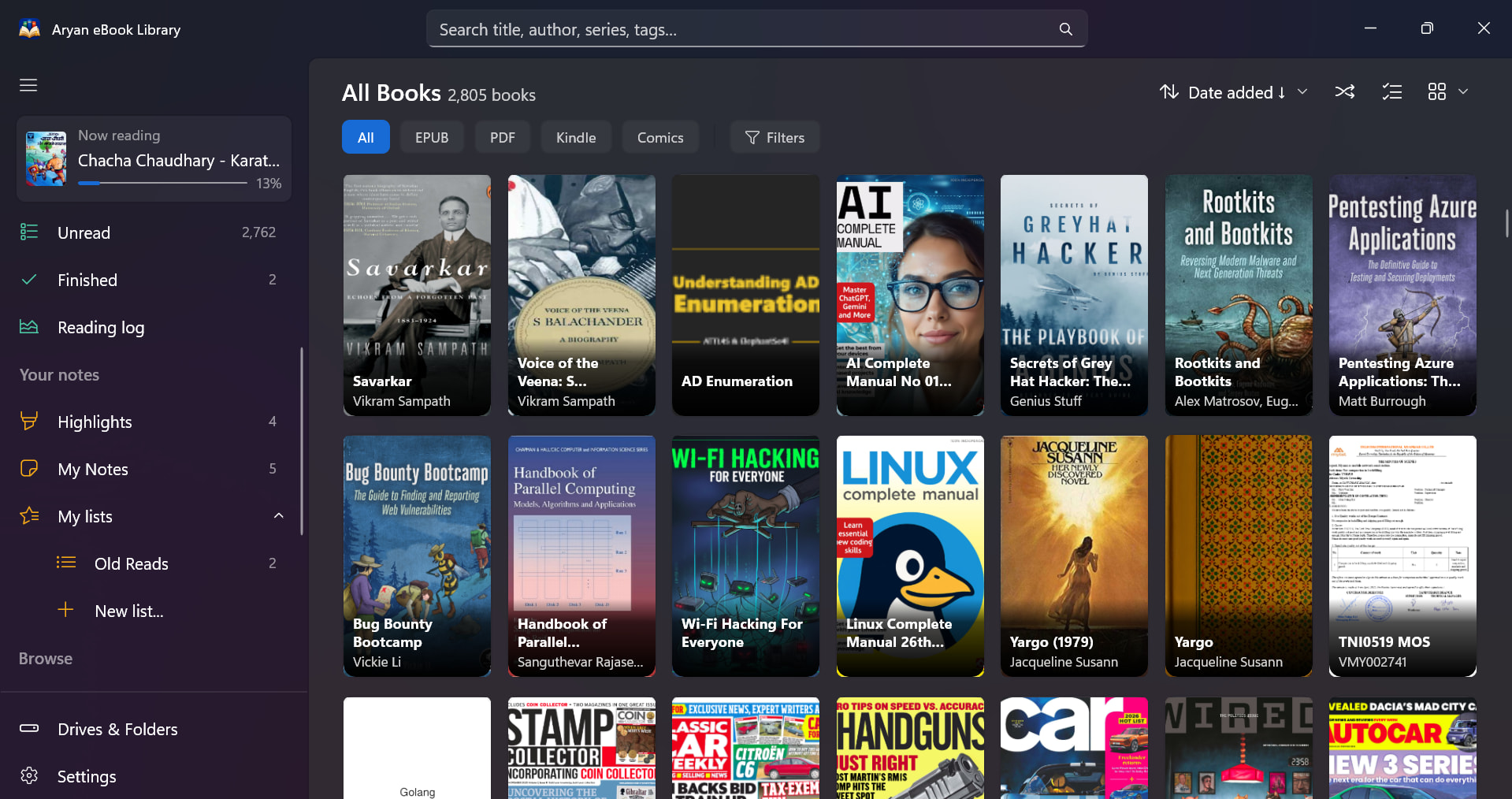

 Thank you for continuing to share us your beautiful creations and not minding little suggestions like this.
 That makes me especially happy to hear that the import was still fast and smooth. That’s exactly the kind of experience I wanted Aryan to provide, instead of digging through folders and Downloads, you should be able to open it and just feel like your books are finally in a proper library.


 !
!