Plenty of PDF apps show Hindi and Myanmar. Change one word and the letters fall apart. This one keeps them whole.
Click a line, type, and the text stays real and searchable Turn scans into text — OCR reads English, Hindi and Myanmar Mark up, sign, reorder, merge and bookmark inside one window. English to English, English to Hindi, English to Myanmar dictionaries built in.
Fit page, fit width, actual size, and zoom up to 800%
Turn the view without changing the file
Find text, with F3 for the next match
Links you can follow, with Back and Forward (Alt+Left and Alt+Right)
Page thumbnails and a bookmarks panel
Full screen, night mode, and light or dark themes
Recent files, and double-clicking a PDF in File Explorer opens it as a new tab in the window already open
Marking up
Highlight, underline and strike out text
Freehand drawing
Shapes: rectangle, rounded rectangle with adjustable corners, ellipse, line and arrow, with colour, line width, opacity and fill opacity
Effects for shapes, saved into the PDF so they look the same in any reader:
gradient fills with start and end colours, angle and spread, written as a true vector gradient
soft drop shadows with colour, light direction, distance, blur and opacity
outer glows with colour, blur and opacity
Text boxes:
Hindi (Devanagari) and Myanmar shaped properly, with conjuncts, vowel signs and stacked consonants in the right places
any font installed on your PC, embedded in the PDF so the text looks the same everywhere
saved as real text, so it can be searched, selected and copied
colour, fill, outline, alignment, underline and strikethrough
the words re-wrap when you resize the box, the box can be rotated, and a double-click opens it for editing again
Sticky notes
Stamps: APPROVED, NOT APPROVED, DRAFT, FINAL, CONFIDENTIAL, REVIEWED, RECEIVED, VOID, URGENT, COPY, PAID and SIGN HERE, marks such as a tick, a cross and a star, or your own pictures
Signatures: draw one once, save it, and place it on any document
Links to web and email addresses
Group, align, distribute, duplicate, rotate, and bring forward or send back
Rulers and guides, including margin and column guides
Editing text
In Edit mode, click a line of text to change it right on the page
English, Hindi and Myanmar are shaped and written back as real, searchable text
Paragraphs reflow as you type
For Myanmar, editing works on text set in Myanmar Text or Pyidaungsu
Pages
Reorder pages by dragging their thumbnails, and act on several at once
Insert pages from another file, or a blank page
Extract, rotate and delete pages
Merge PDFs and pictures into a new document
Recognize text
English, Hindi and Myanmar are included
112 more languages can be downloaded in Recognition languages, and each download is checked before it is kept. Chinese, Japanese and Korean are not available yet.
The recognised words are written as an invisible layer, so the page looks the same but can be searched, selected and copied
A Fast option uses the recognition built into Windows, for English
Define
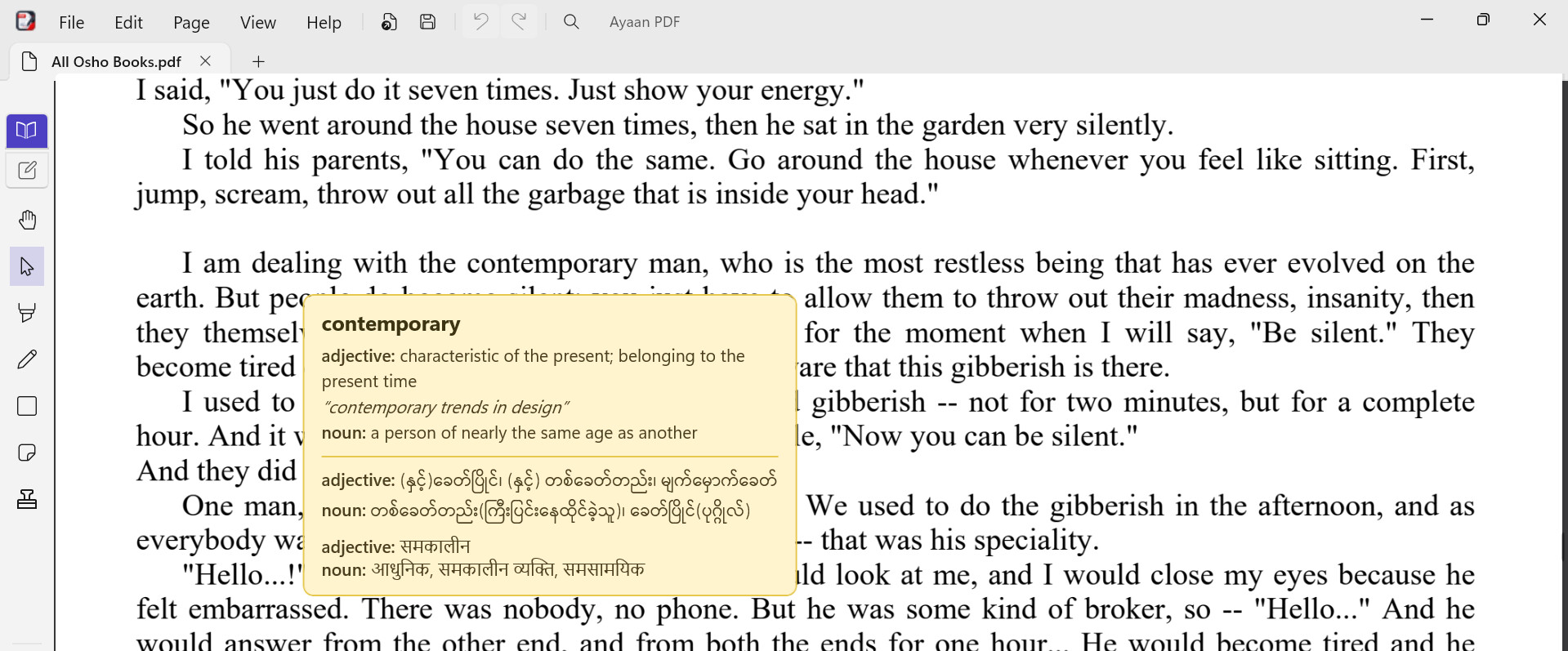
Right-click an English word for its definition, from WordNet
Myanmar and Hindi meanings are shown under it, and each can be turned off in Settings
Works entirely offline
Document
Document properties (Alt+Enter): title, author, subject, keywords and language
Choose how the file opens: page, zoom, panel and layout
Remove personal information when saving
See, save and remove attached files
Check pages for missing text, old fonts, or text that was recognised
Build bookmarks from the document’s headings, by how they look or by what they say
Fill in forms
Open password-protected PDFs
Print, and save a flattened copy
Your work is safe
Saving happens in the background, so the app stays usable
If Ayaan PDF closes unexpectedly, your unsaved work is offered back the next time it starts
Thank you so much for taking the time to try the app and write such detailed feedback. I really appreciate it.
I’m glad you liked the custom colors, custom stamp options, and the overall UI. It’s great to hear those features stood out to you.
Regarding the scrolling and movement feeling slow or slightly laggy, thank you for pointing that out. I’ll investigate the performance and see where I can make things smoother and more responsive.
For the text editing issue, your assumption is probably correct. PDF text can be complex depending on how the document was originally created. The fact that deletion worked but adding characters did not is useful information and gives me something specific to look into.
Thanks for the feedback on the squiggly annotation. I’ll revisit its appearance and see if I can make it look more natural and closer to what users typically expect from a squiggly markup tool.
Thanks again for testing the app so early and sharing your experience. Feedback like this is incredibly valuable and helps me prioritize improvements for future updates.
Text you type into the page is sharp at any zoom. Above 100%, the words being edited were drawn small and then stretched, so they looked soft, grey and heavier than the page around them. They are now drawn at the zoom you see them at, sit on the page’s own baseline, and no trace of the old words shows above or below the line. This applies to English, Hindi and Burmese.
An extra space no longer stops an edit. Typing two spaces in a row made Ayaan PDF refuse the whole line, saying it could not be rewritten with the letters it needs. Two or more spaces are now written as one, which is how every PDF reader shows them anyway.
Nice, glad the double-space bug is gone — that one must have been a headache to track down. Text staying sharp above 100% zoom is also one of those small things that makes daily use feel way more polished. Keep the updates coming!

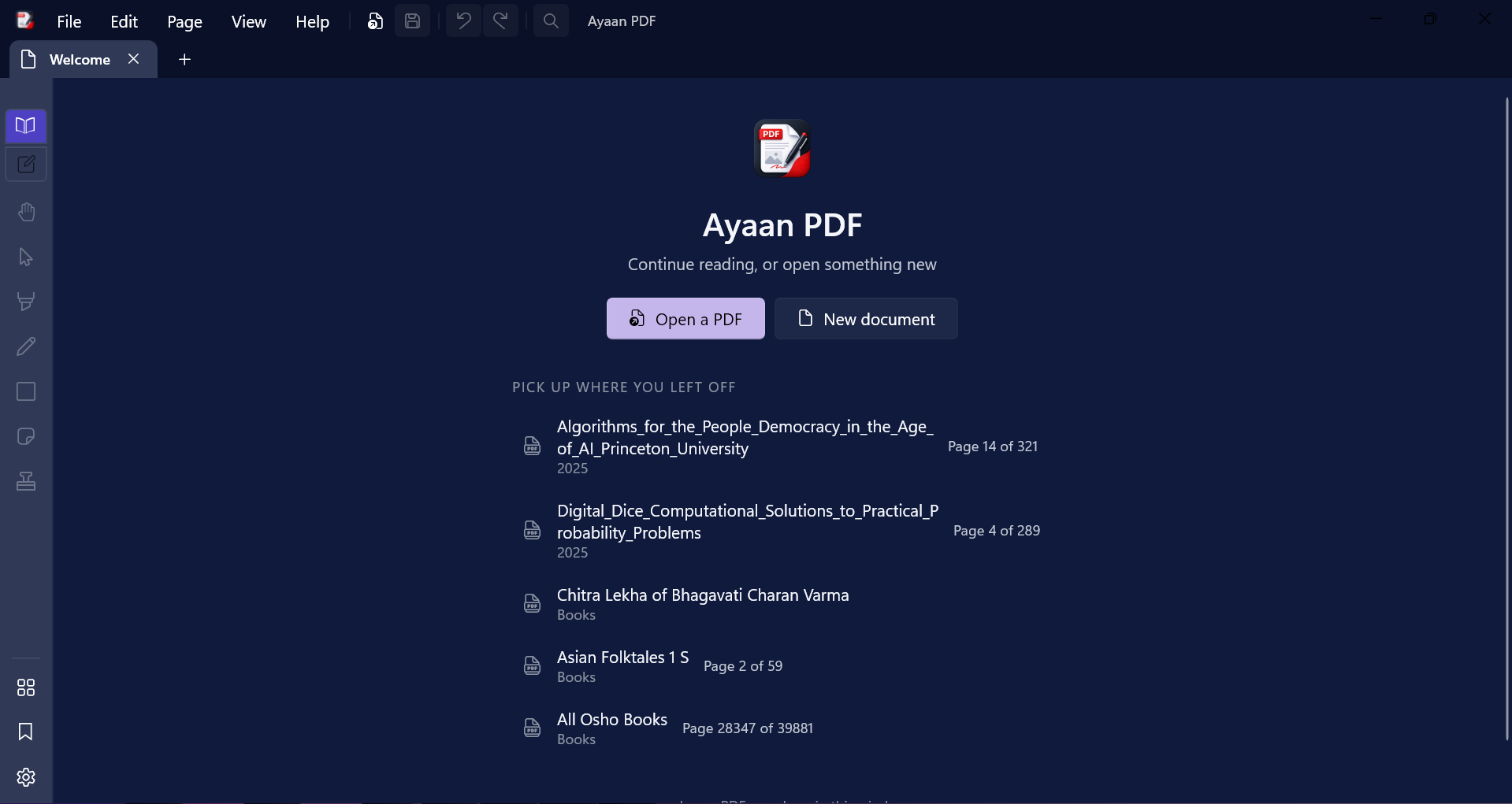
 Plenty of PDF apps show Hindi and Myanmar. Change one word and the letters fall apart. This one keeps them whole.
 Turn scans into text — OCR reads English, Hindi and Myanmar
 Mark up, sign, reorder, merge and bookmark inside one window.
 English to English, English to Hindi, English to Myanmar dictionaries built in.
 Installer from the official page
 aungkokomm.github.io/ayaanpdf
 Source, releases and licence on GitHub
 Text you type into the page is sharp at any zoom. Above 100%, the words being edited were drawn small and then stretched, so they looked soft, grey and heavier than the page around them. They are now drawn at the zoom you see them at, sit on the page’s own baseline, and no trace of the old words shows above or below the line. This applies to English, Hindi and Burmese.
 An extra space no longer stops an edit. Typing two spaces in a row made Ayaan PDF refuse the whole line, saying it could not be rewritten with the letters it needs. Two or more spaces are now written as one, which is how every PDF reader shows them anyway.
 !
!