Sadly, I’ve got an individual blasting music via Spotify at 4AM every night and it needs to stop. I’ve tried a few tests for blocking the app on my network via router port blocking but to no avail. Port 4070 is blocked on my device that I’m testing on but it the app still works completely fine.
I’m at the end of my tether Don’t suppose there’s anyone here that has a bit more experience than I do and could lend a hand?
Blocking music artists is easy with the new feature: First, go to the Spotify app on your smartphone. Next, find the artist you want to block, go to the “…” menu on their page, and click “Don’t play this artist.” Spotify will then remove them from your personal library and automatically curated playlists. Once you choose to mute an artist, you’ll have to manually turn the blocking feature off to hear their tunes again. so the bottom line is blocking the artists and get rid of it. Check here
Disable Autoplaying mode can also help.
Normally It should be get blocked this way:
Blocking Spotify can be difficult, so here are the things we suggest:
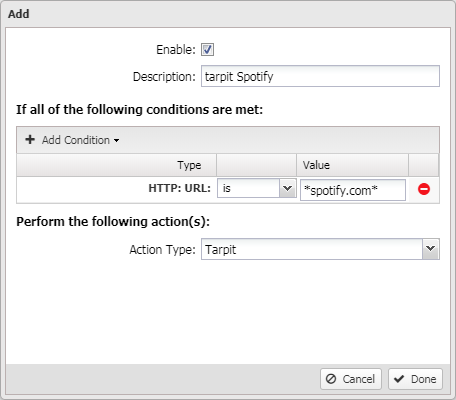
As many sites are encrypted via SSL, we do recommend installing and configuring SSL Inspector and ensuring the certificate is deployed to all client devices. (This will allow Web Filter to treat HTTPS sites as though they were HTTP sites.) If you have SSL Inspector running, you can also enable the ‘block invalid HTTPS traffic’ option, which might help:
This won’t work for me; the router I have is very basic, one included with in my package from my provider and can only block ports. I’ve already blocked port 4070 numerous times to no avail; that’s why I came here
I’ve got a MAC filtering setup going right now but ideally, I’d like to be able to target specific things such as Xbox live connectivity and Spotify respectively. I’ve tried testing a ton on my mobile device but to no avail… It’s pretty frustrating
How about URL filtering. I dug up these links through my Spotify desktop app and after blocking them through host file, I found that not even a single song is playing.
Try blocking every URL form the list through your router!
I have not tested this method through a router(Only tested them through windows host file) but worth a try. I hope it works. If in case it works try giving a feedback, will help me and the community
Then I don’t see any other way in which you can stop that without changing your WiFi password! Even if changing the password doesn’t work then it means the person is not playing music through Spotify(Playing downloaded songs) else playing it through his mobile data. If that’s the case, I don’t see a solution to it!
I appreciate the time to post! I didn’t want to make it obvious that I was doing it because the person I’m living with is a pain in the ass and we both can’t exactly go anywhere else, what with the isolation malarkey going on.
I think it’s in part with the setup that Spotify has in place with various server ranges to act as failsafes when connecting with tokens to acquire playlists etc. I’ve tried a ton of different variations and although I imagine there’s a way to beat it, my router is too shitty to do anything other than blocking ports and IP addresses through a long-winded and slow ass process one by one, making the whole thing a nightmare to even test on my own device.
 Don’t suppose there’s anyone here that has a bit more experience than I do and could lend a hand?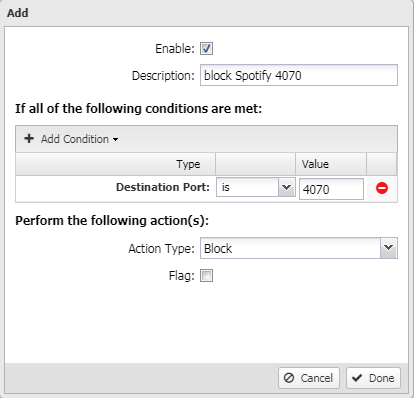



 !
!