 The Voice-Cloning Pipeline Pros Don’t Explain — yt-dlp → UVR → DeepFilterNet → Voicebox → seed-vc, All Free, All Local
The Voice-Cloning Pipeline Pros Don’t Explain — yt-dlp → UVR → DeepFilterNet → Voicebox → seed-vc, All Free, All LocalVoicebox clones any voice for free. The combos below turn it into a studio that out-muscles the paid cloud apps — all on your machine.
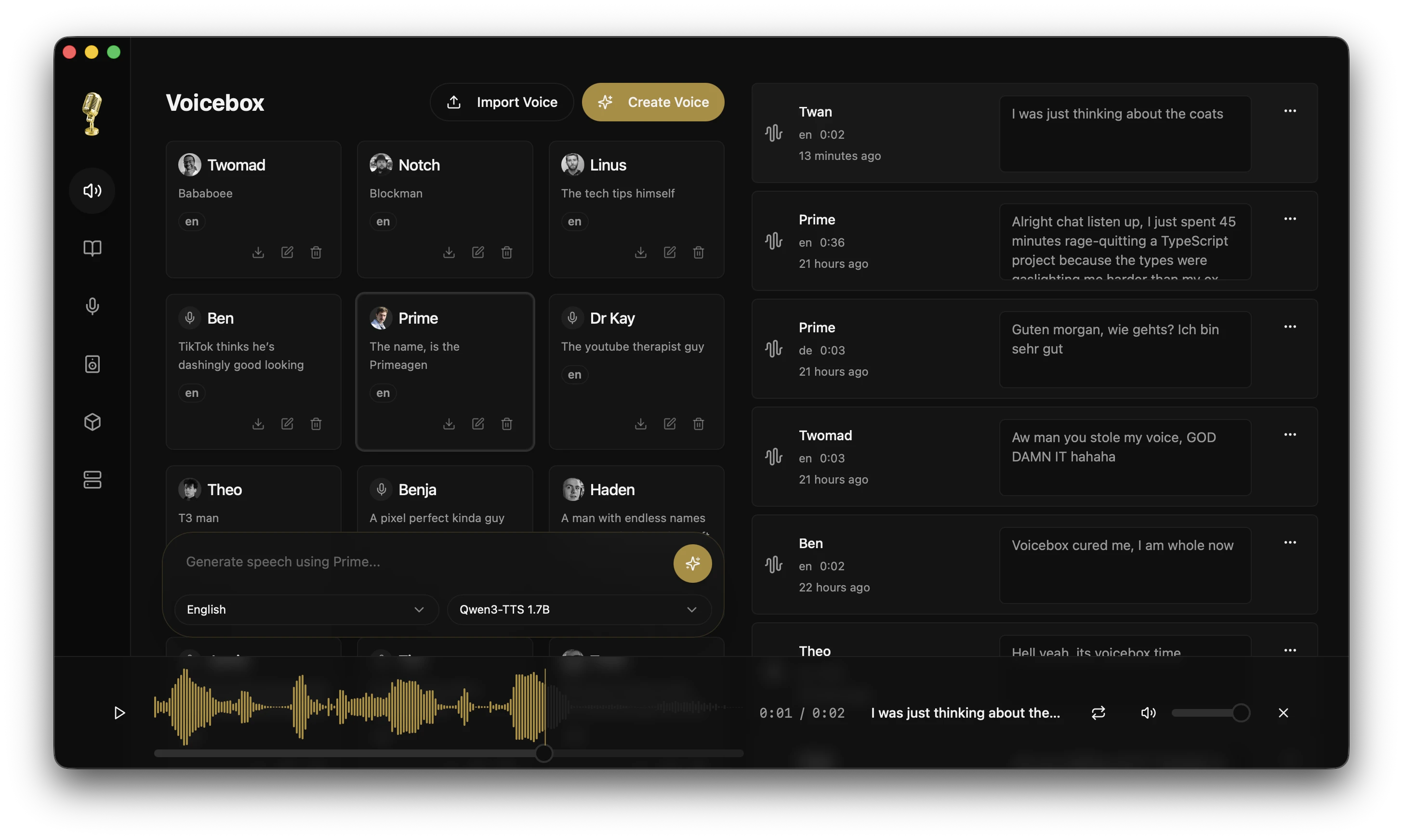
The hub clones voices, types what you say, gives your AI a mouth. Bolt on the right free repos → clean-clip prep → near-perfect cloning → timbre re-skin → full video dubbing. Zero subscriptions, nothing leaves your PC. Tap a chapter 
🎤 New here? — what Voicebox even is (3 free tricks)
Free, open-source, 28k+ GitHub stars. Replaces two paid apps (ElevenLabs + WisprFlow) on its own. Three tricks:
- Clones voices → feed it 3 seconds of anyone talking, it reads anything you type in their voice. No clip? 50+ presets built in.
- You talk, it types → hold a key, speak, let go → words drop into whatever’s open. Fancy word: dictation.
- Your AI talks back → coding helpers (Claude Code, Cursor) speak answers out loud in a voice you cloned. One command:
voicebox.speak.
TTS = text-to-speech, the robot that reads text aloud. Local = everything stays on YOUR machine, nothing uploaded. That’s the whole point.
The 7 engines — pick your fighter:
| Engine | Langs | Best for |
|---|---|---|
| Qwen3-TTS | 10 | Top cloning + “speak slowly / whisper” control |
| Qwen CustomVoice | 10 | 9 built-in voices, no clip needed |
| LuxTTS | EN | Tiny + fast (150x realtime on CPU) |
| Chatterbox Multilingual | 23 | The polyglot — Arabic, Hindi, Polish + more |
| Chatterbox Turbo | EN | Does laughs, sighs, gasps |
| HumeAI TADA | 10 | Mood-aware, voices that feel |
| Kokoro | 8 | 82M featherweight, runs on a potato |
🎬 LEVEL 0 — clone a voice in 3 seconds (no code)
- Sample → drag an audio file, record your mic, or grab audio playing onscreen
- 3 seconds is enough → the clone learns fast
- Type, hit generate → it reads back in that voice
🧪 LEVEL 1 — feed it surgically-clean clips (the prep chain)
Clone from a noisy rip → robot in a tin can. Run the source through a cleanup pipeline first: rip the voice out of the music, scrub the noise, slice a perfect 3–10 second sample. All free, all offline.
| Tool | Link | What it does |
|---|---|---|
| yt-dlp | github.com/yt-dlp/yt-dlp | Rips audio from 1000+ sites — the front door of every clone |
| Ultimate Vocal Remover | github.com/Anjok07/ultimatevocalremovergui | Pulls the voice out of music/noise (click-and-go GUI) |
| Demucs | github.com/facebookresearch/demucs | Same job, command-line one-liner |
| DeepFilterNet | github.com/Rikorose/DeepFilterNet | Nukes background hiss + room echo, no Python |
| resemble-enhance | github.com/resemble-ai/resemble-enhance | Rescues trashy phone/stream audio |
| audio-slicer | github.com/openvpi/audio-slicer | Auto-chops a long clip into clean pieces |
Grab the audio, rip the vocal out, scrub the noise — three commands:
yt-dlp -f bestaudio -x --audio-format wav "URL"
demucs --two-stems=vocals input.wav
deep-filter vocals.wav
🎭 LEVEL 2 — re-skin the timbre (the secret weapon)
The move nobody tells beginners: let Voicebox generate the words, then run the output through a voice-conversion tool to nail the exact timbre. TTS gets the script + a rough voice; these (voice conversion = repaint one voice as another) lock the character tight.
| Tool | Link | What it does |
|---|---|---|
| seed-vc | github.com/Plachtaa/seed-vc | Zero-shot re-skin from a 1–30s clip, no training. Start here. |
| Applio | github.com/IAHispano/Applio | Friendliest RVC fork — installer, batch convert, downloader |
| RVC | github.com/RVC-Project/Retrieval-based-Voice-Conversion-WebUI | The OG — trains a tight voice model from ~10 min audio |
| so-vits-svc (fork) | github.com/voicepaw/so-vits-svc-fork | Makes a cloned voice sing — TTS can’t, this can |
| w-okada voice-changer | github.com/w-okada/voice-changer | Real-time changer for streaming/gaming |
| GPT-SoVITS | github.com/RVC-Boss/GPT-SoVITS | Alt cloning engine to A/B — its prep UI also preps clips |
🌍 LEVEL 3 — auto-dub any video into YOUR voice
These already do the full chain — download → transcribe → translate → speak. Point their voice step at Voicebox = dub a foreign video into your own cloned voice, fully offline.
| Tool | Link | What it does |
|---|---|---|
| VideoLingo | github.com/Huanshere/VideoLingo | One-box dubbing + Netflix-style subtitles |
| pyvideotrans | github.com/jianchang512/pyvideotrans | Multi-speaker dub, auto-splits who-said-what |
| SoniTranslate | github.com/R3gm/SoniTranslate | Synced multi-voice dub, wired for voice conversion |
| Auto-Synced-Translated-Dubs | github.com/ThioJoe/Auto-Synced-Translated-Dubs | Times each dubbed line to the original subtitles |
🤖 LEVEL 4 — wire it into your AI + automate
Voicebox listens on a local address and speaks MCP, so script it or plug it into agents.
Hook it into Claude Code so your AI talks back — one line:
claude mcp add voicebox --transport http --url http://127.0.0.1:17493/mcp --header "X-Voicebox-Client-Id: claude-code"
Make it spit out a voice file from any script — one command:
curl -X POST http://127.0.0.1:17493/generate \
  -H "Content-Type: application/json" \
  -d '{"text":"hello world","profile_id":"YOUR_ID","engine":"qwen_custom_voice","instruct":"warm, slow, cinematic"}' \
  --output line.wav
| Tool | Link | What it does |
|---|---|---|
| n8n | github.com/n8n-io/n8n | Drag-drop automation — “new email → summarize → speak it” |
| Ollama | github.com/ollama/ollama | Local AI brain that feeds text into Voicebox, offline |
| llama.cpp | github.com/ggml-org/llama.cpp | Same, squeezed onto weak hardware |
| awesome-mcp-servers | github.com/appcypher/awesome-mcp-servers | Giant list of tools to plug into the same agent |
instructfield ("warm, slow, cinematic") is your no-code director — steers tone + pace, no markup to learn.
😂 Emotion tags + studio effects (built in + free add-ons)
Type cues straight into text — only Chatterbox Turbo (other engines read them out loud literally): [laugh] [sigh] [gasp] [cough] [whisper] [groan]
8 built-in effects (Spotify’s own audio kit): pitch shift, reverb, delay, chorus/flanger, compressor, high/low-pass filter. Save mixes as presets.
| Free post-tool | Link | What it does |
|---|---|---|
| pedalboard | github.com/spotify/pedalboard | Script your own effect chains / load plugins |
| Audacity | github.com/audacity/audacity | Full free editor — fades, trims, assembly |
| ffmpeg-normalize | github.com/slhck/ffmpeg-normalize | Levels a whole folder to streaming-loud |
Level every clip so nothing’s too quiet or blown out:
ffmpeg -i in.wav -af loudnorm=I=-16:TP=-1.5:LRA=11 out.wav
⚙️ Faster transcription + run it on a potato
The dictation side runs on Whisper. These make it faster or lighter:
| Tool | Link | What it does |
|---|---|---|
| faster-whisper | github.com/SYSTRAN/faster-whisper | Up to 4x faster transcription, less memory |
| whisper.cpp | github.com/ggerganov/whisper.cpp | CPU-friendly, no Python — for old machines |
| WhisperX | github.com/m-bain/whisperX | Word-level timing + splits speakers apart |
⬇️ Download + the FULL crazy chain (start to finish)
| Machine | How |
|---|---|
| Mac (M1/M2/M3) | DMG → drag to Applications |
| Mac (Intel) | Intel DMG |
| Windows | MSI installer |
| Docker | docker compose up |
| Linux | Build from source (site) |
 voicebox.sh · github.com/jamiepine/voicebox
The whole stacked pipeline:
yt-dlp (grab) → UVR / Demucs (rip voice out) → DeepFilterNet (scrub) → audio-slicer (clean clip) → Voicebox (clone + words) → seed-vc / Applio (lock timbre) → so-vits-svc (sing, optional) → ffmpeg loudnorm (publish-loud) → mux onto video.
⚠️ Watch-outs (so you don't ragequit)
- Clone what you’ve got rights to — your voice, the presets, clips you may use. RVC/so-vits-svc/w-okada ban impersonation in their terms. Keep it clean.
- RVC OG repo is frozen — use Applio. so-vits-svc upstream is archived — use the fork linked above.
- Whisper “thanks for watching” loops hit on quiet audio — turn on VAD (voice-detection filter) in external whisper tools.
- Don’t confuse it with Stardog’s unrelated commercial “Voicebox.”
Simple-pimple: Voicebox is the engine. These 27 free repos are the turbo, the bodywork + the paint. Clean clip in → clone → re-skin the voice → dub a whole video → let your AI speak it. All offline, all yours.
Build the monster, then drop the chain you ran
Tidied up by @SRZ — added a few free tools and extra resources on top of OP’s original find. 
 !
!