I installed Claude Code and tried to make it work with AWS Bedrock. Somehow, it didn’t. And now it is stuck is stuck to it. I can break it to change provider. Unistalled, removed from the user profile, tried every trick known to me. Can someone help how to break the connection? Im on Win 11.
I think this is probably not a browser cache issue or a bad install.
One thing that catches a lot of people is that Claude Code stores its configuration outside of the executable. Uninstalling it doesn’t necessarily remove the configuration or Windows environment variables that tell it to use Bedrock.
I’d try these steps before reinstalling again.
1. Log out first
Inside Claude Code run:
/logout
Completely close Claude Code afterwards and launch it again.
Sometimes that alone resets the provider selection wizard.
2. Check whether Bedrock is being forced by an environment variable
Open PowerShell and run:
Write-Host "Claude config directory: $env:CLAUDE_CONFIG_DIR"

Get-ChildItem Env: |
Where-Object {
    $_.Name -match 'CLAUDE|ANTHROPIC|AWS|BEDROCK'
} |
Sort-Object Name
Look specifically for variables like:
CLAUDE_CODE_USE_BEDROCK
CLAUDE_CONFIG_DIR
AWS_PROFILE
AWS_REGION
AWS_DEFAULT_REGION
AWS_BEARER_TOKEN_BEDROCK
If CLAUDE_CODE_USE_BEDROCK is set, that’s a strong clue as to why it keeps launching into Bedrock mode.
3. Inspect Claude’s settings
Run:
$settings = if ($env:CLAUDE_CONFIG_DIR) {
    Join-Path $env:CLAUDE_CONFIG_DIR "settings.json"
} else {
    Join-Path $HOME ".claude\settings.json"
}

Write-Host "Settings file:"
Write-Host $settings

if (Test-Path $settings) {
    Get-Content $settings
}
If you see Bedrock-related settings in the env section, remove only those entries and save the file.
4. Safe reset (recommended)
Instead of deleting everything, rename the configuration folder.
That preserves your chats and settings if you need them later.
Get-Process claude -ErrorAction SilentlyContinue |
Stop-Process -Force

$claudeDir = if ($env:CLAUDE_CONFIG_DIR) {
    $env:CLAUDE_CONFIG_DIR
} else {
    Join-Path $HOME ".claude"
}

if (Test-Path $claudeDir) {

    $backup = "$claudeDir.backup-$(Get-Date -Format 'yyyyMMdd-HHmmss')"

    Move-Item $claudeDir $backup

    Write-Host "Backed up to:"
    Write-Host $backup
}

claude
Claude Code should now recreate a brand new configuration directory.
5. Check User and Machine environment variables
Sometimes Windows stores the variable permanently.
foreach ($scope in 'User','Machine') {

    Write-Host "`n=== $scope variables ==="

    [Environment]::GetEnvironmentVariables($scope).GetEnumerator() |

        Where-Object {

            $_.Key -match 'CLAUDE|ANTHROPIC|AWS|BEDROCK'

        } |

        Sort-Object Key |

        Format-Table Key,Value -AutoSize
}
If you find:
CLAUDE_CODE_USE_BEDROCK
Remove it from the User scope:
[Environment]::SetEnvironmentVariable(
    "CLAUDE_CODE_USE_BEDROCK",
    $null,
    "User"
)
Then close every PowerShell, Command Prompt, VS Code, and Claude window before launching Claude again.
My guess
If I had to bet, I’d say one of these is happening:
- The Bedrock configuration is still in
settings.json CLAUDE_CODE_USE_BEDROCKis still set- Claude never actually reset its configuration after uninstalling
If you post:
- the output of the environment-variable command, and
- the contents of the
settings.jsonfile (with any secrets removed),
I’m happy to help narrow it down.
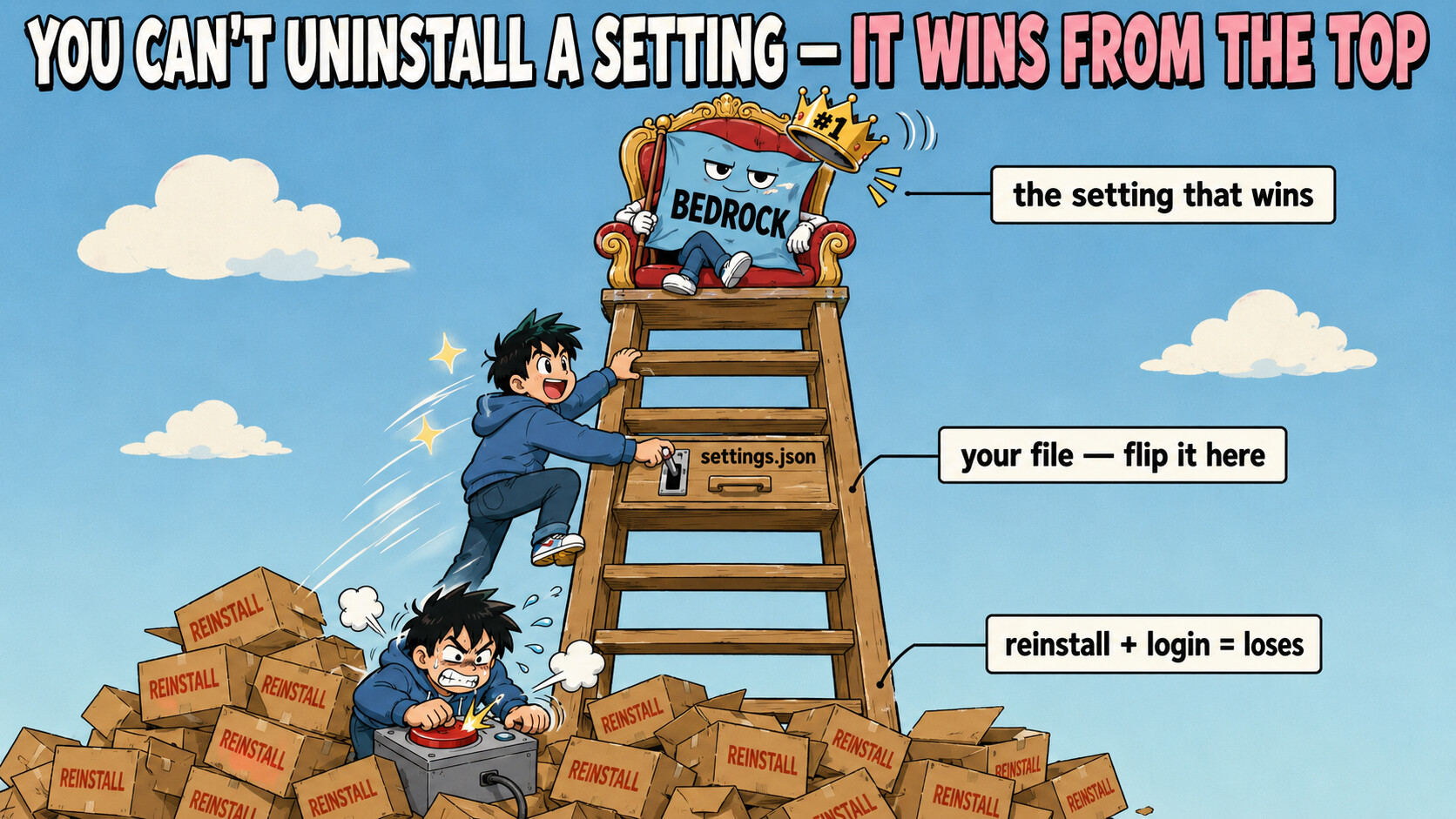
@BCBC pointed the right direction — here’s why it won’t die, in one picture.
Uninstalling removed the app, not the setting. Claude Code decides its provider by climbing a ladder of settings, and whichever rung is highest wins. Your Bedrock flag is stuck near the top — above your API key, above /login. Everything you kept re-trying lives at the bottom, so it never had a chance:
   WHO WINS?  (higher rung beats every rung below it)
   ────────────────────────────────────────────────────
   ①  company-policy file / Windows registry policy      ← survives uninstall
   ②  CLAUDE_CODE_USE_BEDROCK  (a saved setting)   ◀━━ IT'S HIDING HERE
   ③  project folder's  .claude\settings.json
   ④  your  settings.json          ← the file to edit ✎
   ⑤  /login , reinstalling         ← what you kept doing ✗ loses every time
   ────────────────────────────────────────────────────
(A “setting” here just means a line saved in a file or in Windows — separate from the program, which is why removing the program leaves it behind.) The /setup-bedrock wizard wrote that flag into your settings.json, and /logout is switched off while Bedrock is active — that’s why signing out did nothing.
━━━━━━━━━━━━━━━━━━━━━━━━━
✎ Fix it in one edit
You can’t delete rung ②, but you can overrule it from rung ④. Open %USERPROFILE%\.claude\settings.json and set the flag to empty — Claude reads "" as “off,” and this beats the system setting even if something keeps re-adding it:
{
  "env": {
    "CLAUDE_CODE_USE_BEDROCK": "",
    "AWS_PROFILE": "",
    "AWS_REGION": "",
    "ANTHROPIC_MODEL": ""
  }
}
Save → fully close Claude Code → reopen → /login. That clears it for most people. 
Want to test it before touching files? Boot once with the flag forced off:
claude --settings '{"env":{"CLAUDE_CODE_USE_BEDROCK":""}}'
Boots off Bedrock → that flag was the whole problem.
━━━━━━━━━━━━━━━━━━━━━━━━━
 Still on Bedrock? Make it point at the guilty rung
/status
Prints the live provider and which setting-sources are active — API provider: Amazon Bedrock means a rung is still forcing it. (Skip claude doctor for now — it freezes on Bedrock, and that freeze is the confirmation.)
Then corner it — launch from an empty settings folder with no project around:
$env:CLAUDE_CONFIG_DIR="$env:TEMP\cc-clean"; cd $env:TEMP; claude
├─ Bedrock gone here → the culprit was one of your files (rungs ③–④). Done.
└─  Still Bedrock here → it’s a top rung (①): a company-policy file, a registry policy, or a machine-wide Windows setting → open the drawers below.
🗄️ The top rungs — company-policy & registry (survive uninstall, exact paths)
├─  Policy file →
 C:\Program Files\ClaudeCode\managed-settings.json (+ its managed-settings.d\ folder). Heads-up: the old C:\ProgramData\... spot was dropped in v2.1.75 — ignore guides pointing there
├─  Registry policy → run
 regedit → check HKLM\SOFTWARE\Policies\ClaudeCode and HKCU\SOFTWARE\Policies\ClaudeCode → delete the Settings value if its text mentions Bedrock
├─  Org-pushed cache →
 %USERPROFILE%\.claude\remote-settings.json — a rung that even beats command-line flags and comes back after reinstall
└─  Saved login →
 %USERPROFILE%\.claude\.credentials.json holds the Bedrock auth — delete it
🔁 Why it keeps coming BACK — the re-adders on every launch
Something re-writes the flag each time you open Claude. Track it down:
├─  See the real setting a running Claude got (not what you think is set) → Process Explorer → right-click
 claude.exe → Properties → Environment tab
├─  A clean GUI to remove Windows settings → PowerToys Environment Variables (run as admin to reach system-wide ones)
├─  Remove it properly —
 $null does NOT delete it, use ''; plain setx "" leaves it in the registry:
[Environment]::SetEnvironmentVariable('CLAUDE_CODE_USE_BEDROCK','','User')
reg delete "HKCU\Environment" /v CLAUDE_CODE_USE_BEDROCK /f
├─  Your PowerShell startup file → open
 $PROFILE, delete any line setting CLAUDE_CODE_USE_BEDROCK
├─  Auto-refreshers inside settings.json → search it for
 awsAuthRefresh, awsCredentialExport, apiKeyHelper — these re-run AWS login and yank you back. Delete them
├─  VS Code keeps its own copy → check
 claudeCode.environmentVariables in VS Code’s settings (the extension reads it before your .claude)
└─  AWS leftovers → clean the failed profile from
 %USERPROFILE%\.aws\config + credentials; and clear Bedrock model names (us.anthropic.*) or you’ll hit errors that look identical
🧨 Full clean reinstall — the part people miss
A wipe fails because the VS Code extension, JetBrains plugin, and Desktop app each rebuild ~/.claude — remove those first, then:
where.exe claude          # two results = a leftover second copy
winget uninstall Anthropic.ClaudeCode
npm uninstall -g @anthropic-ai/claude-code
Remove-Item "$env:USERPROFILE\.claude" -Recurse -Force
Remove-Item "$env:USERPROFILE\.claude.json" -Force
irm https://claude.ai/install.ps1 | iex
🔀 Or don't fight it — send Claude Code to a different backend
├─  Back to normal → clear the flag (above), set
 ANTHROPIC_API_KEY, /login
└─  A different provider entirely → route it through
 ANTHROPIC_BASE_URL via LiteLLM or claude-code-router (OpenRouter / Groq / local) — a fresh backend instead of a half-set-up Bedrock
━━━━━━━━━━━━━━━━━━━━━━━━━
You can’t uninstall a setting — a top-rung flag shrugs off every reinstall until you outrank it in its own file.
 !
!