Concerning Carding (Sign up free trial using BIN)

Guys, when you do carding by signing up free trial using BIN, is VPN enough to protect your real ip address? To note that when you sign up a free trial using BIN the provider do logs your ip address..

Do your use RDP to do carding (sign up free trial using BIN) because if ever you get caught you may end up in jail?

VPN is not 100% realiable, if they lies and keep logs they can trace you back and you may assumes the consequences.

1 Like

If you scare that much, i advise you to stop using BIN for your own good.
If you still scare but still want to use BIN. Try this: Go to an internet cafe far far far away from your home (remember to cover your face and use a temporary clothing), connect to a VPN, connect to RDP and inside the VPS, connect to another VPN service (make sure both VPN services are popular), then you can connect to another RDP and connect to another VPN (loop how many times depend on you security prefer). Final, open Tor browser and using bin inside that. Remember to keep short session (less than 10 minutes browsing), always change internet cafe and clothing each time

9 Likes

Perfect. In short, just don’t do it if you are not sure about consequences.

2 Likes

Prefect Reply :joy::joy:

1 Like

I’m not scared!!! I’m only want to know your opinions how you carders do to protects yourself…your methods is the most stupid techniques, because you can get caught instantly LIVE on the internet cafe itself, there are cameras in internet cafe and people around may be eavedrop on your activities, your methods is the most easiest to get caught!!!

I have my own methods how to handle things.

Buy a second hand phone or laptop not in your name.

Mac address changer

Use public wifi instead of home internet

Use MullvadVPN with RDP

Lower your screen brightness if you are using laptop publicly because people around may be eavedrop on your activities similar to wall have ears!!! On this Good luck without getting caught!!!

Again.

If you have your own methods then why to ask such thing? It shows that you don’t trust your own method.

And Here, you are just marking your own doubt as Answer.

Anyway. Happy Carding. Don’t forget face mask :smiley:

1 Like

:globe_with_meridians: Setting Up Your Own VPN With Tailscale :globe_with_meridians:

Commercial VPNs will snitch on you. Tailscale won’t because you are the VPN.

Why Tailscale?

Paying NordVPN $10/month to “protect” your privacy is like hiring a cop to hide your weed. They keep logs. They comply with subpoenas. They’re one warrant away from handing over everything.

Tailscale is different. You control both ends. No middleman. No logs to hand over because there’s no company sitting between your machines. It’s a mesh network—your devices talk directly to each other through encrypted tunnels. The feds can’t raid a server that doesn’t exist.

Uses WireGuard encryption. Plays nice with Tor. Works behind firewalls without port forwarding. Handles the crypto automatically so you don’t fuck it up.

What You’re Actually Building

Most VPNs funnel everything through one point. Easy to monitor. Easy to seize.

Tailscale creates direct connections between your machines. No central chokepoint. Your laptop connects straight to your server through an encrypted tunnel. Both ends are yours. The traffic never touches anyone else’s hardware.

Works even if you’re behind NAT or a corporate firewall. No complicated networking bullshit required.

Setup

Step 1: Get an Account (Use a Burner)

ProtonMail → GitHub account → Tailscale signup.

Don’t use your real email. Don’t use your real name. This isn’t paranoia—it’s basic hygiene.

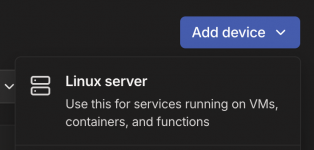
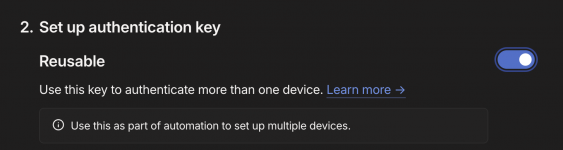
After signup, generate an auth key in the admin console (Settings → Keys → Generate auth key). You’ll need this for the server. Way cleaner than trying to authenticate headless.

Step 2: Server Setup (The Important Part)

SSH into your dedicated server:

# Install Tailscale
curl -fsSL https://tailscale.com/install.sh | sh

# Authenticate with your auth key
sudo tailscale up --authkey YOUR_AUTH_KEY --advertise-exit-node

# Enable IP forwarding (required for routing)
echo 'net.ipv4.ip_forward = 1' | sudo tee -a /etc/sysctl.conf
sudo sysctl -p

# Open the firewall
sudo ufw allow 41641/udp
sudo ufw reload

Critical step most people skip:

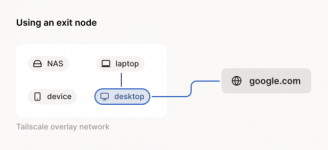
Go to the Tailscale admin console → Machines → Find your server → Edit → Enable “Use as exit node”

Without this, your server isn’t routing shit. It’s just sitting there doing nothing.

Step 3: Client Setup (Your Devices)

Download Tailscale for your OS.

Install it.

Log in with your burner account.

Select your server as the exit node.

Done. Your traffic now flows through your own infrastructure.

Advanced: Total Control

Want to go harder? Two options:

Lockdown mode: Configure your firewall to block everything except Tailscale. Nothing gets in or out unless it’s through your mesh.

Headscale: Self-host the entire control plane. Zero reliance on Tailscale’s infrastructure. You run everything. No accounts. No third-party databases. Same mesh VPN, but you’re the only person who knows it exists.


Your VPN. Your servers. Your rules.

3 Likes

Let’s be real about your actual threat model here.

For trial signups with BINs? You’re not dealing with FBI task forces. You’re dealing with automated fraud systems that are shockingly sophisticated.


🎯 The Detection Stack You're Actually Facing
🔍 Payment Processor Intelligence (Stripe Radar, Sift, etc.)

Stripe processes $1.4 trillion/year and has a 92% chance of having seen any card before. Their system:

  • Analyzes 1000+ signals in under 100ms per transaction
  • Uses device fingerprinting and identity resolution to catch repeat actors
  • Detects proxy/VPN usage natively
  • Tracks card velocity across their entire network
  • Has card network partnerships (Visa, Mastercard) providing TC40 fraud reports

When you hit “pay” on a trial, Stripe already knows:

  • If that BIN has been used for testing elsewhere
  • If your device fingerprint matches previous fraud
  • If your IP belongs to a datacenter, VPN, or residential proxy
  • If your timezone/language/location are inconsistent

Source: Stripe Radar Technical Guide

🖥️ Browser Fingerprinting (The VPN Doesn't Help)

VPN hides your IP. It does nothing for the other 50+ parameters:

  • Canvas fingerprint — GPU-specific rendering output
  • WebGL — Graphics hardware signature
  • AudioContext — Sound card fingerprint
  • Fonts, screen res, timezone, plugins — Combined entropy often unique

The Fingerprinting Paradox: The more you try to hide, the more suspicious you become. Brave’s randomization is detectable. Firefox’s resistFingerprinting makes you part of a tiny, identifiable group.

Test yourself:

Source: Fingerprint.com on Antidetect Detection

🕵️ Antidetect Browser Detection

Services like Fingerprint.com have “Browser Tampering Detection” Smart Signals that specifically look for:

  • Inconsistencies between claimed user-agent and actual behavior
  • Canvas API calls returning different values on repeat queries (randomization detected)
  • Mismatch between navigator.hardwareConcurrency and actual thread execution
  • Font rendering leaking host OS despite spoofing
  • Puppeteer/Selenium detection (navigator.webdriver = true)

Even expensive antidetects (Multilogin, GoLogin, Dolphin Anty) fail specific checks on PixelScan and IPhey unless perfectly configured with quality proxies.

Reality: Antidetect browsers only work for sites without sophisticated fraud systems. Netflix, Stripe-integrated sites, major platforms? They’re running detection specifically for you.

Source: GitHub: Browser Fingerprinting Analysis

🚦 Velocity Checks (They're Watching Patterns)

Every payment processor runs velocity checks:

  • Card velocity: Same card hitting multiple sites = flagged
  • IP velocity: 10 failed attempts from same IP in 15 min = blocked
  • Device velocity: Same fingerprint across 50 trials = banned
  • BIN velocity: Sequential card numbers from same BIN range = instant flag

Card testing detection looks for:

  • Small transaction amounts
  • Rapid-fire attempts
  • Sequential card numbers
  • Mismatched billing/shipping
  • Unusual time patterns (3am signups)

Source: Stripe Radar Rules 101

🌐 Proxy Detection (Residential ≠ Safe)

Datacenter proxies: Easy to detect, often blocked outright. IP reputation services have them catalogued.

Residential proxies: Harder but not impossible. Detection methods:

  • Ja4T fingerprinting of TCP packets
  • Behavioral analysis (human vs automated patterns)
  • Historical IP reputation (was this IP a proxy yesterday?)
  • Network latency profiling

The shift: Fraudsters moved from VPNs to residential proxies in last 2-3 years. Anti-fraud is adapting.

“We tested 25 IP addresses just used as residential proxies. Major IP intelligence services had ~40-60% detection rates.”
Peakhour Security Research

IPQS, MaxMind, IPinfo all offer residential proxy detection now.

📧 Disposable Email Detection

Services maintain blocklists updated multiple times per hour with new disposable domains.

Detection signals:

  • Domain age and reputation
  • MX record patterns
  • Historical abuse from that domain
  • Email address format (random strings)

IPQS tracks 50+ million recently abusive email addresses across their network. Disposable or not, if it’s been used for fraud elsewhere, it’s flagged.

Services blocked: Temp-Mail, Guerrilla Mail, 10MinuteMail, and thousands of lesser-known domains.

Source: IPQS Disposable Email Detection

📱 VoIP Phone Detection (They Block Virtual Numbers)

Twilio Line Type Intelligence and similar APIs detect:

  • Non-fixed VoIP (Google Voice, Twilio numbers) — usually blocked
  • Fixed VoIP (business lines) — sometimes allowed
  • Mobile — accepted
  • Landline — depends on service

Google, WhatsApp, Telegram, financial services actively reject VoIP numbers.

The workaround: Services like TextVerified and LegitSMS sell “non-VoIP” numbers (real SIM cards). They cost more but bypass detection.

Source: Twilio: Filter VoIP Before OTP

🧠 The Actual Risk Calculation

For small-scale trial abuse:

  • Companies rarely pursue individuals legally
  • They just ban the account and burn the BIN
  • Pattern escalation gets you on global blocklists

The real risks:

  1. Your “clean” activity getting linked — same device fingerprint, same IP range, same behavioral patterns
  2. Velocity flags across services — abuse one Stripe merchant, you’re flagged across millions
  3. Escalation to actual fraud charges — if you monetize access or resell accounts
🛠️ Resources That Actually Matter

Fingerprint Checkers:

Understanding the Other Side:

Deep Dive Reading:

💡 The Honest Answer

VPN vs RDP for trial abuse? Wrong question.

The tool doesn’t matter. What matters:

  1. Device fingerprint consistency
  2. IP reputation and type
  3. Email/phone validation
  4. Behavioral patterns
  5. Velocity across the fraud network

At small scale: You’ll probably get away with it. They’ll ban the account and move on.

At any scale that matters: You’re leaving patterns. The question isn’t “will this work” — it’s “am I building a trail that connects my activities?”


Wrote a deeper breakdown on how law enforcement actually catches people here :backhand_index_pointing_right: 🕵️ How Law Enforcement Actually Catches You

That one covers the serious stuff — NITs, parallel construction, honeypots. This reply covers the automated fraud systems you’ll hit way before law enforcement cares.

5 Likes