Short Introduction
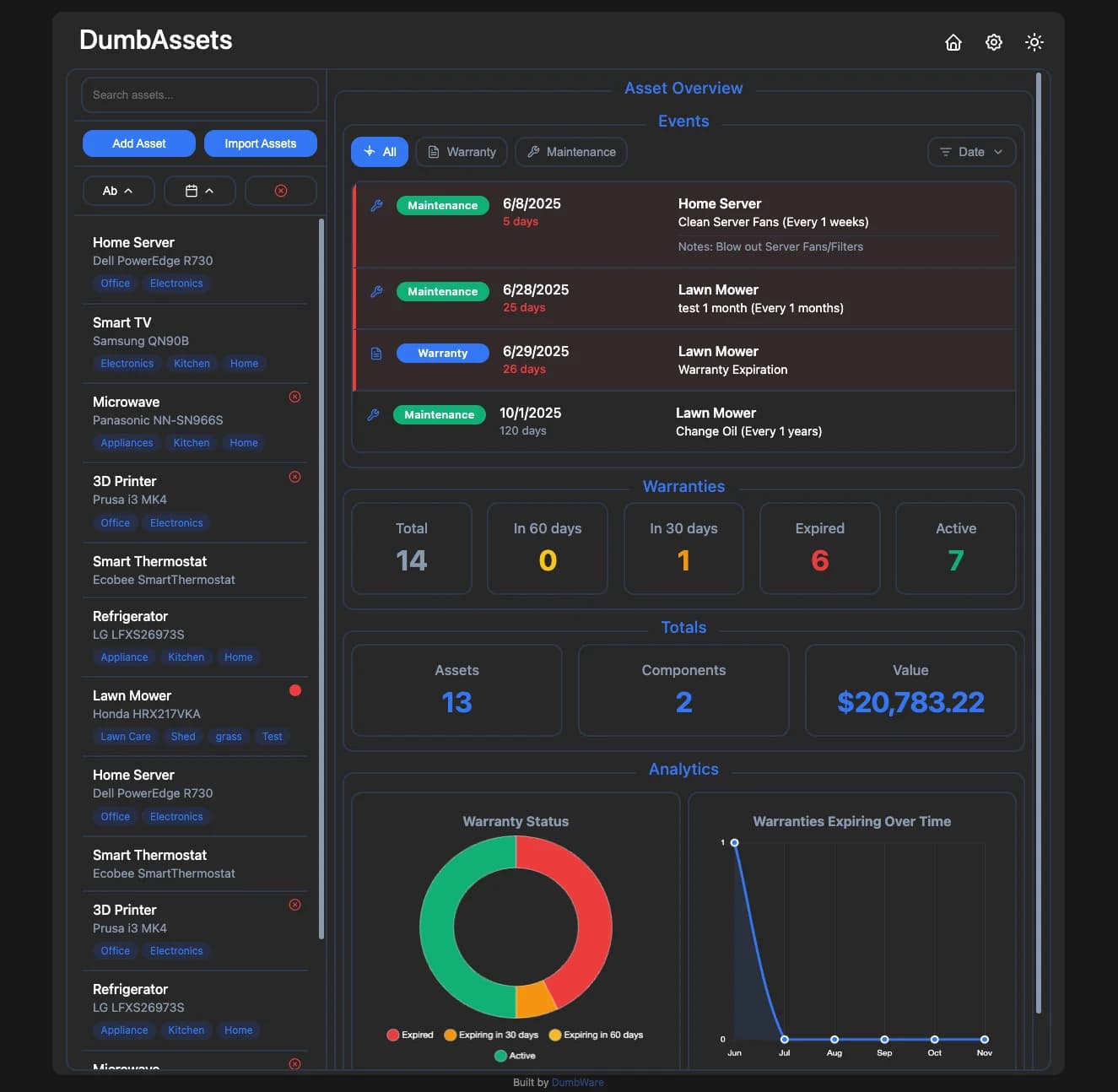
DumbAssets is a super simple self-hosted app for tracking physical items—gadgets, furniture, appliances, tools, or even clothes and shoes. It reminds you about warranties, scheduled maintenance, and lets you attach receipts, manuals, and photos. Designed with minimal setup in mind, it’s ideal for home users who want better organization without enterprise bloat.
Simplified One-Line Flowchart
Deploy via Docker ➔ Add assets with info and components ➔ Get reminders and notifications ➔ Stay organized effortlessly
Easy Step-by-Step Method
Step 1: Access the Tool and Demo
- GitHub: https://github.com/DumbWareio/DumbAssets
- Live Demo: https://dumbassets.dumbware.io/
- Docker Hub: https://hub.docker.com/r/dumbwareio/dumbassets
Step 2: Install Using Docker
- Run via Docker for fast local deployment:
docker pull dumbwareio/dumbassets
Step 3: Add and Organize Your Assets
- Use the web UI to add physical assets (like a PC, router, blender, etc.).
- Create hierarchical components (e.g., Server ➔ HDD ➔ Router).
- Add metadata like:
- Warranty & expiration dates
- Photos, manuals, receipts (multiple supported soon)
- Notes, location info, tags
Step 4: Setup Notifications (Optional)
- Powered by Apprise:
https://github.com/caronc/apprise - Alerts can be sent to:
- Discord
- Telegram
- Ntfy
- Gotify
- Email and more
Step 5: Use Tags and Filters to Navigate Easily
- Filter by:
- Warranty expiration
- Tag (e.g.,
network,kitchen) - Status (e.g., active/disposed)
- Alphabetically or by expiration date
Step 6: Customize and Extend (Optional)
- Set a custom name using the
SITE_TITLEenvironment variable - Track “dumped” items with a disposal log (future feature)
- Store purchase cost breakdowns (price, tax, shipping, tariff – user suggested feature)
- Consider integrating with reverse proxies (like Authentik) for auth, since there’s no login by default
Quick Tips
- Works great even without user login—perfect for personal/local use
- Add reminders to maintain even non-electronic stuff (e.g., shoes, clothes)
- Future updates may include barcode/QR scanning and multi-user support
- You can use asset “notes” to store quantity, or wait for official quantity field
Important Notes
-
Data Storage:
Assets are saved in.jsonfiles inside/data. Every update rewrites the whole file. This is fast and simple, but not ideal for heavy use. Future versions may include SQLite. -
No Login Required:
By default, there’s no enforced login, which is great for home setups. Security can be handled with reverse proxies if needed. -
No Built-in Asset ID Links Yet:
Direct links to assets are included in notifications, but asset pages don’t yet expose QR-scannable URLs. Planned for the roadmap. -
Not Suitable for Enterprise Use (Yet):
While great for home and small lab usage, features like LDAP/OIDC login, permission roles, or Snipe-IT-like fleet management are not ready. SSO and AD support are under consideration. -
Similar Alternatives:
- Homebox: More rigid, with location-based hierarchies
- Snipe-IT: Enterprise-ready but complex
- Warracker: Focused on warranty, but fewer notification options
- Grocy: Great for barcode/food/inventory scanning
- BookStack Tags: Inspires future dynamic tagging in DumbAssets
Popular Feature Requests from the Community
 Quantity fields for assets
- Track disposal/dump logs with date and value
- Manual barcode or QR tag support (planned)
- Configurable currency symbols (e.g., $ ➔ £)
- Better theming (box colors, borders)
- Maintenance for clothes, shoes, and more
- Asset export/import between instances
- Multi-file support for receipts/manuals (planned)
- Check-in/Check-out for loaned gear
Made by DumbWare.io – home of delightfully dumb but useful tools.
Community chat: https://discord.gg/zJutzxWyq2
 !
!