E-commerce Payment Guide — How to Actually Get Paid Online
Plain-English breakdown of payment gateways, checkout tricks, and what costs what.
 The Money Collection Problem
You built a store. People want to buy. But: which payment system won’t kill your margins, confuse customers, or require a CS degree to set up?
Why this matters:
Wrong payment gateway = lost sales + high fees + support nightmares → right choice = customers trust you, checkout flows smoothly, you keep more money
What’s covered:
✓ What payment gateways actually are (no jargon)
✓ 6 main options compared (PayPal, Stripe, Amazon, Authorize, Intuit, Worldpay)
✓ Real costs breakdown (fees that actually matter)
✓ Checkout tricks that boost sales 20% (upselling, cross-selling)
✓ Guest checkout vs forced signup (conversion killer exposed)

Squeeze More Money at Checkout (Before You Even Pick a Gateway)
Upselling — The 'Go Large' Strategy
What it is: Offering upgraded versions at checkout.
“Want fries with that?” works because some customers will happily pay more if you just ask. Price-sensitive buyers stick with basic. Others don’t care and give you extra money.
Examples:
→ Larger size
→ Premium version
→ Extra features
→ Different color/material
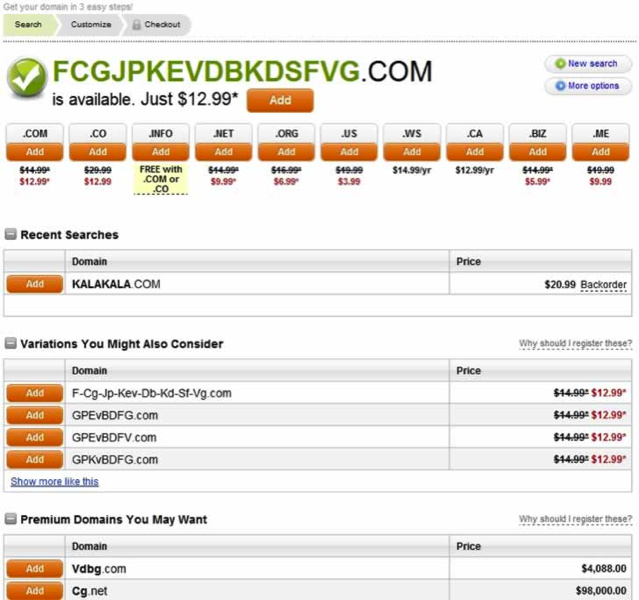
GoDaddy does this to the point of annoyance — because it works. Not asking = leaving money on table.
Cross-Selling — The 'Others Also Bought' Move
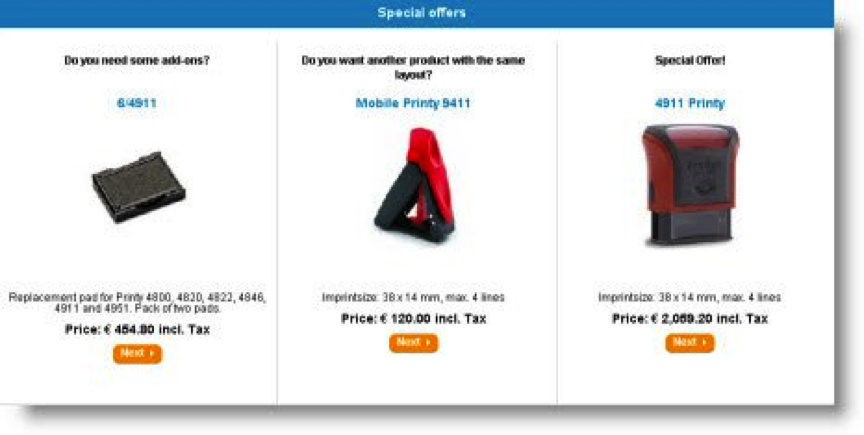
What it is: Suggesting related products during checkout.
Someone buys a camera? Show them memory cards, cases, lenses. Amazon built an empire on this.
Why it works:
Customer already has wallet out → you’re shipping a package anyway → might as well sell them one more thing
Not using upselling + cross-selling = missing 20% extra revenue. In competitive online retail, that’s money you can’t afford to skip.
What Payment Gateways Actually Are
Simple version: The thing that takes your customer’s card info, checks if they have money, and puts it in your account. Like a cash register, but online.
Why it matters: Wrong gateway = customers don’t trust you, checkout breaks, fees destroy margins.
How Payment Gateways Work (2-Second Process)
The flow:
- Customer clicks “buy” on your site
- Card info encrypted and sent to payment gateway
- Gateway forwards to your bank’s payment processor
- Processor asks card company (Visa/Mastercard) if funds exist
- Card’s bank says yes/no
- Response travels back through chain
- Your site shows “payment successful” or “declined”
All happens in under 2 seconds. Gateway handles encryption (keeps card numbers safe), fraud checks, and moving money around.
Gateway Fees Explained
Two cost types:
Setup/monthly fees:
Some gateways charge upfront + monthly flat rate to exist
Transaction fees:
Small percentage of each sale (usually 2-4%) + flat fee per transaction (usually 20p)
Why this matters:
Small savings multiply fast. 0.5% difference on 10,000 transactions = real money.
The 6 Main Payment Gateways (Real Talk)
PayPal — Everyone Knows It (Expensive But Trusted)
The deal:
Most expensive option. Customers love it. You’ll use it anyway because buyers demand it.
Costs: 20p + 3.4% per transaction (ouch for small purchases)
Pros:
✓ Customers already have accounts (familiar = more sales)
✓ People trust the brand
✓ No merchant account needed
✓ No SSL certificate required
✓ No monthly fees
✓ Works globally (handles currency conversion)
✓ WordPress/WooCommerce compatible
Cons:
✗ Most expensive gateway (fees eat profits fast)
✗ Takes customers off your site to PayPal’s checkout (kills conversions)
✗ Website looks dated (could hurt premium brand perception)
✗ Holds 30% of transactions for 90 days (cash flow nightmare)
✗ Support is email-only (24-hour response, not instant)
Verdict: You’ll probably offer it anyway because customers expect it. Just don’t make it your only option.
Stripe — Developer Favorite (Cheaper, On-Site Checkout)
The deal:
Keeps customers on YOUR site during checkout. Cheaper than PayPal. Requires some tech skills to set up.
Costs: 2.9% + 20p for credit cards, 2.4% + 20p for debit (no monthly fees)
Pros:
✓ Cheaper than PayPal for most transactions
✓ Checkout stays on your site (your branding, better conversions)
✓ Easy integration (if you’re technical)
✓ Good for startups
✓ Handles multiple payment types
Cons:
✗ Debit card fees higher than some competitors
✗ Requires technical integration (need dev help for most people)
✗ Email-only support (no phone)
✗ Built for developers (non-tech people feel lost)
✗ Fees increase with volume
✗ Requires SSL certificate
✗ No mobile payments yet
Verdict: Best for tech-savvy sellers who want control and lower fees.
Amazon Payments — Trusted Name, High Fees
The deal:
Amazon’s brand trust. Customers log in with Amazon account. Good for items over £20. Expensive for small purchases.
Costs: Same as PayPal (20p + 3.4%)
Pros:
✓ Strong seller fraud protection
✓ Customers trust Amazon brand
✓ No compliance headaches (Amazon handles it)
✓ No merchant account needed
Cons:
✗ Max 20 items per transaction (bizarre limit)
✗ Same high costs as PayPal
Verdict: Use if you sell higher-priced items and want Amazon’s trust factor.
Authorize.net — Feature-Heavy, Upfront Costs
The deal:
Advanced fraud protection. Owned by Visa. Best for volume sellers. Costs $99 setup + $20/month + $0.10 per transaction.
Costs: $99 setup, $20/month, $0.10 per transaction
Pros:
✓ Low per-transaction fees (saves money at volume)
✓ Advanced fraud filters (block suspicious IPs, set rules)
✓ Good support team
✓ Integrates with most e-commerce platforms
✓ PCI DSS compliant
✓ QuickBooks integration
✓ Recurring payments + customer info management
Cons:
✗ Requires separate merchant account (extra setup hassle)
✗ Additional compliance requirements
✗ High setup fees ($99 upfront)
✗ $20 monthly fee
✗ Limited mobile app
✗ No monthly reporting tools
Verdict: Worth it for volume sellers who need fraud protection. Setup costs pay for themselves if you’re doing serious sales.
Intuit — QuickBooks Users, This One's For You
The deal:
Great if you use QuickBooks for accounting. Not super common outside USA. Low fees, simple integration.
Costs: 4% + 20p per swiped transaction, no monthly/setup fees
Pros:
✓ Low fees (no monthly or setup charges)
✓ Easy integration with e-commerce platforms
✓ Fast merchant account setup
✓ Perfect QuickBooks integration
Cons:
✗ 4% + 20p for keyed transactions (high)
✗ Account reconciliation difficult without QuickBooks
✗ Not very international (mostly US-focused)
Verdict: If you use QuickBooks, this makes life easy. Otherwise, skip.
Worldpay — Big Business Focus
The deal:
Global giant. Good for scaling. Not great for small businesses. Bespoke pricing (you get quoted custom rates).
Pros:
✓ Fast merchant account setup
✓ Multichannel support (expand to other sales channels)
✓ eInvoicing service
✓ PayPal integration
✓ Fees reduce at high volume
Cons:
✗ Not ideal for small businesses
✗ Bespoke pricing (unclear costs until quoted)
✗ Fraud support costs extra
✗ Expensive setup fees
✗ Weak sales approach
✗ Often locks you into contracts
✗ PCI DSS charges
Verdict: Built for enterprise. Small businesses look elsewhere.
The Forced Signup Mistake (Conversion Killer)
Guest Checkout vs Required Login
The temptation: Force customers to create account before buying → you get their email for future marketing.
The reality: Every barrier = lost sales.
What actually works:
→ Offer guest checkout (no signup required)
→ Collect email AFTER purchase (not before)
→ Make buying as friction-free as possible
Why:
People ready to buy don’t want to fill forms. They want to give you money and leave. Force signup = they abandon cart and buy elsewhere.
Solution:
Guest checkout is mandatory for optimized conversions. Collect data after the sale, not before.
Pick gateway based on your situation. Keep checkout simple. Upsell at the right moment. Get paid. 
 !
!