 $120/Year in Cloud Credits You Already Paid For (and Never Claimed)
$120/Year in Cloud Credits You Already Paid For (and Never Claimed)$10 drops into your account every month. Nobody tells you to go grab it.
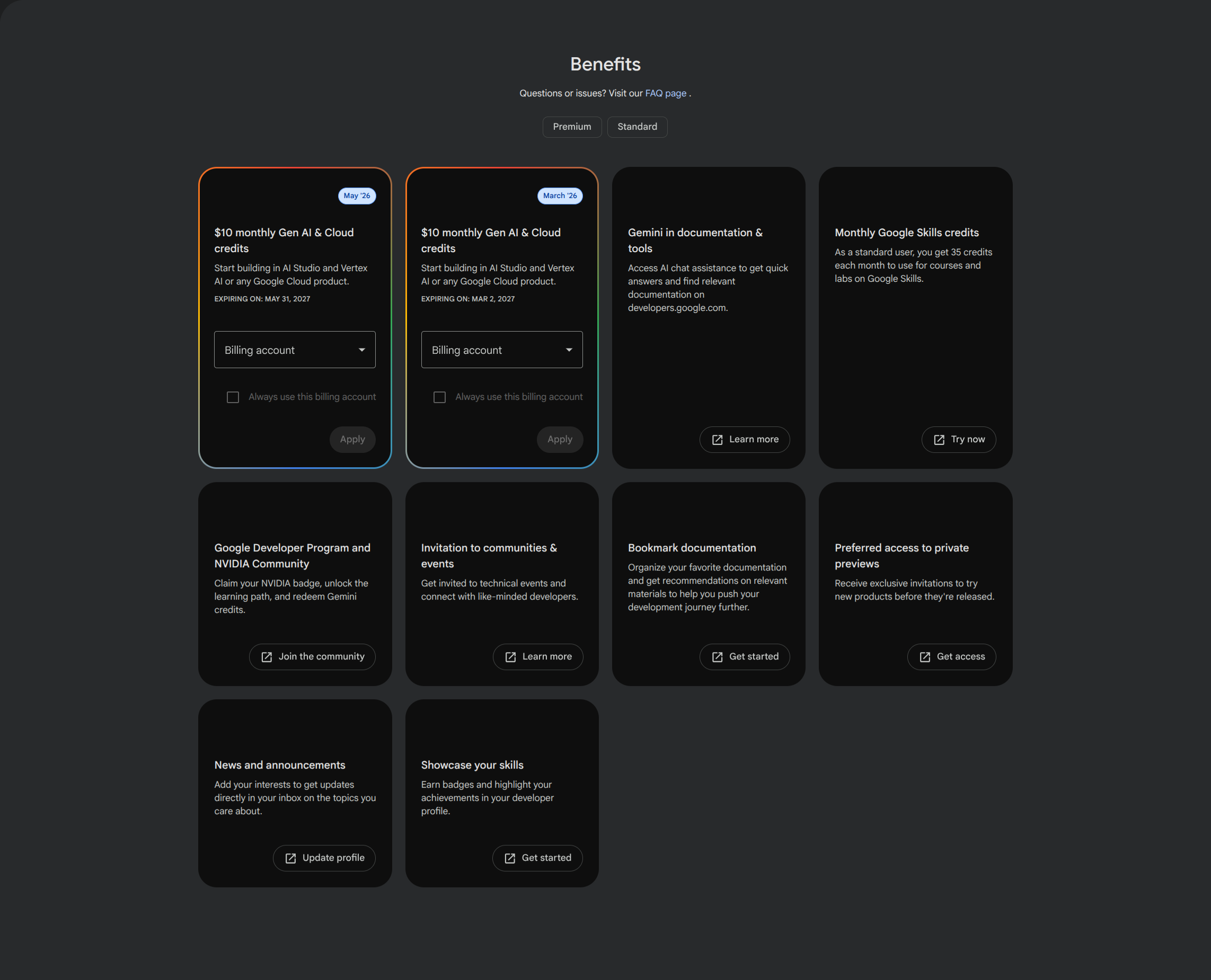
$10 every month. On top of the sub you already pay. No new signup. No trial. No catch you’d notice.
Google quietly bundled developer credits into AI Pro back in January — and they don’t auto-apply. They sit there. They expire. Yours the second you click.
If you build anything with AI, this is free fuel you’ve been letting rot.
💸 Wait, free money?
In January, Google stapled its paid Developer Program perks onto every Google AI Pro and Ultra plan — for free. The loudest perk: cloud credits that refill on their own.
Think of it as a gift card that tops itself up on the 1st of every month. Spend it on Google’s AI stuff — the Gemini API, AI Studio, or Vertex AI (Google’s grown-up, production cloud-AI service). Don’t spend it, it vanishes. A fresh one shows up next month.
| Your plan | Monthly cloud credit | What it costs |
|---|---|---|
| Standard (free) | $0 cloud credit (you get 35 Google Skills learning credits instead) | Free |
| AI Pro | $10/mo (~$120/yr) | $19.99/mo — you’re probably already paying |
| AI Ultra | $100/mo (~$1,200/yr) | The big tier |
The kicker: if you already hand Google $19.99 a month, that $10 is money you’ve already bought. Leaving it unclaimed is lighting a tenner on fire every month.
🛠️ Claim it in about 60 seconds
It is NOT automatic. You have to walk over and pick it up.
Step 1 — Open the benefits page: me.developers.google.com/benefits — logged into the Google account that pays for AI Pro.
Step 2 — Find the card that says “$10 monthly Gen AI & Cloud credits.”
Step 3 — Pick a Billing account from the dropdown, then hit Apply. Done — the credit is now attached.
Trick: Credits burn before your card does. Once they’re attached to a billing account, every dollar of usage eats the free $10 first — your card only gets touched if you blow past it. So set a budget cap at $10 in Google Cloud and you literally can’t be surprise-charged. Free playground, hard ceiling, zero stress.
🎁 What else is sitting on that same page
Same login, one page — the credits are just the loudest thing on it. While you’re there:
| Perk | What you get |
|---|---|
| Gemini in docs & tools | AI chat baked straight into Google’s developer docs |
| Google Skills credits | 35 free course/lab credits a month |
| Google + NVIDIA community | Claim an NVIDIA badge + unlock a learning path |
| Private previews | Try new Google products before they go public |
| Community & event invites | Get pulled into developer events and groups |
 One door: me.developers.google.com/benefits — everything above lives behind this single link.
🚫 The fine print nobody reads (read it)
| Gotcha | What it actually means |
|---|---|
| Not the free tier | The $10 needs a paid AI Pro/Ultra plan — free Standard members don’t get cloud credit |
| Vertex works, prepay often doesn’t | Tons of people report the credit applies to Vertex AI usage but NOT a direct AI-Studio API-key “prepay” balance — if it won’t show up, route your usage through Vertex |
| Use it or lose it | Unused credit expires; a fresh batch lands next month — no rollover |
| Overspend = real charge | Go past $10 with no budget cap and the overflow hits your card |
 Quick Hits
| Want | Do |
|---|---|
| The free $10 |
→ Apply it at the benefits page, manually |
 Never get charged Never get charged |
→ Set a $10 budget cap in Google Cloud |
 Where to spend it Where to spend it |
→ Gemini API / AI Studio / Vertex AI |
 Don’t lose it Don’t lose it |
→ Use it before month-end; it doesn’t roll over |
 Why Google’s doing this Why Google’s doing this |
→ Out-bribing AWS free tier, Azure, and OpenAI/Anthropic for your loyalty |
You already bought the ticket. Stop leaving the free popcorn at the counter.
 !
!