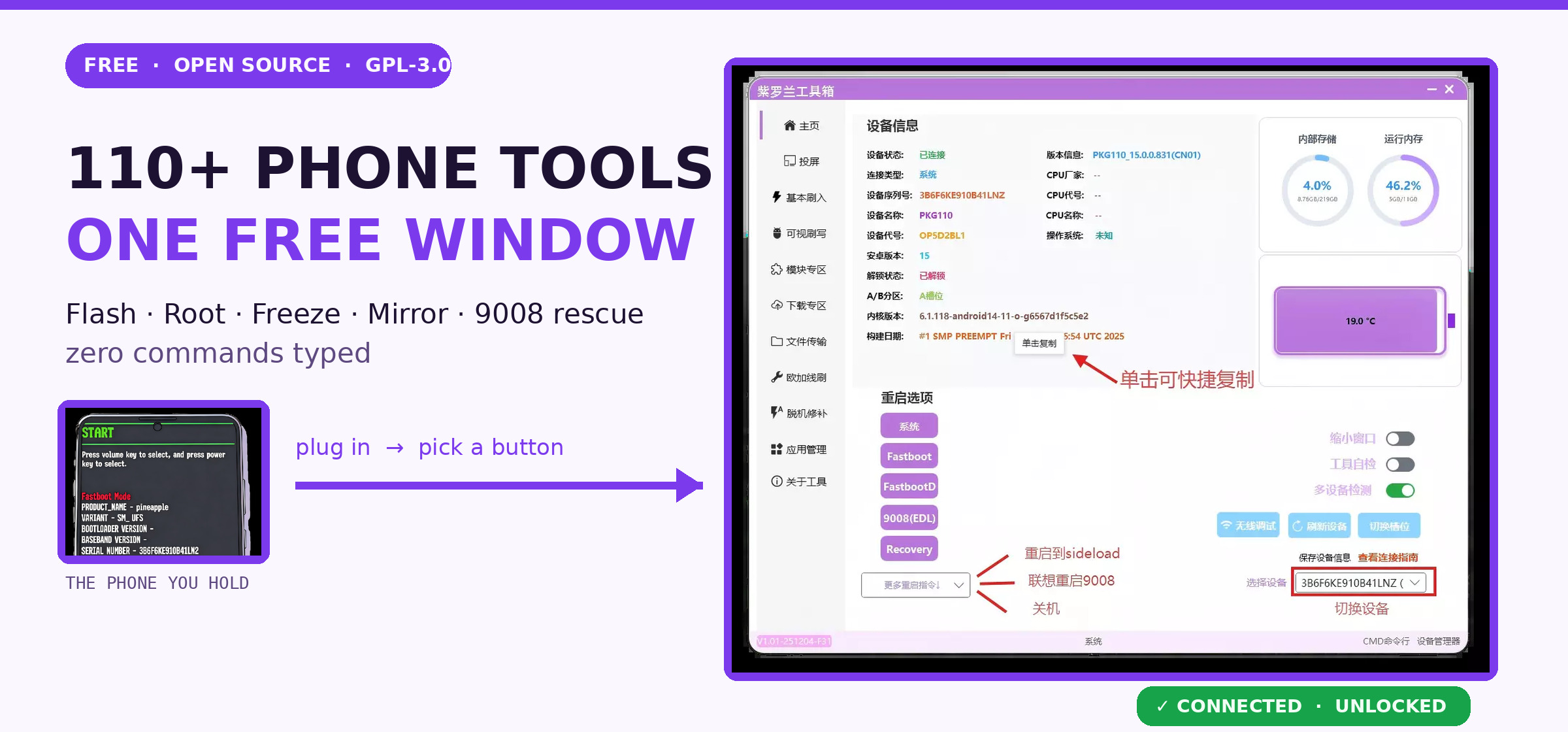
Your Own Android Service Center
Repair what’s stuck. Unlock what’s hidden. Control what’s yours.
110+ Functions · Free · Graphical Interface · Zero Commands to Type in VioletToolBox
 Meet your main toolbox
110+ repair, flashing, rooting and device-management functions in one window — zero commands to memorize

Supported brands include Xiaomi · Redmi · OPPO · OnePlus · Realme · Lenovo · Meizu · Redmagic. Individual features depend on your exact device and chipset.
 What do you want to do?
🛠️ Bring a stuck phone back to life
Qualcomm rescue
 Restore factory firmware.
 Read, write, wipe and back up partitions.
 Repair the GPT partition layout.
 Back up the baseband responsible for mobile connectivity.
Works through EDL 9008 on compatible devices.
🔓 I want to root, flash or modify my phone
Offline rooting & boot modification
 Patch boot images without a root manager.
 Automatically root supported OnePlus devices.
- Create GKI images.
 Select the appropriate AVB signature.
🧹 I want to remove unnecessary apps and take control
App management
 List, freeze and unfreeze applications.
- Clear a system updater’s data.
 Extract installed APK files directly to your PC.
🖥️ I want to control my phone from my computer
scrcpy integration
 Mirror your Android screen live.
 Control it using your mouse and keyboard.
- ↔️ Resize the display window.
 Adjust the frame rate.
Detect → Pick the right mode → Perform the operation → Verify → Boot
More paths — keep expanding what you can do
VioletToolBox is the start · these free tools extend the chain for other chipsets and situations
⚡ More flashing tools, chipsets & recovery modes
XMF Flash Tool — 220 tools, five chipset families and 554 no-auth boot packets.
ToroBoro Suite — portable, free flashing suite with MTK, Qualcomm and Unisoc drivers bundled.
EDL Packages + Rescue Manual — a bootable Linux rescue environment with the necessary recovery interfaces packaged.
📱 No computer? Use another Android phone instead
MOFLASH — an entire rescue toolbox inside an Android app.
9008 · Fastboot · MTK · ADB
Connect through OTG.
No PC · No Root
🌐 Prefer flashing directly from your browser?
Android Flash Tool — Google’s browser-based flashing utility for supported devices.
Lineage Flash Tools — browser-based flashing resources for supported LineageOS devices.
Both use WebUSB instead of requiring a traditional flashing application.
💾 Need firmware, backups or safer flashing?
PixelFlasher — automatic backups, dry-run testing, one-click root patching and a single-file executable.
backup_partitions — partition backups with SHA-256 integrity verification, serial-number matching and typed confirmation before restoration.
Typhon Tool — retrieves matching firmware image packs and serves the images requested by the phone.
🧊 Want deeper app control without unnecessary rooting?
UAD-ng — categorized debloat lists with restorable snapshots.
Shizuku — gives compatible apps access to elevated Android system interfaces.
Dhizuku — shares device-owner capabilities with compatible applications.
Thor — device-owner management with QR-based provisioning.
 The rare-gem layer — extra paths that stack on top
Pairing resources into one longer rescue chain is where the extra reach lives
🪄 Build a rescue file from a sibling device
A signed Firehose loader is tied to the chip family and OEM signing key, so a sibling device’s loader authenticates on yours.
Pair that loader with your own stock boot images and GPT, and the rescue file comes together.
Match the exact hardware, signing requirements and partition layout first — then the pairing lines up.
🧬 When you need deeper chipset-level recovery
Qualcomm Sahara V3 chip identification helps with loader matching, while mtkclient covers MediaTek BROM and V6 preloader recovery paths.
🛡️ Before downgrading firmware, check this
AVB Rollback Protection + MIUI ARB Checker
Understand rollback protection and inspect the firmware package’s rollback index before attempting a downgrade.
The rollback index tells you which firmware boots cleanly on that device.
🖥️ Want to retain live screen access during flashing?
Offers live screen-channel access during supported flashing operations without the additional security-toggle detour described in its workflow.
🔓 Trying to unlock a HyperOS bootloader?
Understand the community-level requirements, account age and daily unlocking quotas before attempting the process.
 Save this mini cheat sheet
| What you need | Where to start |
|---|---|
| All-in-one Android toolbox |
VioletToolBox |
 Additional chipset support |
XMF · ToroBoro |
| Flash without a PC |
MOFLASH |
 Flash through a browser |
Android Flash Tool · Lineage |
| Backup & recovery |
PixelFlasher · backup_partitions |
| Matching firmware |
Typhon |
| Remove unnecessary apps |
UAD-ng |
 Elevated app control |
Shizuku · Dhizuku · Thor |
 Advanced unbricking |
go-unbrick · edl · mtkclient |
| Downgrade safety |
AVB · MIUI ARB Checker |
 Live screen control |
scrcpy · RMFlashTool |
Your Phone. Your Toolbox. Your Control.
From everyday Android management to advanced device recovery — an entire ecosystem of tools worth keeping in your digital arsenal.
 !