 [FREE TOOL] Cloud RDP — Phone-Based RDP + Free Disposable Windows Instances
[FREE TOOL] Cloud RDP — Phone-Based RDP + Free Disposable Windows InstancesAndroid app = remote desktop client + ad-funded VPS dispenser. 16GB RAM Windows server, $0.
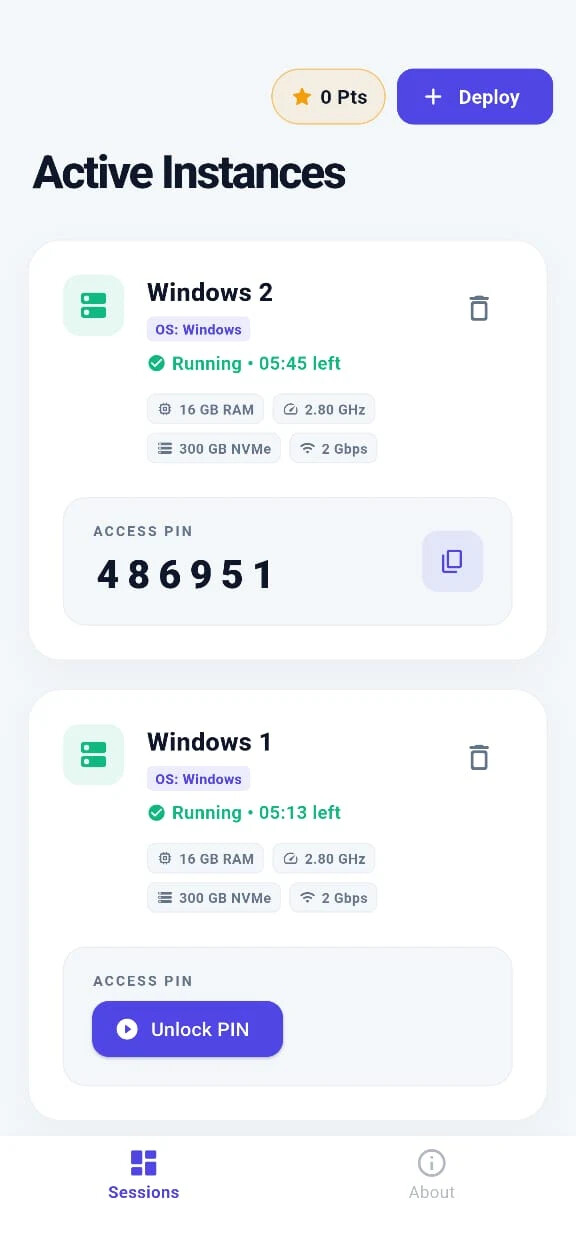
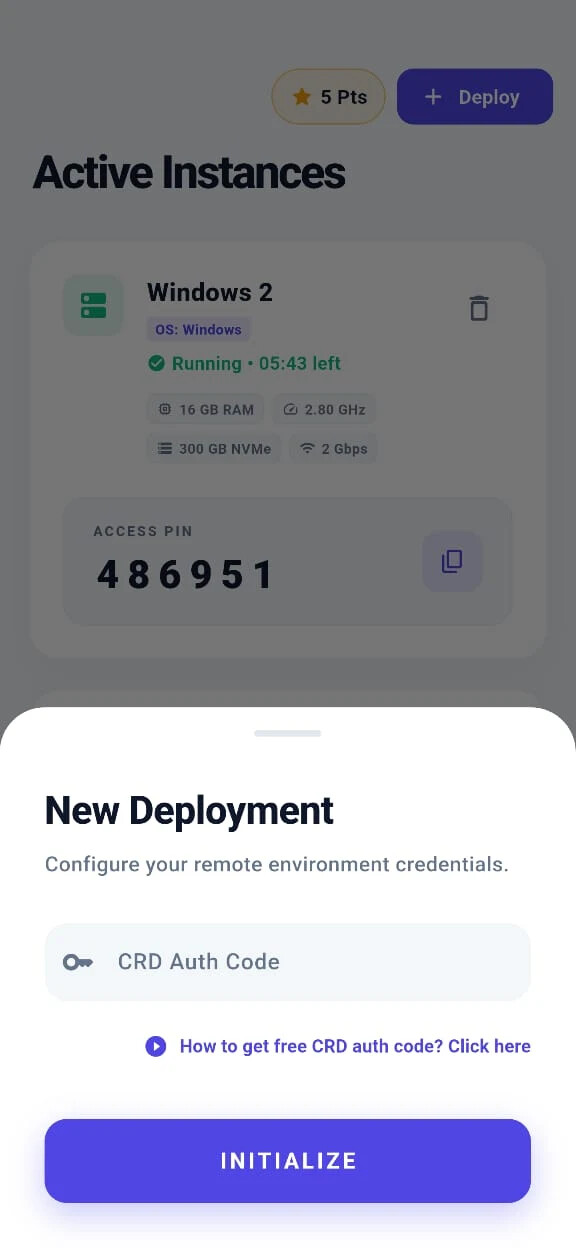
 Two apps in one: connect to your own servers via RDP — AND earn Points from ads to spin up free Windows VPS instances on demand.
 Play Store: Cloud RDP: Remote Desktop
🧠 What this thing actually is — the 2-in-1
 Mode 1 — Classic RDP client (for your own servers):
Already got a VPS somewhere (Contabo, Hetzner, your work server)? Punch in the address → connect → control Windows from your phone. On-screen mouse, mobile keyboard, encrypted.
 Mode 2 — The free-VPS slot machine (the unique trick):
Watch a couple short rewarded ads → collect Points → spend Points → app spins up a fresh Windows VPS for you, full specs, ~6 hour session. Connects via Chrome Remote Desktop.
Mode 2 is the actual hook. You don’t need to own a server — the app gives you one in exchange for ad views.
💪 Free VPS specs (Mode 2)
Per instance you deploy:
| Spec | What |
|---|---|
 OS OS |
Fresh Windows |
 RAM RAM |
16 GB |
 CPU CPU |
2.80 GHz |
 Storage Storage |
300 GB NVMe |
 Network Network |
2 Gbps |
 Session Session |
~6 hours, then redeploy |
That’s a $30–60/month VPS equivalent. Watch an ad, get a server. Math is filthy.
🎮 How to use it
For the free VPS (Mode 2):
- Install app → open it
- Watch 1-2 rewarded ads → collect Points (shown top-right)
- Hit + Deploy → enter a CRD Auth Code (app shows you how to get one free from Google)
- Hit Initialize → fresh Windows VPS spins up in minutes
- Copy Access PIN → paste into Chrome Remote Desktop → you’re inside Windows
- Session ends in ~6 hours → re-deploy with more Points → loop forever
For your own VPS (Mode 1):
- Open the app → enter your server IP + credentials → save config
- Hit one-click connect → mobile-optimized RDP session opens
🎯 What to actually do with this
| Play | Why it works |
|---|---|
| Run heavy Windows software on a cheap phone/Chromebook |
Adobe, AutoCAD, Visual Studio — phone is just the screen |
| Test Windows-only games without owning Windows |
Spin up → install → test → throw away |
| Browse from a clean US/EU IP |
Cloud server is in a different country than you |
 Run scripts 24/7 (within session) Run scripts 24/7 (within session) |
Web scraping, bots, Python jobs, automation |
 Student needing Windows on a Mac/Chromebook Student needing Windows on a Mac/Chromebook |
Spin one up for assignments, drop after |
 Sandbox sketchy Sandbox sketchy .exe files |
Nukes the VPS? Fresh one in 5 minutes. |
 Mobile RDP for your real work server Mobile RDP for your real work server |
Mode 1 — clean phone-friendly client |
🛡️ Catch check
| Q | A |
|---|---|
| Actually free? | Yes. Ad-watching = the price. No card. |
| Session length | ~6 hours per deploy. Redeploy with new Points. |
| Specs real? | 16GB RAM / 300GB NVMe / 2Gbps shown live on dashboard |
| Data safe? | App encrypts PINs locally with SHA-256 |
| Catch? | Play Store data-safety says “Data isn’t encrypted” in transit — don’t log into anything personal |
| Limits? | Just how many ads you’ll sit through |
 Simple-pimple: install app → use it as a normal RDP client for your servers (Mode 1) AND watch a couple ads to spin up free Windows cloud PCs on demand (Mode 2). Treat the free VPS as throwaway, don’t log into personal stuff.
Watch a 30-second ad, get a $50 Windows server. Math checks out.
 !
!