Please which free app can I use to change my voice to more matured voice in real time during recording or streaming and can comfortably work with Camtasia and OBS?
 Free Real-Time Voice Changers for OBS & Camtasia
Thread: Best free tool for a deeper, more mature voice while recording/streaming?
Good news, this is a solved problem. Both Camtasia and OBS pull audio from your system microphone input, so any tool that installs as a virtual audio device will work with both automatically.  Here’s what actually works, based on what’s out there right now.
🥇 Top Pick: Voicemod
Voicemod is the most widely recommended free option for exactly this use case. It runs as a virtual microphone on Windows, integrates directly with OBS, Twitch, and Discord, and clocks in at roughly 12-20ms of latency on a mid-range PC  — low enough that it won’t create noticeable lag while recording or streaming live.[1][2]
The free tier gives you a rotating set of voice effects plus a permanent clean-mic filter. Since it installs as a system audio device, Camtasia picks it up the exact same way it picks up any regular mic.[1][2]
Pro tip: For a naturally deeper, mature tone, use the pitch-shift feature rather than a themed voice filter.  Pitch shifting moves your entire voice down in semitone steps, giving you a controlled, believable deepening effect you can dial in yourself.
🐡 Runner-Up: Clownfish Voice Changer
If you want zero limitations and zero cost, Clownfish is fully free, no paid tiers, no feature locks, no rotating restrictions.[3]
It works at the OS level, meaning it modifies your mic input across every app simultaneously, OBS and Camtasia included, with no per-app setup. It has a basic pitch-shift effect suitable for voice deepening, though the quality is a bit rougher than Voicemod’s .[3]
 Windows-only, worth noting.
🎵 For Higher Audio Quality: EaseUS VoiceWave
EaseUS VoiceWave brings a much larger library, 300+ effects, with both real-time and file-based modes. It explicitly lists OBS, Streamlabs, and Twitch as supported integrations .
Some effects are locked behind a paywall, but the real-time deepening effects are typically included in the free version.
🔌 Setup Note (Read Before You Install)
All three tools work by installing a virtual audio cable that sits between your mic and any app receiving audio. Once installed:
Open OBS/Camtasia’s audio settings
Select the tool’s virtual microphone as your input device
The voice effect now applies automatically to everything you record or stream
This is a one-time setup per app, not something you redo every session. 
 TL;DR / My Recommendation
Start with Voicemod  , smoothest streaming integration, lowest latency for live use. Use its pitch-shift slider rather than a novelty filter for a natural deeper tone.
If the free tier’s rotating effects feel limiting, Clownfish is a solid permanent fallback with zero restrictions, just a slightly rougher pitch effect. 
Thanks for your help.
How about Okada RealTime voice changer, have you tried it before?
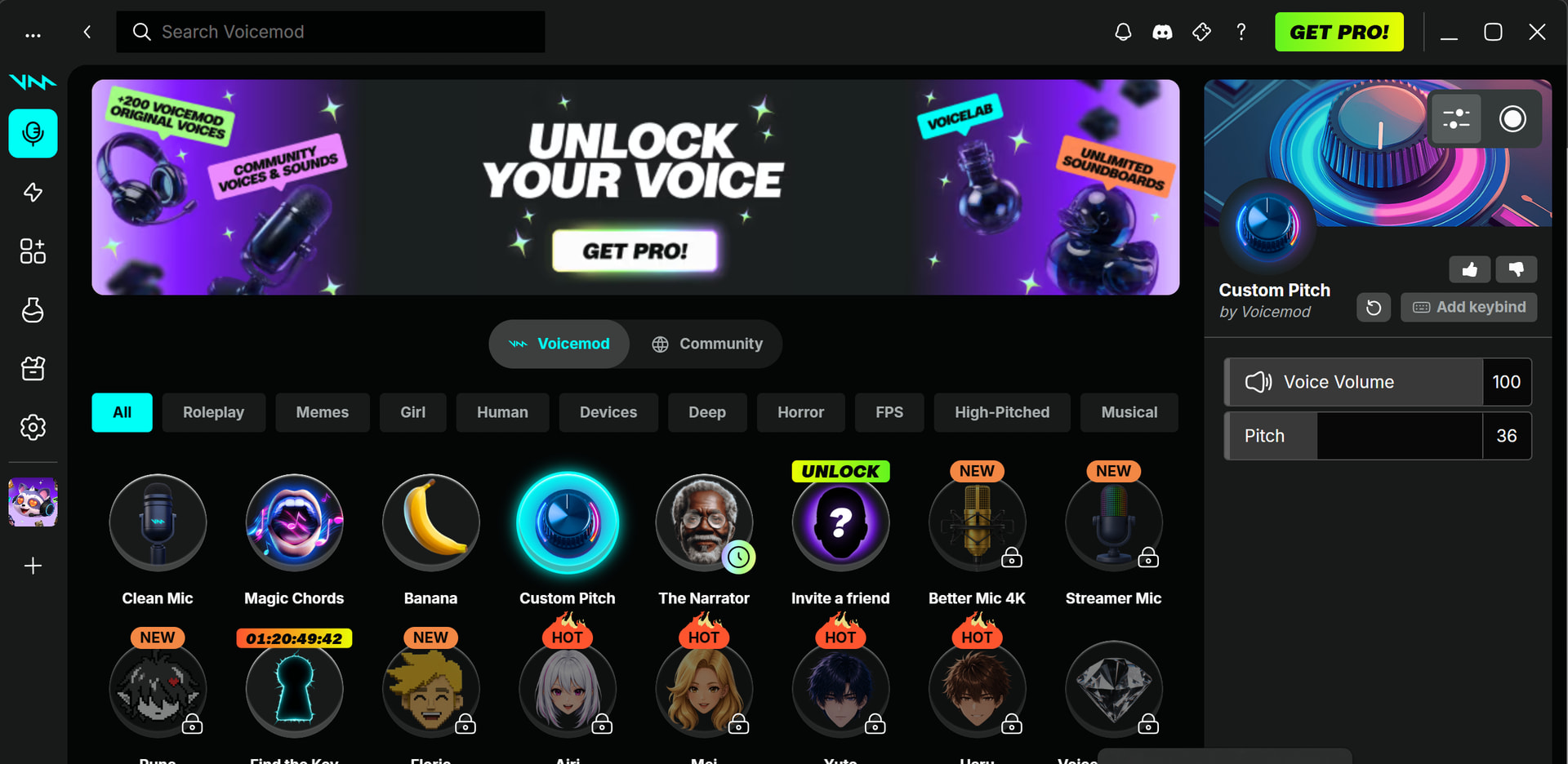
it’s just gated behind Pro. Not available for free tier unfortunately.
What about Mac has to be good and free
A deeper voice, free, no Pro gate — the route Voicemod hides
A deeper voice, free, no Pro gate — the route Voicemod hides@odirachukwu_onyejefu — you found the catch yourself: Voicemod’s pitch control is Pro-only, and the free tier gives you fixed character voices instead. So skip it. The tool that deepens a voice properly is a free VST plugin, and OBS can load one in three clicks.
The 3-minute version, inside OBS
OBS → the mic → Filters → + → VST 2.x → point it at the plugin
1  download Graillon 3 Free Edition (Auburn Sounds)
2  OBS → mic → Filters → + → VST 2.x → add → Graillon
3  Pitch: -2 to -4 semitones, Formant: -2 for a fuller chest
4  Test, then raise the Mix so it stays natural
Graillon 3 Free Edition moves a voice 12 semitones either way and keeps it human with formant control — that formant slider is the difference between “deeper” and “chipmunk”. Free, no account. 
 Free pitch plugins that do the same job
- MAutoPitch — free, includes formant shift and a clean pitch wheel
- GSnap — tiny, free, instant pitch with a formant knob
- Nine free pitch shifters compared for 2026 — if you want the whole shelf in one page
 Making it reach Camtasia, Discord or Zoom
OBS filters only touch audio inside OBS. For everything else, give your system a fake microphone:
VB-Cable (free, donationware) → set Cable Input as the output of the app doing the pitch shift, then choose Cable Output as the microphone inside Camtasia. One cable, every app. 
 When you want a different person, not a deeper you
Real-time AI voice conversion, free and open source:
- VCClient by w-okada — live RVC and Beatrice v2 models, Windows/macOS/Linux, CPU or GPU, feeds OBS directly. This is the project that proved live conversion works
- VybeShift — small C# real-time changer for Windows, no GPU needed
- Your own voice as a model — record 10 minutes, train once, and the stream hears a version of you that never gets tired
 After recording, inside a free editor
Camtasia’s Audiate is paid. Audacity does the same job free: select the track → Effect → Pitch and Tempo → Change Pitch, and keep Change Formants on or the voice turns robotic.
Start with Graillon at -3 semitones and formant -2. That is the “mature, composed” tone you were chasing, and it costs nothing.
 !
!