 Your Phone Lives Inside Your PC Now — Free, Open, No Root
Your Phone Lives Inside Your PC Now — Free, Open, No Root142K-star tool. Mirrors any Android to Windows / Mac / Linux. Real keyboard, real mouse, 1080p recording — no app on phone, no account, no fee.
v4.0 just dropped — flex window, camera zoom, Wi-Fi mode, F11 fullscreen, OPUS fixes. Every chapter is collapsed below — open what you need.
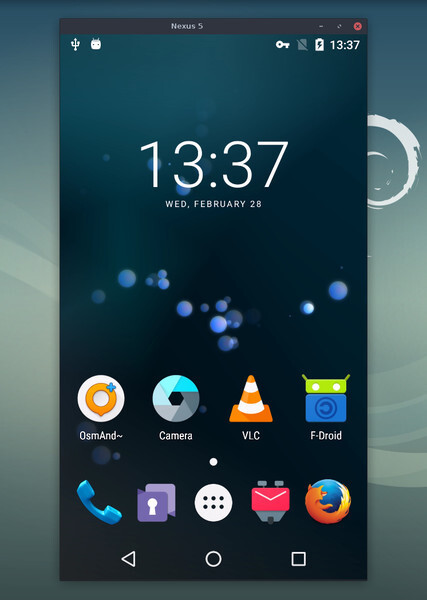
🎬 What this is?
Plug your Android into your PC. Your phone screen pops up as a window on your monitor — full size, lag too small to notice. You control it with your real keyboard and mouse like any other app on your desktop.
The phone needs nothing installed. Zero. The tool uses ADB — a USB messenger Android has built-in since forever for developers. It wakes up for 2 seconds, scrcpy does its thing, that’s it.
| Boring name | What it actually means |
|---|---|
| scrcpy (say “screen copy”) | Mirrors phone → PC + lets you control it |
| Open-source | Code is public — no spyware hiding inside |
| Apache 2.0 (license name) | Means: free forever, do whatever you want with it |
| 142,000+ GitHub stars | That’s how many devs bookmarked it |
| No root needed | Don’t need to “unlock” your phone — works on stock Android |
 Official repo (only ever download from here): github.com/Genymobile/scrcpy
📥 Direct download links — v4.0 (fresh drop)
Skip the GitHub page hunting — these are the direct asset URLs from the v4.0 release.
| Your computer | Download |
|---|---|
 Windows 64-bit (most people) Windows 64-bit (most people) |
scrcpy-win64-v4.0.zip — 15 MB |
| Windows 32-bit (old PCs) |
scrcpy-win32-v4.0.zip — 13.9 MB |
 Mac (Apple Silicon / M1+) Mac (Apple Silicon / M1+) |
scrcpy-macos-aarch64-v4.0.tar.gz — 12 MB |
| Mac (Intel) |
scrcpy-macos-x86_64-v4.0.tar.gz — 12.7 MB |
 Linux (most distros) Linux (most distros) |
scrcpy-linux-x86_64-v4.0.tar.gz — 20.1 MB |
 Verify hash (paranoid mode) Verify hash (paranoid mode) |
SHA256SUMS.txt |
 Full v4.0 release notes Full v4.0 release notes |
Release page |
Terminal people:
brew install scrcpy(Mac) ·sudo apt install scrcpy(Ubuntu/Debian) ·sudo pacman -S scrcpy(Arch) ·winget install scrcpy(Windows) — same tool, less clicking.
⚙️ First-time setup — 3 steps, 60 seconds
1. Wake up Developer Mode on your phone (hidden menu Android ships with — totally legit, made for developers)
Settings → About phone → tap "Build number" seven times → "Developer options" now appears in Settings
2. Inside Developer options:
- Turn USB debugging ON
- Xiaomi / Redmi / Poco users: also turn on USB debugging (Security Settings) — without this, scrcpy can SEE your phone but can’t TYPE on it. Xiaomi is just weird.
3. Plug in + run
- USB cable → phone to PC
- Phone pops up: “Allow USB debugging?” → tick “always allow from this computer” → OK
- Double-click
scrcpy.exe(Windows) OR typescrcpyin Terminal (Mac/Linux)
Done. Your phone is a window on your monitor.
If nothing happens — the cable is the villain 90% of the time. Cheap charging-only cables don’t carry data. Try the one your phone came with. Fixes most “scrcpy is broken” rants in the GitHub issues.
 Official setup walkthrough: doc/connection.md · FAQ.md
⚡ Command cheat sheet — copy-paste these
Type any of these in Terminal / Command Prompt (wherever you launched scrcpy from). Each one does one thing.
| What you want | Command |
|---|---|
| Just mirror, defaults | scrcpy |
| Wireless / no cable (after first USB setup) | scrcpy --tcpip=PHONE_IP:5555 |
| Record everything to a video file | scrcpy --record=clip.mp4 |
| Mirror while phone screen stays BLACK (stealth mode) | scrcpy --turn-screen-off |
| Best quality on big monitors | scrcpy --video-codec=h265 --max-size=1920 |
| Smaller window for weak PCs | scrcpy --max-size=1024 |
| Phone camera as your webcam (Linux only) | scrcpy --video-source=camera --v4l2-sink=/dev/video2 |
| Control phone with NO mirror display (headless OTG) | scrcpy --otg |
| USB gamepad → play phone games on PC | scrcpy --gamepad=uhid |
| Mirror + screen off + don’t let it sleep | scrcpy --turn-screen-off --stay-awake |
| Launch a specific app in its own resizable window | scrcpy --new-display --start-app=com.spotify.music |
| Crank bitrate for crisp gameplay recording | scrcpy --video-bit-rate=16M |
| Front camera as webcam | scrcpy --video-source=camera --camera-facing=front |
| Don’t let phone sleep mid-session | scrcpy --keep-active |
| Change scrcpy window background color | scrcpy --background-color=234567 |
| Limit framerate (for weaker hardware) | scrcpy --max-fps=30 |
Every flag explained, plain English: scrcpy/doc folder
🆕 What's new in v4.0 — the headline stuff
| Feature | Why you care | Command |
|---|---|---|
| Flex display | Resize the mirrored window like any normal app — content scales with it | scrcpy --new-display -x |
| Camera torch + zoom | Control flashlight + zoom from your PC | scrcpy --video-source=camera --camera-zoom=1.5 |
| Keep-active flag | Phone won’t sleep on you mid-mirror | scrcpy --keep-active |
| F11 fullscreen | Just hit F11 — no more digging for the shortcut | (keyboard) |
| Mod + q to quit | One key combo to nuke the window | (keyboard) |
| Aspect ratio lock | Window keeps phone proportions when you resize | (default) |
| Dark gray background | No more pure black void around the phone window | (default) |
| Disconnected icon | When your phone unplugs you SEE it for 2 seconds instead of “did it crash?” | (automatic) |
| Meta Quest fix | Mirroring a Quest VR headset works again after a firmware update broke it | (automatic) |
| OPUS audio CPU fix | Silence no longer eats 40% of your CPU (yes, that was a real bug) | (automatic) |
| SDL3 migration | Smoother window, better cross-platform behavior, future-proof | (under the hood) |
| FFmpeg upgrade to 8.1.1 | Better codec support, faster decode | (under the hood) |
| Camera shortcuts inside scrcpy | Mod + k (torch on), Mod + Shift + k (torch off), Mod + Up/Down (zoom) |
(keyboard) |
Full changelog with every fix + PR link: Release v4.0 page
🎯 Real-world use cases — what people actually do with this
| Situation | Why scrcpy crushes it |
|---|---|
| Long WhatsApp / Telegram replies | Real keyboard, real punctuation, no autocorrect rage |
| Reading DMs while you work | Tiny phone window in the corner of your monitor |
| Recording mobile gameplay for YouTube | 1080p straight to SSD, no watermark, no battery drain |
| Screen-sharing your phone in Zoom / Meet | Share the scrcpy window — instant phone demo |
| Phone screen is cracked but the display works | Plug in, control with mouse, back up everything |
| Using your phone with the screen completely off | Phone face-down on desk, you still see/use everything |
| Demoing an Android app to a client | Big screen, smooth pointer, looks professional |
| Avoiding notification anxiety | Notifications stay quiet on phone, visible only in window |
| Pentesting / dev testing on a real device | No emulator slowness, real device on real screen |
| Streaming phone gameplay to OBS | Add scrcpy as a window source — done |
| Daily-driving from your laptop | Mouse and keyboard for everything, phone in pocket |
| Showing memes on Discord screen-share | Phone window → screen share →  |
The “phone screen black + mirror to PC” combo is the secret weapon. Phone stays cold and dark on the desk. Battery lasts ~40% longer. Notifications don’t bug you visually. Pure focus mode — and nobody at the cafe sees what you’re doing.
⌨️ Every keyboard shortcut worth memorizing
Mod = Left Alt OR Left Super (Windows key on PC / Cmd key on Mac) — both work.
| Shortcut | Does this |
|---|---|
| F11 (v4.0) | Toggle fullscreen |
| Mod + f | Toggle fullscreen (classic) |
| Mod + q (v4.0) | Quit scrcpy |
| Mod + h | Click HOME button |
| Mod + b or Right-click | Click BACK button |
| Mod + s | Click APP-SWITCHER |
| Mod + m | Click MENU button |
| Middle-click | Click HOME |
| Mod + p | Power button (turn phone screen on/off) |
| Mod + o | Turn phone display OFF (mirror still works) |
| Mod + Shift + o | Turn phone display back ON |
| Mod + r | Rotate phone screen |
| Mod + n | Pull notification shade |
| Mod + Shift + n | Pull settings panel |
| Mod + c | Copy phone clipboard → PC |
| Mod + v | Paste PC clipboard → phone |
| Mod + Shift + v | Force-paste (works where normal paste is blocked) |
| Ctrl + scroll wheel | Zoom in / out |
| Mod + k (v4.0, camera mode) | Camera torch ON |
| Mod + Shift + k (v4.0) | Camera torch OFF |
| Mod + ↑ / ↓ (v4.0, camera mode) | Camera zoom in / out |
Full official shortcut list: doc/shortcuts.md
🪤 If it breaks — common problems + actual fixes
| The error you’re seeing | The actual cause | The fix |
|---|---|---|
| “No devices found” | Cable is charge-only, OR USB debugging is off | Swap cable + double-check USB debugging |
| Mirror works, mouse doesn’t click | Xiaomi/Redmi extra security toggle | Enable “USB debugging (Security Settings)” in dev options |
| No sound | Phone is below Android 11 | Audio needs Android 11+. Video still works. |
| Window is super laggy | 4K monitor + max quality | Add --max-size=1920 |
| Wireless mode drops randomly | Wi-Fi router throttling devices | Plug in for important stuff |
| Antivirus flags scrcpy.exe | Generic false positive (only real if from a sketchy site) | Download ONLY from the official GitHub |
| “Connection refused” on Wi-Fi mode | TCP/IP port wasn’t enabled | First plug in via USB, run adb tcpip 5555, then unplug |
| Black screen but everything else works | App blocks screen capture (Netflix, banking, etc.) | DRM protection. Not a scrcpy bug. |
| Phone gets warm during long sessions | Encoding the screen burns some CPU | Lower bitrate: --video-bit-rate=4M |
| Can’t paste from PC to phone | Some Android keyboards block sync | Use Mod + Shift + v instead |
| Camera mode shows black screen | Camera permission not granted to ADB | Toggle camera permission for “Shell” in app settings |
| High CPU when audio is silent | Old version — v4.0 fixed this | Just update to v4.0 |
The dev’s own FAQ — genuinely good, not content-farm trash: FAQ.md
🎁 Bonus tools + GUI wrappers (no Terminal required)
scrcpy by itself is great. Pair it with these and it gets stupid powerful — or easier, if Terminal scares you.
| Tool | What it adds | Link |
|---|---|---|
| QtScrcpy | GUI on top of scrcpy + multi-device mirroring + key mapping for games | github.com/barry-ran/QtScrcpy |
| guiscrcpy | Python GUI wrapper — good for Linux users who hate the terminal | github.com/srevinsaju/guiscrcpy |
| scrcpy-gui (Windows) | Simple Windows GUI, point-and-click control | github.com/Tomotoes/scrcpy-gui |
| MirrorTo / Vysor / AirDroid | Paid alternatives — $5-10/month for the same thing | (skip — scrcpy is free) |
| OBS Studio | Capture the scrcpy window for streaming / recording | obsproject.com |
| ADB platform-tools (if needed standalone) | The raw USB messenger scrcpy uses internally | SDK Platform-Tools |
| scrcpy-server (advanced) | Run scrcpy headlessly on a server | Included in releases |
Vysor and AirDroid charge real money for the same job. scrcpy uses ADB + standard codecs — there’s literally nothing to charge for. They just rely on people not knowing scrcpy exists.
📚 Deep-dive docs — every official guide, one click each
| Topic | Doc page |
|---|---|
| Connection (USB + Wi-Fi) | connection.md |
| Video options | video.md |
| Audio forwarding | audio.md |
| Recording | recording.md |
| Virtual display | virtual_display.md |
| OTG mode (controller-only) | otg.md |
| Camera mirroring | camera.md |
| Webcam mode (Linux V4L2) | video4linux.md |
| Gamepad support | gamepad.md |
| Keyboard simulation (HID) | keyboard.md |
| Mouse simulation (HID) | mouse.md |
| Window options | window.md |
| Device control | device.md |
| TCP tunnels (advanced) | tunnels.md |
| Build from source | build.md |
| Verify release signatures | verify_release_signatures.md |
 Dev’s articles on how scrcpy works under the hood:
- Introducing scrcpy — the original 2018 post
- scrcpy now works wirelessly — Wi-Fi mode explainer
- scrcpy 2.0 with audio — audio forwarding deep dive
💛 Throw the dev a coffee — totally optional
The whole thing is built by Romain Vimont (rom1v) at Genymobile — one French dev, 8+ years, zero ads, zero “scrcpy Pro” trap. Apache 2.0 license. Code is public.
| If you want to say thanks | Link |
|---|---|
 GitHub Sponsors GitHub Sponsors |
github.com/sponsors/rom1v |
| Liberapay |
liberapay.com/rom1v |
| PayPal |
paypal.me/rom1v |
 Bluesky Bluesky |
@scrcpy.bsky.social |
 Twitter / X Twitter / X |
@scrcpy_app |
 Reddit community Reddit community |
r/scrcpy |
 Bug reports Bug reports |
GitHub Issues |
Using it for free is also a valid thank-you. More users = more eyes on bugs = better tool. That’s the open-source deal.
The lot: one free tool, phone on PC, real keyboard, real mouse, real recording. v4.0 fresh. No app on phone, no account, no annual fee. Download once, use forever.
If you’ve been thumb-poking that tiny glass screen all this time — that was a choice, not your only option.
 !
!