 GitHub: A Free Time Machine, Web Host & Robot Army in One
GitHub: A Free Time Machine, Web Host & Robot Army in OneA free vault that saves every version of anything you make — code, writing, prompts, whole sites. No terminal to start.
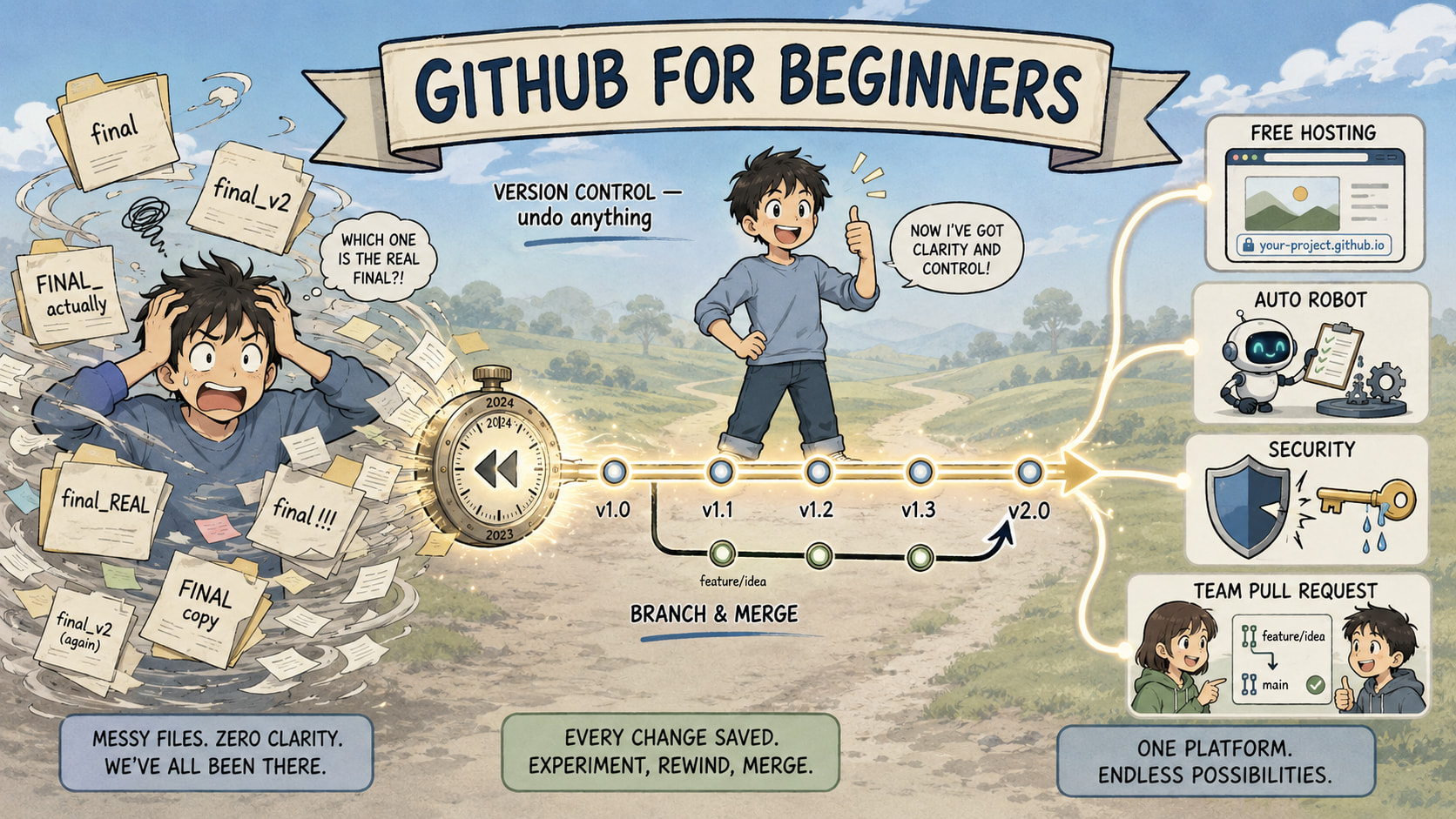
Sold to you as a “coder thing.” It’s a free undo-button + free hosting + free automation for anything. Open a section, take what you need.
⚡ 5 Real Use Cases — Shared-Edit Rollback, Free Site, Scheduled Automation, Leak Alerts, Skill Proof
One payoff, five faces: free history-vault for anything + free hosting + free robots.
- Shared edits, no chaos. You + teammates edit one shared doc/prompt list — every change tracked, roll back any mistake in one click, no
final_v9copies. - Free website in 5 min. Portfolio or project live at
yourname.github.io— no hosting bill. - Scheduled robot. Run a task or report automatically on a timer — no server, free.
- Leak alert. Accidentally commit a password or API key? GitHub flags it before strangers find it.
- Clickable proof of skill. Fixing real open-source bugs builds a public record recruiters can check.
🧩 Basics — Version Control, Git Commits, 2FA + Profile README, Git Command Cheatsheet
Version control = unlimited undo for a whole project folder. Git is the engine. A commit = a saved snapshot (a game checkpoint). Screw up → rewind.
Three zones: working directory (where you type) → staging area (the “about to save” pile) → local repo (your history). Moved by git status / git add / git commit.
 What is Git? Beginner’s guide to version control
Lock the account: turn on 2FA (a second login code, so a stolen password is useless) → Settings → Password and authentication. Stash the recovery codes in a password manager. Then give yourself a profile README — a public repo named like your username; whatever you write shows on your profile.
Set up + secure your profile
The commands that do 90% of the work:
| Command | What it does |
|---|---|
git config --global user.name "…" |
Name on your commits |
git init |
Turn a folder into a repo |
git clone <url> |
Copy a remote repo locally |
git status |
See what changed / is staged |
git add . |
Stage all changes |
git commit -m "message" |
Save a snapshot |
git switch -c <branch> |
New branch + switch to it |
git push |
Upload commits to GitHub |
git pull |
Download latest from GitHub |
git merge <branch> |
Fold a branch into yours |
🏗️ Build — Create a Repo, .gitignore, Markdown, GitHub Flow (Branch → Merge)
Repo = a project folder that tracks history and lets people work together. From your dashboard at github.com: green New → name → public/private → tick “add README” (the front door people see). Add a .gitignore = a “don’t track this junk” list (system files, downloaded dependencies, build gunk stay out).
Create your first repo
Markdown = simple symbols → clean formatting. It’s how you write READMEs, issues, PRs, and comments everywhere on GitHub.
Getting started with Markdown
GitHub flow = the repeat loop: branch → change → commit → push → pull request → merge. A branch = a parallel copy where you experiment without breaking the live version:
main    ──●──●─────────●──   ← live, safe version
            \         /
 branch      ●──●──●─┘       ← your playground; merge back when ready
Works for anything, not just code — a team’s shared AI prompts, docs, notes.
Adding code to your repository
🤝 Collaborate — Pull Requests, Diffs, Merge Conflicts, Issues + Projects, Closes #42 Auto-Close
Pull request (PR) = “here are my changes, can we add them?” + a review space. Shows a diff (exactly what changed, line by line). Keep PRs small → faster reviews, fewer bugs.
Create a pull request
Merge = fold reviewed changes into main (usually one green button). A merge conflict = two edits hit the same line; Git asks you to pick. Fix it in the browser or VS Code (free editor) → resolve → merge.
Merge a pull request
Issues = shared sticky notes (task/bug/idea, assignable + labelable). Projects = a Kanban board (To Do → Doing → Done). Trick: drop Closes #42 in a PR → the second it merges, issue #42 auto-closes and slides to “Done.” Zero manual tracking.
Getting started with Issues + Projects
🔓 Level Up — GitHub Actions (CI/CD), Pages Free Hosting, Secret Scanning + Dependabot + CodeQL, Forks
Actions = a robot that auto-runs tasks (tests, deploys, labeling) when something happens in your repo — that’s CI/CD (auto test + ship). Written as a .yml file (YAML = plain-text step list) in .github/workflows/.
Getting started with GitHub Actions
Pages = free website hosting at username.github.io/repo-name, no server. Settings → Pages → deploy from a branch → live in minutes. Even private repos can publish a public site.
Getting started with GitHub Pages
Advanced Security — free on public repos:
| Tool | Catches |
|---|---|
| Secret scanning | API keys/passwords you committed by accident |
| Dependabot | Known holes in libraries you borrowed → auto-PRs to patch |
| CodeQL | Risky patterns in how your data flows |
Getting started with GitHub security
Open source = code anyone can read + improve. Look for a project with a clear README + CONTRIBUTING.md + license + a good first issue label. A fork = your own full copy of someone’s repo (vs a branch = a workspace inside a repo you already own). Combo move: fork → branch → PR back.
Getting started with open source contributions
📚 Full Beginner Series, FAQ, YouTube Video Course & Official GitHub Docs
| Resource | Inside |
|---|---|
| Full beginner series | Every topic, expanded |
| Common questions | The stuff everyone asks |
| Video series (YouTube) | Watch it on screen |
| GitHub Docs — Get started | The official manual |
 The point: free version-history for anything + free website + free robots + free security. Make an account, learn the top three commands, climb from there.
Every “final_v9” file you ever lost was a repo you never bothered to make.
 !
!