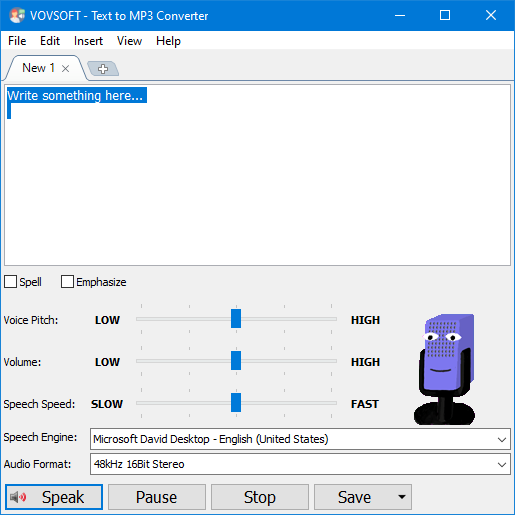
If you have been searching for a text-to-speech software that easily allows you to convert text to speech, please check out the Vovsoft Text to MP3 Converter application. This professional program is designed to help you convert any written text into spoken words. With its help, you are able to view and read some text content without having to actually spend time reading it. This tool provides 2 options for the output audio format WAV and MP3.
Key Features:
Speech speed (fast-slow)
Voice pitch (high-low)
Spell
Emphasize
DOCX to MP3
DOC to MP3
Multiple speech engine support
Read aloud
Insert silence
Voiceover highlighting
Text to MP3
Text to WAV
Supported OS: Windows 11, Windows 10, Windows 8/8.1, Windows 7 (32-bit & 64-bit)
How to get the Vovsoft Text to MP3 Converter license key for free? Step 1. Download the installer for Vovsoft Text to MP3 Converter version 2.2 –> text-to-mp3-converter.exe text-to-mp3-converter-portable.zip
Step 2. Install the software on your computer and register it with the Vovsoft Text to MP3 Converter license key. Use the below license:
8J2QC-RGZPF-JLTV6
This is a lifetime license
Non-commercial usage
No free updates and tech support
This giveaway is valid until Oct 09, 2022
Enjoy!
Thanks @PlayBoy83 . Very helpful.
I wish the voices were human like
Aina
21.Март.2023 22:06:10
5
Step 1. Download the installer for Vovsoft Text to MP3 Converter version 2.6 –> text-to-mp3-converter.exe text-to-mp3-converter-portable.zip
Step 2. Install the software on your computer and register it with the Vovsoft Text to MP3 Converter license key. Use the below license:
4F2NX-GN6XE-DZ2VX
This is a lifetime license
Non-commercial usage
No free updates and tech support
Aina
17.Декабрь.2023 00:18:11
6
Step 1. Download the installer for Vovsoft Text to MP3 Converter version 3.7 –> text-to-mp3-converter.exe text-to-mp3-converter-portable.zip
Step 2. Install the software on your computer and register it with the Vovsoft Text to MP3 Converter license key. Use the below license:
CE7RW-2ZCT6-Z8B57
This is a lifetime license
Non-commercial usage
No free updates and tech support
Aina
29.Март.2024 23:56:40
8
Step 1. Download the installer for Vovsoft Text to MP3 Converter version 3.5 –> text-to-mp3-converter.exe text-to-mp3-converter-portable.zip
Step 2. Install the software on your computer and register it with the Vovsoft Text to MP3 Converter license key. Use the below license:
HEXCW-KTBVP-E8NUJ
This is a lifetime license v3.5
Non-commercial usage
No free updates and tech support
Aina
18.Август.2024 22:35:13
10
Step 1. Download the installer for Vovsoft Text to MP3 Converter version 3.6 –> text-to-mp3-converter.exe text-to-mp3-converter-portable.zip
Step 2. Install the software on your computer and register it with the Vovsoft Text to MP3 Converter license key. Use the below license:
XRKAB-PRS53-8R41Z
This is a lifetime license v3.6
Non-commercial usage
No free updates and tech support
Aina
13.Ноябрь.2024 10:45:43
12
Step 1. Download the installer for Vovsoft Text to MP3 Converter version 3.7 –> text-to-mp3-converter.exe text-to-mp3-converter-portable.zip
Step 2. Install the software on your computer and register it with the Vovsoft Text to MP3 Converter license key. Use the below license:
YCQR7-6MU89-XTG49
This is a lifetime license v3.7
Non-commercial usage
No free updates and tech support
Aina
02.Декабрь.2024 20:21:45
14
Step 1. Download the installer for Vovsoft Text to MP3 Converter version 3.7 –> text-to-mp3-converter.exe text-to-mp3-converter-portable.zip
Step 2. Install the software on your computer and register it with the Vovsoft Text to MP3 Converter license key. Use the below license:
License: R7L1A-QNY7M-2K3SE
This is a lifetime license v3.7
Non-commercial usage
No free updates and tech support
Aina
02.Февраль.2025 13:59:17
15
Step 1. Download the giveaway installer for Vovsoft Text to MP3 Converter version 4.0 –> Text_to_MP3_Converter_v4.0.exe
Step 2. Install the software on your computer and enjoy it!
This is a lifetime license v4.0
Non-commercial usage
No free updates and tech support
Day
02.Февраль.2025 16:04:56
16
Thanks, I was looking for this a long time ago…
Aina
12.Март.2025 20:52:40
17
Step 1. Download the giveaway installer for Vovsoft Text to MP3 Converter version 4.1 –> text2mp3.exe text2mp3-portable.zip
Step 2. Install the software on your computer and use the license code below to register it:
3DFAV-FCRVZ-TJVZ1
This is a lifetime license v4.1
Non-commercial usage
No free updates and tech support

 !
!