For people who purchased via Play Store, here is how you can make a refund request.
Goto https://play.google.com/store/account .
Scroll down to Order History.
Find your Fifa Points purchase and click on the drop down menu → Report a Problem
http://imgur.com/Qundxus
Select “Purchase is defective or doesn’t work as advertised”. https://imgur.com/a/MR2pu
Describe the issue (describe how its a fraud/scam). Submit. Below is what I used, copied from another thread:
“Game mislead me into buying points for in game use and rendered them useless within 24 hours.please refund my purchase. Without prejudice”
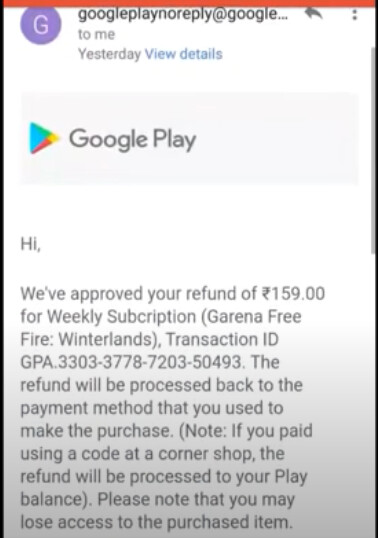
UPDATE: Google refunded, here is what I get:
https://imgur.com/a/Df1ZC
https://imgur.com/a/helS3
VIDEO
https://techindroid.com/google-play-store-refund/
Go to (on a computer):
Scroll down to your Order history.
For each purchase, click the 3 dots and choose Request a refund.
Choose “Purchase is defective or doesn’t work as advertised”
Click submit.
For the text description, I wrote “Game is being shut down with no prior notice, essentially scamming money from its users”.
Click submit.
I’ve just had all my purchases dating back to 20 September refunded instantly.
This is not a trick , this is a feature for reporting if something unexpected happens or if we really dont like the purchase , we will get refunded only 4 times or 5 times i think so use it wisely because if sometimes something gets wrong in future then u might not be able to refund !

 !
!