How To Disable All Ads In Chrome A Complete Solution!

To completely remove ads from your chrome follow these steps:

  • Part 1. First of all install ad-blocker extension.
    You can either install uBlock Orgin or Adblock plus(or any other) from following links:

    Note: You can install and use both! But remember this may result into some conflicts and the load on processor will increase.

  • Part 2. Now ads on some sites will be blocked but some will detect adblocker and will give popup message “Disable adblocker”. To solve this we will use “Anti-Adblock Killer” script by “Reek”

    1> First of all install another extension Tempermonkey from following link:

    2> Add reek’s filter list to adblocker

    • Go to anti-adblock filter list
    • Click on “Subscribe”
    • Click "OK"(if installed uBlock) or “YES, USE THIS FILTER LIST”(if adblock plus)

    3> We are ready to install script

    • Go to following site - anti-adblock script
    • Click on “Install this script”, it will open script in tempermonkey
    • Click on “Install”, now the script is installed.
      Note: This will disable popup message for most of site but there are always some excceptions
  • Part 3. To skip the time constraint/countdown ads or continue pages like ‘adf.ly’,‘linkbucks’ etc
    Install another script “AdsBypasser”

    • Go to - “https://adsbypasser.github.io”
    • Click “Install Full Edition”
    • Click “Install”
      Note: This script was able to solve older captcha but it CANNOT help you to solve new reCAPTCHAs(images).
    • For reCAPTCHAs you can use Buster: Captcha Solver
      Note: Buster will only able to solve captca with audio, and continuous of buster may be detected by site, then you have to solve it manually.

Please disable adblocker for the forum. As this is only way we can contribute to them.

54 پسندیدگیاں

useful tutorial @goku_pistol. thanks for sharing

2 پسندیدگیاں

Very useful post!

I use uBlock Origin + Nano Defender for anti-adblock / adblock-killer

Both of them from Chrome Extension official page

4 پسندیدگیاں

Ummmh, I’m pretty Impressed, a very nice tutorial with proper explanation, I must say Well done :+1:

And a few sites don’t requires blocking ads, help them besides blocking ads. there much learning resources can be found.

Cheers!

12 پسندیدگیاں

Everybody please keep this in mind. Don’t block ads where we are getting so much of knowledge and resources

3 پسندیدگیاں

Thanks, Chief!

2 پسندیدگیاں

thank u for the info..!!

But adguard says that, adblock and ublock are fake and used for cookie stuffing!

2 پسندیدگیاں

Thank you for bringing this to my attention!
But I believe the headline/title of article is misleading. It’s about the fake extensions or say copy of real extensions. The 2nd para of article states following :

The two extensions, called AdBlock by AdBlock Inc. and uBlock by Charlie Lee, also mislead users by mimicking names of two real ad blocking extensions, as well as the names of the developers behind those extensions. Users have reported these extensions as fake, but Google has seemingly yet to take action.

To prevent from such frauds please don’t use the WebStore internal search.

2 پسندیدگیاں

So, we have to get extension only from their websites directly??

1 پسند

Yes, Adblock and uBlock provides Extensions for specific browsers, Visit them and get Extension. else Go to Browser’s extension and search the extension, it will give you the correct one. else Google search with the extension name and add browser name in the end. it will output the correct and original extension. no fake.

Here’s the Originals:

Adblock Plus: https://adblockplus.org/
Adblock: https://getadblock.com/

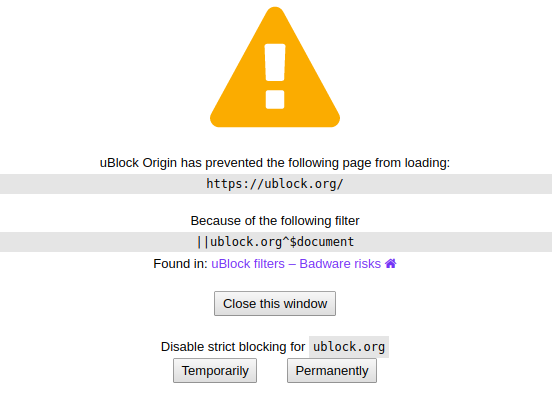
uBlock: https://ublock.org/ (Not sure about it)

3 پسندیدگیاں

That nice tutorial you have shared with us, but as for me, I use Brave browser which has excellent adblocking feature! Try it out but please disable the adblocking on ftuforum or onehack!

3 پسندیدگیاں

also guys check this
https://www.ghacks.net/2019/08/28/how-to-block-blockadblock-manually-using-ublock-origin/

3 پسندیدگیاں

This is one is fake - uBlock: https://ublock.org/
The real extension were done by Raymond Hill.

1 پسند

Yes, we can surely use manual script for custom blocking

This is one is fake - uBlock: https://ublock.org/
The real extension were done by Raymond Hill.

True, in fact it is blocked by uBlock origin! LOL!:joy:

Thanks, this was really helpfull :smile:

1 پسند

UBlock Origin by Raymond Hill is the original & very effective adblocker, it is real, it is not at all malicious in anyway. don’t believe fake versions & their fake stories

2 پسندیدگیاں

Very nice solution and I do not use it on FTU and onehack forum.

2 پسندیدگیاں

very useful . thank you soooo much.

1 پسند

Will definitely try this, Thanks

1 پسند

I needed this thanks for this

1 پسند