Heyy !! its my first post, thank you guys for your amazing work !!
Couple of months ago there was a site named “saavndownload.com” which works fine for downloading entire album/playlist or even single song but this site is somehow shut down now . So, i am hoping anyone know how to download Saavn songs/playlist online or through any software !!
Thank you guys !!
Guys seriously i dont know how to use this downloader can you please guide me how can i use this to download !!
1 Like
can we install this in colab?
if yes then plz explain a bit
i don’t know about colab but it works perfect in windows and in linux distros
for this you need to install python 3 or above so that pip command can be used after that clone the package from git link provided using git clone command after that go to the directory where you have cloned the repository you can see yourself by typing ls in terminal from their change the directory using cd command followed by the directory name or directly open the terminal in the directory after that follow README file to install it
I tried my best to explain if you still face issue or don’t understand what am i saying you can ask again
If you can direct us to any video which is present on youtube i guess it could help us, it will automatically demonstrate the whole process !!
don’t mind but you need to learn how to use linux cause most of the scripts are written in python and to use them proper manner you need to get some knowledge how to do these things
I hope you understand
1 Like
Most ppl will give up when it comes to cli
i myself give up
There r many useful github repos but most of them r cli
See ppl only want GUI  …told ya
2 Likes
Yep !! still no actual solution !! Still searching !!
Do one thg…request feature on bhadoo’s repo on github…i think he will add that feature sooner or later
https://github.com/ParveenBhadooOfficial/Jio-Saavn-Downloader
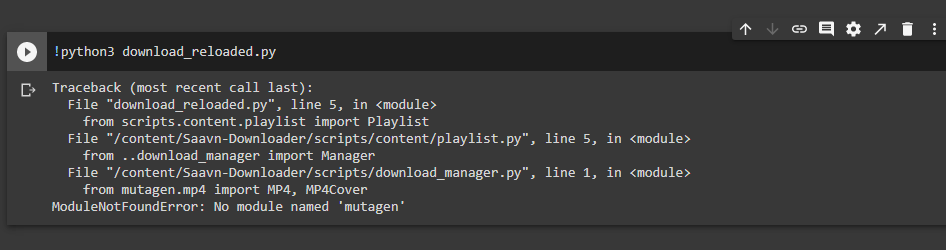
installed requirements now when i run the code, it gives following eror
Heyy how can i use this on PC i dont know about python ??
Can you elaborate roughly !!
Thank you !!
1 Like
You use linux or windows ???
If you use windows then download ubuntu 18.04 lts from Microsoft Store and then tick the option of WSL and reboot your pc or laptop
Then in the GitHub link download or clone the package and then open the linux terminal where the package has been downloaded and follow the steps present in Readme that’s it
highest quality of savaan is super duper which is actually 320kps aac and in this apk it downloads lower bitrate
Does it download whole playlist ??
No, you have to download the songs individually

 !
!