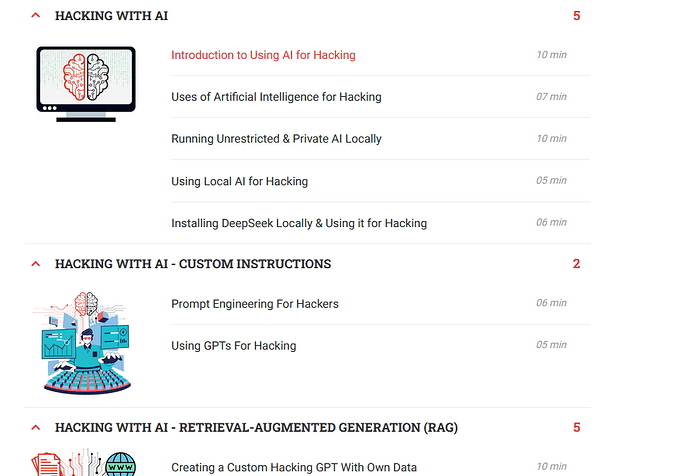
Please does anybody know how to integrate Ai on my terminal for CTFs. I have seen the likes of penligent and Claude but doesn’t seem to understand how to use it. Any video link or course will help. Thanks. Use the URL link and image below to understand what I am trying to accomplish
There’s some approach you can try:
Gemini CLI (Kali Linux Tools) - Google Official Tool to use the most recent Gemini Models straight from terminal, free and paid plans avaliable
Claude Code CLI (Cool Tutorial) - paid but has much more tools and models to use
Github Copilot CLI you can connect a wide range of models with a API key or use a paid plan with 300 requests per month
You’re basically asking: “How do I make my hacking terminal smarter — so instead of memorizing 400 commands, I can just tell the AI what I want and it runs the right tool for me?” That’s a $14/month question (what zSecurity charges), and you’re closer than you think — you just grabbed two tools that weren’t meant to be installed the way you tried. Penligent is a website you log into, not software you download. And “Claude” has a hidden terminal version most people don’t know about. Let me save you the next 6 hours of frustration.
 Do this tonight (10 min): Sign up at Groq — free, no credit card, permanent — paste the API key into Shell-GPT on your Kali (
pipx install shell-gpt), and you’re talking to a 70-billion-parameter AI from your terminal at 500+ words per second. Type sgpt --shell "scan 10.0.2.7 with nmap" and watch it generate + run the exact command for you.
 This weekend (2 hrs): Run
 sudo apt install hexstrike-ai — it’s already in Kali’s repos as of March 2026, comes with 250+ hacking tools and a built-in CTF solver agent, and it’s what replaced the basic mcp-kali-server most tutorials still point you to. Connect it to your free Groq key through 5ire (a desktop app that bridges AI and hacking tools) and you’ve got what that zSecurity screenshot shows — for $0.
| What’s bugging you | What works | Time |
|---|---|---|
| “How to get AI in my terminal” | sudo apt install hexstrike-ai + free Groq API key |
30 min – 2 hrs |
| “Penligent doesn’t work” | It’s a website (penligent.ai), not installable — but has a free tier if you want to try it in-browser | 5 min |
| “Claude doesn’t work” | Browser Claude can’t run commands. Claude Code CLI can — but costs ~$5 API credit. Groq does the same thing free | 10 min |
| “Need it for CTFs” | AI scores ~95% on easy web challenges but near 0% on forensics and binary exploitation — use it for recon and web, learn the rest yourself | Ongoing |
| “Want it free” | Groq (permanent free), Mistral (1 billion tokens/month free), Google AI Studio (Gemini free) — all zero credit card | 5 min signup each |
| “Video or course to learn” | Kali’s own AI blog series with screenshots (free), TCM Security AI 100 (free tier), HTB AI Red Teamer path (built with Google) | Start tonight |
Here’s the part nobody tells you: AI solves 21% of hacking challenges on its own, but 64% when a human guides it. That’s a 3× speed multiplier — but only when YOU drive. Think of it like GPS in a car: it makes you faster, but it can’t drive. I use Groq + HexStrike for web CTF challenges and it genuinely cuts my recon time in half — but for crypto and binary exploitation I don’t even bother asking the AI.
 Common traps: don’t run AI models smaller than 7 billion parameters for security work (every 3B model tested failed at analyzing logs), don’t use AI during OffSec exams like OSCP (they’ll permanently ban you), and don’t skip the “Enabled + Tools” toggle in 5ire settings — it’s the #1 reason people think HexStrike isn’t working.
🔧 Do Exactly This, In This Order — Full Setup From Zero to AI-Powered Terminal
We’re building three layers: a free AI brain (so you don’t need an expensive graphics card), a tool bridge (so the AI can actually run hacking tools instead of just talking about them), and a learning path (so you understand what the AI is doing). Takes 2-3 hours total. By the end, you type plain English and your terminal runs the right hacking tool automatically.
Already comfortable with Kali? Fast track: sudo apt install hexstrike-ai → sign up at console.groq.com → connect HexStrike to Groq through 5ire → done. HexStrike includes a CTF Solver Agent. Jump to the “Pick Your Situation” table at the bottom.
Layer 1 — Get a Free AI Brain (5 minutes)
You know how Netflix streams movies instead of making you download them? Same idea here — instead of running AI on your own computer (which needs an expensive graphics card), you’ll use a free cloud service that does the heavy lifting. Your terminal sends a question, the cloud AI answers in milliseconds, your terminal acts on it.
Step 1: Go to console.groq.com and create an account. No credit card. No trial that expires. Free forever.
Step 2: Click API Keys in the left sidebar → Create API Key → copy the key that starts with gsk_. Save it somewhere safe.
What just happened: You now have free access to Llama 3.3 70B — a 70-billion-parameter AI model (basically ChatGPT-level intelligence) running at 500+ words per second. That’s faster than you can read.
Why Groq instead of OpenAI or ChatGPT? OpenAI has zero free API tier in 2026. Anthropic (Claude’s company) gives ~$5 in one-time credits then charges you. Groq’s free tier is permanent — no tricks, no countdown. And every tool that works with ChatGPT’s API works with Groq by just swapping one URL.
Backup brains (all free, all no credit card):
| Provider | What you get free | Best for | Sign up |
|---|---|---|---|
| Groq | All models, 500+ tok/s, permanent free | Speed + CLI tools (primary pick) | console.groq.com |
| Mistral | 1 billion tokens/month (!) | Heavy usage, long sessions | console.mistral.ai |
| Google AI Studio | Gemini 2.5 Pro, 1M token context | Feeding it massive scan outputs | aistudio.google.com |
| OpenRouter | 30+ free models from multiple providers | Variety, fallback when one is down | openrouter.ai |
| Cerebras | 2,500 tok/s (fastest on Earth), 1M tokens/day | Raw speed for short queries | cloud.cerebras.ai |
Sign up for Groq now. Get the others later if you hit rate limits.
Layer 2 — Connect AI to Your Hacking Tools
Right now the AI can chat but can’t DO anything on your machine. This layer gives it hands.
Option A — Shell-GPT (Simplest path, 10 minutes)
Think of this as autocomplete on steroids — you describe what you want in English, it generates the terminal command AND runs it if you say yes.
# Update your system first
sudo apt update

# Install Shell-GPT (a terminal AI assistant)
pipx install shell-gpt
When it asks for an API key, paste your Groq key. Then edit the config file to point at Groq:
nano ~/.config/shell_gpt/.sgptrc
Change these two lines:
OPENAI_BASE_URL=https://api.groq.com/openai/v1
DEFAULT_MODEL=llama-3.3-70b-versatile
How you know it worked: Type this:
sgpt --shell "scan scanme.nmap.org for the top 100 ports"
You should see an nmap command appear. It’ll ask [E]xecute, [D]escribe, [A]bort. Hit E. If ports show up — you’re live.
Option B — HexStrike AI + 5ire (Most powerful, 1-2 hours)
Shell-GPT can generate one command at a time. HexStrike AI is a whole different animal — it has 250+ cybersecurity tools organized into autonomous AI agents that chain tools together. There’s literally a CTF Solver agent, a BugBounty agent, and a Recon agent built in. Check Point wrote about it being used for zero-day exploitation — that’s how capable it is.
Install HexStrike (it’s already in Kali’s official repos):
sudo apt update
sudo apt install -y hexstrike-ai
HexStrike speaks a language called MCP (think of it as a universal translator between AI and tools). You need a desktop app that speaks MCP too — that’s 5ire:
# Install a dependency 5ire needs to run
sudo apt install -y libfuse2t64

# Download 5ire (version 0.15.3 — this is the one Kali tested and confirmed working)
curl -L https://github.com/nanbingxyz/5ire/releases/download/v0.15.3/5ire-0.15.3-x86_64.AppImage -o /tmp/5ire.AppImage
chmod +x /tmp/5ire.AppImage
sudo mkdir -p /opt/5ire
sudo mv /tmp/5ire.AppImage /opt/5ire/
sudo ln -sf /opt/5ire/5ire.AppImage /usr/local/bin/5ire
Launch 5ire from your application menu or terminal (5ire). Then:
- Add Groq as your AI provider: Settings → Providers → add Groq with your API key and endpoint
https://api.groq.com/openai/v1 - Enable your model for tool use: Go to each model → flip BOTH the “Tools” switch AND the “Enabled” switch to ON → Save
- Add HexStrike as an MCP tool: Tools → Local → new entry → command: the HexStrike MCP server path → Enable
Now type something like “run a full port scan on scanme.nmap.org and analyze the results.” The AI should invoke nmap through HexStrike, get the output, and tell you what it found and what to try next — all in one conversation.
Option C — Fully local, zero internet (2-3 hours, needs NVIDIA GPU)
If you have an NVIDIA graphics card with 6GB+ memory and you want nothing leaving your machine:
# Install Ollama (runs AI models locally on your GPU)
curl -fsSL https://ollama.com/install.sh | sh

# Pull a model that supports tool-calling (the AI needs this to use hacking tools)
ollama pull qwen3:4b     # Fits 6GB GPU memory
# OR if you have 8GB+ GPU:
ollama pull llama3.1:8b   # Better reasoning, needs more memory
Then install HexStrike (sudo apt install hexstrike-ai) and connect 5ire to Ollama (instead of Groq) as the provider.
Where AI Actually Helps in CTFs vs. Where It’s Useless
Academic benchmarks tested this extensively. Here’s what the numbers actually say:
| CTF Category | AI Success Rate | Translation |
|---|---|---|
| Web exploitation (SQL injection, XSS, SSRF) | ~95% on easy, ~40% on medium | AI’s best category — let it lead here |
| Recon and enumeration | High | This IS the sweet spot — “scan this, what do you see?” |
| OSINT (finding info from public sources) | Good | AI connects dots across text data fast |
| Reverse engineering | Varies | Needs GhidrOllama feeding it decompiled code — can’t read binaries raw |
| Crypto challenges | ~10% | AI can’t invent math — learn this yourself |
| Forensics (analyzing evidence files) | 0–7% | Near useless — entirely manual skill |
| Binary exploitation / pwn | ~10% | AI guesses memory layouts wrong — dangerous to trust |
Sources: CTFUSION benchmark (NYU), AutoPenBench (EMNLP 2025), PentestEval (Dec 2025)
The headline number: fully autonomous AI solves 21% of pentesting challenges. With a human guiding it, that jumps to 64%. The AI is your 3× multiplier — but the multiplier only works when you’re behind the wheel.
Rare Tools Most Guides Won’t Mention
These are deeper finds — stuff you won’t see on page 1 of Google:
| Tool | What it does | Why it matters | Link |
|---|---|---|---|
| CAI | The actual successor to PentestGPT (which is effectively abandoned). 300+ AI backends. | Battle-tested on HackTheBox machines — not vaporware | github.com/aliasrobotics/cai |
| Deadend CLI | When attacks fail, it writes custom Python exploits and retries automatically | Only ~204 GitHub stars but scores 80% on XBOW benchmarks. Solved blind SQL injection where other agents scored 0% | github.com/xoxruns/deadend-cli |
| AIRecon | Fully autonomous pentest agent — zero API keys, runs on Ollama. 57 built-in skill files | Brand new (Mar 2026), expect rough edges. The most ambitious free tool out there | github.com/pikpikcu/airecon |
| PentestThinkingMCP | Uses the same algorithm that beats humans at chess to plan attack paths | Designed specifically for CTF/HTB solving — not generic pentesting | github.com/ibrahimsaleem/PentestThinkingMCP |
| Fabric | 200+ AI prompt patterns including security-specific ones. Pipe any tool output into AI analysis | Run `nmap output | fabric --pattern analyze_threat_report` and get instant analysis. 300 developers maintaining it |
| pentest-mcp | MCP server covering nmap, dirbuster, nikto, John the Ripper, hashcat + scope management | Alternative to HexStrike if you want something lighter | github.com/DMontgomery40/pentest-mcp |
Free Learning Path (What zSecurity Charges For, Replicated at $0)
The zSecurity masterclass you screenshotted ($14/month) teaches five things: running local AI models, building custom knowledge bases, using AI agents for hacking, AI-powered malware analysis, and prompt injection attacks. Here’s how to learn each one free:
| zSecurity teaches | Free equivalent | Link |
|---|---|---|
| Running uncensored local AI (Ollama, DeepSeek) | Kali’s official blog series — 3 posts, Jan–Mar 2026, with full screenshots | kali.org/blog/kali-llm-ollama-5ire |
| Custom hacking knowledge base with AI | AnythingLLM (free) + Ollama — load HackTricks and ExploitDB into it | github.com/Mintplex-Labs/anything-llm |
| AI agent frameworks for hacking | HexStrike AI + CAI (both free, both in the setup above) | Already installed if you followed Option B |
| Prompt injection / attacking AI systems | OWASP LLM Top 10 + PortSwigger’s AI labs + TCM Security’s AI Hacking CTF | tcm-sec.com/ai-ctf-results-takeaways |
| “Accessing paid AI for free” (their actual lesson title) | Groq + Mistral + OpenRouter — the free API providers in Layer 1 above | Already done if you followed Layer 1 |
zSecurity also has a free blog post + video covering their Ollama setup — basically a preview of what they charge for.
Structured path if you want certificates:
- TCM Security AI 100: Fundamentals — free tier, ~4 hours, start here
- TryHackMe AI/ML Security Threats room — free, hands-on
- Hack The Box AI Red Teamer Path — built with Google, ends with a certification
 The OSCP Warning
If you’re planning to take any OffSec certification (OSCP, OSEP, OSED) — AI is completely banned during exams. ChatGPT, Claude, Gemini, Copilot — all of them. Getting caught means permanent certification revocation. Use AI to learn and practice. Do the exam with your own brain.
Pick Your Situation
| Your setup | Do this | Time to first AI command |
|---|---|---|
| No GPU + want free + want fast | Groq + Shell-GPT (Layer 1 + Option A) | ~10 min |
| No GPU + want powerful autonomous tools | Groq + HexStrike AI + 5ire (Layer 1 + Option B) | ~2 hrs |
| NVIDIA GPU + want everything offline | Ollama + HexStrike AI + 5ire (Option C) | ~2-3 hrs |
| NVIDIA GPU + want autonomous CTF solving | Ollama + AIRecon (advanced users, expect bugs) | ~3+ hrs |
| No hardware confidence yet — learn first | Kali blog series + TCM AI 100 (Layer 3) | Start tonight, no install needed |
| Want the closest thing to zSecurity for free | Ollama + AnythingLLM + HexStrike + HTB AI path (the whole stack) | Weekend project |
That zSecurity screenshot you shared — honestly, everything their masterclass covers maps 1:1 to free tools: Ollama for local AI, HexStrike for tool integration, Groq for cloud power, AnythingLLM for custom knowledge bases. The paid course adds structure and a Discord community, but the tools are identical. What you wanted already exists in Kali’s own repos — you were just one apt install away.
What GPU does your machine have (or no GPU at all)? That one answer decides which of the paths above gets you to your first AI-assisted CTF solve the fastest.
is nvidia t1000 4gb enough for AI-assisted CTV?
Thanks a lot. This information is priceless.
sgpt no longer accepts api key from api.groq.com/openai/v1. Morover when I change default model to DEFAULT_MODEL=llama-3.3-70b-versatile, it didnt accept. Please can you check from your end?
 !
!