- You should go to google.com
- You type CloudFlare Warp
- Download it on your phone or computer
- Run it
- Go to setting and check if its all “connected”
- Enjoy your faster internet folks !
Happy learning!
Happy learning!
Great post Whitehat-- always looking forward to the post on onehack!
Here is link for other OS: iOS, Linux, Android,Chrome and as Whitehat listed WIndows
Great post, here’s 6 Warp+ Key with 24598562 GB (24,59 PB)
3HMq851D-0V1U6fJ5-6p347jta
A48RN69e-20Y1AgI3-Ox8PM349
H4U1V09h-y82vD15A-9YQT508B
1yi0r5P7-a956gc1I-f6l14i5d
23eq9ay0-9573blwp-9kS7fg24
19Y5RKy0-GN1zJ704-8ai5T32L
thank you for sharing
Can you please provide more keys. thank you
By using this , is it safe to visit pirated sites
After having used it, one thing I can say for certain. It DID NOT increase my speed. At all. Period.
In fact it did the opposite.
Instead try this
Go to run and type ncpa.cpl, open your ‘Ethernet’ or ‘WiFi’ whichever you use, go to properties, double click on Internet Protocol Version 4 and set your DNS as below image
Ping if you need help 
So this obviously works as much as it obviously mKes sense? Lol never tried though
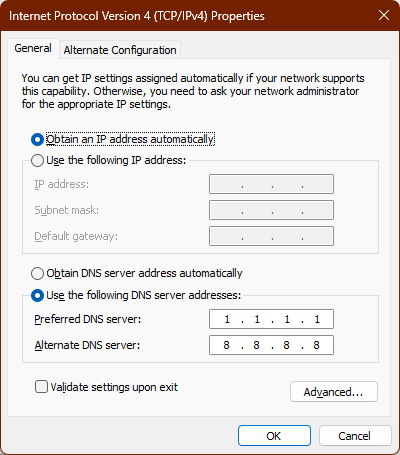
 !
!