I’m a digital marketer, and honestly, I’m tired of paying monthly subscriptions to AI platforms just to generate videos.
Now that I have a powerful desktop PC, I’m thinking of exploring some locally hosted, offline AI video generation tools that I can run on my own system.
Do you guys know any good open-source models or tools for AI video generation? Something that can generate videos without recurring subscription fees?
If you’ve tried any, drop your recommendations below. Let’s put this hardware to work!
Honestly, the subscription drain is so real. Since you’ve got the hardware now, ditch the cloud tools and go straight for ComfyUI. It takes an hour to wrap your head around the node UI, but it’s completely free and runs everything offline.
Here’s the current cheat sheet of what people are actually running:
Wan 2.1 / 2.2: Currently the king for marketing stuff. Permissive license so you won’t get sued using clips for clients, and the motion is crazy clean.
HunyuanVideo: If you want that slick, cinematic look. It’s heavy, but grab the quantized (GGUF) versions on Hugging Face so it doesn’t melt your card.
LTX-Video: The speed demon. Perfect if you just want to churn out quick 5-second b-roll hooks for ads without waiting 10 minutes per render.
However, GPU power matters always. Please remember that. If you want better information, I would ask you to gimme your specs.
What graphics card does your desktop have, and how much VRAM does it have? To give you a better recommendation, keep in mind that generating videos takes more GPU power than LLMs.
the ones that i tried
Wan: Great for cinematic B-roll, promotional visuals, and animating still images. The 5B model supports text-to-video and image-to-video at 720p and 24 fps, but you need 24 GB of GPU VRAM for the 720p workflow, this is why i told you to give me your spec, use it with LXT
HunyuanVideo: detailed visuals, realistic movement, and image-to-video generation, 8.3 billion runs a little bit slow on 24 GB GPU
at the end it is not worth it unless you have a very powerful GPU the videos no matter what i tried still not as good as the one you can generate online but it is yours and you can create anything you want, anyway good luck if you have any thing else ask me!
Good thread – and good advice above on ComfyUI. One practical tip from my side: start small before you commit to a big model. Try a short 5-second clip at low resolution first and check how long it takes and how much VRAM it actually uses on your card – that one test tells you more than any spec sheet. If that runs smoothly, step up the resolution and length gradually. Also keep your first prompts short and concrete (one subject, one action, one setting) – long flowery prompts tend to fall apart in local models. Once you find a setup that runs well on your hardware, stick with it for a few projects before chasing the next model release.
The subscription fatigue part is so relatable, I have cancelled a few tools for the same reason. Starting local makes sense once you already have a decent PC, even if the first setup takes a bit of patience. For marketing clips, I would start with short, simple prompts and see what the machine handles comfortably before going bigger. It is better to get a few usable short clips than to wait forever on one long render that ends up looking off.
╭──────────────────────────────────────────╮
│ LOCAL AI VIDEO GEN — NO SUBSCRIPTIONS │
│ Status: Setup-ready · For digital marketers │
╰──────────────────────────────────────────╯
Short answer: Run Wan 2.2, HunyuanVideo, or LTX-2.5 locally through ComfyUI, no recurring fees, your GPU does all the work.
For HunyuanVideo, grab Kijai’s community wrapper with ready-made workflow JSONs
④
Place model weights into the right ComfyUI/models/ subfolders per the official tutorial
Want a simpler GUI instead of ComfyUI’s node editor? Locally Uncensored auto-detects your install and one-click installs Wan, Hunyuan, and others .
┄┄┄┄┄┄┄┄┄┄┄┄┄┄┄┄┄┄┄┄┄┄┄┄┄┄┄┄┄┄┄┄┄┄┄┄┄┄┄┄┄┄
▍Pick by VRAM
Your VRAM
Pick
16GB+, max license freedom
Wan 2.2
14GB+, best visuals
HunyuanVideo 1.5
8-12GB, speed over quality
LTX-2.5
Need 15-30s clips
SkyReels V2
┄┄┄┄┄┄┄┄┄┄┄┄┄┄┄┄┄┄┄┄┄┄┄┄┄┄┄┄┄┄┄┄┄┄┄┄┄┄┄┄┄┄
▍Bonus for Marketing Content
Agnes Video Generator is fully self-hosted and free, bundling TTS narration, auto-subtitles, and a digital presenter, built for explainer/talking-head content rather than cinematic clips.
All this is quite good actually! Just a recommendation, the “feeling of subscription fatigue” may feel that you are spending a lot, but taking into account, the price of a good GPU, its only worth it if you are gonna make a substantial amount of money after buying the gpu. 4080, 5080, 3090, 5080, 5090. All these cards are quite good, but quite expensive too.
For local video generation, treat 16GB of VRAM as the comfortable line and 12GB as workable for short, low-resolution test clips. A mid-range current GPU with 16GB, 32GB of system RAM, and a fast NVMe drive will cover most beginner projects without constant out-of-memory stops. Do not buy the top card first; spend the difference on RAM and storage, which matter more once clips get longer. Before committing, run one 5-second clip at low resolution and watch VRAM use, render time, and heat, then scale up only if that test is smooth. If the test already struggles, a smaller model or shorter clip is a cheaper fix than new hardware.
This is for you.
Make videos on the computer you already own. FreeVideo runs MiniMax H3 in as little as 8 GB of VRAM and 16 GB of RAM, and adapts its acceleration path to your hardware.Make videos on the computer you already own. FreeVideo runs MiniMax H3 in as little as 8 GB of VRAM and 16 GB of RAM, and adapts its acceleration path to your hardware.
first of all thank you to all. i have read all solutions.. thank you very much again. i have tried comfyUI on my system. it doesnt created a well output. it give images with noises, like it cannot create human face correctly..
 What you get: Run offline, open-source AI video generators locally to ditch monthly cloud subscriptions.
 Start here:
 Also useful:
 Watch out:


 LOCAL AI VIDEO GEN — NO SUBSCRIPTIONS │
 Setup-ready · For digital marketers │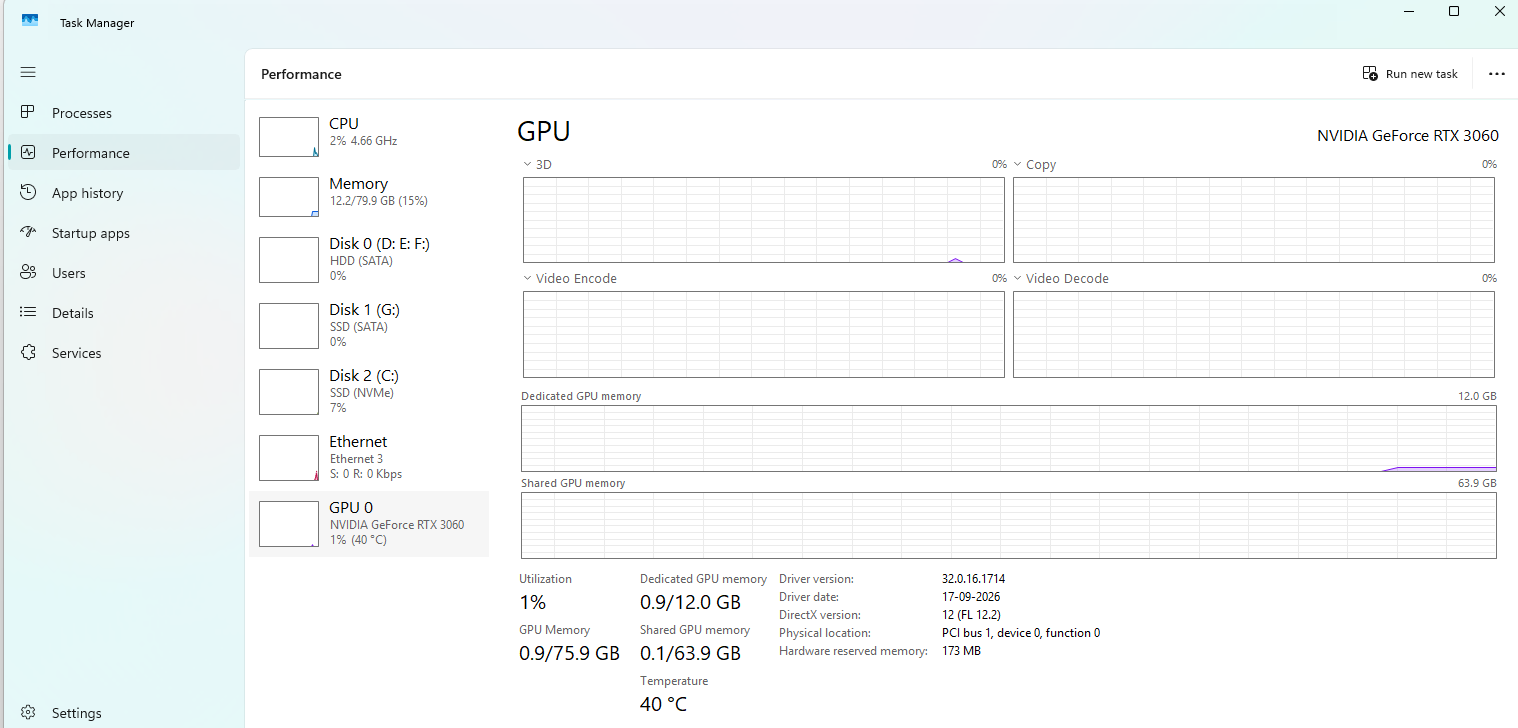
 !
!