is there a way to download file From google drive to google drive?
like from shared google drive to EDU google account without using you local intent.
write click on any file or select all files in folder and click > Make a copy
Multcloud doesnt support shared drives bro read its faq
i would recommend using rclone or u can use Mixplorer(app for phone-it supports serverside transfer)
Make rclone config
the use this
http://martins.ninja/RcloneBrowser/
its gui u dont need to use Cli its way easier
and put “–drive-server-side-across-configs” this command in extra arguments while transferring to enable server side transfer
By doing server side transfer it wont consume ur local bandwith
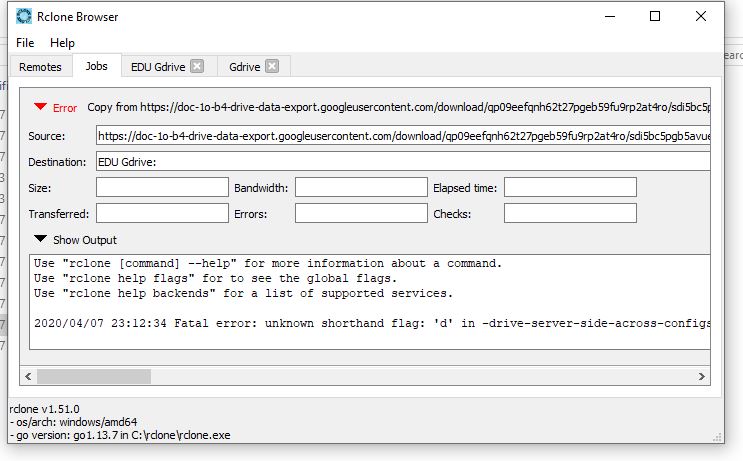
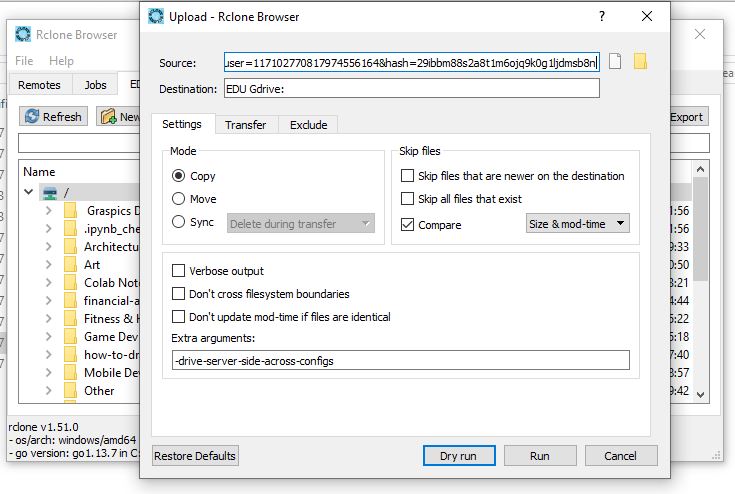
Bruh u use it like this
thank you for help
is there a way i can see a shared folder?
U can in Mixplorer app, in rclone u cant
it consume my local bandwith
Trf from one main drive to another main drive will consume
Trf frm shared/Main drive to shared drive/Main drive wont if its added to the same id
Mixplorer will consume some local bandwidth to get file info
So frm where to where r u transferring?
i want to transfer from team driver to main driver and vise versa
i want to transfer from team/share driver to main driver and vise versa
then it shdnt consume ur data…if teamdrive is added to the same gmail as that of ur main drive
Try this ver …it supports shared with me section of gdrive
From the file url, lookup for ‘uc’ and replace with ‘file’.
Refresh the url address. Click on the three dots at the top corner to your right and click add to drive. Open your google drive, open shared folder, lookup for the file, right click and choose ‘make a copy’
AirExplorer
i am already using rclone browser
the problem is i can’t transfer the folder from TD to my personal gsuite
I got error message in the output like “error 404 : file not found”, i following your step carefully
air explorer in windows
mixplorer on android
 !
!