 JetBrains All Products Activated — Scripts, Configs, Firewall Tricks
JetBrains All Products Activated — Scripts, Configs, Firewall Tricks JetBrains Crack Guide — From Lazy Scripts to Full Control
One-Line Flow: Turn any JetBrains IDE into a permanently activated tool using ja-netfilter, firewall blocking, or one-command scripts — no account, no payment, no expiration.
 Why Your Wallet Will Thank You
JetBrains IDEs cost $149-649/year. You’re a developer, student, or someone who just wants PyCharm to stop screaming about licenses every 30 days.
This guide hands you every working method as of January 2026 — from one-liner scripts that do everything automatically, to manual configs for the paranoid, to completely legal free licenses most people don’t know exist.
Zero skills required. Copy. Paste. Code.
 Pick Your Method (Ranked by Ease)
| Rank | Method | Difficulty | Time | Best For |
|---|---|---|---|---|
 |
Free Non-Commercial License | Baby Mode | 2 min | WebStorm, Rider, CLion, RubyMine, DataGrip, RustRover users |
 |
ckey.run Script | One Command | 1 min | “Just make it work” people |
 |
Firewall Blocking | Copy-Paste | 5 min | Performance nerds, clean system lovers |
| 4th | ja-netfilter Manual | Medium | 15 min | Control freaks, offline warriors |
| 5th | IDE Eval Reset | Easy | 3 min | Temporary use, commitment issues |
 Still using IntelliJ IDEA, PyCharm, PhpStorm, or GoLand? — Skip to or below. No free legal option yet.
🆓 The Legal Route — Free Non-Commercial Licenses
The “I’m Not Even Breaking Rules” Method
Plot twist: JetBrains made a bunch of IDEs completely free in 2024-2025. Most people have no idea.
 Currently Free for Non-Commercial Use
| IDE | Free Since | Minimum Version | Get It |
|---|---|---|---|
| RustRover | 2024 | All versions | Download |
| Aqua | 2024 | All versions | Download |
| WebStorm | Oct 2024 | 2024.2+ | Download |
| Rider | Oct 2024 | 2024.2+ | Download |
| CLion | May 2025 | 2025.1.1+ | Download |
| RubyMine | Sep 2025 | 2025.2.1+ | Download |
| DataGrip | Oct 2025 | 2025.2.4+ | Download |
 NOT Free Yet (Need Other Methods)
- IntelliJ IDEA Ultimate
- PyCharm Professional
- PhpStorm
- GoLand
What Counts as “Non-Commercial”
You’re good:
- Learning / self-education
- Hobby projects (side projects you don’t sell)
- Open-source contributions (unpaid)
- Content creation (YouTube tutorials, Twitch streams, blog posts)
You need to pay:
- Freelance work (even $5 gigs)
- Work for any employer
- Projects you plan to sell or monetize
How to Activate (Step-by-Step)
Step 1: Download and install the IDE (use links above)
        ↓
Step 2: Launch it — a license dialog appears
        ↓
Step 3: Click "Non-commercial use" option
        ↓
Step 4: Log in with JetBrains Account (or create one free)
        → Go to: https://account.jetbrains.com/login
        ↓
Step 5: Accept the agreement
        ↓
Step 6: Done. Full features. One year. Auto-renews.
The Fine Print
| Catch | What It Means |
|---|---|
 Telemetry required Telemetry required |
They collect anonymous usage stats. Can’t opt out. |
 Online activation Online activation |
Needs internet to activate (works offline after) |
 Use it or lose it Use it or lose it |
Must open IDE once every 6 months or renewal fails |
Other Free Legal Options
| Program | Who Qualifies | Link |
|---|---|---|
| Student/Teacher | Valid .edu email or ISIC card | Apply Here |
| Open Source | Maintain an active OSS project | Apply Here |
| Startups | <3 years old, <$1M funding | Apply Here |
⚡ The One-Command Nuclear Option (ckey.run)
The “I Don’t Want to Think” Method
One command. All products. 2099 expiration. Done.
 Windows
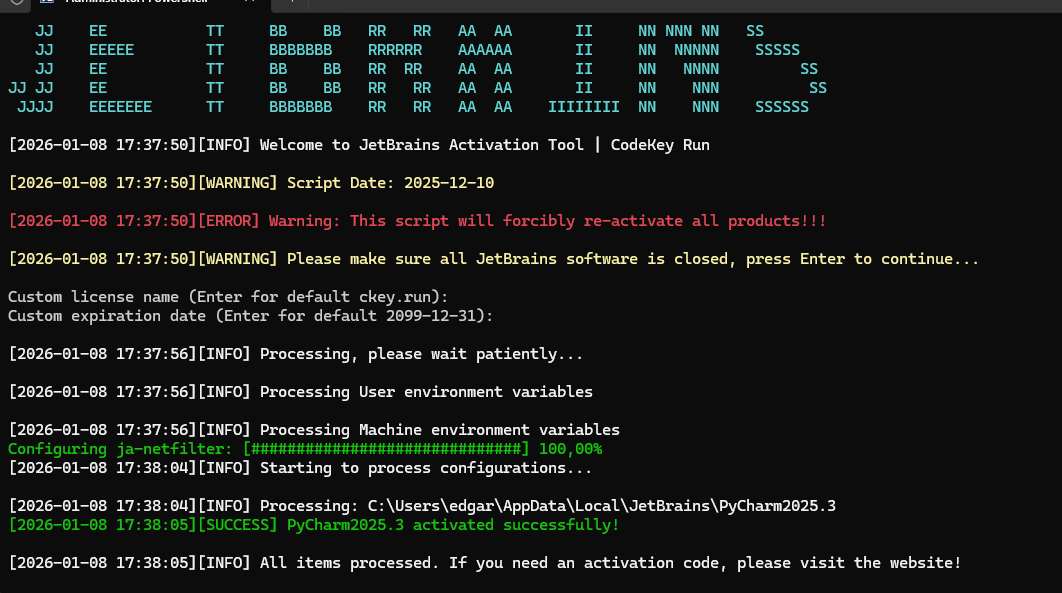
Open PowerShell as Administrator, then paste:
irm ckey.run | iex
What this does:
- Downloads activation script from ckey.run
- Finds all your JetBrains IDEs automatically
- Installs ja-netfilter silently
- Generates machine-specific activation codes
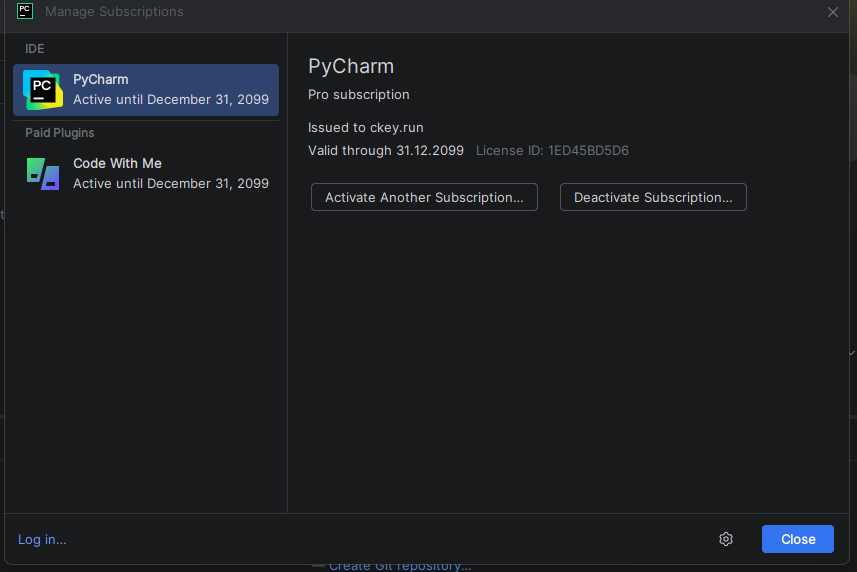
- Activates everything
 Mac /
Mac /  Linux
Linux
Open Terminal, then paste:
curl -sSL ckey.run | bash
Same process, different syntax.
What You’ll See
JJJJJJ   EEEEEEE  TTTTTTTT  BBBBBBB   RRRRRR    AAAAAA
   JJ    EE          TT     BB    BB  RR   RR  AA    AA
   JJ    EEEEE       TT     BBBBBBB   RRRRRR   AAAAAAAA
JJ JJ    EE          TT     BB    BB  RR  RR   AA    AA
 JJJJ    EEEEEEE     TT     BBBBBBB   RR   RR  AA    AA

欢迎使用 JetBrains 激活工具 | CodeKey Run
[WARNING] Script date: 2025-10-31
[WARNING] Please ensure all JetBrains software is closed...

Custom license name (press Enter for default: ckey.run):
Custom license expiration (press Enter for default: 2099-12-31):
Just hit Enter twice. Let it cook.
Your Antivirus Will Scream
This is normal. The script modifies JVM options, which triggers heuristic scanners.
Fix:
- Add exclusion folder:
C:\ja-netfilter\(Windows) or~/ja-netfilter/(Mac/Linux) - Or temporarily disable real-time protection
- Or run in a VM if you’re paranoid
The script is open-source. You can read it at ckey.run before running.
Supported Products
All of them. Literally every JetBrains IDE:
| IDE | Status | IDE | Status |
|---|---|---|---|
| IntelliJ IDEA | |
WebStorm | |
| PyCharm | |
Rider | |
| PhpStorm | |
CLion | |
| GoLand | |
RubyMine | |
| DataGrip | |
RustRover | |
| DataSpell | |
AppCode | |
🔥 The No-Agent Method (iptables/Firewall Blocking)
The “Cleanest System” Method
No javaagent. No startup slowdown. Just block JetBrains from phoning home.
Why This Works (Simple Version)
Normal flow:
You activate → IDE checks with JetBrains → "This key is blacklisted" → Sad

Blocked flow:
You activate → IDE tries to check → Can't reach server → "Guess it's valid ¯\_(ツ)_/¯" → Happy
Why /etc/hosts Doesn’t Work Anymore
JetBrains got smart. Their IDE bypasses your hosts file by querying DNS servers directly:
8.8.8.8(Google)1.1.1.1(Cloudflare)9.9.9.9(Quad9)
You need firewall-level blocking.
Linux (iptables)
Copy-paste this entire block:
# Block DNS queries for JetBrains domains
sudo iptables -I OUTPUT -p udp --dport 53 -m string --hex-string "|03|www|09|jetbrains|03|com|" --algo bm -j DROP
sudo iptables -I OUTPUT -p udp --dport 53 -m string --hex-string "|07|account|09|jetbrains|03|com|" --algo bm -j DROP
sudo ip6tables -I OUTPUT -p udp --dport 53 -m string --hex-string "|03|www|09|jetbrains|03|com|" --algo bm -j DROP
sudo ip6tables -I OUTPUT -p udp --dport 53 -m string --hex-string "|07|account|09|jetbrains|03|com|" --algo bm -j DROP

# Make it survive reboots
sudo apt install iptables-persistent -y
sudo iptables-save | sudo tee /etc/iptables/rules.v4 > /dev/null
sudo ip6tables-save | sudo tee /etc/iptables/rules.v6 > /dev/null

echo "Done. JetBrains can't phone home anymore."
Windows (PowerShell as Admin)
Copy-paste this entire block:
$domains = @(
    "www.jetbrains.com",
    "account.jetbrains.com",
    "jetbrains.com",
    "www-weighted.jetbrains.com"
)

foreach ($d in $domains) {
    New-NetFirewallRule -DisplayName "BLOCK_JB_OUT_$d" -Direction Outbound -RemoteFQDN $d -Action Block -Profile Any -ErrorAction SilentlyContinue
    New-NetFirewallRule -DisplayName "BLOCK_JB_IN_$d" -Direction Inbound -RemoteFQDN $d -Action Block -Profile Any -ErrorAction SilentlyContinue
}

Write-Host "✅ JetBrains domains blocked. Rules persist after reboot." -ForegroundColor Green
Check if it worked:
Get-NetFirewallRule | Where-Object DisplayName -like "BLOCK_JB_*"
Remove rules later:
Get-NetFirewallRule | Where DisplayName -like "BLOCK_JB_*" | Remove-NetFirewallRule
Now Get Your Activation Code
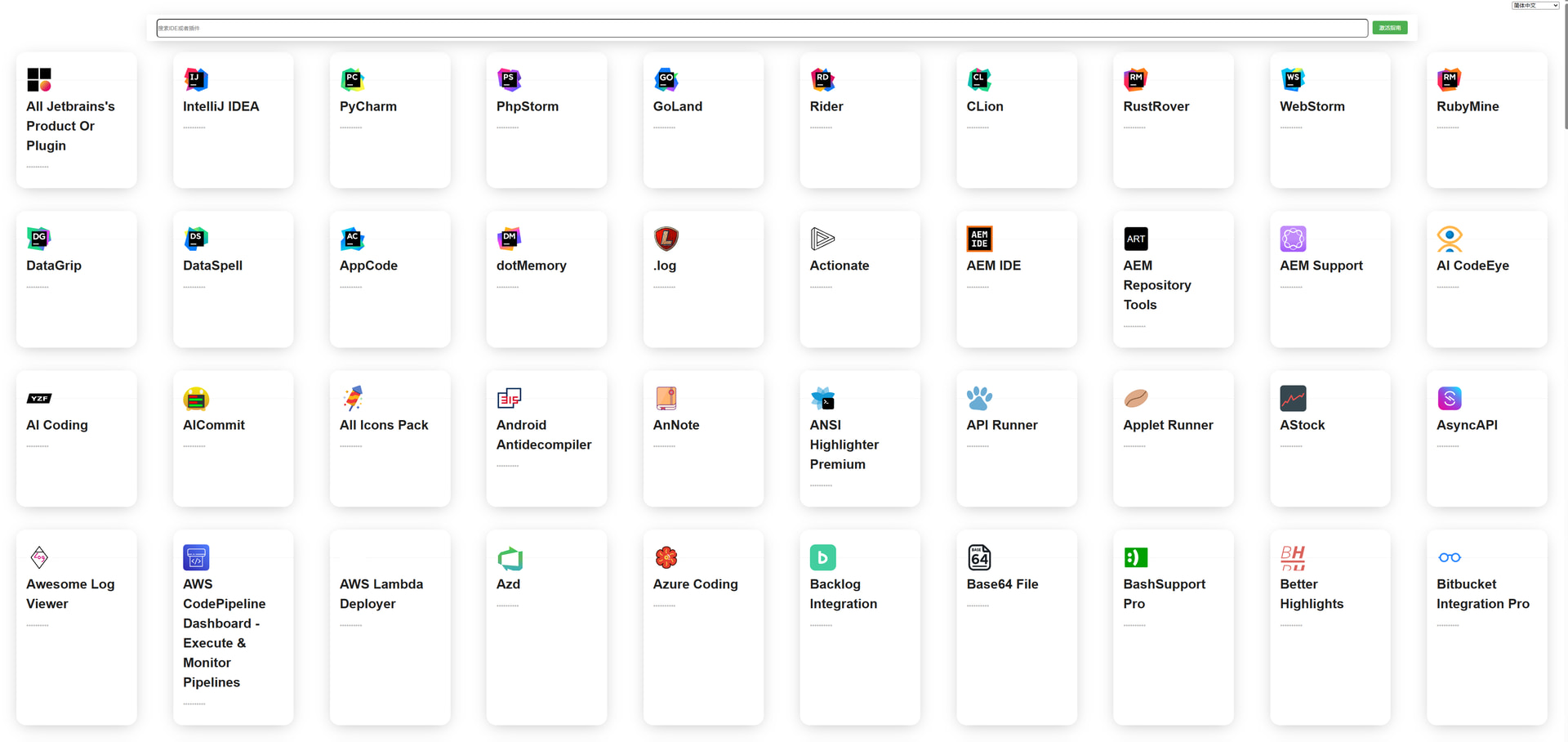
- Go to 3.jetbra.in
- Click any online IPFS gateway (green = online)
- Find your product
- Copy the activation code
- In IDE:
Help → Register → Activation Code → Paste → Activate
No ja-netfilter needed. The firewall does all the work.
What You Lose
| Feature | Why It’s Dead |
|---|---|
 AI Assistant AI Assistant |
Cloud-based, needs account.jetbrains.com |
| Junie AI |
Same deal |
 Settings Sync Settings Sync |
Needs JetBrains account |
 Plugin Marketplace Plugin Marketplace |
Can’t reach plugins.jetbrains.com |
Workaround for plugins: Download .zip from plugins.jetbrains.com on another device, install manually via Settings → Plugins → ⚙️ → Install from Disk
🛠️ ja-netfilter — The OG Method (Manual Setup)
The “I Want Full Control” Method
The original. The classic. Created by pengzhile (zhile.io).
How It Actually Works
JetBrains License Check:
1. IDE receives activation code
2. Code contains JSON data + RSA signature
3. IDE uses BigInteger.modPow() to verify signature
4. If signature valid → activated

ja-netfilter Intercept:
1. You load ja-netfilter as a javaagent
2. When IDE calls BigInteger.modPow()...
3. ja-netfilter intercepts it
4. Returns "yep, signature checks out" (it doesn't)
5. IDE believes it → activated
Translation: ja-netfilter lies to the IDE about math. The IDE trusts math. The IDE is wrong.
Step 1: Download ja-netfilter
Go to: 3.jetbra.in
- Click any green (online) IPFS gateway
- Download
jetbra.zip(latest version: 251031) - Extract to a permanent location:
| OS | Recommended Path |
|---|---|
| Windows | C:\ja-netfilter\ |
| Linux | /opt/ja-netfilter/ |
| Mac | ~/ja-netfilter/ |
Don’t put it in Downloads. Don’t put it somewhere with spaces in the path.
Step 2: Configure power.conf
Open config/power.conf in the extracted folder.
Delete everything and paste this exact content:
[Args]

[Result]
EQUAL,55225648167853313963797564236788620375823669548347220922774310709827403911518263287616387100268543266230233866848442341418362382822530312949501167824269284249248881651498967624678824814834241326748519556823164148221689826687743835412828706076663185916147933220572566657446416402052253759570336207556523489026379081126562829355365677692595954505412289246859665634951468451820899724375004402183725193875327880750230568511397071721883183561863845775813024476963452564494937450851704460199094811762010527172042825951890903134141793321152616818473718423963489394847508510942048152224335892799808050861335612369288976777
That giant number is the fake RSA result. Don’t modify it. Don’t add spaces. Don’t break the line.
Step 3: Configure url.conf
Open config/url.conf.
Add these lines:
[URL]
PREFIX,https://account.jetbrains.com/lservice/rpc/validateKey.action
PREFIX,https://account.jetbrains.com.cn/lservice/rpc/validateKey.action
This blocks the IDE from checking if your key is blacklisted.
Step 4: Find Your IDE’s vmoptions File
Option A: Let the IDE show you
- Open your IDE
Help → Edit Custom VM Options- A file opens. That’s it.
Option B: Manual locations
| OS | Path |
|---|---|
| Windows | %APPDATA%\JetBrains\<Product><Version>\<product>.vmoptions |
| Linux | ~/.config/JetBrains/<Product><Version>/<product>.vmoptions |
| Mac | ~/Library/Application Support/JetBrains/<Product><Version>/<product>.vmoptions |
Examples:
- Windows PyCharm:
C:\Users\YOU\AppData\Roaming\JetBrains\PyCharm2025.1\pycharm64.exe.vmoptions - Mac IntelliJ:
~/Library/Application Support/JetBrains/IntelliJIdea2025.1/idea.vmoptions - Linux WebStorm:
~/.config/JetBrains/WebStorm2025.1/webstorm64.vmoptions
Step 5: Add javaagent Lines
Add these 3 lines at the end of your vmoptions file:
--add-opens=java.base/jdk.internal.org.objectweb.asm=ALL-UNNAMED
--add-opens=java.base/jdk.internal.org.objectweb.asm.tree=ALL-UNNAMED
-javaagent:/path/to/ja-netfilter.jar=jetbrains
Replace /path/to/ with your actual path:
| OS | Example |
|---|---|
| Windows | -javaagent:C:\ja-netfilter\ja-netfilter.jar=jetbrains |
| Linux | -javaagent:/opt/ja-netfilter/ja-netfilter.jar=jetbrains |
| Mac | -javaagent:/Users/yourname/ja-netfilter/ja-netfilter.jar=jetbrains |
Path has spaces? Use quotes or forward slashes:
-javaagent:"C:\Program Files\ja-netfilter\ja-netfilter.jar"=jetbrains
Step 6: Restart IDE & Get Activation Code
- Close the IDE completely
- Go to 3.jetbra.in
- Find your product, copy the activation code
- Reopen IDE
Help → Register → Activation Code → Paste → Activate
The displayed expiration date is fake. It might say 2025 or 2026. Ignore it. The license is perpetual.
Step 7: Verify It Worked
Help → About should show:
- Licensed to: [some name]
- License type: Commercial/Personal

If it still says “Evaluation” or shows a trial countdown, something went wrong. Check Troubleshooting.
🔌 Paid Plugin Activation (Tampermonkey Method)
Premium Plugins for Free
Material Theme UI, RainbowBrackets Pro, Laravel Idea, etc. — they cost money. Here’s how to activate them.
Prerequisites
- ja-netfilter must be configured with correct
power.conf(see above) - Tampermonkey browser extension installed
Method 1: MyJBLS Script (Recommended)
| Step | Action |
|---|---|
| 1 | Install Tampermonkey for your browser |
| 2 | Go to MyJBLS on Greasyfork |
| 3 | Click “Install this script” |
| 4 | Visit plugins.jetbrains.com |
| 5 | Browse to any paid plugin |
| 6 | A new “ Get Activation Code” button appears Get Activation Code” button appears |
| 7 | Click it, copy the code |
| 8 | In IDE: Help → Register → Manage Licenses → Plugins tab → Add |
| 9 | Paste code, activate |
Backend server: https://jbls.ide-soft.com
Method 2: JetBra Script (Alternative)
Same process, different script:
This one embeds a private key and generates codes locally (no server call).
Method 3: Web Generator
No Tampermonkey needed:
Go to: jetbrains.ankio.net/license
- Select your plugin from the list (290+ supported)
- Click “Generate”
- Copy code
- Paste in IDE
🧰 Toolbox App Complications
Using JetBrains Toolbox? Read This.
Toolbox manages vmoptions differently. Don’t edit files directly — Toolbox will overwrite them.
vmoptions Locations (For Reference Only)
| OS | Path |
|---|---|
| Windows | %LOCALAPPDATA%\JetBrains\Toolbox\apps\<PRODUCT>\ch-0\<version>\bin\ |
| Mac | ~/Library/Application Support/JetBrains/Toolbox/apps/<PRODUCT>/ch-0/<version>/ |
| Linux | ~/.local/share/JetBrains/Toolbox/apps/<product>/ch-0/<version>/bin/ |
The Right Way to Configure
Step 1: Open Toolbox App
        ↓
Step 2: Find your IDE in the list
        ↓
Step 3: Click the ⚙️ gear icon next to it
        ↓
Step 4: Click "Settings"
        ↓
Step 5: Scroll to "Configuration"
        ↓
Step 6: Find "Java Virtual Machine options"
        ↓
Step 7: Click "Edit..."
        ↓
Step 8: Add your 3 lines here:
        --add-opens=java.base/jdk.internal.org.objectweb.asm=ALL-UNNAMED
        --add-opens=java.base/jdk.internal.org.objectweb.asm.tree=ALL-UNNAMED
        -javaagent:/path/to/ja-netfilter.jar=jetbrains
        ↓
Step 9: Save and restart IDE
Toolbox will preserve your changes across updates.
🍎 macOS Specifics
Apple Silicon (M1/M2/M3/M4)
All JetBrains IDEs run natively on ARM since late 2021. ja-netfilter is pure Java — works perfectly.
No Rosetta needed. No special configuration.
Code Signing Issues
If IDE crashes with “Code Signature Invalid”:
| Problem | Solution |
|---|---|
| Modified .app bundle | Re-download IDE fresh |
| ja-netfilter inside /Applications | Move it to ~/ja-netfilter/ |
| Corrupted download | Use Toolbox App to install instead |
Correct Path Format
-javaagent:/Users/yourname/ja-netfilter/ja-netfilter.jar=jetbrains
Not:
-javaagent:~/ja-netfilter/ja-netfilter.jar=jetbrains  ← Won't work
-javaagent:/Applications/ja-netfilter/ja-netfilter.jar=jetbrains  ← Might break signing
🐧 Linux Automation (dhay3 Installer)
One-Click Installer for Linux
If you don’t want to configure manually:
GitHub: github.com/dhay3/ja-netfilter
Features
| Feature | Description |
|---|---|
 Auto-config Auto-config |
Uses environment.d to set VM options system-wide |
 DE-agnostic DE-agnostic |
Works with GNOME, KDE, Xfce, i3, whatever |
 Bundled codes Bundled codes |
Activation codes included in licenses/ folder |
 Interactive Interactive |
Choose which IDEs to activate |
Installation
# Download latest release
wget https://github.com/dhay3/ja-netfilter/releases/latest/download/ja-netfilter.tar.bz2

# Extract
bzip2 -d ja-netfilter.tar.bz2 && tar xvf ja-netfilter.tar

# Run installer
cd ja-netfilter
./install.sh

# Follow the prompts
How It Works
Instead of editing each IDE’s vmoptions, it sets environment variables:
IDEA_VM_OPTIONS=/path/to/custom.vmoptions
PYCHARM_VM_OPTIONS=/path/to/custom.vmoptions
# etc.
These are exported via ~/.config/environment.d/ so they apply to all sessions, regardless of how you launch the IDE.
🐳 Docker / Container Usage
The Problem
JetBrains stores license info in:
- Config directory (
~/.config/JetBrains/) - System keychain (Mac) or registry (Windows)
Containers are ephemeral. License disappears on restart.
The Solution
Use activation codes + firewall blocking. Don’t rely on account-based activation.
Mount the config directory:
docker run -v ~/.config/JetBrains:/root/.config/JetBrains \
           -v ~/ja-netfilter:/opt/ja-netfilter \
           your-jetbrains-image
Or bake the activation into your Dockerfile:
COPY ja-netfilter /opt/ja-netfilter
COPY idea.vmoptions /root/.config/JetBrains/IntelliJIdea2025.1/
# Pre-configure activation code in config
🔄 IDE Eval Reset (Trial Extension)
The “I Just Need 30 More Days Forever” Method
Doesn’t crack anything. Just resets the trial period. Indefinitely.
Installation
| Step | Action |
|---|---|
| 1 | Open IDE |
| 2 | Settings → Plugins → ⚙️ → Manage Plugin Repositories |
| 3 | Add: https://plugins.zhile.io |
| 4 | Go to Marketplace tab |
| 5 | Search “IDE Eval Reset” |
| 6 | Install it |
| 7 | Restart IDE |
Usage
Manual reset:
Help → Eval Reset → Reset (IDE restarts)
Automatic reset:
Check “Auto reset before per restart” in the Eval Reset window. Now it resets every time you close the IDE.
Limitations
| Issue | Reality |
|---|---|
| Must restart regularly |
At least once every ~25 days |
 Some IDEs hang Some IDEs hang |
CLion especially has exit issues |
 It’s not real activation It’s not real activation |
Just trial extension forever |
 Same author Same author |
zhile.io made both this and ja-netfilter |
When to Use This
- You only need the IDE temporarily
- You’re testing before committing to ja-netfilter
- You have commitment issues with software
🪦 Deprecated: BetterIntelliJ
Don’t Use This. Seriously.
From 2018-2021, BetterIntelliJ was the go-to. It’s dead now.
Why It’s Dead
| Problem | Explanation |
|---|---|
| Security issues |
Chinese forums report it was “篡改过” (tampered with) |
 Codes blacklisted Codes blacklisted |
JetBrains banned all known BetterIntelliJ keys |
| Bypassed by JB |
It used hosts file blocking — JetBrains now ignores hosts |
 Replaced Replaced |
ja-netfilter does everything better |
If You Have It Installed
Remove it:
Settings → Plugins → Installed- Find “BetterIntelliJ”
- Uninstall
- Also check your vmoptions file — it auto-adds itself
⚠️ Troubleshooting
“This license has been cancelled”
Translation: JetBrains blacklisted your activation code.
| Solution | How |
|---|---|
| 1. Block validation | Use firewall method (most reliable) |
| 2. Update hosts | Add 0.0.0.0 account.jetbrains.com (might not work alone) |
| 3. Fresh code | Get new one from 3.jetbra.in |
“Key is invalid”
Translation: power.conf is wrong or ja-netfilter isn’t loading.
Checklist:
- power.conf has the 617-digit EQUAL line?
- No extra spaces or line breaks in power.conf?
- vmoptions path to ja-netfilter is correct?
- vmoptions has the two
--add-openslines?
IDE Won’t Start After Adding javaagent
| Cause | Fix |
|---|---|
| Path has spaces | Use quotes: -javaagent:"C:\my path\ja-netfilter.jar"=jetbrains |
| Path has non-ASCII | Move ja-netfilter to ASCII-only location like C:\janf\ |
| Missing --add-opens | Required for JetBrains 2022.2+ (they use Java 17+) |
| Wrong path syntax | Windows: use \ or /. Don’t mix. |
Activation Works but Expires Later
Translation: JetBrains is phoning home and invalidating your license.
The IDE checks validity even in “offline mode.” Use:
- Firewall blocking (recommended), or
- url.conf in ja-netfilter config
Windows Defender Deletes ja-netfilter
This is a false positive. ja-netfilter modifies JVM behavior, which looks suspicious.
Fix:
Windows Security → Virus & threat protectionManage settings → ExclusionsAdd an exclusion → Folder- Select your ja-netfilter folder
Or just rename ja-netfilter.jar to something boring like java-agent.jar.
Debug Mode (See What’s Happening)
Linux/Mac:
export JANF_DEBUG=1
# Then launch IDE from terminal
All platforms (add to vmoptions):
-Djanf.debug=1
Now ja-netfilter will log what it’s doing.
📊 Version Compatibility Matrix
Does It Work on My Version?
| IDE Version | ja-netfilter | ckey.run | Firewall | Notes |
|---|---|---|---|---|
| 2024.1.x | |
|
|
Standard config |
| 2024.2.x | |
|
|
Add .cn domain to url.conf |
| 2024.3.x | |
|
|
Unified distribution |
| 2025.1.x | |
|
|
Needs updated power.conf |
| 2025.2.x | |
|
|
Working |
| 2025.3.x | |
|
|
Current latest |
Success Rates (from Chinese forum reports)
| Version | Rate | Notes |
|---|---|---|
| 2024.1 | 95%+ | Smooth sailing |
| 2024.2 | 90%+ | After url.conf fix for China region |
| 2024.3 | 85% | Unified distribution caused initial issues |
| 2025.1+ | 95%+ | After power.conf number update |
🔐 What Can't Be Cracked
Server-Side = Game Over
Some features run entirely on JetBrains’ servers. No local bypass exists.
| Feature | Why It’s Uncrackable |
|---|---|
| JetBrains AI Assistant |
Processing happens on their cloud |
| Junie AI |
Same deal — online only |
| Settings Sync |
Requires authenticated JetBrains account |
 Code With Me (Full) Code With Me (Full) |
Server validates session participants |
If you block JetBrains domains: These features die completely.
If you want them: Buy a license. There’s literally no workaround.
🌐 All Resource Links
Primary Distribution
| Resource | URL | What It Is |
|---|---|---|
| IPFS Gateway | 3.jetbra.in | Main download site for ja-netfilter + codes |
| Author Blog | zhile.io | pengzhile’s official blog |
| Telegram | @ja_netfilter_group | Community support group |
| Gitee Repo | gitee.com/ja-netfilter | Original source code |
Automation Tools
| Tool | URL | Platform |
|---|---|---|
| ckey.run | ckey.run | Windows/Mac/Linux |
| dhay3 Installer | github.com/dhay3/ja-netfilter | Linux |
| kingparks Activator | github.com/kingparks/jetbra-activate | Go-based, all platforms |
Plugin Activation
| Tool | URL | Method |
|---|---|---|
| MyJBLS | greasyfork.org/scripts/489057 | Tampermonkey |
| JetBra | greasyfork.org/scripts/480799 | Tampermonkey |
| Web Generator | jetbrains.ankio.net/license | No extension needed |
 Discussions & Updates
| Gist | Author | Focus |
|---|---|---|
| iptables method | nort3x | Firewall blocking deep-dive |
| 2025 activation guide | PathumRathnayaka | Latest codes & discussion |
Official Free Options
| Program | URL | For |
|---|---|---|
| Non-Commercial | jetbrains.com/non-commercial | Hobbyists, learners |
| Education | jetbrains.com/community/education | Students & teachers |
| Open Source | jetbrains.com/community/opensource | OSS maintainers |
| Startups | jetbrains.com/startup | Young companies |
🎯 Quick Decision Tree
START HERE
    │
    ▼
Do you use WebStorm, Rider, CLion, RubyMine, DataGrip, or RustRover?
    │
    ├─YES──▶ Is it for hobby/learning (not work)?
    │            │
    │            ├─YES──▶ 🆓 Get FREE non-commercial license (100% legal)
    │            │
    │            └─NO───▶ Continue below ↓
    │
    └─NO───▶ Continue below ↓

Do you just want it to work with zero effort?
    │
    ├─YES──▶ ⚡ Run ckey.run script
    │
    └─NO───▶ Continue below ↓

Do you hate startup slowdowns / want cleanest system?
    │
    ├─YES──▶ 🔥 Use firewall blocking + activation code
    │
    └─NO───▶ Continue below ↓

Do you want full control / work offline a lot?
    │
    ├─YES──▶ 🛠️ Manual ja-netfilter setup
    │
    └─NO───▶ Continue below ↓

Do you only need this temporarily?
    │
    ├─YES──▶ 🔄 IDE Eval Reset plugin
    │
    └─NO───▶ Just pick ckey.run honestly
 Final Notes
This works because JetBrains uses client-side validation. The IDE checks a signature locally, ja-netfilter lies about the math, and everyone’s happy. They could move to server-side validation like Adobe did, but that would break offline development — their enterprise customers would riot.
The legal reality: This violates JetBrains’ Terms of Service. Whether it violates law depends on your jurisdiction. Educational use, personal exploration, and reverse engineering for interoperability have various protections in various places. Commercial use is clearly over the line everywhere.
The practical reality: JetBrains knows about all of this. They’ve known for years. They haven’t gone nuclear because their business model is enterprise licensing, not hunting individual developers. The crackdown would cost more than they’d recover.
Use responsibly. If you make money with these tools, buying a license is the right thing to do.
Edited by @SRZ — added the stuff that was missing. 
Bookmark 3.jetbra.in — they ship fixes faster than JetBrains ships bugs.
 !
!