Lost call notes and history after HubSpot CRM free – need advice on recovery and alternatives

Hi everyone,

I’ve been using the HubSpot CRM free version, and after the 30-day, I noticed that the history associated with my contacts seems to be gone.

Specifically, all the notes I had taken during calls, activity history, and other information I recorded are no longer visible. This is a major issue for me because I relied on those notes to keep track of conversations and follow-ups.

I’m trying to understand:

  • Has anyone been able to recover their notes or activity history after the trial ended?

At this point, I’m also considering moving away from HubSpot and switching to a self-hosted CRM or another alternative where I have full control over my data and don’t risk losing access after a certain period.

If anyone has recommendations for self-hosted CRMs or migration strategies (assuming I can still recover my data), I’d really appreciate your suggestions.

Thanks in advance for any help or guidance!

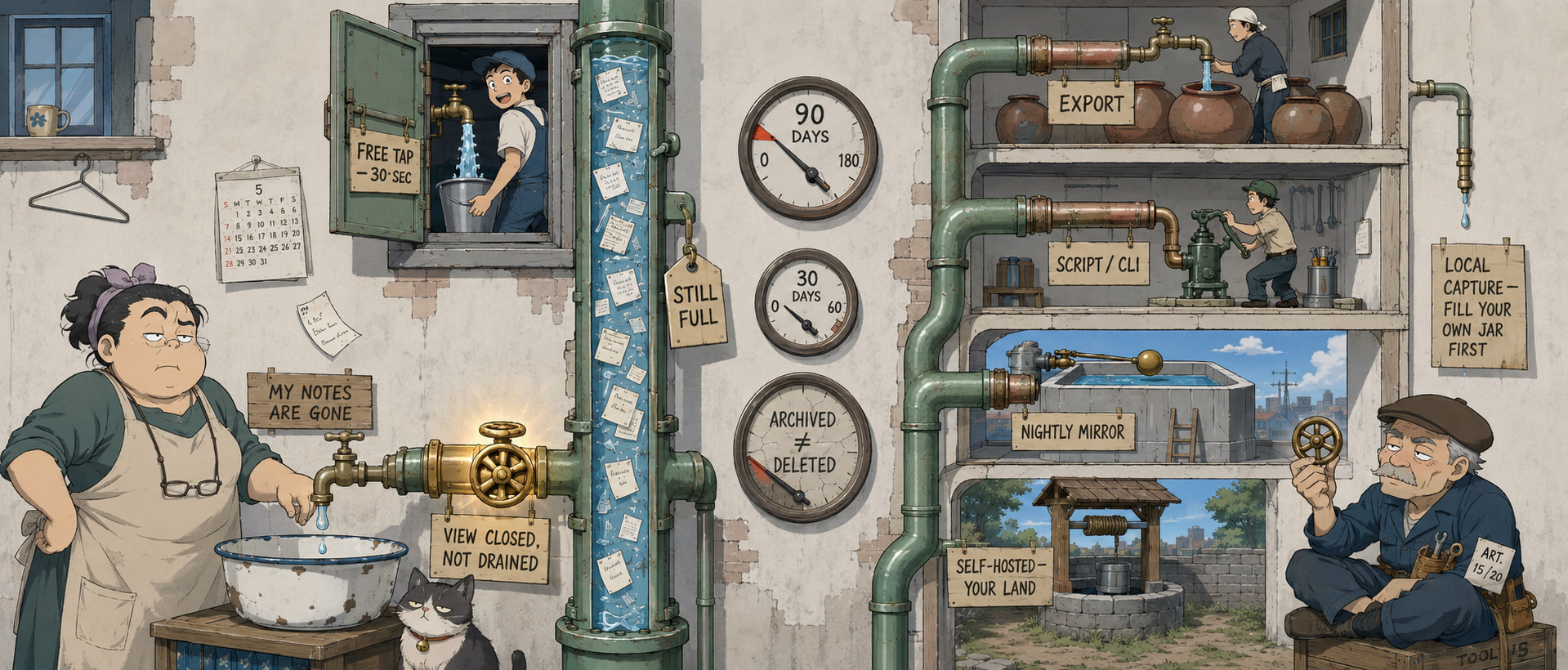
Good news first: your notes are almost certainly not deleted. HubSpot quietly changed the Free plan (late 2024 → Feb 2025) to hide activity older than 30 days from the contact timeline — it’s locked, not gone. Dozens of people got burned by the exact same thing on HubSpot’s own forum.

Two ways to get your history back below — plus the self-hosted CRMs so no vendor can ever do this to you again. :backhand_index_pointing_down:

🧠 Hidden ≠ deleted — what actually happened (+ a free view most people miss)

The Free plan now caps the timeline to the last 30 days. Your data still exists — an upgrade instantly shows it all again — but you shouldn’t have to pay to see your own notes. Two facts that matter:

  • Notes, tasks, and pinned activities are EXEMPT from the 30-day cap — they’re supposed to stay visible. If yours vanished, they were probably actually deleted (not just hidden) → use the Restore tool below.
  • Even for hidden calls/emails, the Activity index pages (open the left menu → Activities, not the contact’s timeline) can still list items older than 30 days. That’s a free way around the cap most people never try.
🔧 Get your history back — the 90-day Restore tool (do this first)

If notes were genuinely deleted, HubSpot keeps them in a recycle bin for 90 days:

  1. Open any contact record → top-left ActionsRestore activity.
  2. A Restore Activities tab opens → filter by date range (defaults to 90 days).
  3. Tick the notes / calls / meetings / tasks you want → Restore.

Official steps + limits here. Caveats: only works within 90 days of deletion, needs Add & edit users / Super Admin, and GDPR or permanent-purge deletions can’t be recovered.

📞 Then: escalate + never get caught again
  • Escalate to HubSpot support and link that community thread — it shows this is a known, documented issue, not a one-off, so you get a real answer instead of a brush-off.
  • Start exporting weekly, todayContacts → Actions → Export pulls contacts + notes + activity to CSV. Do this no matter what you decide next; it’s your insurance.
🖥️ Own your data for good — self-hosted CRMs (you control retention, forever)

Host it yourself and no free-tier rule can ever hide your data again:

CRM Best for The detail
Twenty modern, API-first teams MIT licensed, ~27k★, no per-seat fees
SuiteCRM full HubSpot-level depth most mature, deeply customizable
EspoCRM small teams / simplicity lightest to self-host
ERPNext CRM + inventory/accounting if you want the whole business suite
Odoo all-in-one business suite CRM is one module; heavier setup
Vtiger sales-focused teams open-source core + optional cloud

Pick: Twenty if you want clean, modern, zero lock-in. SuiteCRM or EspoCRM if you want HubSpot-level features or the simplest possible setup.

🔄 Moving out clean — the migration checklist
  1. Export everything from HubSpot first (Contacts → Actions → Export): contacts, notes, deals, activity logs.
  2. Import the CSVs — Twenty, SuiteCRM, and EspoCRM all take CSV import.
  3. Map your HubSpot fields onto the new CRM’s fields.
  4. Turn on automated backups on day one. Now you own retention — this exact problem can never happen again.
😎 Why owning it quietly saves you
  • The month you pause a subscription, your own customer history doesn’t vanish behind a paywall.
  • A client asks “what did we agree back in March?” — you scroll back years, not 30 days.
  • Business picks up and you hit the free contact cap at the worst moment — self-hosted has no cap.
  • A vendor changes the rules overnight (like this) — can’t touch you, the data’s on your box.
  • Fat-finger a delete or a bad import — with weekly backups it’s a 2-minute rollback, not a crisis.
✅ Do this in order
  1. Check the Activity index pages — your older calls/emails may already be sitting there, free.
  2. Run Actions → Restore activity on affected contacts (90-day window) for any deleted notes.
  3. Export everything to CSV now, and message support with the thread link.
  4. Stand up Twenty (or SuiteCRM/EspoCRM), import the CSV, switch on auto-backups.

Bottom line: your notes are hidden, not gone — pull them back via the index pages + 90-day Restore, export a copy today, then move to a self-hosted CRM so retention is yours to control.

Your notes were never HubSpot’s to hide — pull them back, then park them where no one can put your own words behind a paywall. :floppy_disk:

Your notes aren’t deleted. In HubSpot a note/call/meeting is an engagement — a separate object from the contact. The export button only reads contact records, so engagements never appear in it. A tier change hides the view, not the rows.


Free path, 30 seconds: Contacts → click the Contacts dropdown (top-left) → Notes / Calls / Tasks / Meetings. Each is its own full table. Filter → select all → export.

:alarm_clock: Anything genuinely deleted sits in the recycle bin 90 days (attachments: 30). Check today.

Everything below is collapsed — open only what you need.

Free-tier access — activity index pages, saved views, tier limits
CONTACT RECORD ──> properties ──> ✅ included in export

TIMELINE ────────> notes    ┐
                   calls    ├──> ENGAGEMENTS ──> ❌ never in a contact export
                   tasks    │                    ✅ but each has its own table
                   meetings ┘
Do Link
Notes / Calls / Tasks / Meetings as standalone tables Filter activity index pages and record timelines
Save that filtered table permanently Create and manage saved views
Filter by date, owner, association View and filter records
What your tier may render on a record Use cards on records
Official downgrade impact matrix Effects of downgrading a subscription
What trial expiry does to the account Manage your subscription
Recovery windows — 90-day record bin, 30-day file bin
What Link
Restore deleted records — filter by date, user or workflow Restore deleted records
Files & attachments — separate 30-day clock Archive, delete, restore files

:warning: Permanent deletes and privacy-law deletes skip the bin entirely.

No-code export — native tables + Import2 Wizard

Native: the tables above → Actions → Export. Free. Some export paths truncate notes at ~500 characters — check a long one before trusting it.

Import2 Wizard — contacts, companies, deals plus emails, tasks, meetings, calls. Free under 1,000 rows.

Scripts & CLIs — dump notes, calls, tasks + associations
Tool Output
withfriendsco/hubspot-exporter Contacts, companies, notes, tasks, calls + associations → local SQLite (one-file database) + CSVs
revfleet/hscli CLI covering 1,180 endpoints; CSV / JSON / YAML out
bcharleson/hubspot-cli Lighter CLI, handles engagements + associations
openownership/hubspot-backup Scheduled full-portal dump — steal the cron pattern
bomeejung/hubspot-migrate Activity export JSON → importable CSV
TomasPegado/Hubspot_Data_Export_Automation Plain Python export loop
gabrielpfs/script_integration_crm_hubspot Paginated fetch → JSON / CSV / XLSX
shinobukawano/hubspot-crm-importer CSV back in, relationships intact
topics/hubspot-crm · topics/hubspot-api Live feeds — new tools land here first
MCP servers — query your CRM from Claude / ChatGPT

MCP = a plug that lets an AI assistant use a tool for you. Paste a private-app token (a password for scripts), then ask for the data in plain language.

Server Scope
calypsoCodex/hubspot-mcp-extended 106 tools
ZLeventer/hubspot-mcp 33 tools
lkm1developer/hubspot-mcp-server Activity history + engagement timelines
NoBanks/hubspot-mcp 5 tools, writes locked behind a flag
baryhuang/mcp-hubspot Caching layer to dodge rate limits
shinzo-labs/hubspot-mcp One-command install
HubSpot Agent CLI First-party, beta
soft_delete=True — pull archived rows and field history

HubSpot has two kinds of gone: archived=true = actually deleted. archivedInDashboard=true = only hidden from you. Production data pipes can request both.

Tool Why
dlt hubspot_pipeline.py soft_delete=True loads archived records; include_history=True writes every past field value to its own table
dlt HubSpot docs Config, secrets, object selection
dlt → local DuckDB One command, lands on your machine
dlt quickstart dlt init dlthub:hubspot_crm duckdb
Airbyte HubSpot source The scopes people forget to tick
Meltano tap-hubspot Every config key listed
Archived vs hidden, per HubSpot The flag difference, official
Read a deleted record by ID Exact request shape
OpenAPI schema, all endpoints Build your own
Backups + an hourly mirror you run yourself

Managed:

Tool Note
Rewind Daily auto, unlimited version history, item or full restore
Skyvia Backup Date-to-date diff, field-level undo, restore into another portal
SkyBackup Standalone build
mycrmbackup One-click, inside HubSpot
Field comparison ProBackup, BackHUB, others

Self-run pump — copies HubSpot → your box on a schedule:

Tool Style
Activepieces Visual, MIT, 700+ connectors
Huginn Agent-based, MIT, fully yours
Windmill Code-first, git-native
Prefect Proper data pipeline
Which are still alive Licence + activity, checked July 2026

Then back up the file: restic · Borg (append-only) · Kopia · Litestream (live SQLite replication)

Self-hosted CRMs — audit-trail builds + FR / JP / CN / VN options
CRM Why it’s here
Atomic CRM React + Postgres, MIT. Notes, deals, aggregated activity logs, email-to-note capture. Dump your own DB anytime.
marmelab.com/atomic-crm Deploy path, self-host or managed
openCRX Java, enterprise, system-wide audit trail built in
Tryton Modular, very stable, documented data model
Axelor CRM Low-code CRM + ERP, REST API, webhooks
PHPCRM Leads, customers, notes, tasks. Runs on cheap shared hosting.
DaybydayCRM Archived, MIT, forkable — clean schema reference
Non-English What
:france: Crème CRM Python/Django, France, since 2008, no per-user licence
:japan: F-RevoCRM · download PHP, 20+ languages, self-hostable
:china: WukongCRM 10 yrs of releases, 2M+ downloads, CRM + HR + finance
:china: Gitee CRM topic 07flyCRM, FeelCRM, CeresCRM — unindexed in English
:vietnam: Oshima CRM GPLv3
:france: Comptoir du Libre Public-sector registry: real deployments + support providers

Before choosing: Marmelab’s tested benchmark — installed and scored. Key finding: very few let you modify the code without publishing your changes.

Own-the-file setups — Grist, NocoDB, markdown CRMs
Tool Shape
Grist Self-hostable spreadsheet with database powers + per-cell access rules
Baserow / NocoDB / Teable / Mathesar Licences + self-host notes
Airtable open alternatives Different curation
Grist vs NocoDB Honest split

Plain text — still greppable in 2045:

Tool Shape
obsidian-crm Contacts, companies, deals, interactions as markdown + YAML
TalkingQuickly/obsidian-crm People/ + Notes/ folders, backlinks = timeline
obsidian-contacts Birthdays, last-contacted, multiple formats
hal_md Relationship management in markdown, templates included
topics/personal-crm Live feed
Local call capture — note lands on your disk before the CRM

Record and transcribe on your own machine. The CRM becomes a copy that’s allowed to break.

Tool Output
anarlog On-device transcription, every meeting = a .md file on disk. MIT. Sync via git/Syncthing/iCloud. Bring your own LLM incl. Ollama.
anarlog.so Project site + install
Meetily 100% local, live transcription, speaker separation, local SQLite storage
Six compared Judged on where audio goes and where notes land
Wider field Handy STT, Vibe, Whishper, WhisperX, Voxtral
GDPR Art. 15/20 — free letter generator + the EDPB ruling

EU/EEA/UK: you have a legal right to your personal data in a structured, commonly used, machine-readable format, on a one-month clock.

Tool Use
datarequests.org generator Writes the request. Runs in-browser — your details never hit their server. Also generates complaints.
Plain-text letter Copy-paste. The Art. 20 line turns “no export exists” into a compliance issue.
All templates Access, correction, deletion, objection
noyb guide The standard dodges and how to answer them
EDPB summary Regulator: you get the actual data, not summaries
HubSpot’s data-retrieval terms Read before cancelling
SWIPO codes EU cloud-switching rules since Sept 2025 — signatories publish what they export
Discovery engines — find tools after this thread goes cold
Source Why
awesome.ecosyste.ms Searches thousands of curated lists at once. Free API.
openalternative.co Paid tool → open-source equivalent, with licences
awesome-selfhosted.net Canonical catalogue, tag-browsable
easyindie.app/glance Only apps that install one-click on Cloudron / YunoHost / CapRover
YunoHost catalogue Deep, barely overlaps the usual lists
PikaPods Hosted open-source apps for pennies, no sysadmin
EU OSS Catalogue Software governments deployed and must describe honestly
:germany: openCode.de · :france: code.gouv.fr National catalogues; the French one flags publicly funded projects
Open Terms Archive · engine Records every version of a vendor’s terms. Self-host it, point it at your stack.
Software Heritage 400M+ projects archived — dead repos still exist
5 situations where this stack pays for itself

1. Client says “you never told me that.” Open the Notes table, filter to their name, sort by date. Timestamped call log, two clicks. Argument over.

2. Someone leaves the company. The pipeline is fine — their notes are the asset. Filter Notes by owner, export, hand it to whoever picks up the accounts.

3. A teammate bulk-deletes the wrong list. Inside 90 days it’s a restore. Outside 90 days it’s gone forever. Knowing which side you’re on is the whole difference.

4. You quoted a price you don’t remember quoting. include_history=True returns every past value of every field — you can read what the deal amount was on any date.

5. Renewal quote doubles. With a nightly mirror on your own box you can walk in the same week, instead of paying because three years of history is hostage.

Pick your row → the one link you need
You are Do this
Panicking, not technical The two-click activity pages above, then export. 10 minutes.
Think something got deleted Recycle bin — 90-day clock
Want it all out, no code Import2 Wizard
Can run a script hubspot-exporter
Suspect hidden, not gone soft_delete=True
Staying, want insurance Rewind or an Activepieces pump
Leaving, want it easy Atomic CRM or Grist
Leaving, want it bulletproof openCRX — audit trail built in
Just want notes on people obsidian-crm
Never again anarlog
EU and annoyed datarequests.org

A tier controls what gets rendered. It never controlled what got stored.