Perfectly working…Thanks Bro
Thank you very much, sir!
Still working
not working for me
or simply replace “/content/Skillshare/” to “/content/data/”
Don’t understand
Not work anymore
It does not work anymore because of cookie has expired. So, if somebody has the skillshare account, contact the author https://github.com/calvinhobbes23/Skillshare-DL/issues/2
Hi, it worked for the first time and when I tried another day, it starts throwing some error, i tried various ways to fix it, like incognito, various browsers etc., nothing worked. This is the error I am getting:
Downloading /content/Skillshare/anand-rao/az-900-azure-fundamentals-certification/01 - introduction.mp4…
[==================================================]
Traceback (most recent call last):
File “/root/.Skillshare-DL/dl.py”, line 16, in
main()
File “/root/.Skillshare-DL/dl.py”, line 11, in main
dl.download_course_by_url(course_url)
File “/root/.Skillshare-DL/skillshare.py”, line 32, in download_course_by_url
self.download_course_by_class_id(m.group(1))
File “/root/.Skillshare-DL/skillshare.py”, line 74, in download_course_by_class_id
raise Exception(‘Failed to read video ID from data’)
Exception: Failed to read video ID from data
how can i add this on DL that it’s work
brother, how can i add cookies on skillshareDL
simply you must understand how the program works and because it written in python, you need to have basic of python knowledge.
i have tried to read the code, and the cookie stored in “magic.pyc”
Thank you for sharing the cookie, It worked for me, Now I can watch any video I want, thanks a lot!
Hi Mate! I am getting this error ----
Visit Us for more Cool Stuff: https://onehack.st/
Traceback (most recent call last):
File “/root/.skillshare-1hack/dl.py”, line 50, in
main()
File “/root/.skillshare-1hack/dl.py”, line 11, in main
dl.download_course_by_url(course_url)
File “/root/.skillshare-1hack/skillshare.py”, line 29, in download_course_by_url
self.download_course_by_class_id(m.group(1))
File “/root/.skillshare-1hack/skillshare.py”, line 32, in download_course_by_class_id
data = self.fetch_course_data_by_class_id(class_id=class_id)
File “/root/.skillshare-1hack/skillshare.py”, line 69, in fetch_course_data_by_class_id
assert res.status_code == 200, ‘Fetch error, code == {}’.format(res.status_code)
AssertionError: Fetch error, code == 403
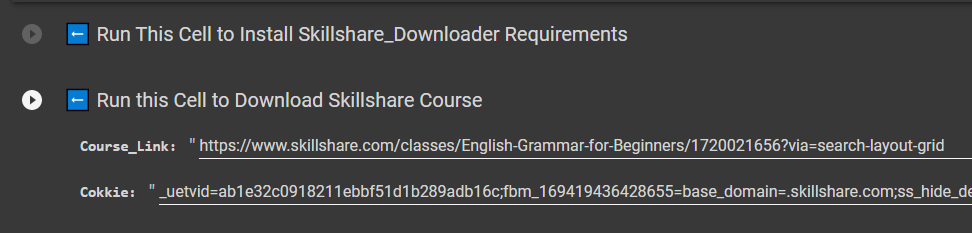
What version is this? It has a column to insert cookies? Do you have the link for this version?
tq brother
You saved my 100 hours searching for the right one… I wanna kiss you right away… thank you very much.. Angry_Man
No longer work
Tried to download the same course that you are downloading but failed.
Traceback (most recent call last):
  File "/root/.skillshare-1hack/dl.py", line 50, in <module>
    main()
  File "/root/.skillshare-1hack/dl.py", line 11, in main
    dl.download_course_by_url(course_url)
  File "/root/.skillshare-1hack/skillshare.py", line 29, in download_course_by_url
    self.download_course_by_class_id(m.group(1))
  File "/root/.skillshare-1hack/skillshare.py", line 32, in download_course_by_class_id
    data = self.fetch_course_data_by_class_id(class_id=class_id)
  File "/root/.skillshare-1hack/skillshare.py", line 69, in fetch_course_data_by_class_id
    assert res.status_code == 200, 'Fetch error, code == {}'.format(res.status_code)
AssertionError: Fetch error, code == 403
@Relaxation_House @Carla_Quevedo
Cookie:
magic.py.txt (1.4 KB)
For Kenway’s colab notebook:
- Remove the .txt extension and upload the python file (magic.py) in Colab.
- After executing Step 2 ( Run This Cell to Install Skillshare-DL Requirements) in the notebook;
Replace the old cookie pyc file:
!rm -r '/root/.Skillshare-DL/magic.pyc'
!mv magic.py '/root/.Skillshare-DL/'
 !
!