 Full Microsoft 365 E5 ➜ Office + Teams + 25 logins, plus free Azure, AI & storage ➜ auto-renews free for life
Full Microsoft 365 E5 ➜ Office + Teams + 25 logins, plus free Azure, AI & storage ➜ auto-renews free for lifeThe enterprise Office suite companies rent for ~$700/user a year — free. Plus every fix for when it blocks you, and the bigger free doors.
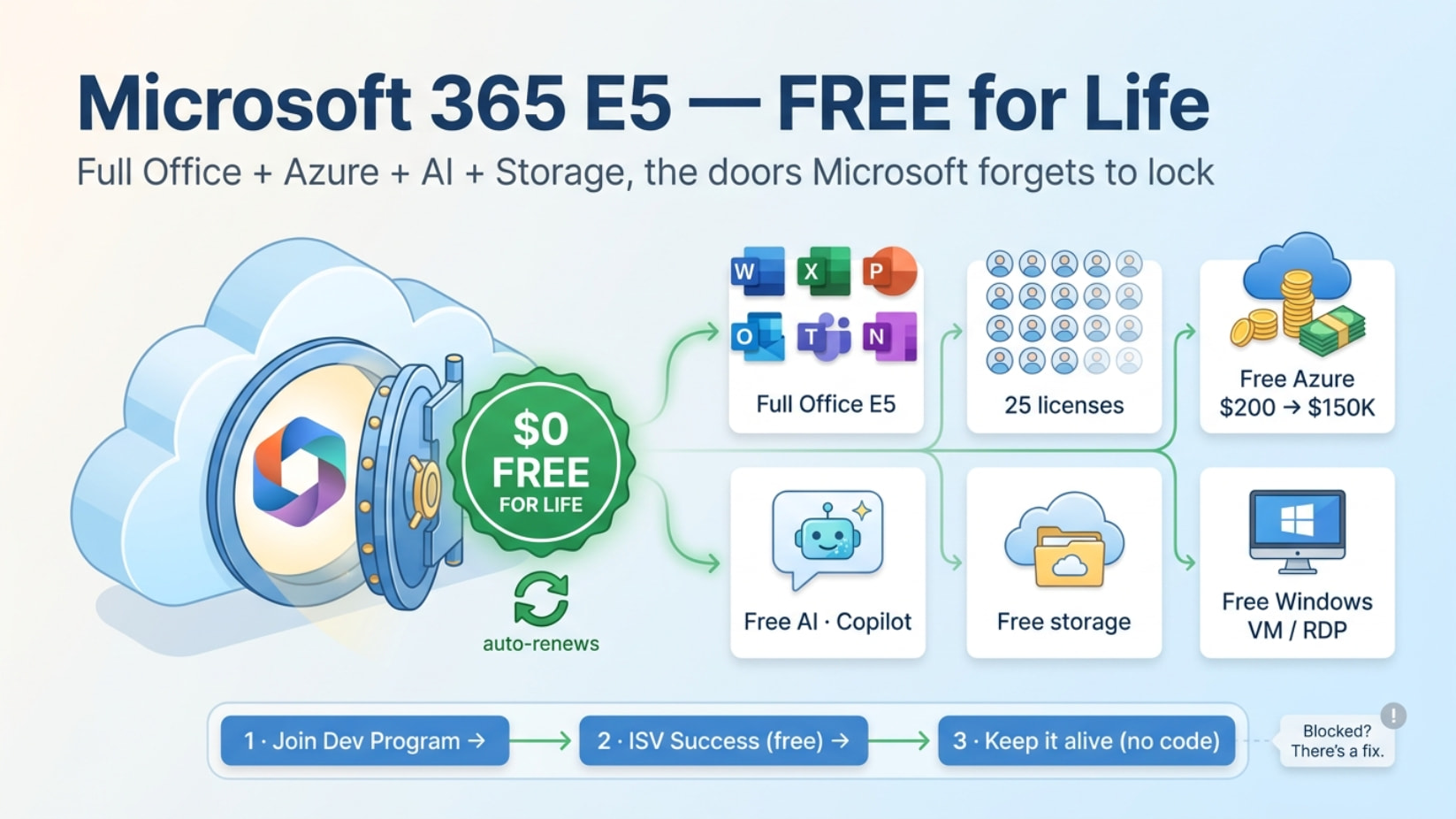
Hello, OneHackers — full desktop Office + Teams + Power BI Pro + 25 accounts, legit and free for life. Then the rare stuff: keep it alive forever with no coding, every “it won’t let me” fix, free Azure + a Windows RDP box, free AI, and a backup plan if you can’t qualify. All in the spoilers. 
📦 What you get
| Get | What it is |
|---|---|
| Desktop Office | Word, Excel, PowerPoint, Outlook, OneNote — installed, activated |
| Teams + SharePoint | Meetings, chat, file hubs |
| Power BI Pro | Paid-grade dashboards, free |
| Power Apps / Automate | Build apps + automate tasks, no code |
| 25 licenses | 1 admin + 24 accounts to keep or hand out |
| Intune · Defender · Entra ID P2 | The enterprise security kit |
 Renews forever Renews forever |
90-day blocks, auto-extends while you use it |
🧾 Every product bundled in
Microsoft Power Automate Free
Exchange Foundation
Common Data Service
Flow Free
Microsoft 365 E5 Developer (without Windows and Audio Conferencing)
Viva Learning Seeded
Nucleus
Data Classification in Microsoft 365
Microsoft 365 Communication Compliance
Graph Connectors Search with Index
Information Protection and Governance Analytics - Premium
Power Virtual Agents for Office 365
Common Data Service for Teams
Project for Office (Plan E5)
Microsoft Insider Risk Management
Microsoft Excel Advanced Analytics
Microsoft 365 Defender
Microsoft Search
Microsoft Bookings
Microsoft Records Management
Microsoft ML-Based Classification
Microsoft Information Governance
Microsoft Data Investigations
Microsoft Customer Key
Microsoft Communications DLP
Office 365 SafeDocs
Microsoft 365 Advanced Auditing
Yammer Enterprise
Whiteboard (Plan 3)
To-Do (Plan 3)
Sway
Skype for Business Online (Plan 2)
SharePoint (Plan 2)
Power Apps for Office 365 (Plan 3)
Power BI Pro
Microsoft 365 Phone System
Office for the Web
The latest desktop version of Office
Office 365 Privileged Access Management
Microsoft Defender for Office 365 (Plan 1 & 2)
Office 365 Cloud App Security
Office 365 Advanced eDiscovery
Microsoft Teams
Microsoft Stream for Office 365 E5
Microsoft Planner
Microsoft MyAnalytics (Full)
Microsoft Intune
Microsoft Forms (Plan E5)
Microsoft Defender for Cloud Apps
Microsoft Azure Multi-Factor Authentication
Azure Rights Management
Information Protection for Office 365 - Standard & Premium
Power Automate for Office 365
Exchange Online (Plan 2)
Customer Lockbox
Azure Information Protection Premium P1 & P2
Microsoft Defender for Identity
Azure Active Directory Premium P1 & P2
🔑 Before you start — how to actually get access
Straight truth: since Feb 2024, Microsoft only hands new E5 sandboxes to Visual Studio Enterprise subscribers + partners. Lots of fresh accounts now hit “you don’t currently qualify.” Real routes, free first:
| Path | Cost | Reality 2026 |
|---|---|---|
| ISV Success | Free 12 mo | Best free legit route — bundles an E5 dev sub (25 seats) + VS Enterprise. Needs a software-product idea + verification (3–5 days) |
| Microsoft for Startups | Free | Parallel door — free Office + Azure (see that chapter) |
| Dev Essentials trick | Free | Link same email → wait → refresh. Mostly fails now (it’s not a qualifying tier) — try it, don’t count on it |
| VS Pro / Enterprise (standard sub) | Paid | Cleanest — auto-renews for the life of the sub, no scripts |
Already have a sandbox? Skip straight to the “keep it alive” chapter. Can’t qualify at all? Jump to “free full Office anyway” at the bottom — you still win.
Need: real phone number (no VoIP) · a Microsoft account · 10 minutes.
 Microsoft 365 Developer Program · Visual Studio Dev Essentials
🛠️ Step-by-step setup (with screenshots)
1. Open the link → blue Join now.
2. New account or your personal one — real or fake info, your call.
3. Country → any company name → accept terms.
4. Why joining? → personal projects.
5. Which apps? → tick anything, you get it all.
6. Sandbox: Instant (ready in seconds, fixed domain) vs Configurable (custom domain, ~2 days). Pick Instant.
7. Make the admin account: country, name, password.
8. Phone number → verification code. Set up an authenticator to log in.
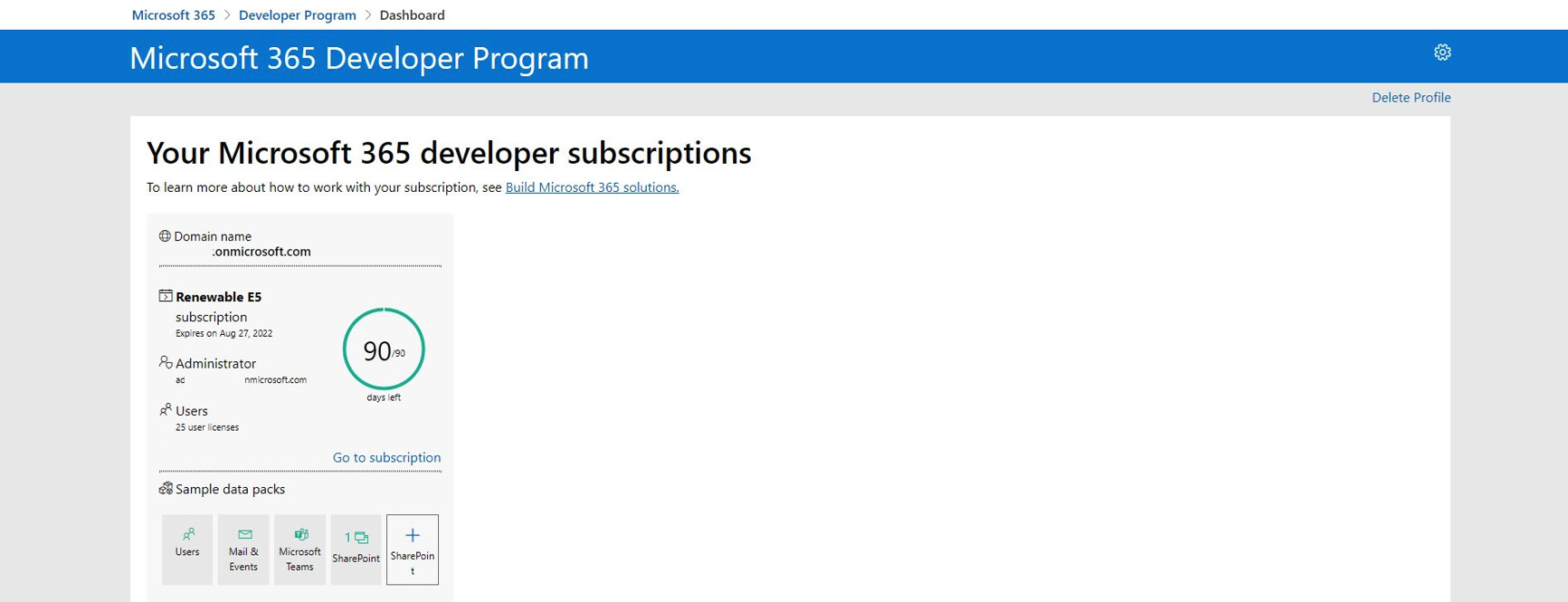
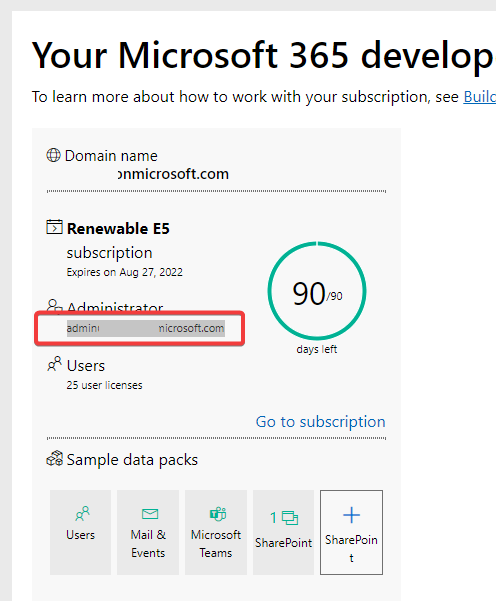
9. Account’s live. The 90-day counter auto-renews:
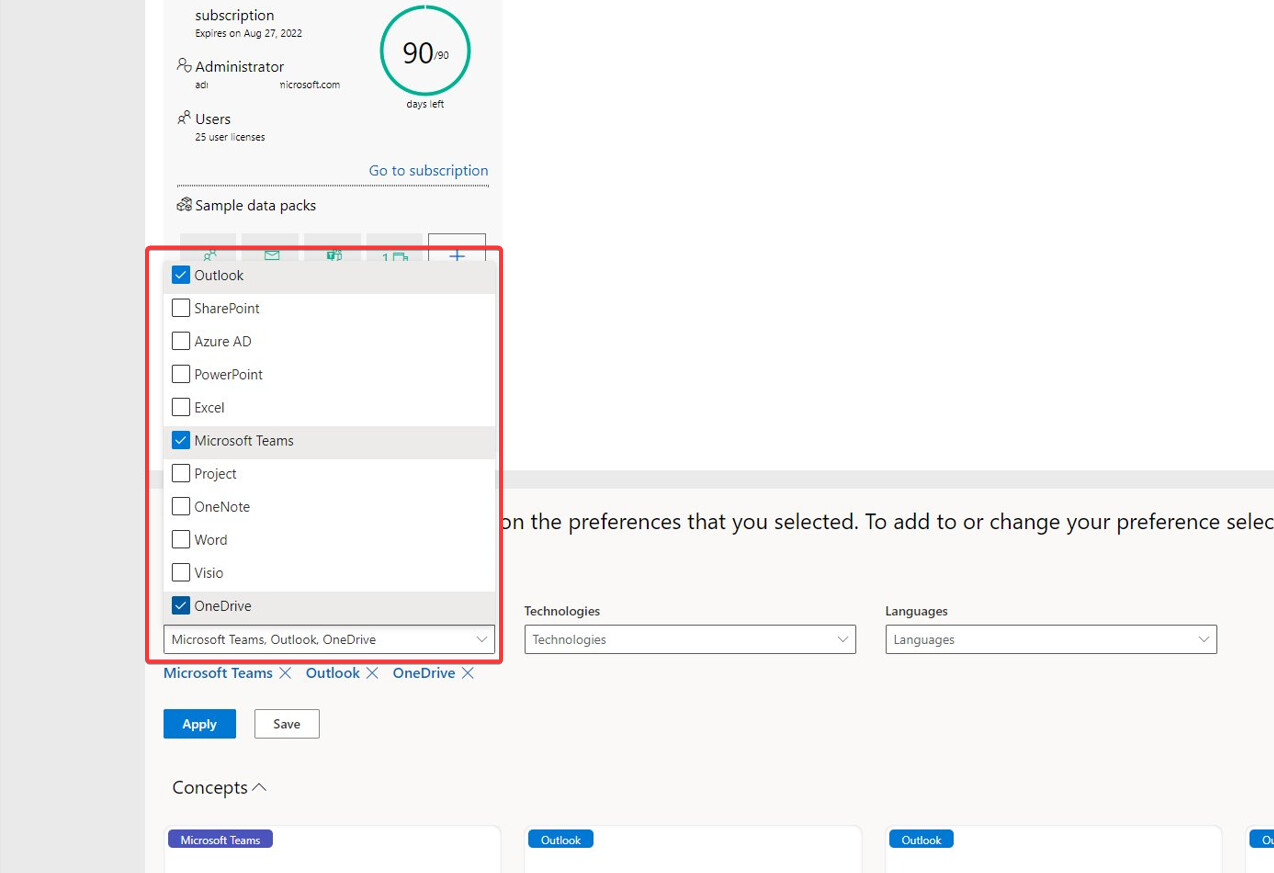
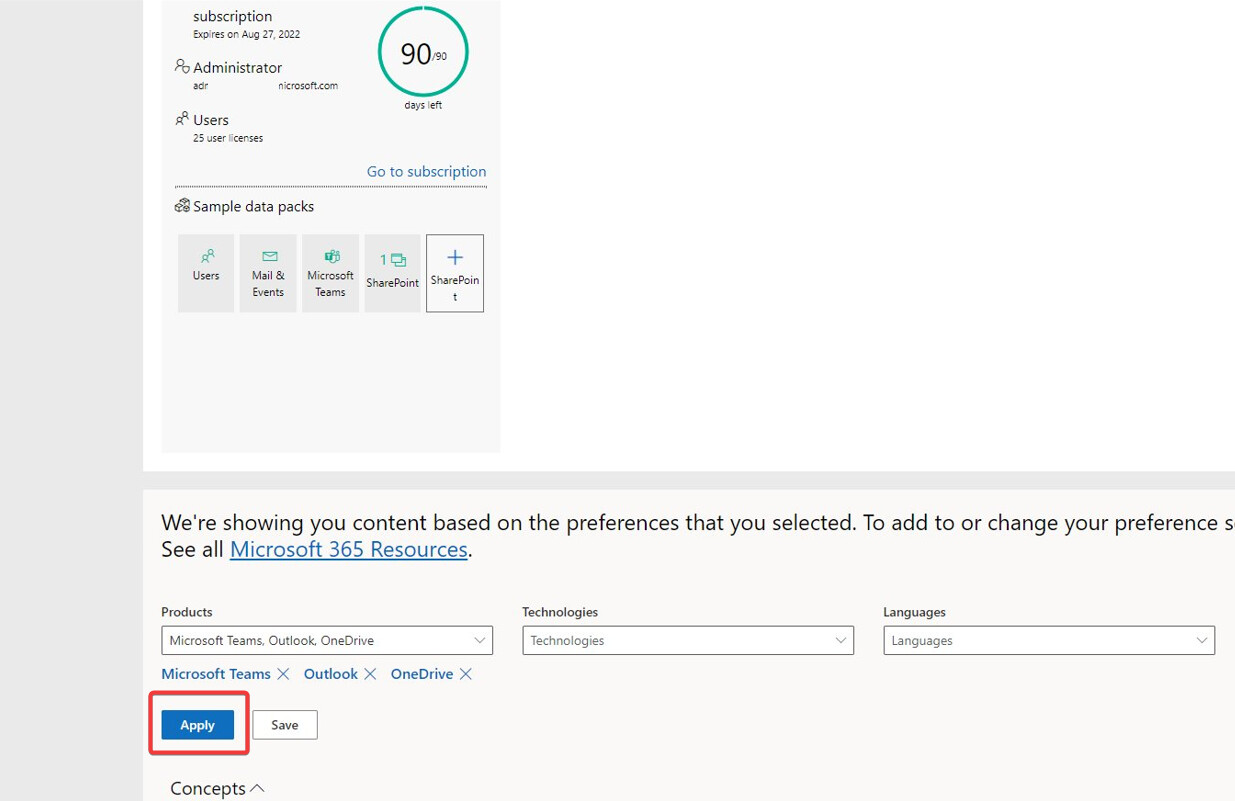
10. Scroll down → switch OneDrive on → Apply:
11. Go to office.com, sign in with the new mail + password:
12. Grab the Office installer. Open OneDrive once, sign in → drive activated.
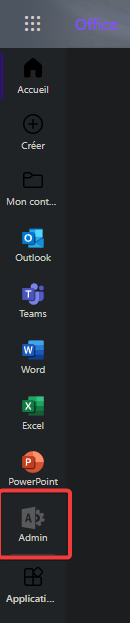
13. Back on office.com → click the Admin app:
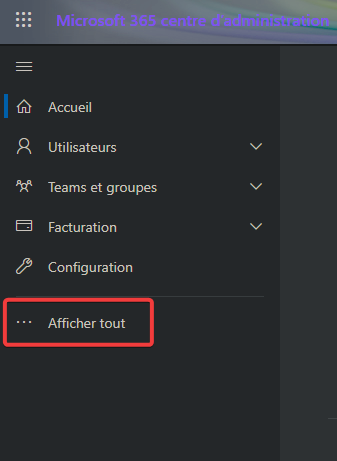
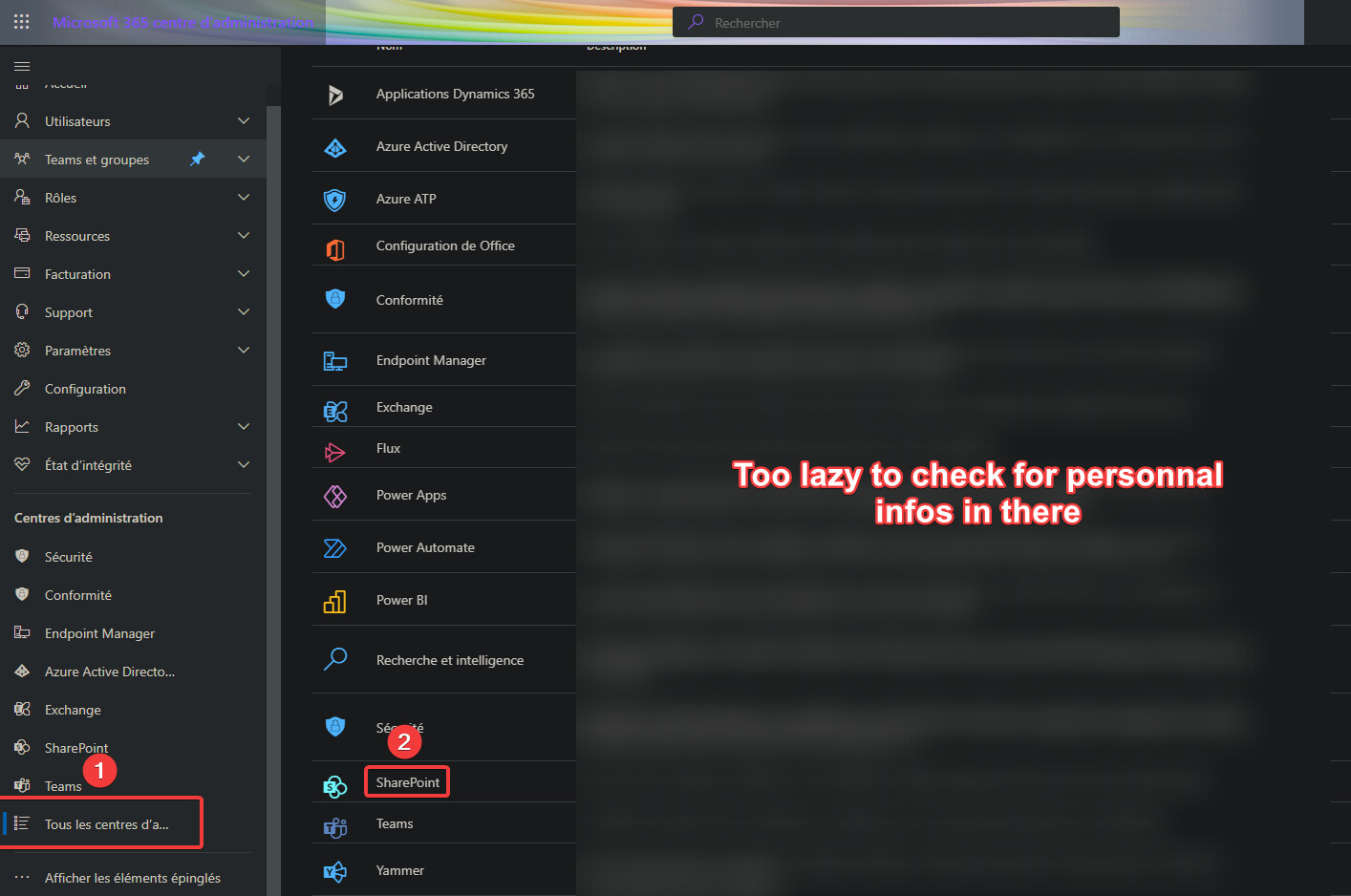
14. Show all → Show all admin centers → SharePoint:
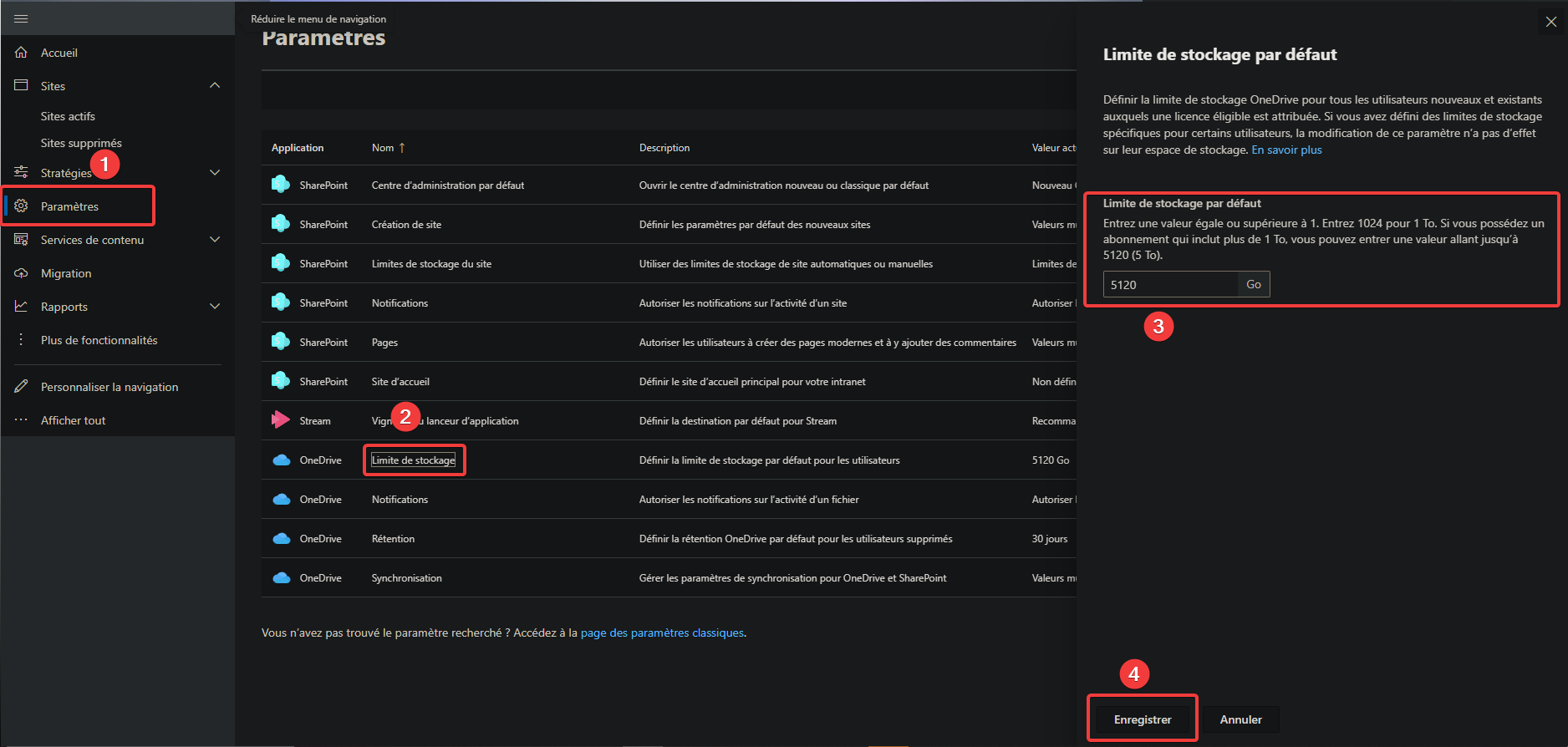
15. SharePoint → Settings → OneDrive — Storage Limit → set value:
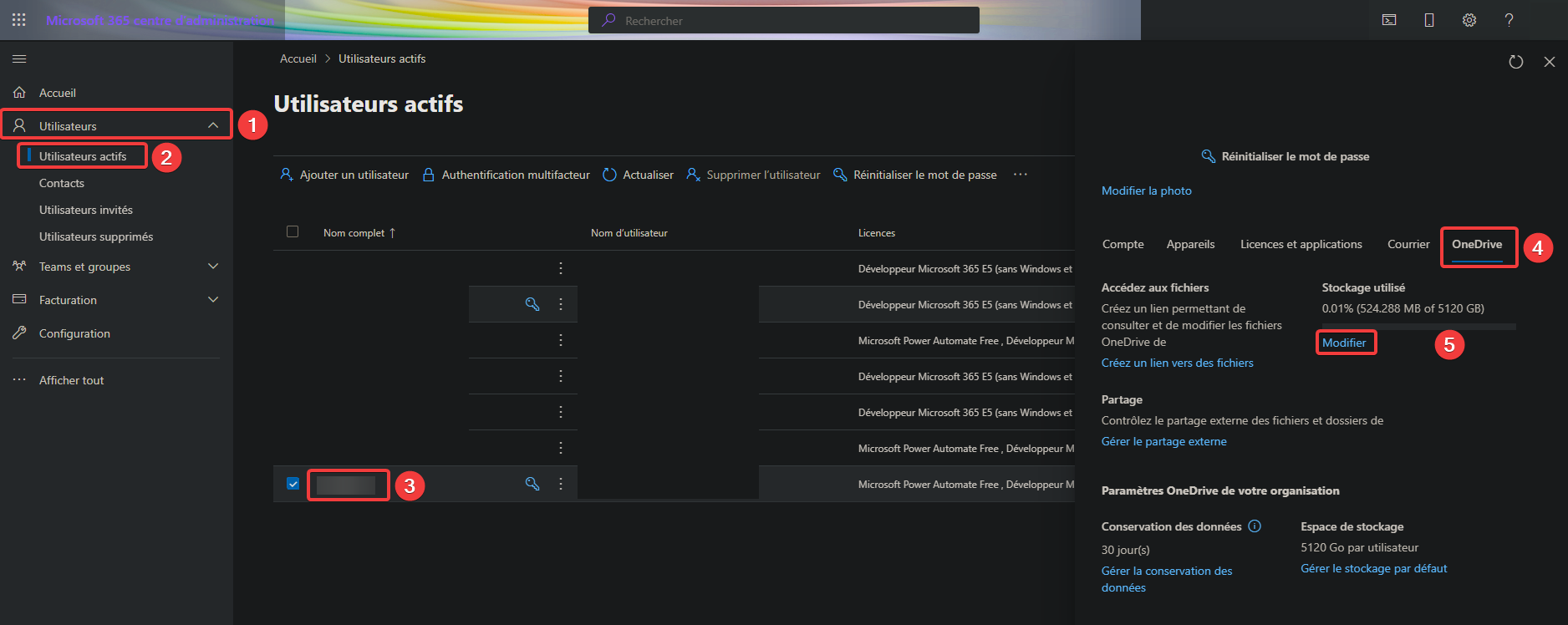
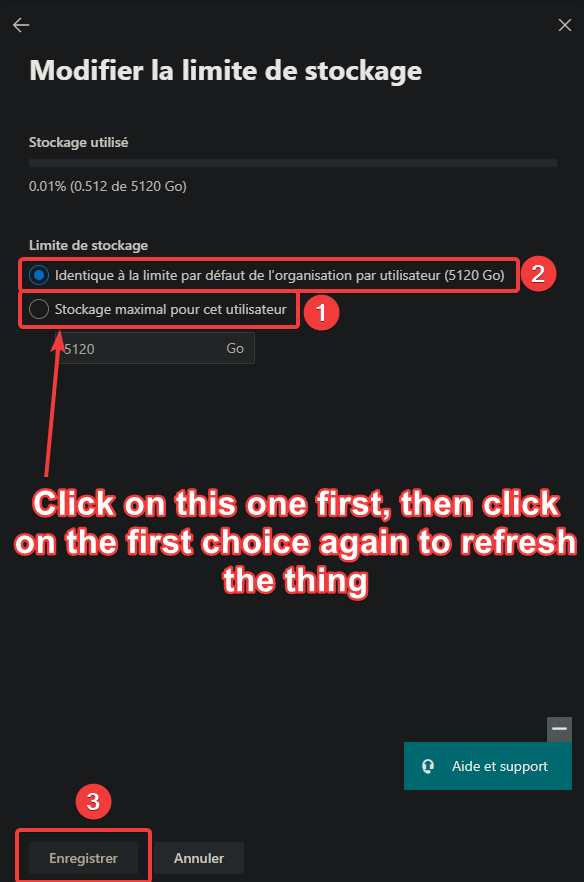
16. Admin → Users → Active users → pick a user (must’ve opened OneDrive once) → OneDrive tab → Modify → save:
♻️ How to keep it alive forever (no coding)
The sandbox renews every 90 days only if Microsoft sees “developer activity” — minimum is one Microsoft Graph API call per cycle. Miss it → ~30-day admin grace → deleted (and non-qualifiers can’t remake one, so don’t let it lapse).
Easiest no-code combo: link your GitHub account in dev-program settings (counts toward renewal on its own), then run a free auto-renew bot that pokes Graph for you:
| Tool | Setup |
|---|---|
| TheCaduceus/Microsoft-E5-Auto-Renewal | Public hosted instance — no server. Get a token in-browser, ping it on a free cron |
| KKtheGhost/E5_Developer_Renew | Free GitHub Actions schedule — paste secrets, done |
| lawdakacoder/Microsoft-E5-Auto-Renewal | JS port, also public instance |
🔧 Getting the token (point-and-click, not coding)
The bots need a client ID + secret + refresh token. It’s all form-filling:
A. Register the app (Entra admin center → App registrations → New registration):
- Account types → “Any org directory + personal Microsoft accounts”
- Redirect URI → Web →
http://localhost:53682/(rclone) or the instance’s/authURL. Never pick “SPA” — that token dies in 24 hrs. - Copy the Application (client) ID.
- Certificates & secrets → New client secret → copy the Value now.
- API permissions → Microsoft Graph → Delegated → add
Files.ReadWrite.All,User.Read,Mail.ReadWrite→ Grant admin consent.
B. Get the refresh token (pick one):
- Phone-friendly: open TheCaduceus’s auth page (in the repo), paste client ID + secret, sign in → it returns the token.
- Desktop: install rclone → run
rclone authorize "onedrive" "<id>" "<secret>"→ sign in → copy therefresh_token.
Heads-up: the token lasts 90 days, and these tools store it static — set an 80-day reminder to regenerate it (same URL, bookmark it). That’s the only recurring chore.
Real talk: this leans against the “dev-only” spirit and Microsoft can revoke the sandbox — use a dedicated account, keep pings every few hours (not every minute), don’t store anything irreplaceable. A VS Enterprise sub renews with zero scripts — the bulletproof path.
🧯 Stuck? Common blockers + the fix
| It won’t let me… | Fix |
|---|---|
| Phone rejected (VoIP) | Google Voice/TextNow fail. Use a real carrier SIM or the “Call me” voice option to a landline. One dev account per number |
| My country isn’t listed | Pick any supported country at setup. Blocked only in sanctioned regions (Cuba, Iran, NK, Sudan, Syria) + Gov clouds. Don’t VPN-fake it |
| Forces authenticator app | Install Microsoft Authenticator, scan QR. Same phone can also get the SMS — fine. Add a backup email/phone before you lose the device |
| I had a dev account before | One per account. Delete the old profile (dashboard → Delete Profile), then wait 60 days for a new sub |
| It expired / got deleted | ~30-day admin grace, gone by day 60. Non-qualifiers can’t remake — so keep it alive |
| Do I need a card? | No. The E5 dev program never asks for one and never charges |
| Will I get banned? | Risk is sandbox revocation, not your main account — if you abuse it. Use a dedicated account, keep it reasonable |
| No PC, only phone? | Whole flow + Office apps + admin all work in a mobile browser |
| Install real desktop Office? | Yes — Admin center → guided setup → Install Office apps, or office.com → Install. Full Word/Excel/etc, not just web |
💾 Storage limits — and where to get big free storage
Old guides scream “5TB–25TB.” Microsoft capped it. No number you type beats these:
| Thing | Real cap now |
|---|---|
| OneDrive / user | ~10 GB |
| Whole tenant pool | ~300 GB |
| Extra SharePoint storage | 0 GB |
The prize is the software + 25 licenses, not the drive. Need real space? Stack these:
| Service | Free | Note |
|---|---|---|
| MEGA | 20 GB | Encrypted, permanent base |
| Degoo | 20 GB | Ad-supported, 90-day inactivity wipe |
| Google Drive | 15 GB | Shared w/ Gmail + Photos |
| Icedrive / pCloud / Koofr | ~10 GB | Solid sync |
| Backblaze B2 | 10 GB | For backups/scripts |
| Cloudflare R2 | 10 GB-mo | No egress fees |
🚀 The bigger door — Microsoft for Startups (worth more than all of this)
Call yourself a software startup (no funding, no incorporation needed to start) and you outgun the dev program:
| Perk | What you get |
|---|---|
| Azure credits | $1,000 instant → $5,000 after business verify → up to $150K with an investor referral code |
| M365 Business Premium | Up to 50 seats, free 12 months |
| GitHub Enterprise | Up to 20 seats, free 1 year |
| Azure OpenAI | Model access — credits cover usage |
| Extras | LinkedIn Premium · VS Enterprise (5 seats) · Dynamics + Power Platform · free 24/7 Azure support |
Eligibility: for-profit software product you own the IP for · not Series C+ · HQ in an Azure country. Solo founders do get approved. Gotchas: personal MS account (work/school emails rejected) + a credit card for ID, new Azure customer only.
☁️ Free Azure credits + a free Windows VM / RDP box
The E5 dev program gives no Windows or Azure — these do:
| Offer | Free | Card? |
|---|---|---|
| Azure free account | $200 / 30 days + 12 mo free + 65 always-free services | Yes (~$1 hold, refunded) |
| Azure for Students | $100, renews yearly while enrolled | No card — charge-proof |
| Oracle Cloud Always Free | ARM VM (now 2 OCPU / 12 GB + 200 GB) | No, but PAYG convert recommended |
Free Windows RDP box: Azure’s 12-month tier includes 750 B1S VM hours/month — enough to run one Windows VM 24/7.
🎓 Free for students (and anyone with an edu email)
| Source | Haul |
|---|---|
| GitHub Student Pack | $100 Azure · Copilot · free .me + .tech domain · DigitalOcean $200 · all JetBrains IDEs · MongoDB · Notion · 20+ more |
| VS Dev Essentials | Free $200 Azure + 12 mo services · Azure DevOps · Pluralsight |
| Azure for Students | $100, no credit card, renews each year |
🤖 Free AI — Copilot, OpenAI, models
| Tool | Free tier |
|---|---|
| GitHub Models | GPT-4o, Llama, DeepSeek, Phi via OpenAI-compatible endpoint + playground (~50 req/day) |
| GitHub Copilot Free | 2,000 completions + 50 chats / month, everyone forever |
| Copilot Student | Unlimited completions + 200 AI credits (verified students) |
| Azure OpenAI | No free tier — fund it with any credit pool above · aka.ms/oai/access |
| Microsoft Learn sandboxes | Free, no-card, time-boxed lab tenants |
| Azure AI Search | Always-free 50 MB tier |
🏢 Nonprofit & education doors (org-only)
Honest heads-up: the donated M365 Business Premium / Office E1 grant ended on renewals from July 1, 2025. Still live for registered 501(c)(3)s:
- M365 Business Basic — donated free, up to 300 users
- Business Premium — nonprofit price ~$5.50/user/mo (vs $22 retail)
- 50 Windows 11 Pro + Azure grants + 10 free Power Apps seats via TechSoup
- Education: Office 365 A1 free for verified schools (web apps + Teams), provisioned by the institution
Needs org verification — individuals can’t self-enroll. Students: use the Student Pack instead.
🆓 Can't qualify? Free full Office anyway (zero gates)
Locked out of E5? You still get Office for nothing:
| Option | What · catch |
|---|---|
| Office on the web | Word, Excel, PPT in-browser + 5 GB OneDrive — free, no card, any Microsoft account. The universal answer |
| LibreOffice | Full desktop suite, offline, opens MS formats — free, no account |
| OnlyOffice | Best MS-format match, desktop + cloud — free |
| M365 1-month trial | Full desktop Office 30 days — needs a card, auto-renews. Cancel right after signup, keep the month |
🧠 What you can do with all this
- Cert lab that isn’t a toy → a full 25-user E5 tenant to break + rebuild. Walk into MS-102 knowing the panel cold.
- Freelance dashboards → Power BI Pro is a paid seat. Bill clients for reports without the monthly fee.
- Free automation → Power Automate runs scheduled jobs (sort inbox, scrape → Excel) — skip the Zapier bill.
- Your own always-on server → free Windows RDP box on Azure, or a permanent Linux box on Oracle for a VPN/self-host.
- Free AI coding → Copilot + GitHub Models, zero spend, in your editor.
- Seats for a side project → 24 spare Office + mailbox accounts. No “buy more licenses” wall.
The gist: qualify free via ISV Success (or grab a sandbox if you can) → keep it alive with a no-code bot → can’t qualify? free Office web + LibreOffice still win → then stack the bigger doors: Startups for $1K–$150K Azure + 50 M365 seats, Students for $100 Azure + Copilot. Credit: DUmaas SkyNET
They gated the front door — but left the side doors, the windows, and the spare keys lying right there.


 !
!