Desperate to Recover My Gmail – Any Help Would Mean Everything
This email account is extremely important to me, and I’ve been trying to recover access to it for months without success.
Out of desperation, I decided to check whether the account had appeared in any data breaches. To my shock, I found information suggesting that the password had been changed 11 different times.
I also came across a few websites that displayed only the first few characters of previous passwords. At first, I assumed they were scams, but then I noticed something surprising—the visible initials actually matched the way my old passwords used to begin.
The catch is that these sites want me to pay to reveal the full, unmasked passwords, and I have no idea whether they’re legitimate or just trying to take advantage of me.
The biggest issue is that this Gmail account is linked to almost everything important in my life—my PayPal account, bank cards, and many other services.
please help
2 Likes
First, breathe — and do not pay those “reveal your password” sites. A real breach-checker only ever compares a scrambled copy of a password, never the plain text — so any site offering to “unmask” your full password for money is just selling you fear. And the old password is useless anyway: the attacker changed it 11 times, and Google recovery never asks for it.
Now the part that matters most — in order, because you’re fighting the wrong fire first.
 The Gmail isn’t the emergency — the PayPal + bank it unlocks are. Whoever holds the inbox can reset those. Ring-fence the money before you spend another day on the email.

 RIGHT NOW — cut the money loose from the inbox
From a different device you trust — 15 minutes, do this first:
├─  Secure PayPal — new password, remove the Gmail as its login/recovery email, turn on 2FA
├─  Call your bank / card fraud line (why + how) — flag it, reissue the cards
├─  Freeze your credit (free, stops new loans in your name): Equifax · Experian · TransUnion
└─  File IdentityTheft.gov — generates an official report + a personalized recovery plan

 THEN — reclaim the Gmail the right way
The reason 11 resets failed: changing the password doesn’t remove the intruder’s hidden foothold. Do the real flow:
├─  Start at g.co/recover — from a device / browser / Wi-Fi / location you’ve used before (this is what makes Google believe it’s you)
└─  The moment you’re back in, run Google’s reclaim-and-lock checklist — the foothold steps are in the drawer
🔵 Kick the intruder OUT — the hidden-foothold checklist
Changing the password alone won’t do it. In your account, in order:

 The honest part
After months of failed recovery, sometimes Google just can’t verify you and the account is gone — that’s not your fault. Before you burn more months:
├─  Human routes: Google’s hijacked-account guide + post your case to the Account Help Community (Product Experts can escalate)
└─  If it won’t come back → migrate: point every account you still control to a fresh, secured inbox (Proton Mail) — don’t leave your life wired to a dead email.
🆓 Free breach-check (the legit version of those paid sites) + 🛡️ lock the next one down
See where you leaked — for free:
- Have I Been Pwned — type your email, see every breach it’s in (the real, free version of the pay sites)
- Google Password Checkup — flags your saved passwords that are breached/reused → change those first
 proof the paid sites are fake: a real checker uses k-anonymity — it never receives your full password
So it can’t happen again:
Don’t pay to “see” an old password — spend that energy locking the money it used to guard.
1 Like
BlueHacker is right, first you solve the problem with PayPal + bank.
I think you should choose something easy first.
Access your Gmail account and sign out of it (Sign Out).
Then access your Gmail account again and instead of your password select the “I forgot my password” option. Gmail will ask you which method you choose to change your password and first choose your phone number and if that doesn’t work, choose the backup email option. Choose a password of at least 12 characters!
Then follow the other steps in BlueHacker’s message!
Since the password has been changed several times, I THINK you should have received a notification on your backup email.
2 Likes
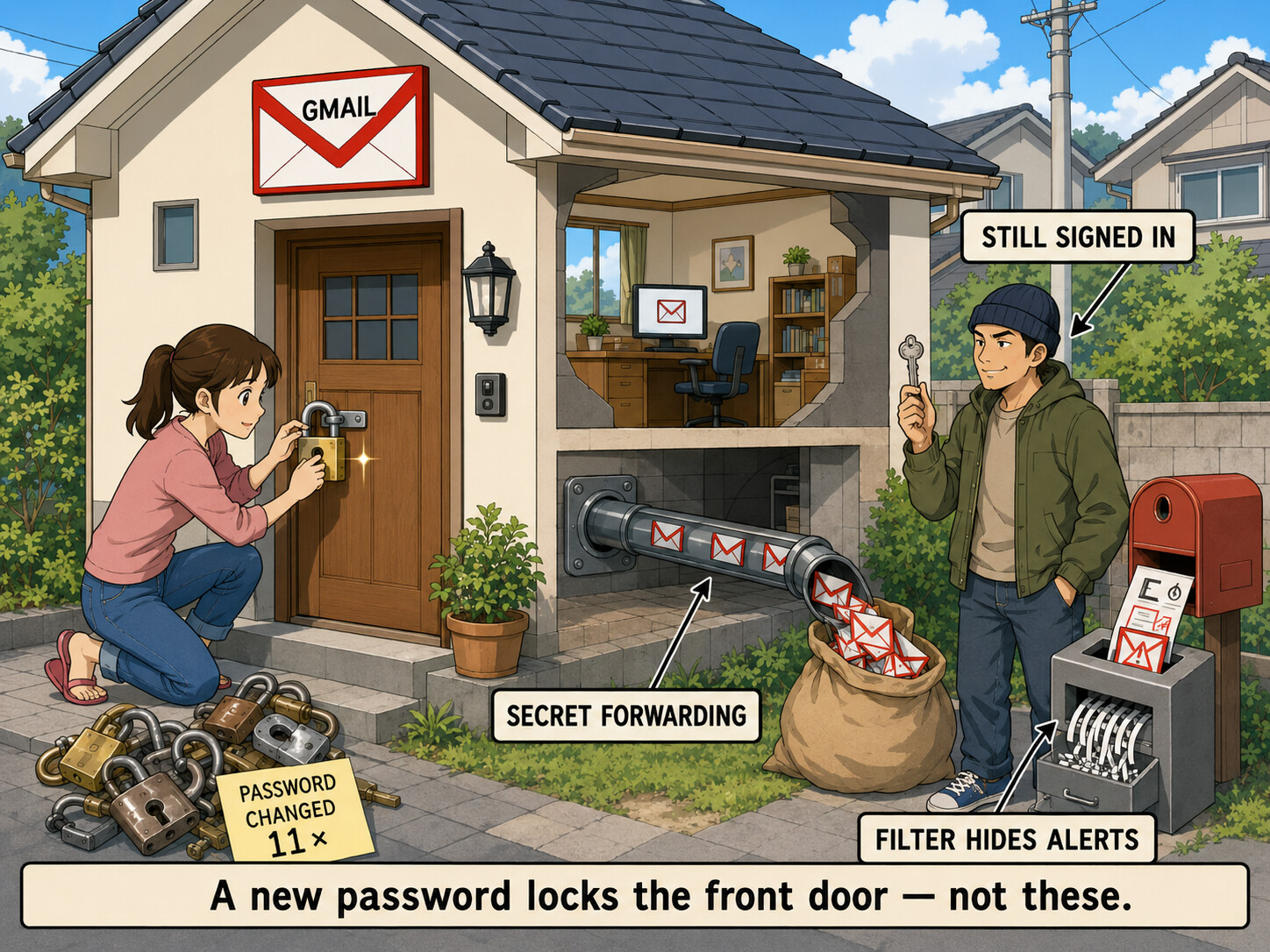


 Reset recovery email + phone to yours (remove theirs) · wipe app passwords · revoke third-party app access
 Turn on

 app-code 2FA (not SMS) · for maximum lockdown,
  !
!