We just added something cool that many of you have been needing — a built-in screen dimmer right here on 1Hack!

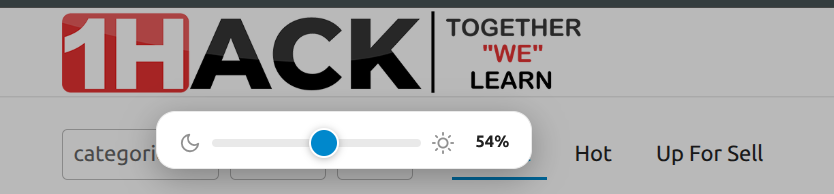
What Is It?
You know when you’re browsing at night or in a dark room and the screen is way too bright? Instead of squinting or turning your monitor brightness down (and forgetting to turn it back up), now you can dim the entire 1Hack page with one simple trick.
It works like lowering the brightness on your phone — everything gets evenly darker, comfortable for your eyes. No weird dark theme, no odd-looking screenshots, just a smooth dimmer.
How to Use It
On PC / Laptop:
- Hold down left-click on the 1Hack logo (top-left corner) for about 1 second
- A small slider pops up below the logo
- Drag the slider left to make it darker, right to make it brighter
- That’s it! Your setting is saved — next time you visit, it remembers
On Phone / Tablet:
- Press and hold the 1Hack logo for about 1 second
- Same slider appears — slide to adjust
- Saved automatically
Normal tap on the logo still takes you to the homepage — nothing changed there. Only holding it opens the dimmer.
Why Not Just a Dark Theme?
Dark themes look great on plain text, but when someone posts a screenshot, a white image, or a tutorial with a bright background — it looks terrible on dark theme. The dimmer avoids this by dimming everything equally, just like turning down your monitor.
This is a Test!
We’re trying this out. If you like it, we’ll keep it. If you have suggestions or find any issues, drop them below!
Try it right now — hold the 1Hack logo for 1 second and play with the slider!


 !
!