 Free Batch Renamer with Variables, Conditions, and a CheatSheet Built In
Free Batch Renamer with Variables, Conditions, and a CheatSheet Built InBatch renaming tool with conditional logic, pattern variables, and an undo button that actually works.
verified · beginner-friendly · windows
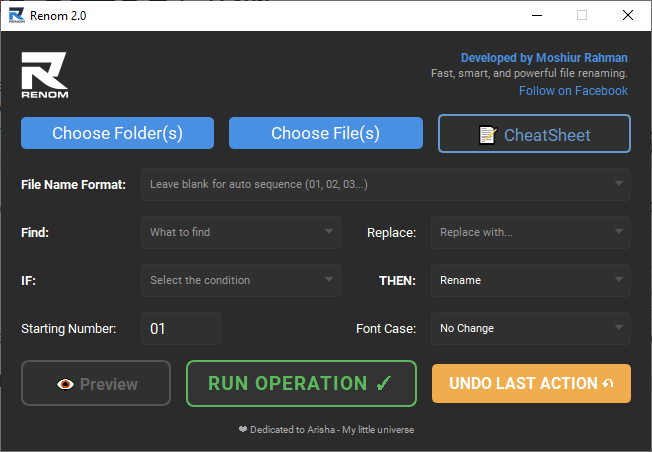
Renom 2.0 — free batch file renamer for Windows. Select folders, set a pattern, hit run. Hundreds of files renamed before you finish reading this sentence.
Built by Moshiur Rahman. Supports 100+ file types. No account, no ads, no hidden anything.
Hi everyone, I’ve released Renom 2.0, an upgraded version of my batch file renaming tool. It’s designed to simplify complex file operations and save hours of manual work. The software is completely free and optimized for real-world workflows — design assets, documents, media files, and code files.
⬇️ Download — One Click

Click Download, install, done. No signup, no email, no license key.
🧠 What It Actually Does — 30-Second Version
Think of it like find-and-replace, but for filenames — across entire folders, with rules.
| You Want To… | Renom Does It By… |
|---|---|
| Rename 500 files at once | Select folder → set pattern → run |
| Add dates to filenames | Use {date} or {datetime} variables |
| Keep original names + add prefix | Use {original} → Project_{original} |
| Sort files into subfolders automatically | IF extension = .png THEN move to /images |
| Fix messy numbering gaps | Auto-detects sequences and fills holes |
| Undo a mistake | One-click undo. Instantly. |
✨ What's New in 2.0
| Feature | What It Means |
|---|---|
| Built-in CheatSheet | All patterns and variables explained inside the app — no Googling |
| Multi-folder processing | Select multiple folders, rename everything in one run |
| Faster engine | Handles massive batches without freezing |
| Live preview | See exactly what changes before committing |
| Smarter patterns | Better numbering detection, handles sequence gaps |
| IF/THEN logic | Conditional rules: if file matches X, do Y (rename, move, copy, delete, zip) |
🎯 Fun Use Cases — Why You'd Actually Want This
 Photographers: 500 wedding photos named
 IMG_4832.jpg → Smith_Wedding_001.jpg in 3 seconds. Use {folder name} to auto-tag by shoot folder.
 Designers: Asset folders with
 final_v2_FINAL_real_v3.psd? Batch clean every filename to ProjectName_001.psd. Your future self will thank you.
 Music hoarders: Rename your entire library to
 Artist - Track Title format. Case formatting handles the messy caps.
 Developers: Auto-organize build outputs — IF
 .log THEN move to /logs, IF .dll THEN move to /bin. One click, zero scripting.
 Students: Semester’s worth of
 Untitled Document (14).docx? Rename to History_Notes_Week01.docx with sequential numbering.
 E-commerce sellers: Product photos from
 DSC00001.jpg → blue-widget-front-01.jpg. SEO-friendly filenames without touching each one.
Trick: The IF/THEN logic is where this gets wild. Set up a rule like “IF filename contains
draftTHEN delete” — and clean entire project folders in one pass. Preview first so you don’t nuke anything important.
🔤 Pattern Variables — Copy-Paste Ready
| Variable | Output | Example |
|---|---|---|
{original} |
Keeps the original filename | backup_{original} → backup_report.pdf |
{date} |
Today’s date | {date}_photo → 2026-04-08_photo |
{time} |
Current time | log_{time} → log_143022 |
{datetime} |
Date + time | Full timestamp |
{folder name} |
Parent folder name | Files in /Wedding/ → Wedding_001 |
| (blank) | Auto-sequence (01, 02, 03…) | Leave format blank for pure numbering |
Case options: lowercase, UPPERCASE, Title Case, Capitalize — applies to the final output.
 Quick Hits
| Want | Do |
|---|---|
 Rename a whole folder Rename a whole folder |
→ Choose Folder → set pattern → Run Operation |
 Replace text in filenames Replace text in filenames |
→ Find field → Replace field → Run |
 Auto-sort by file type Auto-sort by file type |
→ IF extension = X → THEN move to folder |
 Messed up? Messed up? |
→ Undo Last Action (one click) |
 Don’t know the patterns Don’t know the patterns |
→ Hit the CheatSheet button inside the app |
Feel free to share feedback or report issues. Your input helps improve future updates.
1,000 files. 3 seconds. Zero excuses to keep calling them “Untitled Document (47).”
 ctrl + m
 !
!