 GitHub’s Hidden Layer — Mine It, Don’t Just Browse It
GitHub’s Hidden Layer — Mine It, Don’t Just Browse It300M+ repos. The search box shows you maybe 1%. Here’s the other 99%.
mega-list · advanced · web-based
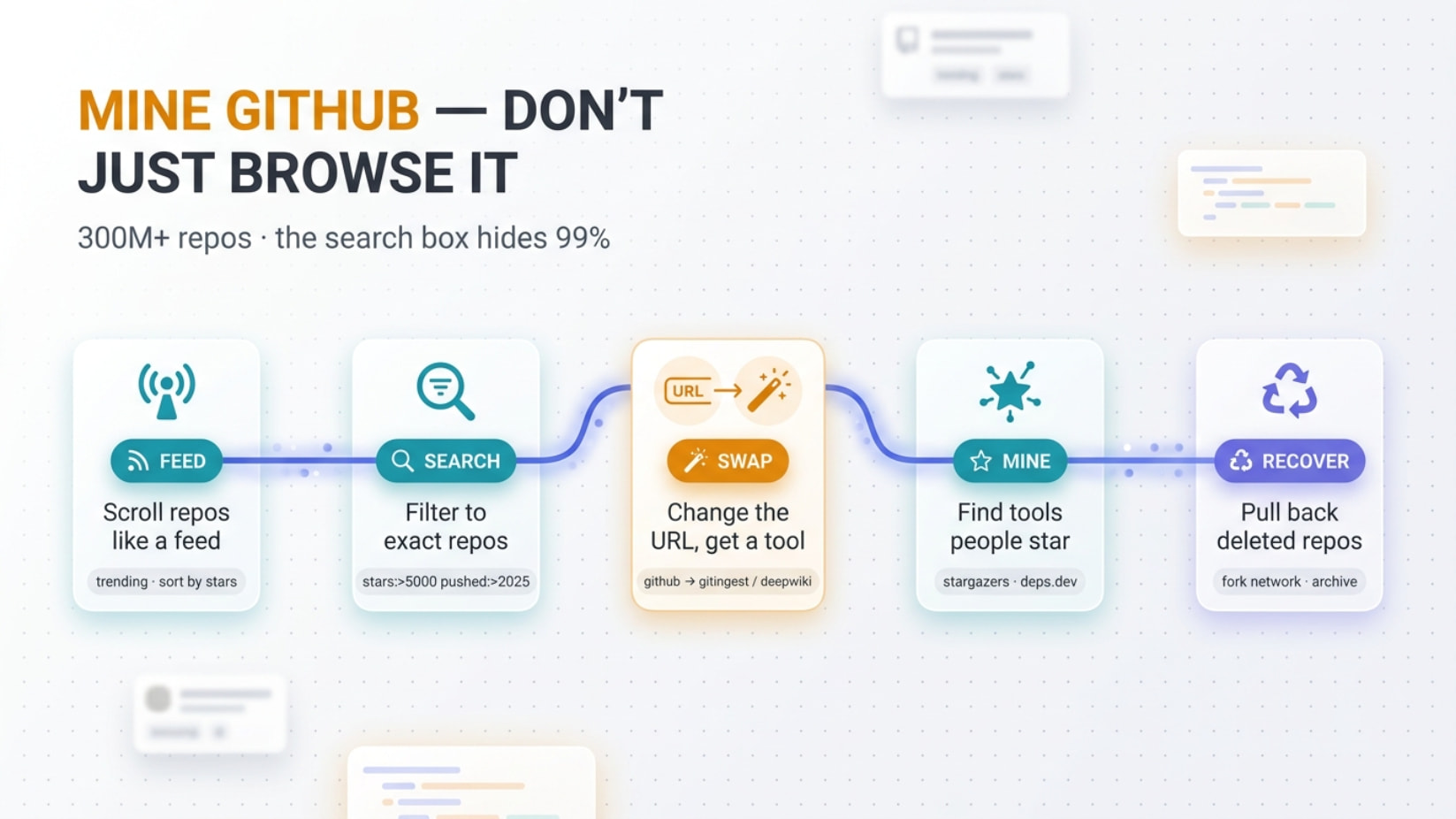
Everyone uses GitHub. Almost nobody mines it.
Trending feeds, code-greppers, deleted-commit recovery, repo→AI converters, leaked-key scanners. All of it is one trick away — most of it is just a URL swap or a search qualifier you were never taught. Full kit below, free, no install.
 Best place to start (the feed): https://gh.jiayouvibe.com/
discover ──▶ grep ──▶ swap-to-tool ──▶ mine / recover
💥 Where this actually pays off
Five spots you’ll hit this week. Each one ties back to the same trick: GitHub is a database, not a website — query it like one.
| Situation | The move |
|---|---|
| Need a tool but don’t know its name | Browse the feed by category → sort by Stars → the working one floats up |
| “Is this library real or just hyped?” | Check forks + dependents (deps.dev) and real star-growth (star-history) — not vanity stars |
| Understand a 50k-line repo in 5 min | Swap the URL → deepwiki.com (wiki + chat) or gitdiagram.com (map). Or dump it to your AI with gitingest.com |
| A repo you needed got deleted | Pull it back through the fork network (4-char ID) or Software Heritage |
| Audit your own leaks first | Run TruffleHog on your repos · open you/repo/commit/HASH.patch to see what email you’ve been leaking |
🍿 Turn GitHub into a feed (start here)
GitHub Open Data (gh.jiayouvibe.com) — stop searching, start scrolling. Sorts the whole of open-source by what actually works.
(screenshot: the feed homepage)
| Tab | Feeds you |
|---|---|
| Trending Hot | Hottest repos — today / week / month / year |
| Recently popular | Quality projects, last 30 days only |
| Featured categories | Front-end · AI/ML · dev tools · databases · learning · Awesome · game engines |
(screenshot: charts + release calendar)
| Hidden bit | Does |
|---|---|
| Galaxy | 3D star-map, every dot = a real repo. Drag → land on a tool you’d never search |
| Collections | Save anything → export JSON / CSV / Markdown |
| Import Stars | Pull your existing GitHub stars in, sync to cloud |
repo = a project’s code folder · star = a public bookmark · fork = someone’s copy to build on (lots of forks = people actually use it)
🎯 The search grammar they never taught you
A qualifier is just a filter word you type in the search bar. Stack them. Works at github.com/search.
| Qualifier | What it pulls |
|---|---|
stars:>10000 · stars:100..500 |
Popularity range |
pushed:>2025-01-01 |
Still actively worked on (not dead) |
created:>2024-01-01 |
Born recently |
language:python · topic:machine-learning |
Stack / subject |
license:mit · archived:false · size:>1000 |
Quality filters |
user:torvalds · org:microsoft |
Whose repos |
in:name · in:readme · in:description |
Where the word sits |
Combine them → actively-kept, popular, non-abandoned JS only:
language:javascript stars:>5000 pushed:>2025-01-01 archived:false
 Code search (search inside files — sign-in needed) takes
 path: filename: extension: plus real regex (pattern-match) by wrapping it in slashes: /sparse.*index/, and boolean AND / OR / NOT.
Search API caps at 1,000 results per query — split by star ranges to page past it.
🐶 Dorking — find what people left unlocked
A dork = a laser-precise search that surfaces stuff people committed by accident. Devs leak secrets constantly — 39M+ secrets hit GitHub in 2024 alone. This is what bug-bounty hunters scan for (their own targets, with permission).
filename:.env "API_KEY"
filename:config.json "password"
"AWS_ACCESS_KEY_ID" AND "AWS_SECRET_ACCESS_KEY"
org:targetcompany extension:json "password"
GitHub token shapes to grep: ghp_ gho_ ghs_ github_pat_ · OpenAI sk- · Anthropic sk-ant- · Slack xox
| Toolkit | Use |
|---|---|
| techgaun/github-dorks | Curated dork list + CLI |
| obheda12/GitDorker | Dork automation at scale |
| streaak/keyhacks | What to do once you find a key (validate it) |
| HackTricks — Github Leaks | Full methodology + keyword bible |
Defensive use only — find your own leaks, or report under responsible disclosure. Don’t touch what isn’t yours.
📡 Catch repos before they blow up
github.com/trending is an opaque black box. These show their math.
| Site | The kick |
|---|---|
| OSSInsight | Trending built on 10B+ GitHub events back to 2011 · free API · project comparison · stargazer geo-maps |
| gitstar-ranking | Top 10,000 users / orgs / repos by star score |
| star-history | Plots & compares star-growth curves — spot fake hype vs real climb |
| trendshift | Catches repos as they rise, not after they peak |
| Track Awesome List | Daily diff of 500+ “awesome” lists via RSS |
| libraries.io | Cross-language library + dependency discovery |
🔎 Grep the entire open-source world
For “how does everyone else actually use this?” — search code across millions of repos, not one.
| Engine | The kick |
|---|---|
| grep.app | A million+ repos, sub-second, regex + filters. Free. Has an MCP server for AI agents |
| Sourcegraph | Structural search (language-aware), commit/diff search, jump-to-definition across repos |
| searchcode | Real function/API examples across 10+ sources |
| publicwww | Search the web by code snippet — find every site using a library |
| grep.app MCP | claude mcp add --transport http grep https://mcp.grep.app |
Browser add-on OctoLinker makes imports on github.com clickable — jump straight to the dependency.
🪄 URL tricks — swap a few letters, unlock a tool
The single highest-leverage move on this list. Change a few letters in any repo URL → it reroutes through a whole tool. Master index: forgithub.com.
Swap github.com/owner/repo → |
You get |
|---|---|
gitingest.com (hub→ingest) |
Whole repo as one clean text dump for any AI |
uithub.com (b→nothing… github→uithub) |
Token-counted LLM context, filter by folder/ext |
deepwiki.com (github→deepwiki) |
Auto wiki + diagrams + chat with the codebase |
gitdiagram.com (hub→diagram) |
Instant clickable architecture map |
gitpodcast.com (hub→podcast) |
A repo explained as a ~5-min audio podcast |
| gitmvp.com · repo2txt · Repomix | “Rebuild this” prompt · browser repo→text · pack with secret-check |
Native github.com URL hacks (no tool needed):
| Trick | Does |
|---|---|
Press . on any repo |
Opens full VS Code in your browser (github.dev) — edit live |
github1s.com (github→github1s) |
Read-only VS Code, no login, with jump-to-definition |
githubbox.com (github→githubbox) |
Opens the repo running live in CodeSandbox |
/compare/v1...v2 |
Diff any two versions |
raw.githubusercontent.com/... |
The raw file, no UI wrapper |
⭐ Mine the stars & the dependency web
Power-users curate for free. Follow their stars; map who-uses-what.
| Tool | The kick |
|---|---|
| stargazers | For any repo: what else its stargazers starred — the “people who liked X” engine |
| astronomer | Scores stargazers to flag bot/fake stars — vet the hype |
| deps.dev | Full dependency graph + the reverse: who depends on this. Free API + BigQuery dataset |
| astralapp | Tag, note & search your own stars so they’re not a graveyard |
Any user’s github.com/USER?tab=stars page is a hand-picked tool feed. The stargazers tool industrializes that.
⚙️ Bulk-clone & automate (gh CLI)
CLI = typing commands instead of clicking. Install gh, then:
Clone every repo in an org at once (8 in parallel):
gh repo list ORG --no-archived -L 500 --json sshUrl --jq '.[].sshUrl' | xargs -n1 -P8 git clone
| Power-up | Does |
|---|---|
| gh-dash | A TUI dashboard of all your PRs/issues with custom filters |
| gh-org-repo-sync | Clone or update every org repo, filtered by search |
gh browse main.py:340 |
Jump straight to a file + line in the browser |
gh api + GraphQL |
Bulk-pull metadata in one call |
🪦 Deleted ≠ gone — recovery & archives
“Deleted” on GitHub mostly means hidden, not erased.
| Method | What it recovers |
|---|---|
| Settings → Deleted repositories | Self-restore within 90 days |
git reflog + git fsck --lost-found |
Your own force-pushed / lost commits, locally |
| Fork network (CFOR) | Commits pushed to any fork stay reachable from every fork — even after the original is deleted. Just the first 4 chars of the commit ID is enough (GitHub calls this intended, so it’s unpatched) |
| GH Archive | Every public event since 2011. Force-pushes show as “Oops commits” that still log the dangling hash — researchers pulled $25k in bounties from these |
| Software Heritage | 50M+ Git repos permanently archived — recovers what vanished from GitHub entirely |
🕵️ The OSINT & leaked-key layer
OSINT = info that’s already public if you know the URL. GitHub leaks identity by design.
| Trick / tool | Reveals |
|---|---|
…/commit/HASH.patch |
The committer’s real name + email — even when hidden in the web view |
github.com/USER.keys · .gpg |
Public SSH / GPG keys (GPG often carries the real identity) |
| gitcolombo | Pulls identities from a user’s whole commit history (web, no install) |
| gitrecon · gitSome | Profile + leaked-commit-email recon |
| TruffleHog | 800+ detectors, verifies keys live, scans history/issues/PRs/gists |
| Gitleaks | Fast regex+entropy scanner — drop it in as a pre-commit gate |
| NoseyParker | High-throughput history scanning + triage UI |
Quick Hits
| Want | Do |
|---|---|
 What’s hot now What’s hot now |
Feed → Trending → This week |
 Skip dead repos Skip dead repos |
pushed:>2025-01-01 archived:false |
 Grok a huge repo Grok a huge repo |
URL → deepwiki.com or gitingest.com |
 Whole repo → AI Whole repo → AI |
swap to uithub.com |
 Recover a deleted one Recover a deleted one |
Fork network (4-char ID) or Software Heritage |
 Find your own leaks Find your own leaks |
TruffleHog + commit/HASH.patch |
 Clone a whole org Clone a whole org |
`gh repo list … |
The repos were always public. The search bar was just hiding the good 99% from you.
 !
!