 Search Inside Every Bookmark, Offline & Free — Ctrl+F Through the Full Text of Everything You Saved in Milliseconds; Raindrop Wanted Pro Money for This
Search Inside Every Bookmark, Offline & Free — Ctrl+F Through the Full Text of Everything You Saved in Milliseconds; Raindrop Wanted Pro Money for ThisStop renting your reading list. One free Windows app, one folder, zero subscription.
beginner-friendly · windows · fresh-drop
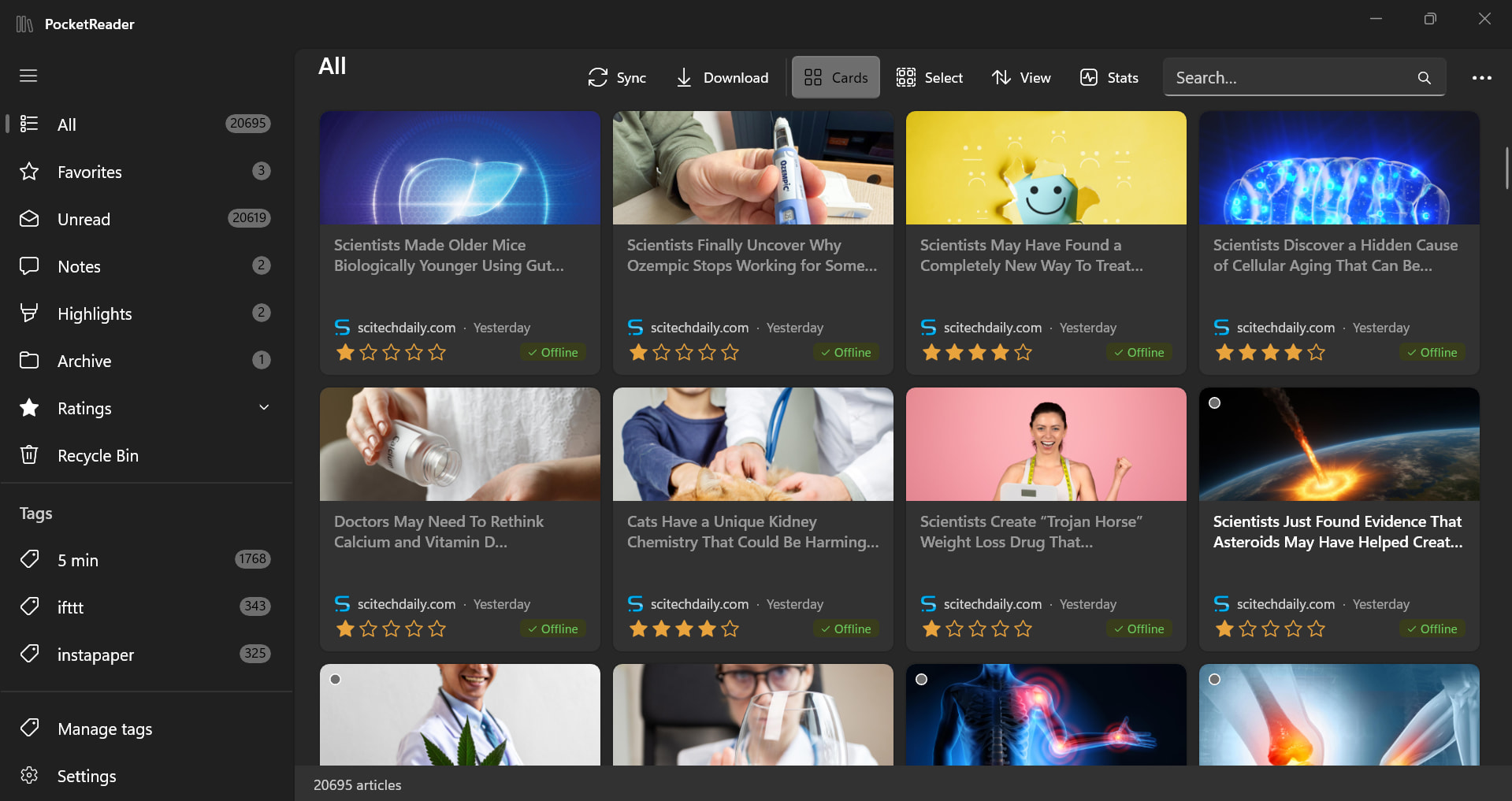
Pocket’s dead. Your “read it later” pile shouldn’t die with it.
Raindrop saves your links for free — then makes you pay to actually use them. Searching inside your saved articles, keeping a copy when the page rots, highlighting a line — all locked behind their paid tier. PocketReader hands you that whole reading half on your own drive. No card, no cloud, nothing leaves your PC.
🗝️ The Move — Grab Raindrop's Paid Reading Stuff Free, On Your Own Drive
Quick picture: Raindrop is your free bookmark drawer (saves unlimited links, forever, no charge). PocketReader is a free Windows program that logs into that drawer with a look-only key, yanks down the full article text + pictures, and parks them on your disk. Now you’ve got your own photocopies that open with the wifi off.
That’s the trick. Raindrop’s free plan is generous on saving and stingy on reading. PocketReader does the reading half locally, for free.
Set it up in 4 steps — no coder stuff:
- Grab it — run the setup, drop it in any folder (even a USB stick). No admin password needed.
- Make a look-only key — Raindrop → Settings → Integrations → create a test token (think: a guest pass that can read your saves but can’t touch them). Paste it in.
- Sync — pulls all your bookmarks in.
- Download offline — saves the full articles to your drive. Done. Read anywhere, wifi or not.
Trick: The token route is the 30-second path — skip the browser sign-in faff entirely. And it only reads, never writes back, so you can’t accidentally nuke anything in your Raindrop. Zero risk to your actual saves.
 Get it: github.com/aungkokomm/PocketReader — grab the
 .exe from Releases · free Raindrop account at raindrop.io
💸 What You Stop Paying For
The stuff Raindrop quietly walls behind Pro (~$3/mo) — yours for nothing, on your machine:
| Locked behind Raindrop Pro | Free in PocketReader (on your disk) |
|---|---|
| Search inside saved articles (Ctrl+F across everything you ever saved) |  Offline, instant, every single word Offline, instant, every single word |
| Permanent copies (your own photocopy when the page dies) | Full text and images, sitting on your drive |
| Highlights + notes | Per-article notes and in-text highlights |
| AI tag suggestions | Smart tags, figured out on your own machine |
And here’s the kicker — Raindrop, even at Pro, isn’t built to work offline. PocketReader is offline-first from the jump.
🎁 Stuff Raindrop Won't Even Sell You
Bonus toys Raindrop doesn’t do at any price:
 Reads articles out loud to you ·
  Export any article to PDF ·
  Reading stats (streaks, words read, time spent) ·
  Star ratings ·
  Resume where you left off ·
  Recycle Bin (delete safe, restore later)
Plus it’s a real program, not a browser tab (clean reader window, light/dark), and it’s private by design — no telemetry, meaning it never phones home with your data. The only things it ever talks to: Raindrop (to read your saves) and the article sites (to fetch the text). That’s it.
 Quick Hits
| Want | Do |
|---|---|
 Keep articles forever Keep articles forever |
→ cache offline once, they live on your drive for good |
| Search inside every save |
→ built-in, runs with the wifi off |
 Zero data leaks Zero data leaks |
→ read-only, no telemetry, local-only |
 Carry your whole library Carry your whole library |
→ one folder, runs off a USB stick |
 Pay nothing Pay nothing |
→ free + MIT open source |
Raindrop’s where you stash it. PocketReader’s where you actually keep it — no rent, no cloud, no link-rot. What’s still rotting in your old read-it-later pile?
 !
!