Track Dead Sites Back to Life — Domain Hunter Script
One-Line Flow: Site goes dark → script checks DNS/TLS/certificates → finds new domain or “new.*” staging site → you know where it moved
Why this matters: Sites you rely on (forums, tools, resources) disappear overnight. No warning, just dead links. This script acts like a detective—it follows digital breadcrumbs (DNS records, SSL certificates, Certificate Transparency logs) to find where a site actually went. Did they change domains? Are they testing on “new.example.com”? Is it really dead or just migrating? You’ll know before anyone else. Built because OneHack kept disappearing and coming back—now you can track any site’s movements automatically.
Why Sites Disappear (And How to Track Them)
The problem: Your favorite site stops loading. You check:
- DNS lookup? Dead.
- Archive.org? Last snapshot from months ago.
- Google? No new results.
Is it actually gone? Not always. Sites migrate for lots of reasons:
- Server costs too high → moving providers
- Domain seized/expired → switching TLDs
- Upgrading infrastructure → testing on staging domains
- Avoiding takedowns → hopping domains
The traces sites leave behind:
- DNS records — Old IPs might point to new locations
- SSL certificates — Shared certs across domains reveal connections
- Certificate Transparency logs — Public record of all SSL certs ever issued
- Redirects — HTTP 301/302 tells you where traffic went
- “new.*” subdomains — Staging sites before full migration
This script checks all of these automatically.
Real Example: How to Read the Signs
Case 1: Site is completely dead
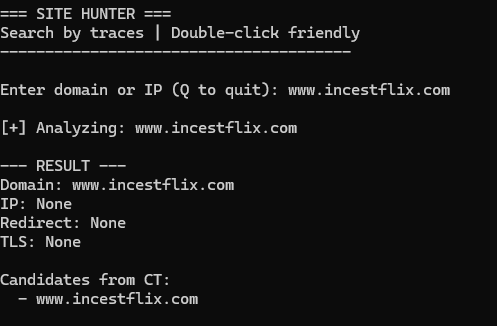
What this means:
- No DNS response
- No Certificate Transparency records
- No redirects
- Verdict: Actually dead or moved without traces
Case 2: Redirect detected

What this means:
- HTTP 301/302 redirect found
- Traffic being sent to new location
- Verdict: Site moved, follow the redirect
Case 3: “new.*” subdomain found
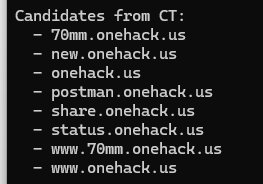
What “new.onehack.us” tells you:
The presence of new.* means:
- Site was being developed, not abandoned
- There was an upgrade or migration plan
- Update was done carefully through test environment
- Domain/server change was deliberate, not chaotic
Translation: The project is NOT dead—it moved or is being updated.
Two Migration Patterns (Scenario A vs B)
Scenario A: Just an Update (Same Domain)
What happens:
new.site.comappears for testing- New version gets finalized
- Main
site.comgets updated new.*disappears- Domain stays the same (IP might change)
Signs:
- No redirect to different domain
- Same domain name before/after
new.*was temporary staging
Scenario B: Domain Change (Relocation)
What happens:
new.site.comappears for testing- New domain appears (
site.net) - Testing on both
- Old domain starts redirecting
- New domain becomes primary
new.*disappears
Signs:
- Redirect appears
- Main domain changes
- New domains show up in Certificate Transparency
- Old domain loses independent content
What the Script Actually Does
Checks it runs:
 DNS lookup → Is domain alive? What IP?
HTTP/HTTPS request → Does it load? Any redirect?
TLS fingerprint → SSL certificate signature (matches across domains = same owner)
DOM structure → HTML layout hash (same layout = same site)
Certificate Transparency → All domains with certs issued for this owner
Similarity scoring → Compares current vs previous data to find matches
What it detects:
 Sees
Sees new.*→ preparation for migration- Sees redirect → domain changed
- Domain stays same → just an update
- New domain in CT logs → migration confirmed
- Same TLS cert → same owner, different domain
Output:
- Current status (alive/dead/redirecting)
- IP address
- Redirect destination (if any)
- List of related domains from CT logs
- Similarity score vs. previous scans
The Python Script (Copy-Paste Ready)
import ssl
import socket
import hashlib
import urllib.request
import urllib.error
import json
import re
import traceback
from html.parser import HTMLParser
from pathlib import Path
from datetime import datetime, timezone

# ================= CONFIG =================
DB_FILE = Path(__file__).with_name("hunter_db.json")
USER_AGENT = "Mozilla/5.0 (SiteHunter)"
# =========================================

# ---------- UTILS ----------
def now():
    return datetime.now(timezone.utc).isoformat()

def pause():
    input("\nPress Enter to continue...")

def is_ip(value):
    try:
        socket.inet_aton(value)
        return True
    except:
        return False

def resolve_ip(domain):
    try:
        return socket.gethostbyname(domain)
    except:
        return None

# ---------- HTTP ----------
def fetch(url):
    try:
        req = urllib.request.Request(url, headers={"User-Agent": USER_AGENT})
        resp = urllib.request.urlopen(req, timeout=15)
        return resp.geturl(), resp.read().decode("utf-8", "ignore")
    except:
        return None, ""

# ---------- TLS ----------
def tls_fingerprint(domain):
    try:
        ctx = ssl.create_default_context()
        with ctx.wrap_socket(socket.socket(), server_hostname=domain) as s:
            s.settimeout(5)
            s.connect((domain, 443))
            cert = s.getpeercert(binary_form=True)
            return hashlib.sha256(cert).hexdigest()
    except:
        return None

# ---------- DOM ----------
class DOMParser(HTMLParser):
    def __init__(self):
        super().__init__()
        self.tags = []
        self.text = []

    def handle_starttag(self, tag, attrs):
        self.tags.append(tag)

    def handle_data(self, data):
        clean = re.sub(r"\s+", " ", data.strip())
        if len(clean) > 30:
            self.text.append(clean)

def dom_fingerprint(html):
    p = DOMParser()
    p.feed(html)
    return {
        "structure": hashlib.sha256(" ".join(p.tags).encode()).hexdigest(),
        "anchors": p.text[:10]
    }

# ---------- CERTIFICATE TRANSPARENCY ----------
def ct_domains(domain):
    res = set()
    try:
        with urllib.request.urlopen(
            f"https://crt.sh/?q={domain}&output=json", timeout=20
        ) as r:
            raw = r.read().decode("utf-8", "ignore")
            if not raw.strip().startswith("["):
                return res
            for item in json.loads(raw):
                for name in item.get("name_value", "").split("\n"):
                    name = name.strip().lower()
                    if name and "*" not in name:
                        res.add(name)
    except:
        pass
    return res

# ---------- STORAGE ----------
def load_db():
    if DB_FILE.exists():
        return json.loads(DB_FILE.read_text(encoding="utf-8"))
    return {}

def save_db(db):
    DB_FILE.write_text(
        json.dumps(db, indent=2, ensure_ascii=False),
        encoding="utf-8"
    )

# ---------- SIMILARITY ----------
def similarity(a, b):
    score = 0
    if a.get("tls") and a.get("tls") == b.get("tls"):
        score += 30
    if a.get("dom", {}).get("structure") == b.get("dom", {}).get("structure"):
        score += 30
    common = set(a.get("dom", {}).get("anchors", [])) & set(b.get("dom", {}).get("anchors", []))
    score += min(len(common) * 5, 30)
    return score

# ---------- ANALYZE ONE TARGET ----------
def analyze(target):
    print("\n[+] Analyzing:", target)
    data = {"input": target, "time": now()}

    if is_ip(target):
        data["domain"] = None
        data["ip"] = target
        data["redirect"] = None
        data["tls"] = None
        data["dom"] = {"structure": None, "anchors": []}
        data["candidates"] = []
        return data

    # domain case
    data["domain"] = target
    data["ip"] = resolve_ip(target)

    url, html = fetch("https://" + target)
    if not url:
        url, html = fetch("http://" + target)

    data["redirect"] = url
    data["tls"] = tls_fingerprint(target)
    data["dom"] = dom_fingerprint(html) if html else {"structure": None, "anchors": []}
    data["candidates"] = sorted(ct_domains(target))

    return data

# ---------- MAIN LOOP ----------
def main():
    print("=== SITE HUNTER ===")
    print("Search by traces | Double-click friendly")
    print("---------------------------------------")

    db = load_db()

    while True:
        try:
            target = input("\nEnter domain or IP (Q to quit): ").strip().lower()
            if not target or target == "q":
                break

            current = analyze(target)

            print("\n--- RESULT ---")
            print("Domain:", current.get("domain"))
            print("IP:", current.get("ip"))
            print("Redirect:", current.get("redirect"))
            print("TLS:", current.get("tls"))

            print("\nCandidates from CT:")
            if current.get("candidates"):
                for c in current["candidates"]:
                    print("  -", c)
            else:
                print("  (no CT domains found)")

            print("\nSimilarity with previous:")
            found = False
            for old_key, old in db.items():
                s = similarity(old, current)
                if s >= 40:
                    found = True
                    print(f"  {old_key} -> {s}%")
            if not found:
                print("  no strong matches")

            db[target] = current
            save_db(db)

            pause()

        except Exception as e:
            print("\n[ERROR]", e)
            traceback.print_exc()
            pause()

    print("\nGoodbye.")
    pause()

# ---------- ENTRY ----------
if __name__ == "__main__":
    main()
How to use:
- Save as
site_hunter.py - Run:
python site_hunter.py - Enter domain when prompted
- Script checks all traces and saves to
hunter_db.json - Run again later to compare with previous scans
Requirements: Python 3.6+ (no external libraries needed)
Use Cases (When You'd Actually Need This)
Scenario 1: Forum you use daily goes dark
- Run script → finds redirect to new domain
- Bookmark new domain before anyone else finds it
Scenario 2: Tool site disappears mid-project
- Script checks CT logs → finds
new.toolsite.comstaging - You access staging version while everyone else thinks it’s gone
Scenario 3: Leaked resource site keeps changing domains
- Track it across hops automatically
- Script finds pattern in TLS certs linking domains
Scenario 4: You run a site and want to monitor competitors
- Track when they migrate infrastructure
- See what new domains they’re registering
Scenario 5: Historical research
- Compare current site vs. archived version
- See if it’s actually the same site under new management
Bottom line: Sites don’t just vanish—they leave traces. This script follows DNS records, SSL certificates, redirects, and Certificate Transparency logs to track where they went. Built it to find OneHack after it kept disappearing, now it works on any domain. Copy the script, run it on sites you care about, check back weekly. You’ll know about migrations before Google does.
 !
!