i want to read some important information from study.com website but each time it is asking for subscription,if anyone knew the trick to access it.
and what would this “important info” be? why dont you just say you want free courses? there’s no “trick” needed anyway, you can register a free account for 30-day trial.
@v_v
Try to follow these:
FIRST METHOD:
- Open Google Chrome Browser and find the topic that you want to access on https://study.com which is currently locked.
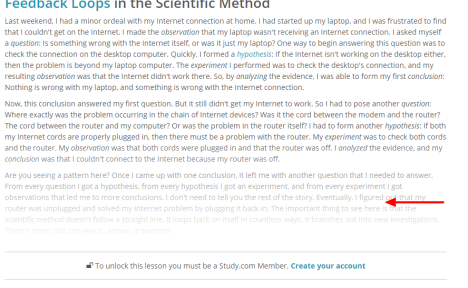
- Press ‘F12’ on your keyboard OR right click on the page and click inspect element.

- A panel will be opened at the bottom or side of your screen. Click on the little Rectangle icon and select on the part which is locked and blurred.
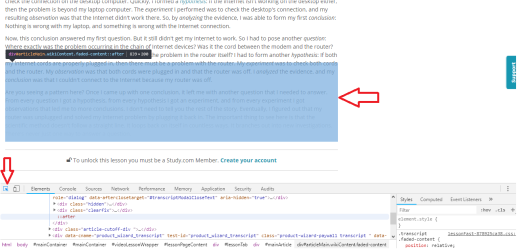
- When you will click on the blurred part, you will see, at the bottom, that there is a ‘hidden’ class. Double click on that hidden class and delete it and hit enter. And then close the panel by clicking the cross icon on the top right of the bottom panel.


- You will now see that the part of the Topic which was locked and blurred is now open and you can read the whole topic.
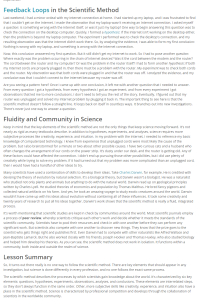
- One more thing. At the last part of the topic, you still see some blurred part which you are not able to look at properly. So you have to do one more thing. Repeat the above mentioned process. Hit F12 or right click on the page and click Inspect element. Select the rectangle tool and click on the part which is blurred ( click on the heading: ‘ Learning Outcomes ‘) and it will take you down in the panel where the selection would be ::after.
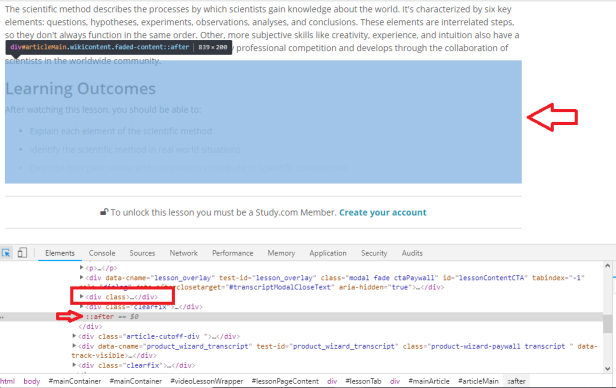
- Just above the ::after, you will see a class 'clearfix’ . You have to click on the little dark arrow on the left of the just above ‘clearfix’. When you will click the arrow, a little area will be expanded below the selection, scroll a little down and find where it is written ‘Learning Outcomes’.
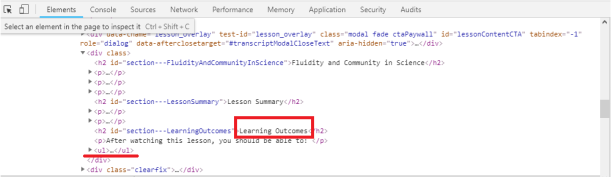
- Again,click on little dark arrow at the start of
- ..
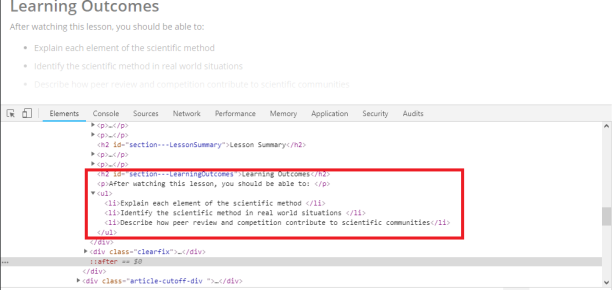
- You can copy the selection by double-clicking each line.
SECOND METHOD:
NOTE: This trick only unblocks the lesson transcripts, I haven’t explored getting access to the full lesson video yet.
Here are the steps:
- Go to a lesson of choice on https://study.com and open the developer-tools in Chrome.
- Use the page inspector tool and select the “Lesson Transcript” text. Confirm that in the Elements tab of the dev tools,
the line “Lesson Transcript” is highlighted (should be under a div that has the id “transcriptHeader”) - Hit the dropdown triangles of "<div class=“transcriptContainer articleContent” data-cname=“main_content>” and(the latter should appear after the contents of the first div appear)
- You should now see a div that has the id “articleMain”. This is where all the text for the transcript is held, so
dropdown its contents. Next, remove the “faded-content” class from the “articleMain” div by doubleclicking on the
“faded-content” text and just removing everything in the little text-editor/box that appears. Then, remove
the “hidden” class for each div that is found inside the “articleMain” div using the same technique.
Not alot is actually ‘unlocked’ by doing this, but at least its something and its something free.
CHECK the video tutorial
THIRD METHOD:
Not confirmed if this site is genuine or not, but try it:
trycheat-hack-study
I hope you were able to follow the steps and unlock your desired topic.All the Best!!
Next time consider before you ask.
thanks for the solution.
Fake site., asks for survey completion
Thanks for confirming!
@ai_machine
Oh dear, forget hacking Study.com — here’s 50 places that teach better for free:
The paywall guards the page. The lesson lives on a different server. 
    study.com                              fast.wistia.net
 ┌────────────────────┐                 ┌──────────────────────┐
 │ 🔒 transcript      │   the 10-char   │ 📄 <ID>.vtt          │
 │    blurred         │ ─── ID ───────► │    whole lesson,     │
 │ "become a member"  │                 │    as plain text     │
 └────────────────────┘                 └──────────────────────┘
      the lock                            no login lives here
 The four steps
1️⃣  open any study.com lesson in your browser
2️⃣  right-click → View Page Source  →  search:  data-wistiaoptions
3️⃣  copy the 10-character ID sitting next to it   →   sx0w6sqlna
4️⃣  open:  https://fast.wistia.net/embed/captions/<ID>.vtt
 Still working today — I pulled the mitosis lesson while writing this:
ID sx0w6sqlna → 6,898 bytes of transcript → no account, no cookie
 Want the video instead of the text? Same ID, different door:
yt-dlp https://fast.wistia.net/embed/iframe/<ID>
 Everything around it is written up here → Study.com’s Paywall Guards the Page — the Full Lesson Sits on Another Server, Free
   🧩 two userscripts   un-blur the transcript · mark quiz answers
   🗄️ archived copies   for lessons that are already gone
   ✅ answer screens    Course Hero previews, questions + 100% marks
   🎓 the free door     Working Scholars licences at no cost
 !
!