 Half the “VirusTotal Clean
  ” Scans You See Are Testing the Wrong Thing
Half the “VirusTotal Clean ” Scans You See Are Testing the Wrong ThingMost “0/85 detections” posts are checking the menu, not the food. Here’s the 30-second fix.
safety · beginner-friendly · 30-seconds
Quick reality check: when someone shares a file and brags “VirusTotal says it’s clean!” — there’s a 50/50 chance they scanned the download page link, not the actual file. Those are two completely different things, and one of them tells you absolutely nothing about whether the file will eat your computer.
Took me a while to spot this trick. Now I see it everywhere — including from people who genuinely think they’re doing the right thing. Here’s the fix, and a side-by-side proof so you can spot it in two seconds.
 The simplest way to picture it
URL scan = checking the restaurant’s safety reviews (“nice neighborhood, no health violations”)
File scan = checking the actual plate of food in front of you (“the chicken is raw”)
The restaurant can have five-star Yelp ratings while the food on your plate is poisoned. VirusTotal works the same way. Scanning the link to a download page tells you the page is safe to load. It says nothing about whether the file you’ll download from that page will trash your machine.
 How to do it the right way (2 steps, takes 30 seconds)
Step 1 — Download the file first.
Yes, download. The file lands in your Downloads folder. Don’t run it. Don’t double-click it. Just let it sit there. (Same way a delivery package lands on your doorstep — you can examine the box without opening it.)
Step 2 — Drag the file into VirusTotal’s “FILE” tab.
Open virustotal.com → make sure you’re on the FILE tab (it’s right at the top — there’s also a URL tab right next to it, that’s the trap) → drag your downloaded file straight onto the page.
That’s it. VirusTotal then runs the file through 60+ antivirus engines at once (picture 60 different doctors all looking at the same X-ray of your file, each calling out what they see).
The tell: When the scan finishes, look at the URL bar in your browser. If it says
virustotal.com/gui/file/...— you scanned the file.
If it saysvirustotal.com/gui/url/...— you scanned the page.(That’s the wrong one, do it again.)
 The proof — same file, two scans, completely different stories
The right way — scan the actual file: notice the URL says /file/ and 12 of 60 antivirus engines flagged it as a trojan. This is what an honest scan looks like.
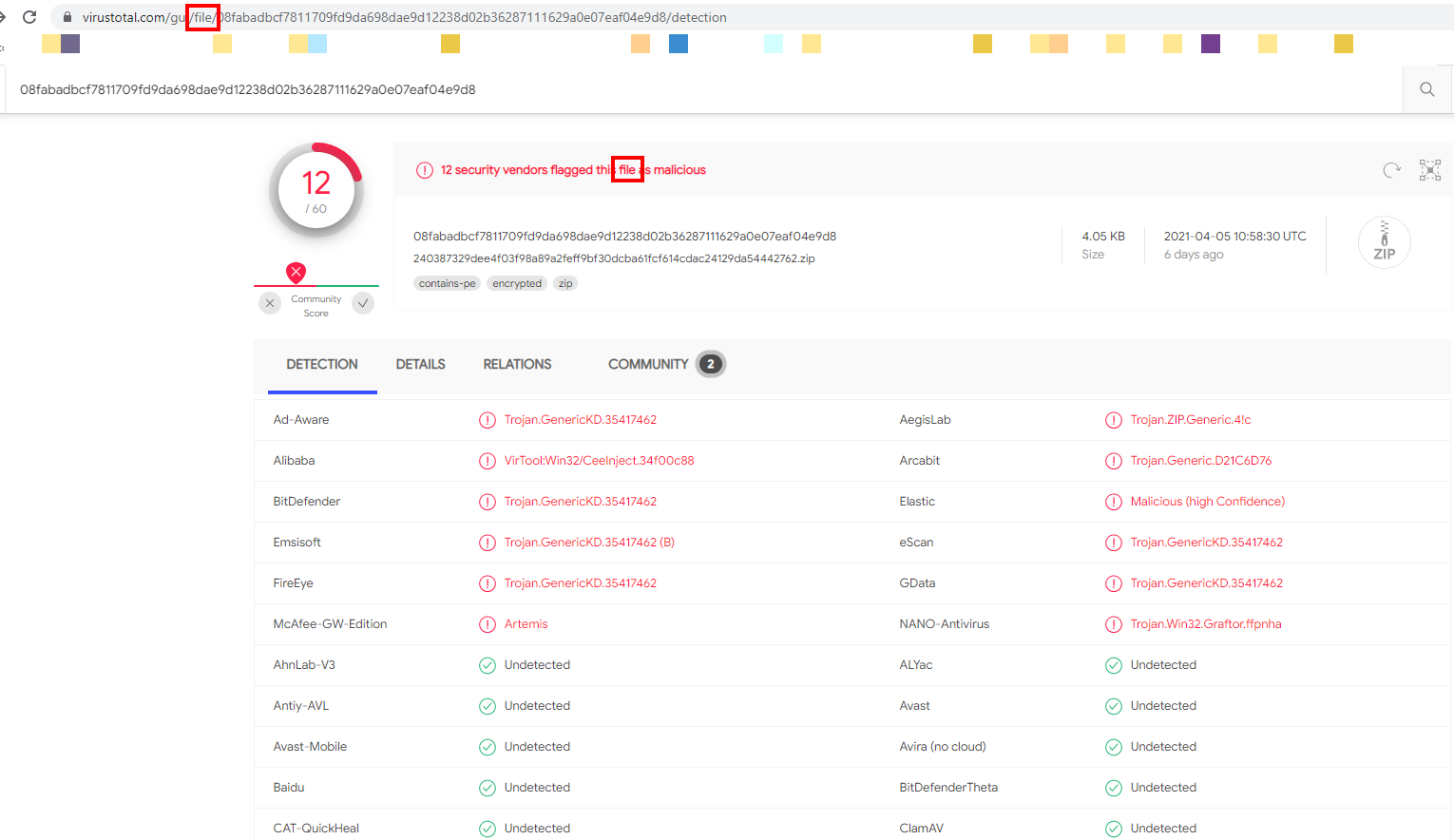
The wrong way — scan the file’s download page link: notice the URL says /url/ and 0 out of 85 flagged anything. Same file. Same trojan. It just got a clean bill of health because VirusTotal only checked the page, not the file inside.
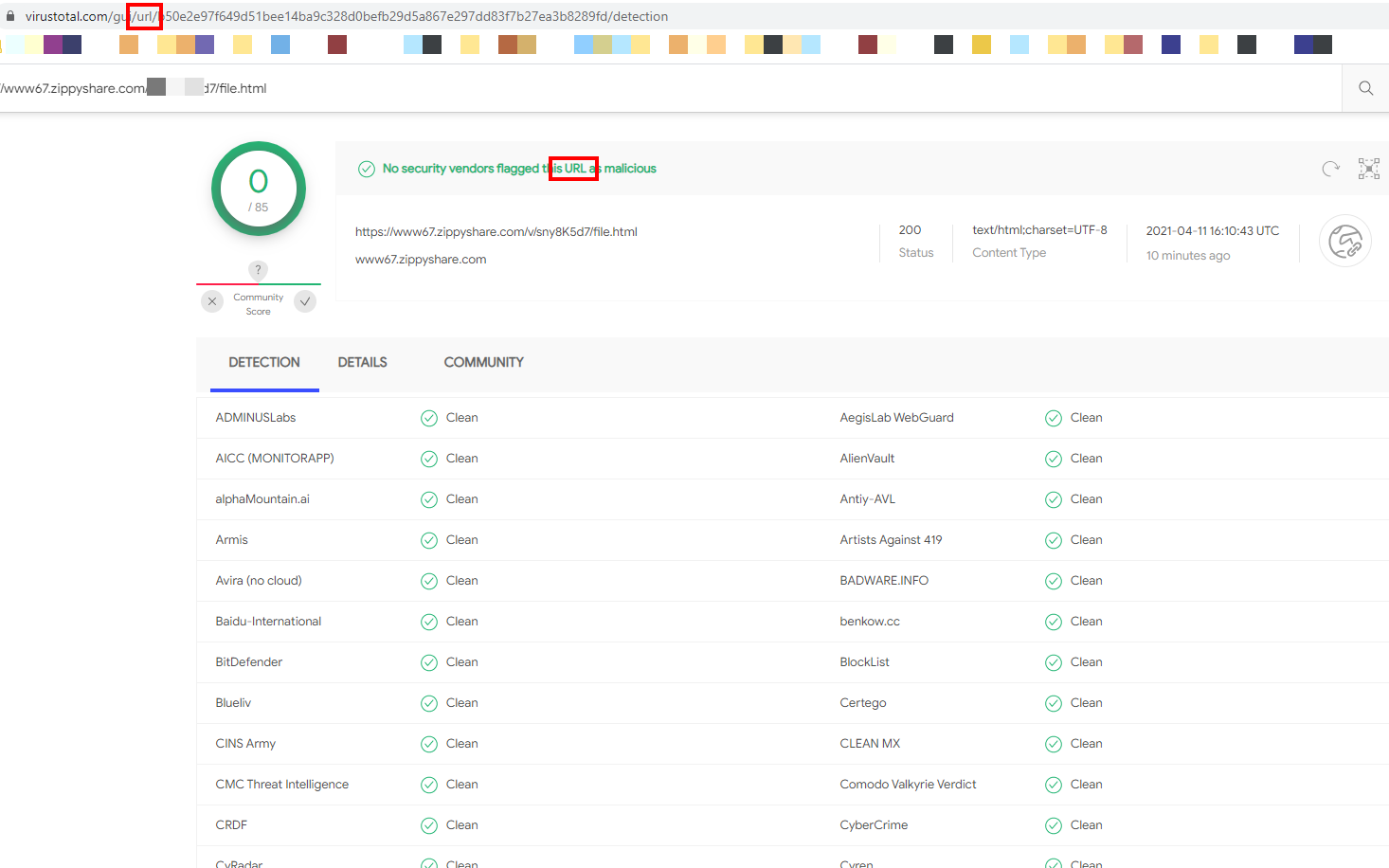
Same exact file. One scan caught the trojan. The other gave it a thumbs up. That’s how a malicious file ends up shared with “VT clean ” stamped on it.
🤔 Why does the wrong scan pass with zero detections?
Because VirusTotal’s URL scanner is doing a completely different job than the file scanner.
| Scanner | What it actually checks |
|---|---|
| URL scan | Is this web address on any blocklist? Is it a known phishing site? Does the page load weird scripts? |
| File scan | Take the actual bytes of this file and run them through 60+ antivirus engines |
A file-sharing site like Zippyshare, MediaFire, or Mega is a clean, legitimate website. Their pages aren’t on phishing lists. Their pages don’t run weird scripts. The page passes — every single time.
The trojan, malware, or backdoor lives inside the file you’d download. The URL scan never opens the file. It just looks at the wrapper.
 Quick Hits
| Want | Do |
|---|---|
 Verify a download before opening it Verify a download before opening it |
→ Download → drag onto FILE tab → check the URL says /file/ |
 Spot a fake “clean” scan in someone else’s post Spot a fake “clean” scan in someone else’s post |
→ Look at their VirusTotal link — /url/ = wrong scan, /file/ = real scan |
 Don’t want to download to verify Don’t want to download to verify |
→ Use the file’s SHA-256 hash if the uploader gave one — paste it into VirusTotal’s search bar, no download needed |
 On mobile, can’t drag-drop On mobile, can’t drag-drop |
→ Tap the Choose file button, pick from your downloads, same result |
 Got a bad scan after downloading Got a bad scan after downloading |
→ Don’t run it. Right-click → delete → empty recycle bin. Done. |
 Want extra paranoia Want extra paranoia |
→ Cross-check with hybrid-analysis.com or any.run — they actually run the file in a safe sandbox and watch what it tries to do |
30 seconds of dragging. Saves you a wiped laptop. Next time you see a “VT clean ” post — check the URL. Did they scan the file or the page?
 !
!