 Quick Overview
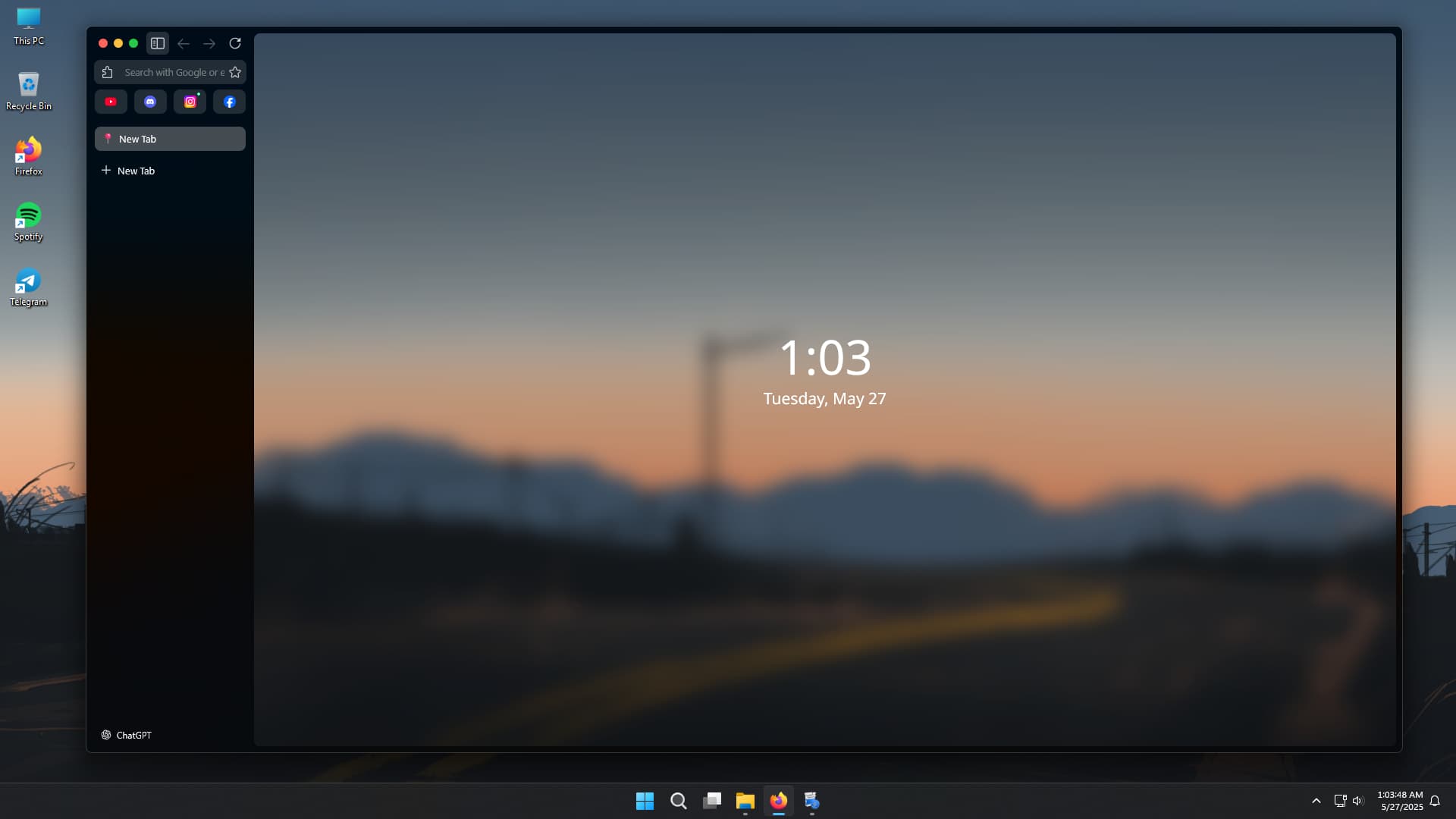
Want your Firefox to look like Zen or Arc, but still work with Netflix and run fast?
This setup gives you that clean, modern look — without switching browsers or losing important features.
 What’s This About?
It’s a simple way to change how Firefox looks using a small design file.
It adds:
- A clean, Zen-style design
- Blurred backgrounds
- Mac-style buttons
- Auto-hiding sidebar
- Dark mode and custom wallpaper
- And still works with sites like Netflix, Prime, and Spotify
No need to install any new browser or heavy tools — it just uses Firefox.
 Everything Needed (All in One Place)
| Use Case | Link |
|---|---|
| Main Theme (CSS File) | gwfox-css GitHub |
| Step-by-Step Install Guide | INSTALL.md |
| Video Tutorial | YouTube |
| Wallpaper (Optional) | Wallhaven |
| Zen Nebula Blur Add-on | Zen Nebula GitHub |
| Extra Firefox Tweaks (Optional) | MrOtherGuy CSS Hacks |
| Zen FAQ about Streaming Issue | Zen FAQ |
| Chrome Alternative with Design | Arc.net |
 How to Set It Up (Simple Steps)
-
Install Firefox (Latest Version)
Make sure Firefox is updated to version 139 or above. -
Download the Theme (gwfox)
- Go to the GitHub page
- Click “Code” → “Download ZIP”
-
Open Firefox Settings Folder
- Type
about:profilesin the Firefox address bar - Click “Open Folder” next to your profile
- Type
-
Add the Theme Files
- Inside that folder, create a folder called
chrome(if it’s not already there) - Copy everything from the ZIP’s
chromefolder into this one
- Inside that folder, create a folder called
-
Restart Firefox
Just close and reopen Firefox to see the new look
 Fix Settings to Make It Work Fully
Go to about:config in the Firefox address bar and switch these settings:
| Setting Name | Set To |
|---|---|
layout.css.backdrop-filter.enabled |
true |
gfx.webrender.all |
true |
ui.systemUsesDarkTheme |
1 for dark mode |
This helps with blur effects and the dark theme.
 Common Problems & How to Fix Them
| Problem | What Helps |
|---|---|
| Sidebar looks clear, not the page | Recheck settings and theme files |
| Bookmarks don’t show | Move the mouse to the bottom of the window |
| Mac-style close buttons showing | That’s part of the design — can be changed in the file if needed |
| Streaming not working (Netflix, etc.) | Use Firefox, not Zen browser |
| Want to remove the design | Delete the chrome folder and restart Firefox |
 Zen Browser vs Firefox with gwfox Theme
| Feature | Zen Browser | Firefox with Theme |
|---|---|---|
| Stylish design |  Yes Yes |
Yes |
| Works with Netflix |  No No |
Yes |
| Uses a lot of memory | Yes |
No |
| Regular updates | Rare |
Often |
| Built-in mods | Yes |
Manual |
So with Firefox and this theme, the look is just as good — but it runs better, uses less memory, and supports all sites.
 Optional Add-ons to Improve It
| Add-on or Tweak | Use |
|---|---|
| Bonjour | Adds time/date widget |
| Sidebery | Vertical tabs sidebar |
| Betterfox | Speeds up Firefox |
| Zen Nebula Theme | Adds extra glow and blur |
| Custom Wallpaper | Add your favorite image as background |
 People Often Ask
Can this work on Chrome or Brave?
No, only works with Firefox 139+ or Firefox forks.
Why not just install Zen?
Zen doesn’t work with Netflix or Prime, and uses more memory.
Is this safe?
Yes. It’s just a visual file — no scripts, no code, no viruses.
Will Firefox still work normally?
Yes. This just changes the look — nothing else.
Quick Final Checklist
 Firefox 139+ installed
Downloaded and added the gwfox theme
Settings changed in about:config
Optional add-ons added (Bonjour, Sidebery, etc.)
This gives the Zen/Arc look — with none of the problems. Fast, sleek, private, and beautiful.
 !
!