Underground Fitness Tools: Free, Self-Hosted, Actually Good
Want to stop paying monthly for apps that track your gym sessions? Want your data to actually be yours? Here’s how.

The Problem (Why You’re Reading This)
Right now, your fitness life is scattered:
- Workouts live in one app
- Your progress lives in a Google Sheet (cursed)
- Your smartwatch data is trapped forever
- You’re paying $15/month to see numbers you already know
That sucks.
The Solution (In 3 Words)
Wingfit. Own it locally.
- Self-hosting Wingfit doesn’t just “protect” your data better — it stops random third parties from collecting it in the first place. No trackers, no ad-SDKs, no surprise “partners.”
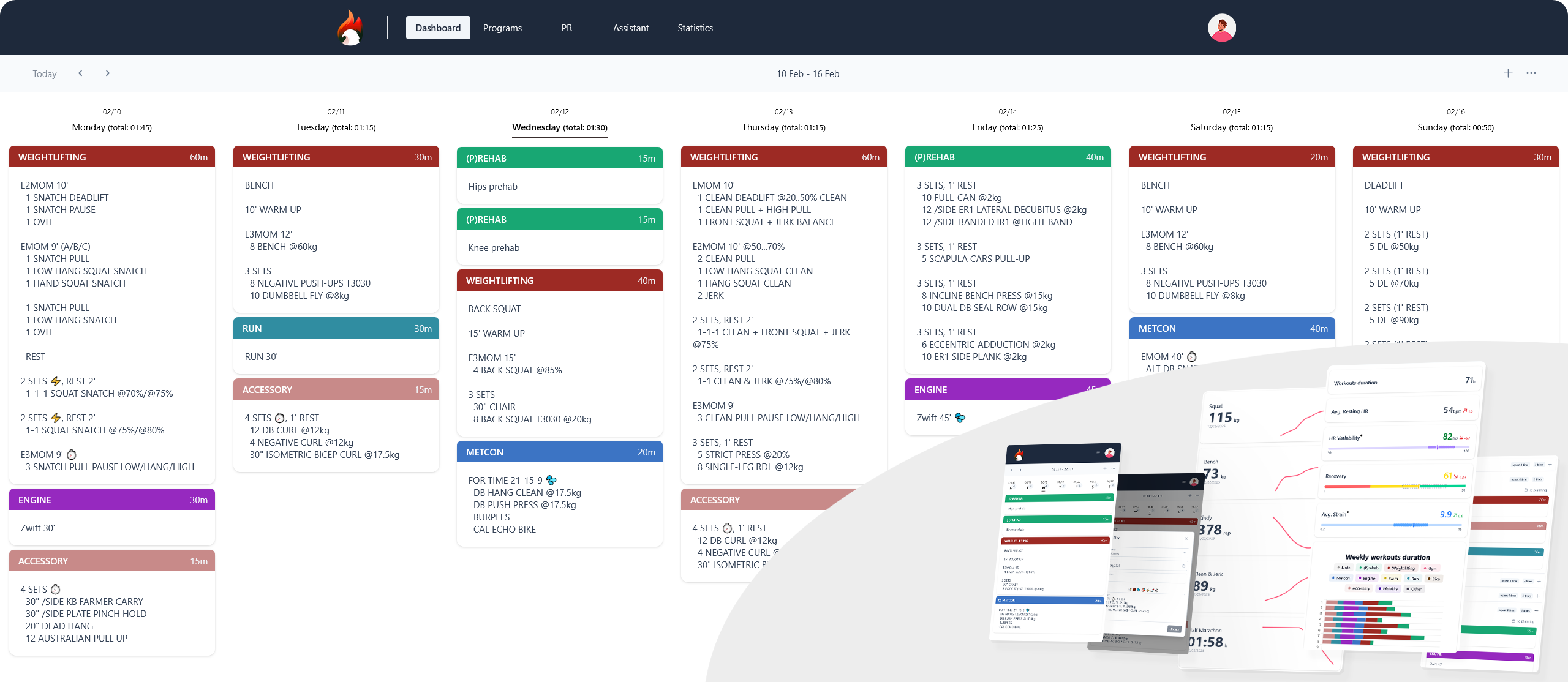
It’s a free app you run on your own computer. No ads. No “come back!” notifications at 3 AM. Just you, your workouts, your data.
Live demo: wingfit.fr
GitHub:
What Does Wingfit Actually Do?
Three things:
- Plan your workouts – Stop improvising every session. Build actual training blocks.
- Track your lifts – Watch your numbers go up. Feel good about it.
- See your smartwatch data – Heart rate, volume, recovery. All in one place.
That’s it. No social feeds. No infinite scroll. Just the things that matter.
But What If Wingfit Alone Isn’t Enough?
No problem. There are other free tools you can glue together.
Want bar speed tracking without $500 hardware?
- Point a webcam at your barbell
- Tape looks cool
- Get actual velocity data
- Tool: VBT-Barbell-Tracker (https://github.com/kostecky/VBT-Barbell-Tracker)
Want a heatmap of your training days?
- See which days you actually showed up
- Tool: ExerciseDiary (https://github.com/aceberg/ExerciseDiary)
Want a simple phone app for logging?
- No cloud, no signup
- Tool: GymRoutines (https://codeberg.org/noahjutz/GymRoutines)
Want to track runs without feeding Strava?
- Offline maps, GPS, easy exports
- Tool: FitoTrack (https://codeberg.org/jannis/FitoTrack)
Want a super lightweight, minimal tracker?
- Built in Rust, lightning fast
- Tool: Toedi (https://github.com/toedirs/toedirs)
Want to log workouts in your browser, no account needed?
- Everything stays on your device
- Tool: MuscleBook.net (https://github.com/cfilipov/MuscleBook.net)
Think of Wingfit as the main brain. These are optional sidequests.
Getting Your Old Data Back (Data Jailbreak)
Stuck in Garmin? Apple Health? Mi Band?
From Garmin:
- Use Garth (Python tool that logs in like their app)
- https://github.com/matin/garth
- Pulls everything out, lasts a year
- Now feed it into Wingfit or keep it safe
From Mi Band / Zepp / Amazfit:
- Use Mi-Fit-and-Zepp-workout-exporter
- https://github.com/rolandsz/Mi-Fit-and-Zepp-workout-exporter
- Talks to hidden APIs
- Exports to GPX, JSON, whatever format you want
From Apple Health:
- Export your data as XML (Settings > Health > Data Access & Devices)
- Use apple-health-parser to turn that mess into readable data
- https://github.com/cvyl/apple-health-parser
Point: Your data is yours. Go get it.
Free Fitness Databases (Build Your Own Coach Brain)
Don’t reinvent the wheel. These exist and are free.
Exercise lists with images:
- Free Exercise DB - thousands of exercises with muscles and equipment
- https://github.com/yuhonas/free-exercise-db
- JSON you can use: https://raw.githubusercontent.com/yuhonas/free-exercise-db/main/dist/exercises.json
Food data:
- Canadian Nutrient File API - ~5,600 foods, 150+ nutrients
- https://food-nutrition.canada.ca/api/canadian-nutrient-file/
- No API key needed
Want to compare lifts scientifically?
- Powerlifting formulas - Wilks scores, IPF standards, DOTS calculations
- https://github.com/Magsport/powerlifting-formulas
- Settle arguments with math instead of opinions
Heart rate variability (recovery tracking):
- pyHRV or hrv-analysis - feed in your heartbeat gaps, get HRV metrics
- https://github.com/PGomes92/pyhrv
- https://github.com/Aura-healthcare/hrv-analysis
- See what sleep, stress, and training actually do to your recovery
How to Actually Run This Thing
Wingfit runs in Docker (a magic box that handles all the boring setup).
Easiest way (Docker Compose):
- Install Docker on your computer or cheap VPS
- Clone the repo: https://github.com/itskovacs/wingfit/
- Run this one command:
docker-compose up -d
Done. Open http://localhost:8080
One-liner version:
docker pull ghcr.io/itskovacs/wingfit:5
docker run -d -p 8080:8000 -v ./storage:/app/storage ghcr.io/itskovacs/wingfit:5
Your data lives in ./storage – back it up by copying that folder.
Privacy & Storage (Real Talk)
- Your data lives in a single database file on your machine
- You can plug in your own login system if you want
- It’s free for personal use (CC BY-NC-SA 4.0)
- Backups are simple: just copy the
.dbfile
Performance? Fine for you, your friends, your family. Only breaks if you dump millions of rows with zero optimization.
Wingfit vs Other Options
vs wger (bigger, fuller system):
- wger has nutrition, photos, measurements, gym management
- Wingfit is lighter, just workouts + PRs
- Pick wger if you want an all-in-one beast
- Pick Wingfit if you want minimal, clean, fast
vs paid apps (Hevy, Strong, etc.):
- Paid apps add social feeds, watch apps, auto-progression
- They own your data
- Wingfit is free, private, yours forever
- Pick this if you care about owning your history
Find Your People (Communities)
Want ideas? Steal them from people who obsess over data:
- Lifelogging Discord: https://discord.com/invite/ZFgwHAn6G9
- Endurain Discord (Strava alternative): https://discord.gg/rPWFv6W
- Self-Hosted Community: https://lemmy.world/c/selfhosted
Just Get Started Already
- Click the demo: https://wingfit.fr/ (2 minutes, see if you like it)
- Pick your level:
- Just want simple tracking? → Wingfit only
- Want your old data? → Add Garth or an exporter
- Want a frankenstein coach system? → Bolt on the free databases and tools
- Copy-paste the Docker command above
- Free your data from wherever it’s trapped
- Done. You now own your fitness stack.
Who This Is For
You want this if you:
- Like owning your own stuff
- Hate paying $15/month to see your own numbers
- Want to keep this data for 5+ years
- Don’t mind one copy-paste command
If that’s you: run Wingfit, maybe add a tool or two, and watch paid apps scream about discounts while you quietly build something better.
Big platforms hate exactly what this topic is about: gluing small, free, self-hosted tools together (Wingfit + VBT + HRV + exports) so you don’t need their walled-garden “fitness cloud” at all.

 !
!