One-Line Flow:
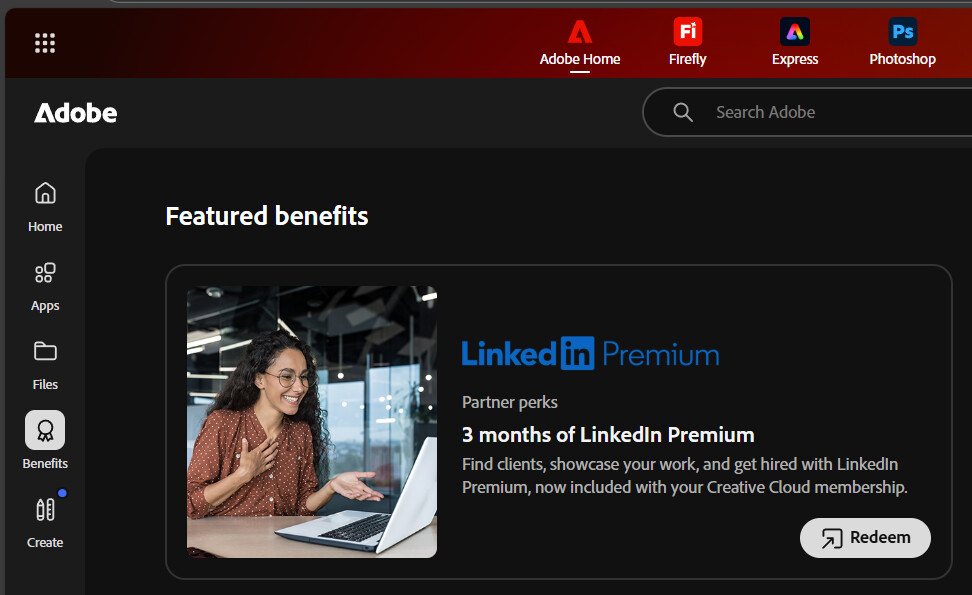
Get 3 months of LinkedIn Premium Career free — straight from your Adobe Creative Cloud perks page (no magic, just buried benefits).
Continuing from Adobe’s 7-Day Trial Just Got Gaslighted Into 4 Months:
Once you’ve created your Adobe account and activated that 4-month Creative Cloud trial —
head to adobe.com/benefits or your Creative Cloud → Home Dashboard → Benefits Section → LinkedIn Premium (3 Months Free) and hit Redeem.
Boom. You just unlocked LinkedIn Premium Career, the version that actually helps with jobs — not just fancy badges.
 What You Actually Get
- Send InMail directly to recruiters
- See who viewed your profile
- Access 24,000+ LinkedIn Learning courses
- Get job & salary insights
- Supposedly makes you 2.6× more likely to get hired (yeah, LinkedIn’s math, not mine)
 Works Only For
 Creative Cloud Individual accounts
CC Teams delegates / hybrid admins
 Not available for Teams admins or Enterprise users (yet)
 Heads Up
- First-time users only: Already had a Premium trial? You’re out.
- Auto-renews after 3 months — cancel 1 day before renewal to avoid charges.
- Once cancelled, you’re locked out of any LinkedIn Premium trial for the next 12 months.
- You can redeem with UPI for verification — confirmed working.
- Card BINs? Nope. Failed multiple times. Stick with UPI.
Credit to the original Adobe trial trick post for discovering this gem.
 Bonus tip: Indian users — if the offer doesn’t appear right away, switch region to “United States” on your Adobe account page before checking Benefits again.
 !
!