Ok, so I have a voice message from a person. How do I see the data or see if it was made by them or a AI. Or any AIs that can help me do that cuz I’m still learning all the programming stuff, etc. Can I do that is that possible. Or what data can I see from it. I need my OneHacks family help here ppl. . pleasee. Thanks a millon in advance!! Much  love.
love.
2 Likes
you can recognize some patterns to understand the difference between human or ai voice while hearing, if not able to send me dm i’ll post the results
1 Like
Yes — it’s possible. You can pull metadata, check for AI/synthesis artifacts, and run the clip through detectors even if you’re still learning programming.
-
What data you can actually see from a voice message.
• Container/metadata: format (ogg, m4a, mp3, opus, amr), duration, bitrate, sample rate, channels, encoder tags, creation/modification timestamps, sometimes device or app tags (WhatsApp, iMessage, Telegram, Voice Memos, etc.).
Audio signal: waveform, spectrogram, pitch/formant contours, silence patterns, background noise floor, clipping, compression artifacts.
• Forensic traces: unnatural phase, missing micro-prosody, flat noise floor, vocoder/GAN fingerprints, identical repeated phonemes, missing room reverb or mismatched reverb, “too clean” highs, metallic/phasey sibilants (common in AI).
• What you usually cannot get: true GPS, real phone IMEI, or cryptographic proof of the human speaker just from the file alone. Speaker verification needs a known-good sample of their real voice.
1 Like
That was my first instinct as well: examine the metadata. Those who generate these types of messages for the purpose of deception seldom think to add legit metadata that you would expect to find. E.g. compare the recording date & time with the date & time that the message was received. If there is a big difference it is likely part of a pack that somebody is reusing on you.
 TWO DIFFERENT THINGS YOU CAN CHECK
IMPORTANT DISTINCTION:
──────────────────────────────────────────────
① METADATA (technical file info)
   → Tells you HOW the file was created
     (device, app, date)
   → Does NOT directly tell you if the
     voice itself is AI or human

② AI VOICE DETECTION
   → Analyzes the actual audio waveform
   → Determines if speech patterns are
     synthetic or human
   → THIS is what you're really asking about
 BEST AI VOICE DETECTORS (NO CODING REQUIRED)
RESEMBLE AI DETECT — START HERE
BEST FOR:
  → Free basic checks
  → Works even on COMPRESSED/EDITED audio
    (important for WhatsApp voice notes!)

ACCESS:
  → resemble.ai
  → No signup needed for basic checks
 HIYA DEEPFAKE VOICE DETECTOR
BEST FOR:
  → Free browser extension
  → Quick second-opinion checks

ACCESS:
  → hiya.com
 WHISPEAK
BEST FOR:
  → Ranked #1 on Hugging Face Speech
    Deepfake Arena
  → Works on real phone-quality audio

ACCESS:
  → whispeak.io
 OTHER SOLID OPTIONS
REALITY DEFENDER
  → Used by governments/news orgs
  → Runs audio through multiple detection
    systems

ELEVENLABS CLASSIFIER
  → Best if you suspect ElevenLabs
    specifically was used

DEEPFAKEDETECTION.IO
  → Simple, free, upload-and-check
 TOOLS COMPARED
 TOOL TOOL |
 BEST FOR BEST FOR |
 ACCESS ACCESS |
|---|---|---|
| Resemble AI Detect | Compressed/edited audio | Free, resemble.ai |
| Hiya | Quick free checks | Free browser tool |
| Whispeak | Real phone-quality audio | whispeak.io |
| Reality Defender | Multi-system verification | Web-based |
| ElevenLabs Classifier | Suspected ElevenLabs clones | elevenlabs.io |
| deepfakedetection.io | Simple upload-and-check | Free |
 ONE BIG CAVEAT YOU SHOULD KNOW
DETECTION ISN'T PERFECT:
──────────────────────────────────────────────
⚠️ Most detectors STRUGGLE once audio is
   compressed through phone/app codecs
   (like WhatsApp does)
⚠️ Detection accuracy can DROP when checking
   a real-world voice note vs. a clean
   studio file

WHAT TO DO IF RESULTS CONFLICT:
  → Don't panic if one tool says "human"
    and another says "AI"
  → Run it through a THIRD tool
  → Also apply your own ears (see checklist
    below)
 MANUALLY SPOTTING AI VOICE YOURSELF (NO TOOL NEEDED)
LISTEN FOR THESE RED FLAGS:
──────────────────────────────────────────────
① UNNATURAL PACING
   → AI voices often have too-even rhythm
   → Lacking natural pauses/hesitations

② MISSING BREATHING SOUNDS
   → AI-generated voices frequently miss
     subtle breath sounds between phrases

③ EMOTIONAL FLATNESS
   → Even "expressive" AI can sound
     slightly mismatched between words
     and emotional tone

④ BACKGROUND NOISE INCONSISTENCY
   → Real recordings have consistent
     ambient noise
   → AI-generated ones are often
     unnaturally clean or have odd
     noise patches

⑤ WORD-BOUNDARY GLITCHES
   → Listen closely for tiny unnatural
     blips where words connect
 CHECKING FILE METADATA (SEPARATE FROM AI DETECTION)
FREE TOOL: TEMBRICA AUDIO FILE INSPECTOR

ACCESS:
  → tembrica.com/en/audio-inspector
  → Just drag and drop the file
  → No account needed

WHAT IT SHOWS:
  ① Encoding format/quality
     (can reveal if re-encoded from
     something else)
  ② Embedded metadata
     (sometimes includes device info)
  ③ Spectrogram analysis
     (visual sound pattern — can reveal
     unnatural generation patterns)
 MY SUGGESTED ORDER OF OPERATIONS
YOUR STEP-BY-STEP WORKFLOW:
──────────────────────────────────────────────
STEP 1:
  Upload the voice message to
  RESEMBLE AI DETECT → get first AI/human read

STEP 2:
  Cross-check with HIYA's browser tool
  for a second opinion

STEP 3:
  Run it through TEMBRICA'S AUDIO INSPECTOR
  to check metadata/spectrogram for
  anything unusual

STEP 4:
  Trust your own EARS using the checklist
  above as a tiebreaker
 PRO TIPS
 Always use at least 2 detectors, not just 1 — this reduces false positives/negatives, especially on compressed voice notes
 Listen with headphones, not phone speakers — subtle AI artifacts like missing breath sounds are much easier to catch
- Spectrogram analysis is your visual backup — if the audio “looks” unnaturally smooth or patterned, that’s a red flag even without a definitive AI score
 Don’t rely on metadata alone — it tells you about the FILE, not the VOICE itself
 If it’s a high-stakes situation (fraud, scam, impersonation), consider Reality Defender or Whispeak since they’re built for professional-grade verification
 No single tool is 100% accurate — especially on real-world phone-quality audio, so combine tools + your own ears for the best confidence level
1 Like
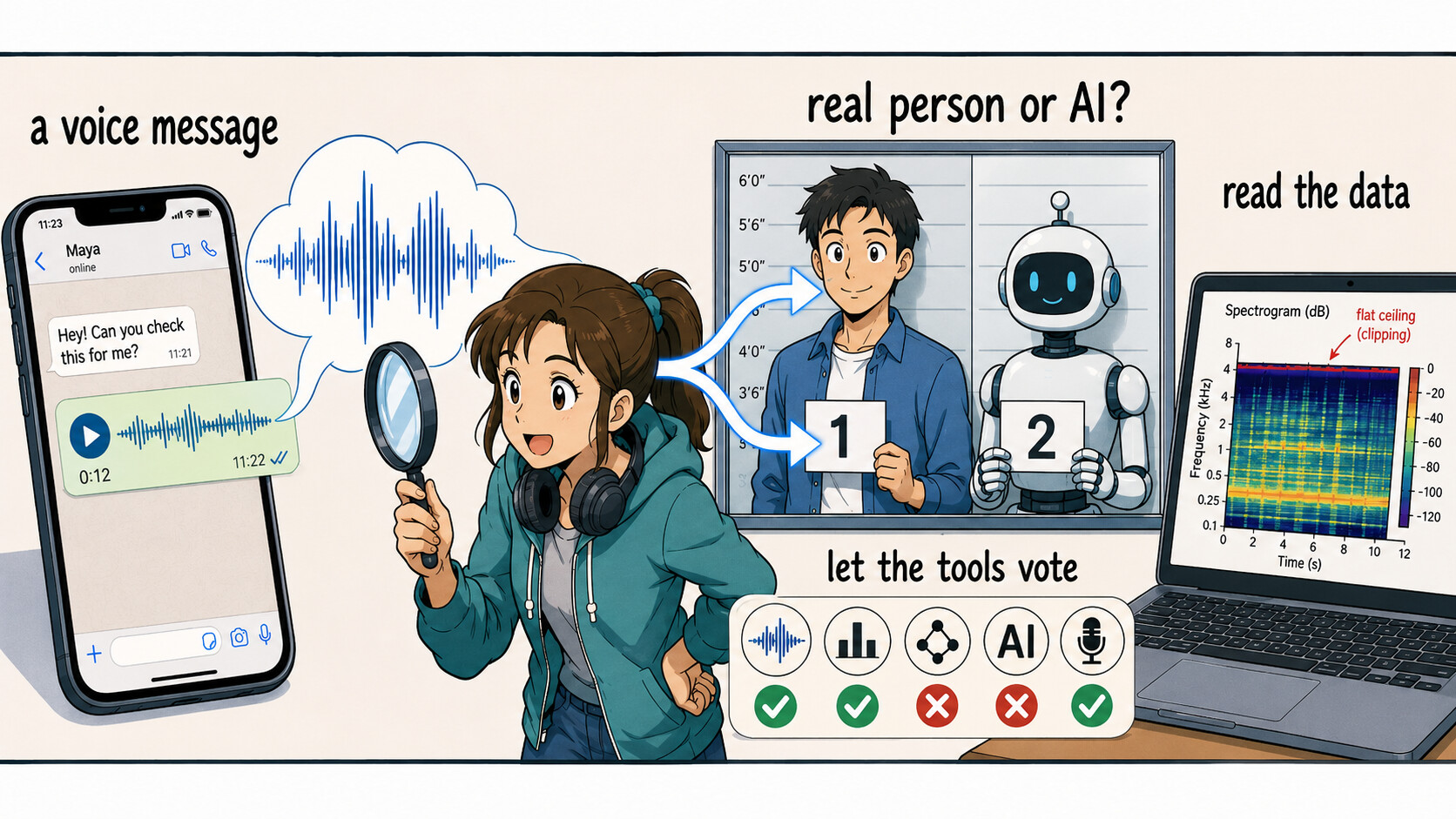
Two things live in a voice note, and you check them separately: the data (what app/device/when made it) and the sound itself (where AI leaves fingerprints). No single tool is truth — you run a few and let them vote. All no-code to start.  (WhatsApp notes are
 .opus — if a tool refuses it, open it in Audacity below and Export as MP3 first.)
1 — Fastest “real or AI?” verdict (no login, no code)
 ElevenLabs AI Speech Classifier — start here. Drop the clip → odds it was AI-made, and it scans for Google’s SynthID watermark. A yes means something; a no doesn’t fully clear it (it mainly knows ElevenLabs).
- Whispeak — best for a squished WhatsApp/phone note (built for compressed audio; ranked #1 on the HF deepfake arena).
- Hiya Deepfake Detector (Chrome ext) — no file needed: play the note in WhatsApp Web → live score.
 Cross-check votes: Resemble Detect · AI or Not · Undetectable.ai — only believe it when 2–3 agree.
 Private clip? EyeSift runs in your browser, never uploads.
  Not English? VoiceID (Hindi/Tamil/Telugu/Malayalam).
 Which detector deserves trust → the live Speech-DF Arena leaderboard (lower EER = better).
 2 — Read the data (metadata), no code
- MediaInfo Online — drag it in (parsed on your PC, nothing uploads): codec, bitrate, and the encoder tag. On a real WhatsApp note that’s
libopus, mono ~16kHz; if it’s a TTS/DAW encoder or the tags are oddly blank, that’s a flag. - The tell: compare the file’s recorded time vs when you received it — a big gap means it’s likely reused/“pack” audio, not a fresh reply. ExifToolGui (drag-drop, no typing) or
ffprobeshows the encoder + whether a realcreation_timeexists. - Kid3 — open a known-genuine note from that person beside the suspect one; mismatched encoder signatures = suspicious.
 3 — SEE the AI tells yourself (spectrogram, no code)
Open the clip in Spek, Sonic Visualiser, or Audacity (or online MAZTR) and look for — always next to a real note from the same person, since WhatsApp also cuts highs:
1  ▔▔▔  a razor-flat frequency ceiling (real fades out gradually)
2  ▦▦▦  vocoder banding / checkerboard up top   ← the gem tell
3  ░░░  too-clean silence between words (no room hiss)
4  · ·   zero breaths / lip-clicks in a 20s note
5  sꜱ    smeared, metallic "s / sh" sounds
💎 Pro / research-grade forensics — near-lab verdict + 'is it really THIS person?'
- DeepFake-o-Meter v2 (Univ. at Buffalo) — free account, upload once, it runs many research models and shows each one’s % — read the consensus. Closest thing to a lab, still no code.
- The other question — is it really them? → Voiceprint 1:1 (no-code) or Resemblyzer (6-line Colab): compare the note to a known-real clip of the same person → same-speaker score. Catches a good clone that fools generic detectors, because it checks identity, not synthesis. Quick A/B: mkdiff.
- Provenance (provable): Google SynthID Detector (watermark from Google’s AI, survives compression) · C2PA Verify (an “AI-generated” credential = smoking gun).
 Praat — jitter/shimmer/HNR: synthetic voices are often too perfect (unnaturally low jitter).
 Open-source models (paste into free Colab, or ask an AI to run): garystafford wav2vec2 (has an on-page upload box = no-code) · SSL_Anti-spoofing (best on compressed “in-the-wild” audio) · Vocoder-Artifact detector (flags AI even when the voice sounds perfect) · index: media-sec-lab list.
The honest limit: a plain audio file can never prove a human made it — only a watermark (SynthID) or a signed credential (C2PA) proves origin, and their absence proves nothing. So treat every score as a vote, not a verdict. For anything that actually matters, confirm the person on a second channel — call them, or ask something only they’d know.
The file whispers how it was made, not who spoke. Stack the votes — then go ask the human.
2 Likes
 !
!