 WritingTools + LanguageTool + Harper — The Windows Grammar Killer Combo
WritingTools + LanguageTool + Harper — The Windows Grammar Killer ComboNo single free tool replaces Grammarly — but three of them stacked together come embarrassingly close.
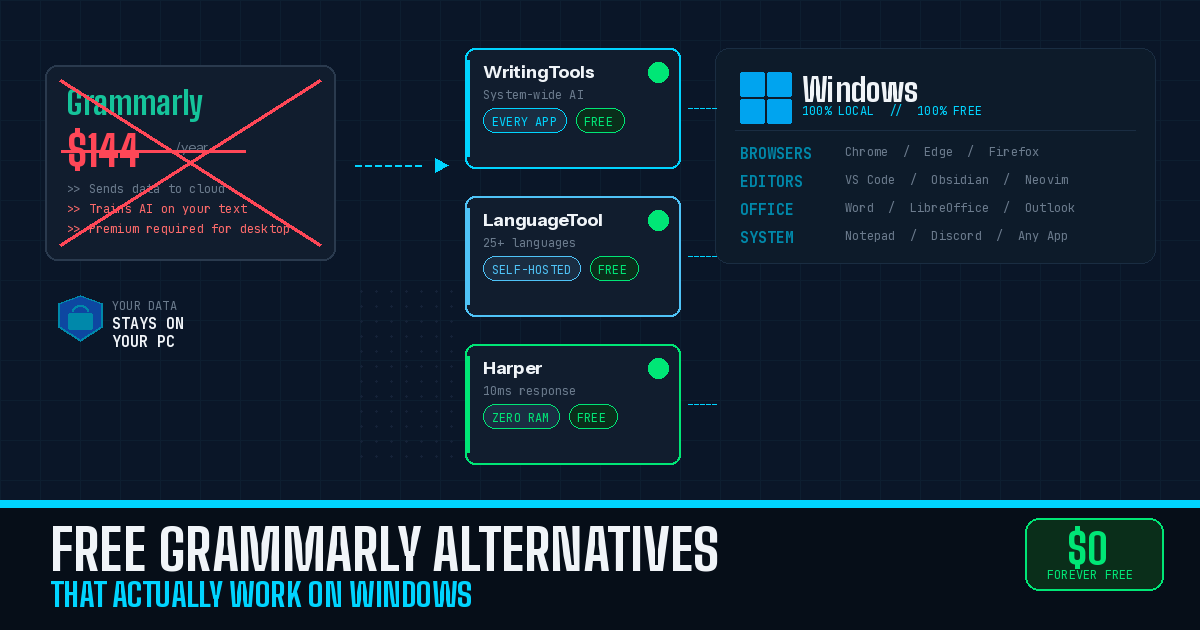
System-wide AI proofreading. Deep grammar rules. Instant editor feedback. All free, all private, all running on your machine.
Grammarly wants $144/year and trains its AI on everything you type. These tools cost nothing, keep your data local, and cover every text field on Windows — from Word to Notepad to your browser to VS Code. Here’s the full breakdown, ranked by how close each one gets to killing your Grammarly subscription.
🏆 #1 — WritingTools — The Closest Thing to Grammarly Desktop (But Free)
Think of it as Apple’s Writing Tools feature — except it works on Windows, it’s free, and you pick the AI brain behind it.
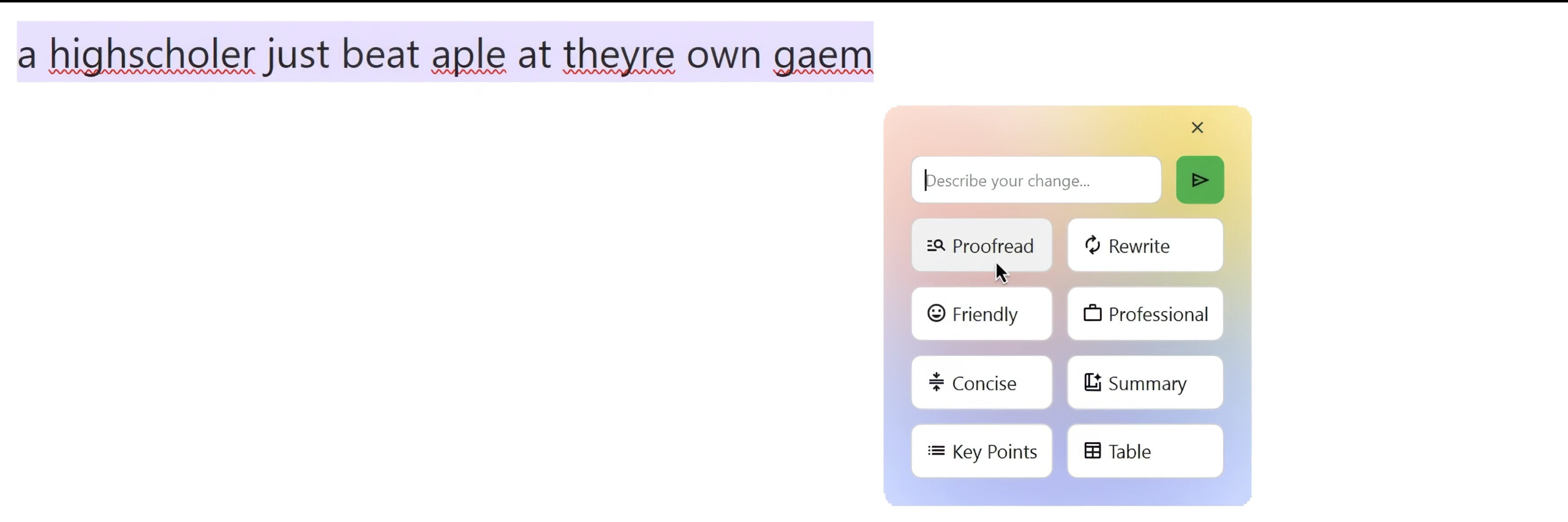
WritingTools is an open-source, system-wide AI writing assistant. Select text anywhere on your desktop — Word, Notepad, Chrome, Discord, literally any app — press a hotkey, and get instant AI-powered proofreading, rewriting, tone adjustment, or summarization.
How it works on Windows:
| Step | What Happens |
|---|---|
| Select any text | Highlight words in any Windows app |
| Press Ctrl+Space | WritingTools popup appears |
| Pick an action | Proofread, Rewrite, Make Professional, Summarize, Custom Instructions |
| Done | Corrected text replaces your selection |
The AI behind it — your choice:
| Option | Cost | Privacy | Speed |
|---|---|---|---|
| Google Gemini API | Free (API key required) | Cloud-processed | Fast |
| Ollama + local LLM | Free (runs on your PC) | 100% offline — nothing leaves your machine | Depends on hardware |
| OpenAI / Anthropic / Mistral | Paid API keys | Cloud-processed | Fast |
The free Gemini API is the easiest starting point — grab an API key from Google AI Studio, paste it in, and you’re running. Want full privacy? Install Ollama for Windows (one-click installer), download a model like Llama 3 or Gemma 3, and everything stays on your PC.
Where it beats Grammarly:
- Completely free and open source (GPL-3.0)
- Works system-wide on Windows — Grammarly’s free tier doesn’t do this
- Supports local AI models for total privacy
- Customizable with any prompt you can think of
- Multi-language support out of the box
- Featured in 28+ publications including XDA, How-To Geek, Windows Central
Where it falls short: No persistent inline underlining as you type — it’s triggered on-demand, not continuous. Quality depends on the AI model you pick. Rich-text formatting in Word may get stripped (works perfectly in Markdown editors like Obsidian).
 Windows install: Download the
 .exe from GitHub releases, run it, pick your AI provider in settings. First launch may be slow (antivirus scanning the new .exe) — after that it sits in RAM and works instantly.
If the default Ctrl+Space hotkey clashes with something, change it to Ctrl+` or Ctrl+J in settings and restart.
🛡️ #2 — Self-Hosted LanguageTool — The Grammar Powerhouse You Control
Think of it as a private grammar server running on your own PC — every browser, every Office app connects to it instead of sending your text to someone else’s cloud.
LanguageTool is the most feature-complete traditional grammar checker available for free. The open-source core has ~13.8k GitHub stars, supports 25+ languages, and catches grammar, spelling, punctuation, and style errors using rule-based analysis — all running locally with no character limits.
Why self-hosting matters now: As of December 2025, LanguageTool’s browser extensions require a Premium subscription — except when pointed at your own server. Self-hosted users bypass this paywall entirely. The free cloud tier is now capped at 10,000 characters per check.
Windows setup with Docker Desktop:
services:
  languagetool:
    image: meyayl/docker-languagetool:latest
    ports:
      - 127.0.0.1:8081:8081
    environment:
      - JAVA_XMX=2g
Install Docker Desktop for Windows → save the above as docker-compose.yml → run docker compose up -d in PowerShell → your grammar server is live at http://localhost:8081/v2.
Where it plugs in on Windows:
| App | How to Connect | Notes |
|---|---|---|
| Chrome / Edge / Firefox | Official browser extension → Settings → point to localhost:8081/v2 |
Unlimited checks, bypasses Premium paywall |
| Microsoft Word | Official LanguageTool Add-in from Microsoft Store | Works with Word 2016+ — note: the add-in requires a Premium account for cloud, but you can use the self-hosted server via the open-source MS Word add-in from GitHub |
| LibreOffice | WritingTool extension (writingtool.org) — actively maintained, supports Writer/Impress/Calc | Free, connects to your local server |
| VS Code | LTeX+ extension | Checks grammar in Markdown, LaTeX, code comments |
| Thunderbird | Official extension (67,749 users) | Checks emails during composition |
| Standalone GUI | LanguageTool Desktop app from Microsoft Store | Works in Outlook, Notepad, WordPad — no registration needed |
The n-gram upgrade: Adding the optional n-gram dataset (~8GB for English) dramatically improves detection of commonly confused words (their/there/they’re, affect/effect). Download once, point your Docker config at it, never think about it again.
Where it beats Grammarly: Free and unlimited when self-hosted. 25+ languages vs Grammarly’s handful. Complete privacy. No account required. Even LanguageTool Premium costs $66/year vs Grammarly’s $144/year.
Where it falls short: Not truly system-wide — covers browsers, Office apps, and editors but not arbitrary Windows apps (that’s WritingTools’ job). Self-hosting needs Docker and ~2GB RAM. Missing the proprietary AI paraphrasing features from the paid cloud version.
Easiest path: Install the LanguageTool Desktop app from the Microsoft Store — it works in Outlook, Notepad, and WordPad with zero setup. For full power, add Docker self-hosting for browser extensions.
🚀 #3 — Harper — The Privacy-First Speedster for Developers
Think of it as a grammar checker that runs in under 10 milliseconds, uses almost no RAM, and never phones home. The tradeoff? English only, rule-based only.
Harper is a Rust-based grammar checker backed by Automattic (the company behind WordPress). ~8.7k GitHub stars. Its defining trait: grammar suggestions arrive in under 10 milliseconds using less than 1/50th of LanguageTool’s memory footprint. Everything runs locally with zero network requests.
Where it works on Windows:
| Integration | Install Method |
|---|---|
| VS Code | Harper extension from VS Code Marketplace |
| Chrome | Official Chrome extension |
| Firefox | Official Firefox add-on |
| Obsidian | Official Obsidian plugin |
| Neovim / Helix / Emacs / Zed / Sublime Text | Language server (harper-ls) |
| Command line | scoop install harper or cargo install harper-ls harper-cli |
What it catches: Spelling errors, article mistakes (a/an), repeated words, sentence capitalization, unclosed quotes, long sentences, spacing issues, commonly confused phrases (“peak behind the curtain” → “peek behind the curtain”). Supports American, British, Canadian, Australian, and Indian English dialects.
Where it beats Grammarly: Completely free (Apache-2.0), blazing fast, total privacy, zero cloud dependency, minimal resources. Where it falls short: English only. Rule-based — misses complex grammatical errors. No tone detection, no rewriting, no generative features.
📝 #4 — LanguageTool Desktop App — The Proper Windows GUI
If you don’t want to mess with Docker or self-hosting, LanguageTool has a standalone Windows app available from the Microsoft Store. It works as a system-level overlay — checking text in Outlook, Notepad, WordPad, and other desktop apps.
What you get:
- Real-time inline suggestions as you type
- No registration required for the free version
- Supports 25+ languages
- Works in Outlook, Notepad (Windows 11 only for Notepad), WordPad
- Auto-starts with Windows, sits in taskbar
- Dark/light mode follows Windows settings
Limitations: The free version has basic grammar and spelling only — style suggestions and AI paraphrasing require Premium ($66/year). It doesn’t cover every Windows app the way WritingTools does. But for Outlook email checking with zero setup, it’s the fastest path from download to working.
Install: Microsoft Store → search “LanguageTool” → Install → Done. No account, no Docker, no config files.
💻 #5 — ltex-ls-plus — LanguageTool for Every Code Editor
If you write in VS Code, Neovim, or Emacs, ltex-ls-plus bundles LanguageTool and a JRE into one download — no Java install, no server setup. It checks grammar in LaTeX, Markdown, MDX, reStructuredText, AsciiDoc, Org mode, Quarto, Typst, and optionally in code comments.
The VS Code extension (LTeX+) provides inline diagnostics, quick-fix suggestions, and dictionary management. Completely offline — nothing uploaded.
Best for: Writers who live in code editors and work with Markdown, LaTeX, or documentation. 20+ languages, custom dictionaries, connects to self-hosted LanguageTool for enhanced checking.
Limitation: Initial document checks can take 30 seconds to 2 minutes on large files. Java-based, so memory usage is significant.
Install: VS Code Marketplace → search “LTeX+” → Install.
📐 #6 — Vale — The Style Enforcer for Technical Writers
Vale isn’t a grammar checker — it’s a prose linter that enforces editorial style guides. Configure it with Google’s Developer Documentation Style Guide, Microsoft’s Writing Style Guide, or custom rules in YAML, and it flags violations in Markdown, AsciiDoc, HTML, and more.
Used by GitLab, Grafana, Red Hat, and Angular. Integrates with VS Code, Neovim, Emacs, Sublime Text, and GitHub Actions for CI/CD.
Best for: Teams maintaining consistent documentation. If you write docs-as-code, this is your CI/CD grammar cop.
Install on Windows: scoop install vale, choco install vale, or download the Go binary from GitHub releases. Fully offline, zero dependencies, MIT-licensed.
🗺️ The Recommended Windows Stack — How to Set It Up
No single tool replaces Grammarly. Three of them together do the job and then some.
| Layer | Tool | Coverage | Why |
|---|---|---|---|
| System-wide | WritingTools + Ollama | Any app, any text field | AI proofreading everywhere, fully local |
| Browsers + Office | Self-hosted LanguageTool | Chrome, Edge, Firefox, Word, LibreOffice | Deep grammar/style rules, 25+ languages |
| Code editors | Harper (or ltex-ls-plus) | VS Code, Neovim, Emacs, Obsidian | Instant feedback, zero latency |
| Docs CI/CD | Vale | Markdown, AsciiDoc in pipelines | Style guide enforcement |
For most people, the first two layers cover 90% of what Grammarly does. If you only install one thing, start with WritingTools + free Gemini API — it’s the fastest path to “grammar checking everywhere on Windows.”
The privacy advantage: Every tool in this stack processes text locally. Grammarly sends all your text to US-based cloud servers and, by default, uses your data for AI training. This stack means your writing never leaves your machine.
⚖️ What Grammarly Still Does Better (Honest Take)
Grammarly’s contextual AI catches subtle errors that rule-based tools miss — misplaced modifiers, ambiguous pronoun references, complex tense issues. Its tone detection dashboard, persistent inline suggestions, and polished UX are still unmatched.
The gap is narrowing. WritingTools with a capable local model (Gemma 3 27B or Llama 3 70B) approaches Grammarly’s rewriting quality. LanguageTool’s rule-based engine catches the majority of common errors.
The real question isn’t feature parity. It’s whether free cost + complete privacy + offline capability + broad Windows integration outweighs Grammarly’s polish. For most Windows users, especially developers and technical writers — yes. If you’re editing high-stakes legal or client-facing prose, do a final pass through Grammarly’s free web editor at app.grammarly.com. It works in any Windows browser.
Quick Hits
| Want | Do |
|---|---|
 Grammar checking in every Windows app Grammar checking in every Windows app |
→ WritingTools + free Gemini API (or Ollama for offline) |
 Grammar in Chrome/Edge/Firefox for free Grammar in Chrome/Edge/Firefox for free |
→ Self-hosted LanguageTool via Docker |
 Grammar in Outlook with zero setup Grammar in Outlook with zero setup |
→ LanguageTool Desktop from Microsoft Store |
| Grammar in VS Code/Obsidian (instant) |
→ Harper extension |
 Grammar in Word Grammar in Word |
→ LanguageTool Word Add-in |
 Maximum privacy (nothing leaves your PC) Maximum privacy (nothing leaves your PC) |
→ WritingTools + Ollama + local LLM |
 Style enforcement for docs teams Style enforcement for docs teams |
→ Vale |
Three free tools. Zero cloud dependency. Every text field on Windows covered. Grammarly can keep its $144.
 !
!