Looking to understand the different ways people are setting up and testing Microsoft 365 trials currently. Interested in what approaches, requirements, and common issues people are running into.
Every door to Microsoft 365 at $0, longest-lasting first. Microsoft built more free doors than it advertises; most people stand at the one with the card reader. Here is the whole corridor — the door for people with no school and no company, and the three doors that are painted on the wall.
🎓 Door 1 — 12 months of Microsoft 365 Premium: the student door, no school required
What you get: desktop Word / Excel / PowerPoint, Copilot, 1 TB, for 12 months. The full thing, not the browser version that forgets your fonts.
Where: Claim it here — personal Microsoft account, card on file, an EDU email to confirm; cancel before month 12 ($19.99 after — set the reminder now, future-you is a stranger).
The door with no school — a college inbox, two steps:
- Test the school first: type its full name into the SheerID box on the Premium page. No name on that list, no offer — SheerID’s own rule.
- Get enrolled somewhere that passes — FernUni Hagen’s Akademiestudium takes anyone worldwide with no school certificate, €110–165 for the semester, student ID card mailed.
- Enter that inbox on the Premium page, or upload the enrolment document at verify.microsoft.com. Full replacement map in post #4.
Bonus with the same inbox: Office 365 Education A1 — web apps, Teams, 1 TB, free while the inbox lives. SheerID checks current-term enrolment: a document showing your name, the school’s name and a date inside this term. Acceptance letters get rejected by design. Your school photo helps nobody.
🏛️ Door 2 — Nonprofit seat, free for as long as the nonprofit stands
What you get: Business Basic — web apps, Teams, 1 TB — for every user of a registered nonprofit.
Where: register the nonprofit · what you get · who qualifies.
The door with no nonprofit: volunteer for one that already runs Microsoft 365 — its admin adds you as a user. You do good, you get Excel. Balance.
🏢 Door 3 — Business trial, 30 days, 25 users
Where: start it here with any email.
Asks: a card; Microsoft issues a something.onmicrosoft.com domain. No company needed — the company is a vibe.
End: converts to $6–$25 per user after day 30 — cancel before then. Trial terms list the countries with no trial.
🏠 Door 4 — Family / Personal + Copilot, 30 days
Where: start it here with a card.
End: cancel here before day 30. Day 31 is when Microsoft remembers you exist.
🤝 Door 5 — Partner trial, 1 month, 25 licences, no card on your side
How it works: any Microsoft partner can provision a trial for a customer (the rule).
Where: find a partner → their contact form with your name → accept the invite in your admin center (where). You are now “a customer”. Wear it.
⛔ Walls — three doors painted on the wall, in Microsoft's words
• E5 developer sandbox — Visual Studio subscribers and partners only (FAQ). A thousand guides still point here. The guides are older than the wall.
• Founders Hub’s 50 Business Premium seats — investor-backed startups only (page). Bring a VC. Not a plan — a VC.
• Rewards gift-card balance — never for Microsoft 365 (page). Points buy Xbox things. Word is not an Xbox thing.
🧾 Requirements — one table
| Door | Length | Card | Domain / tenant | At the end |
|---|---|---|---|---|
| Student Premium | 12 months | yes, cancel before renewal | personal account + EDU email | $19.99/month after month 12 — cancel before |
| Education A1 (school inbox) | while the inbox lives | no | the college’s tenant | ends when the inbox does |
| Nonprofit Business Basic | ongoing | no | the nonprofit’s tenant | stays free |
| Business trial | 30 days, 25 users | yes | auto onmicrosoft.com |
converts, 30-day grace, then deletion |
| Family / Personal | 30 days | yes | personal account | bills after day 30 — cancel before |
| Partner trial | 1 month, 25 licences | no (partner side) | partner-managed tenant | partner decides |
🧱 Common issues → the fix page
• “Trial not available in your country” → the trial follows the country on your Microsoft account (change it when you move); the trial terms list the countries with none.
• Signup demands a card with no company → expected; card-free trials are for existing enterprise agreements (page). The card is the company.
• Verification code never arrives → a real mobile number, not VoIP, or the email fallback (fix). The code is real. The number is imaginary.
• “Need admin approval” on your own trial tenant → you are the Global Admin; approve yourself (fix). Enjoy the power.
• Licence shows an error → Billing → Licenses → Errors and issues → Reprocess (steps).
• No company domain → keep the free onmicrosoft.com one (steps). It’s ugly. It works. Same as most companies.
• Sign-in fails after the trial → Billing → Your products → Reactivate (steps).
• Forgot to cancel → cancel page before day 30. Today is before day 30. Go.
♾️ Free forever — Microsoft's own free shelf, the one nobody promotes
• Word, Excel, PowerPoint on the web — the apps, in a tab, forever.
• Outlook.com — 15 GB mailbox · OneDrive — 5 GB
• Teams free · Office apps on phones and small tablets — free under 10.1 inches; Microsoft measured your screen so you don’t have to.
• OneNote · To Do · Clipchamp (1080p, no watermark) · Designer
• Office Deployment Tool — installs the desktop apps the moment a licence exists. The tool IT uses while telling you it’s complicated.
🔁 When a trial ends — day 31 is a cliff, these are the stairs
• Export mail to a .pst · download OneDrive in one zip
• cancel a consumer subscription · cancel a business subscription and save data first
• The clock: active → expired → disabled → deleted; files turn read-only at once (storage after expiry). Read-only is Microsoft for “pay”.
🪤 Traps
• Key resellers and “lifetime” activations → check your licence. “Lifetime” meant the seller’s lifetime on that marketplace. Two weeks.
• Cracked activators — the illegal floor, and the fastest way to a banned account. The crack was the malware. It always was.
• Shared accounts — one password change and the files are gone, along with the friendship.
🤝 Ask where staff answer
Microsoft Q&A — M365 tag · Tech Community — Microsoft 365 forum
The student door is a college inbox. The rest is a card and a calendar reminder. Set the reminder. Then set a second one.
2 Likes
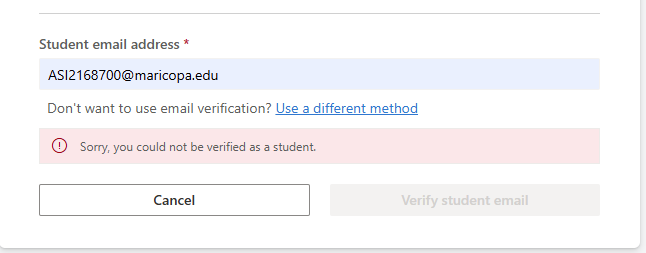
Good catch, Iffi. You walked to the door, the door said no, and you came back with a photo. That is how this list stays alive. 
What changed: Microsoft farms the student check out to SheerID, and SheerID stopped caring about your email address. It wants proof you are enrolled this term. Their own FAQ, word for word: “acceptance letters unfortunately are not proof you are currently enrolled” and “If your school isn’t on the list then you are not eligible.”
In plain terms: getting accepted means the college likes you. Being enrolled means the college has your money. Only one of those unlocks Word.
Maricopa handed you an inbox. It never handed you a class.
🔎 First — test any school in 30 seconds, before you spend a cent
• Open the student offer page and type the school’s full name into SheerID’s school box. No name in the list = no offer, whatever the email says.
• Cross-check the domain in JetBrains swot (lib/domains) — the list academic-discount programs share. A domain sitting in abused.txt explains a lot.
• Azure for Students takes a school email with no card and answers instantly — a free second opinion on the same domain.
📄 Second — the 'different method' link you already saw
• It leads to verify.microsoft.com — upload a document showing your name, the school’s name, and a date inside the current term: student ID with dates, class schedule, transcript, enrolment letter.
• Acceptance letters get rejected by design. Wait for the email, never refresh the page — SheerID’s own walkthrough.
🎓 Third — the doors that produce real enrolment, cheapest first
 FernUni Hagen — Akademiestudium — Germany’s state distance university. No school certificate needed, no entrance exam, open to everyone worldwide. One module runs €110–165 for the whole semester, and they mail you a student ID card. Winter intake closes 30 September.
 Universitas Terbuka — Indonesia’s open university: ~Rp100,000 (~$6) registration, ~Rp120,000 (~$7) per credit for overseas students, E-KTM student card from
 myut.ut.ac.id. Foreign diplomas need an equivalency letter first.
 University of the People — $60 application, tuition-free courses, admission from 200+ countries.
 CCCApply — free application to 116 California colleges. Admission stays free; the class is what makes the enrolment real, and out-of-state tuition applies.
🐙 Fourth — a different verifier entirely
GitHub Education runs its own check and takes a document or a photo of a student ID: how to apply · why an application gets refused. Copilot Pro and Azure credit sit inside it.
🪤 Traps
• Three failed tries and SheerID stops the offer for that account — pre-check first.
• “Edu email for $3” sellers and generators — a rejected verification plus a stolen card number.
• A school that runs no Microsoft tenant hands you an inbox that no education offer reads.
Post whatever you hit next — a dead door here gets replaced the same day.
2 Likes
maaricopa is long ago removed because of abuse hundred of peoples created accounts and abuse Microsoft offer then they removed the maricopa edu mail, we need new free edu mail method…
i like this post. thank you for sharing.
 !
!