Dear onehackers I am giving and inviting you for an exclusive free offer! Until 15 July 2026 only!
I’m an indie developer who has built 10 portable tools so far, each one started as a way to solve my own pain points, and I’ve shared them all for free on GitHub.
Now I want to help solve your painpoint: building one app to solve your pain point.
If there’s a daily frustration or workflow gap you’d love to see fixed, drop it in the comments. I’ll pick one (or more) depending on complexity.
C# is my strength I develop exclusively app that run on Windows only. So no Mobile App requests please.
Note: Creating apps take time… debugging, testing, iterations — so this won’t be instant. But if it’s a real pain point, I’ll pick it and work on it for you.
(Although the App will be created for your request it will be open source and would made available for everyone, on GitHub)
Thank you
I’m looking for a windows standalone app or a Total Commander add-on that enables one to turn a multi-step procedure into a simple one‑click task.
I download lots of files every day and save my daily series into specifically titled folders. Sometimes this takes a lot of time and attention. I had an app that enabled this function, but I lost it somewhere:
I download 30+ video files titled by their original content, e.g., Dr. House – Season 1 – Episode 12.mp4 and others.
I mark all the files that are important to me.
I press Sort, Copy, or Move on this app, and it moves each file to its corresponding folder, based on either a 100% match in the name or at least an 80% match.
Any file that already exists, or does not have enough matching filename data to be copied or moved to any of the chosen folders (Total Commander split screen with two partitions), the app must leave in place so I can check it manually.
It would be great to have this as an add‑on for Total Commander or as a standalone app for Windows 10/11.
IHi @western_duplek
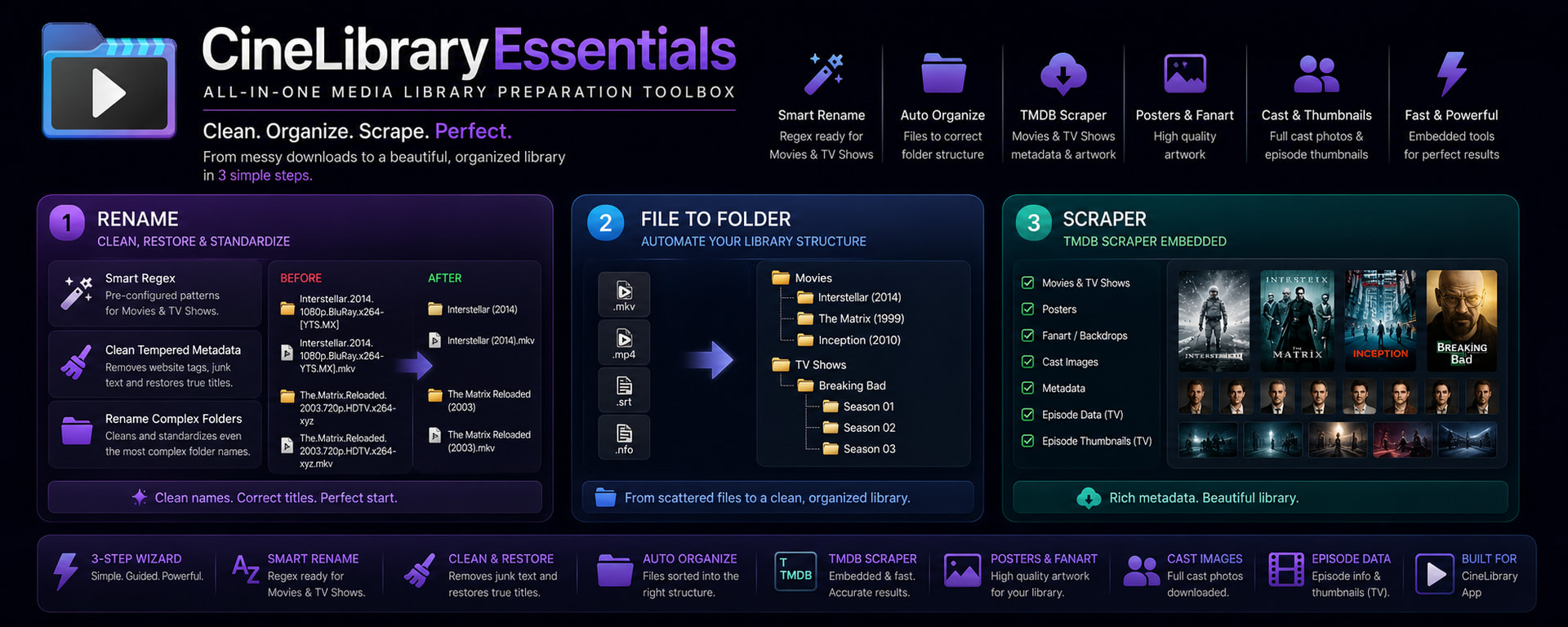
Same pain-points I had to face daily in past! For that I developed the tool called CineLibrary Essentials that handle both Movies and TV Shows more that I expected to. It is not add-on for Total Commander, it’s a simple media toolbox for collectors. I am glad you don’t have to wait it is already there for you.
Thanks for the idea! I understand the nostalgia for Windows 7’s folder background changer, but I won’t be able to build this one.
The reason is that Windows 11’s shell is locked down much more tightly than older versions, and changing folder backgrounds requires intrusive system‑level hacks. That goes against my philosophy of building portable, safe utilities that don’t tamper with the OS internals.
I focus on tools that solve workflow pain points without compromising stability or security. If you’ve got another daily frustration, something practical and non‑intrusive, I’d be glad to consider it for development.
@At-Bt I’m just an indie dev, so adding people to my GitHub projects requires trust. Claude’s program has requirements I don’t meet since I’m not a big developer, so I can’t help with that.
So can you build a file explorer for windows 10 like windows 11 explorer. In which we can open another tab by pressing control + T like we do in chrome. So it will be easy to navigate folders in windows 10.
I have a problem. Every time I install Windows, I have an issue with the date in File Explorer, which separates each document by download date, and I don’t like that. I can disable it, but I have to go through each folder individually, and I want it to be applied across all folders.
It would also be great to have a file search function like the one in Windows, but external, without having to open File Explorer. The current file search isn’t very efficient, and I find it takes too long to search. Ideally, the search function would be available and functional even on the desktop (I manage two separate desktops, and on one I keep books to translate and other things).
• Disable grouping: In any folder, right‑click → Group by → None.
• Apply to all folders:1. Open a folder, set it the way you want (no grouping, details view, etc.).
2. Go to the ribbon → View → Options → Change folder and search options.
3. In the Folder Options dialog, click Apply to Folders.
This forces the current view across all folders of the same type (Documents, Music, Pictures).
• Limitation: Windows categorizes folders by type, so you may need to repeat this for each category.
Second External File Search Tool
Windows Search is slow because it indexes selectively. For a faster, desktop‑level search:
• Everything: Lightweight, instant search across all drives. It hooks into NTFS change journals, so results appear immediately.I personally use Everything for searching.
I’ve started trying out the Telegram themes contest website where we can make custom themes and I want to know if there is a way to quickly know the name of every single Telegram theme colour edit option? The default ones they give don’t seem to edit every single item available to edit in the app and it also takes quite a long time to manually choose the desired colour for every single item allowed. Even ChatGPT doesn’t seem to know the full list as it misses a lot of items and so it can’t do a complete theme.
Dear @Marie
There isn’t a single public “master list” of every Telegram theme color option, the official Online Theme Editor and in‑app editors expose the editable items, but they don’t document them all in one place. The most complete way to see every option is to export a theme file (.attheme or .tdesktop-theme) and inspect its contents directly.
Okay, so I tried Openscreen because FoneLab Screen Recorder doesn’t export a 2 hrs+ video for free (allows only 3 minutes of it, lol) and exporting takes quite a while in Openscreen so I wish there was a really lightweight app that is easy to use and really smooth and quick for recording long lectures of personal paid courses to keep it offline for personal use (requires a manual log in and OTP every time so it’s a bit annoying); I want to keep those videos from the paid courses to last even after the subscription ends.

 Change Windows Display Language
 Apply Folder View Settings Globally
 External File Search Tool
 !
!