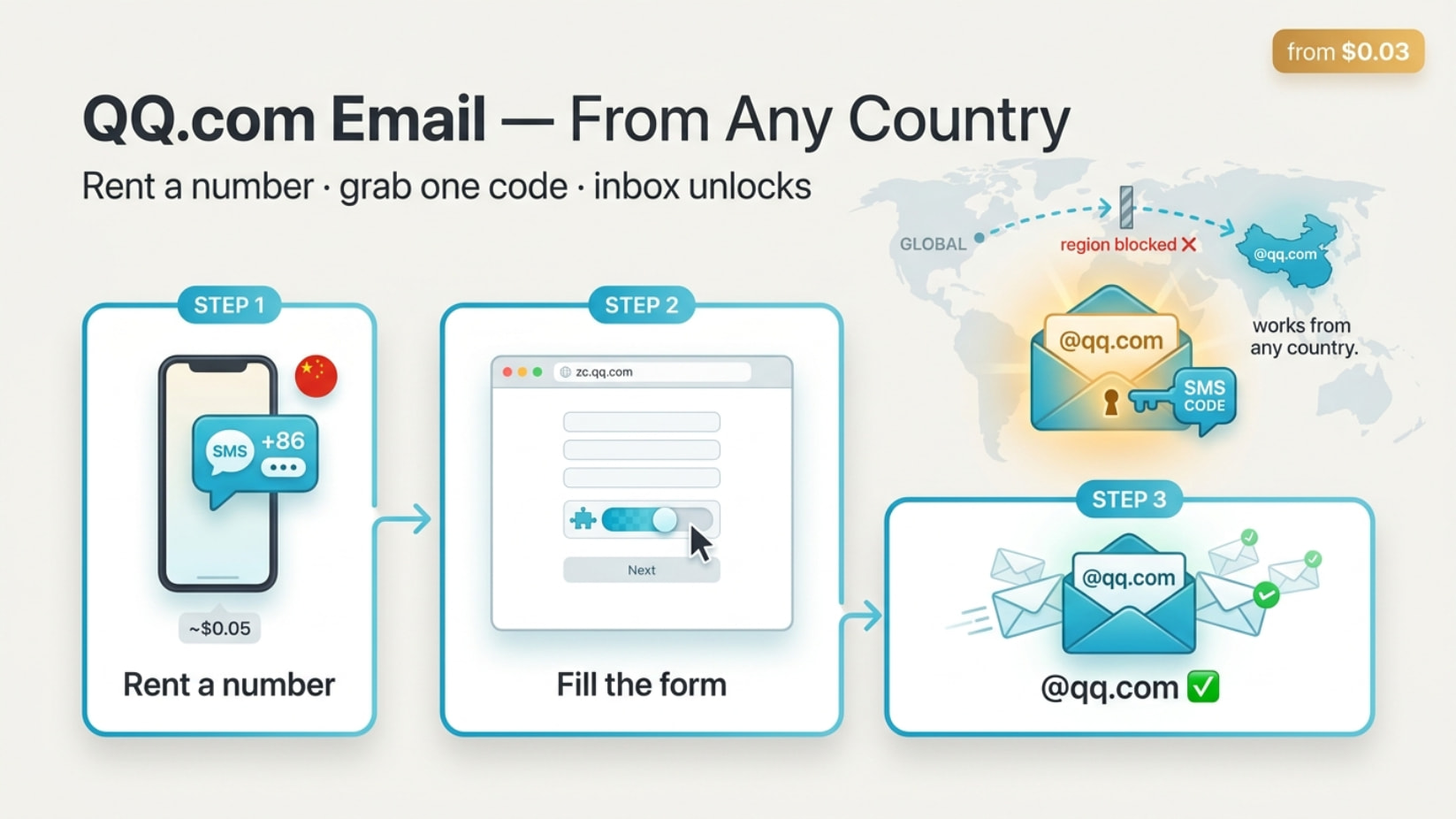
Hey @Michael_Red  The wall isn’t “making an email” — it’s catching one SMS code. Rent a Chinese number for ~$0.05, grab the text, done. Your country being blocked doesn’t matter once you have that number.
 Three moves: rent number → fill form → flip inbox on. Each ~5 min. Everything’s tucked in the spoilers
🔑 The number-for-pennies move (the part you got stuck on)
QQ texts a code to a phone before it lets you finish. You just rent a number for 60 seconds to catch it. Pick one that has China (+86) and lists “Tencent QQ”:
- 5SIM →
5sim.net — from $0.03, auto-refunds if no code arrives. One use.
- sms-man →
sms-man.com — China QQ ~$0.05 ($10 min top-up).
- Grizzly SMS →
grizzlysms.com — China “from 2 cents.”
- SMS-Activate →
sms-activate.io — pricier (~$1.90) but huge stock.
 QQ rejects fake internet numbers (Google Voice / TextNow type) — that’s why free shared-number sites flop. Paid = real SIM = works.
 China sold out? Use Hong Kong (+852) or even US (+1). A plain mailbox doesn’t need a mainland number — that’s only for QQ payments.
🪜 The signup, click-by-click (zh→en cheat-sheet inside)
Go to zc.qq.com (direct EN: ssl.zc.qq.com/v3/index-en.html). Chinese page? Flip 简体中文 → English top-right.
 VPN OFF — it works worldwide already, and a VPN trips QQ’s bot-check.
Field translations if it shows Chinese:
昵称      = Nickname
密码      = Password (8–16, +uppercase +number +symbol)
国家/地区 = Country/Region → match your NUMBER, not where you live
手机号码  = Phone (no country code, no "+")
同意 注册 = Agree / Register
- Pick country code (+86 / +852 / +1 to match number)
- Tick terms → type number
- Drag the slider puzzle
- Send code → copy from your rental site → paste
 It shows your QQ number — WRITE IT DOWN. That number is your email.
 “Service busy / too many attempts” → stop spamming. Wait, clear cookies, switch Wi-Fi↔data, retry once.
✉️ Wake up the inbox (the step that fools everyone)
A fresh QQ inbox starts asleep — people think they failed here. Wake it:
en.mail.qq.com → log in with QQ number + password- First login shows activate / 进入邮箱 (Enter Mailbox) → click it. One-time.
- Log into QQ within 3 days or it auto-deletes. One login = yours forever.
 Want it in Outlook / Apple Mail? Generate an authorization code (not your password): Settings → Account → POP3/IMAP/SMTP → turn on → generate.
IMAP: imap.qq.com  993 SSL
SMTP: smtp.qq.com  465 or 587
Button hiding in English view? Switch mail language to Chinese (设置 → 语言) and it appears.
🧯 When it bites back — fixes
- “Number can’t be used” / no text → VoIP or burned. Grab fresh, or switch country (HK/US).
- Frozen right after creation → normal for new account + new IP. Complete the re-verify text. (Re-usable number beats one-and-done here.)
- IP blocked / too many tries → wait an hour, change network, incognito, retry.
- Wall of Chinese → right-click translate, or use the cheat-sheet above.
🛟 Hate the whole dance? Buy one instead
Don’t want to register? Grab a ready-made qq.com account from our own mod — @jim_ross sells them in-house, no sketchy outside seller, no escrow gamble. Just ping him, if it’s available he will sell it to you.
Making your own with a 5-cent number is still the cleaner play, but this is the no-effort shortcut.
🤔 Why you'd actually want a qq.com — real situations
One regional email quietly unlocks a pile of stuff:
 Chinese-only game/app betas that demand a qq.com on signup — now you’re in.
 Taobao / Tencent / Chinese-store accounts that reject foreign mail.
 Geo-locked free trials & rewards that only fire for China/Asia regions.
 A clean throwaway for “this service needs a qq mail” without touching your main inbox.
 Cross-region logins where a qq.com just works and your Gmail gets refused.
One number → one inbox → a whole region opens up.
✦ One text is the only lock. Rent the key, walk in. ✦
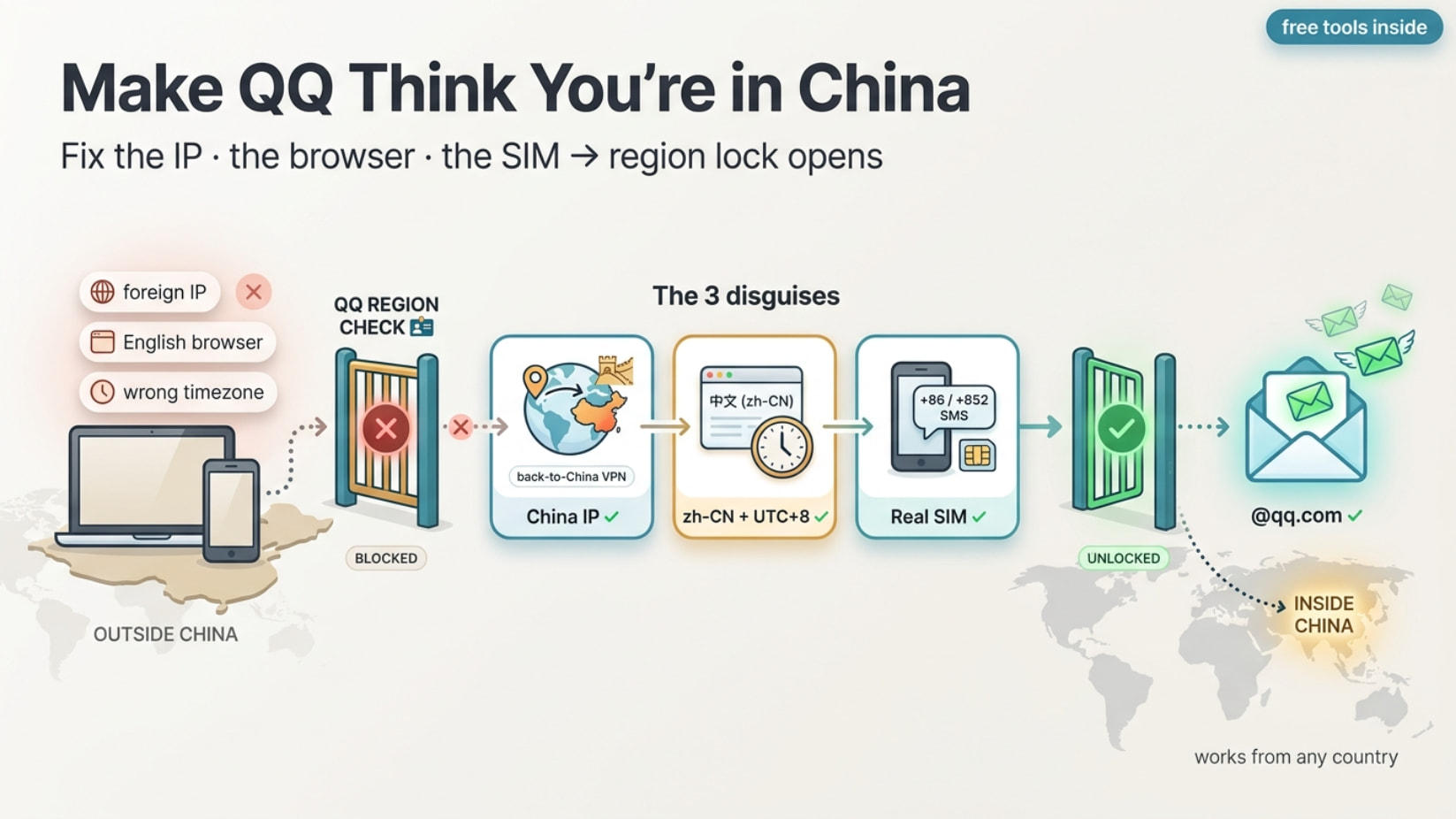
 Drop the app. Use the website on desktop — English-friendly, easier to fool.
 Scaling many accounts? Rent a residential proxy (IPRoyal / Decodo / SOAX, ~$1–4/GB). Overkill for one.
 Trust trick: first few logins → stay on the same IP + same number. Country-hopping right after = the “abnormal login” freeze. Settle first, roam later.
 Chinese-only streaming (Tencent Video, iQIYI, Bilibili) that greys out abroad → HK/CN IP turns it on.
 Geo-locked trials & drops that only fire for China/Asia regions.
 Any “this app works only in X country” wall → same playbook, swap the country node.
 !
!